SOA Suite UMS: Deregister obsolete Messaging Client applications by Martien van den Akker
July 17, 2015 Leave a comment
 There are already several blogs on how to receive and send email using the UMS email adapter. A few good starting points that use GMail as a provider are the ones written by our respected con-colleagues of Amis:
So I won’t bother to do a how-to on that on my account. Although I managed to get that working with a local Exchange setup.
What I managed to do is to read e-mail and then process it to upload the attachments and body using BPEL and java in a Spring-Context to Adaptive Case Management. If you want to do something similar make sure you install the patch 18511990 for fetching the attachment-properties and -content, since without the patch the properties for inline attachements are not written properly to the soa-infra database. See my earlier blog-posts here and here.
Having it all setup and playing around with it, you might end up in the situation that the service won’t listen to the actual email-address you reserved for it, as I did. This might be the case when you change the email address in your receiving adapter component in the composite. Or after deploying several versions of the composite, especially with different addresses.
It turns out that there is a panel to deregister Messaging Client Applications to cleanup the mess.
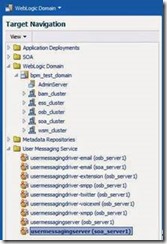
First go to the Enterprise Manager and under the Weblogic Domain navigate to the ‘usermessagingserver’ (there are also entries for the different usermessagingdriver’s, but in this case you need the server itself):
Right click on it and in the pop-up choose ‘Messaging Client Applications’: Read the complete article here.
For regular information on Oracle SOA Suite become a member in the SOA & BPM Partner Community for registration please visit www.oracle.com/goto/emea/soa (OPN account required) If you need support with your account please contact the Oracle Partner Business Center.


![image[7][2][2][2]](https://paascommunity.com/wp-content/uploads/2013/04/image7222.png?w=20&h=20 "image[7][2][2][2]")
![clip_image002[8][4][2][2][2]](https://paascommunity.com/wp-content/uploads/2013/04/clip_image00284222.jpg?w=26&h=23 "clip_image002[8][4][2][2][2]")


 PaaS Community Blog