Start expired instances in waiting state for Oracle SOA Suite by Reinhold Becker
February 8, 2015 Leave a comment
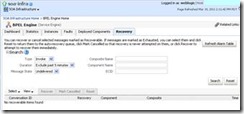 In a BPEL process there are some use cases where a Wait activity or the onAlarm branch of a Pick activity is needed. An example for an onAlarm branch is a timeout mechanism for an asynchronous call. These activities save the instance in the dehydration store for a defined time. To wake up the waiting instances there is a quartz scheduler job running in the weblogic and check the expiration date in the dehydration store. For the case the dehydration store is not available, the scheduler retry to call the database. The retry settings can be found in the advanced BPEL properties in the System MBean Browser. The properties are named ExpirationMaxRetry and ExpirationRetryDelay. When the retry failed the data sets won’t be cleaned from the dehydration store.
The suggestion to clean this is to click on the Button “Refresh Alarm Table” in the Recovery console. But it is unpleasent to click the button periodically, so the wish appear to do this automated. There is a way for an automatically clean. Just start a job on the SOA Suite Database with the following SQL script. Read the complete article here.
For regular information on Oracle SOA Suite become a member in the SOA & BPM Partner Community for registration please visit www.oracle.com/goto/emea/soa (OPN account required) If you need support with your account please contact the Oracle Partner Business Center.


![image[7][2][2][2]](https://paascommunity.com/wp-content/uploads/2013/04/image7222.png?w=20&h=20 "image[7][2][2][2]")
![clip_image002[8][4][2][2][2]](https://paascommunity.com/wp-content/uploads/2013/04/clip_image00284222.jpg?w=26&h=23 "clip_image002[8][4][2][2][2]")
 About Jürgen Kress

 PaaS Community Blog