Apply SOA/BPM Bundle Patch 3 to JDeveloper 12c (12.1.3.0.3) by Arda Eralp
May 25, 2016 Leave a comment
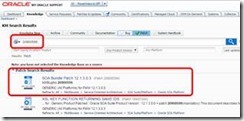 Step 1: Download Bundle Patch 3
Go to "Oracle Support" and Search bug number (20900599)
Step 2: Run "Command Prompt (cmd)" as Administrator
Step 3: Set "ORACLE_HOME" and add OPatch directory to "PATH" variable
SET ORACLE_HOME=C:\Dev\Oracle\Middleware12c (Oracle direcotry)
SET PATH=%PATH%;C:\Dev\Oracle\Middleware12c\OPatch (OPatch direcotry)
Step 4: Extract the downloaded patch and browse folder via cmd
cd ……\p20900599_121300_Generic\20900599
Step 5: Run "opatch apply" Read the complete article here.
For regular information on Oracle SOA Suite become a member in the SOA & BPM Partner Community for registration please visit www.oracle.com/goto/emea/soa (OPN account required) If you need support with your account please contact the Oracle Partner Business Center.


![image[7][2][2][2]](https://paascommunity.com/wp-content/uploads/2013/04/image7222.png?w=20&h=20 "image[7][2][2][2]")
![clip_image002[8][4][2][2][2]](https://paascommunity.com/wp-content/uploads/2013/04/clip_image00284222.jpg?w=26&h=23 "clip_image002[8][4][2][2][2]")
 About Jürgen Kress

 PaaS Community Blog