Expose a database to an Oracle BPM 12c Process using the Oracle SOA Database Adapter by Dan Atwood

image

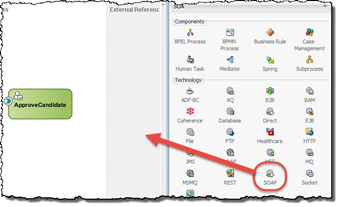
This is the 5th of a 5 part series that explains how to expose a database to an Oracle BPM 12c Process using the Oracle SOA Database Adapter and a Mediator.  In this, the Composite with the Database Adapter created in part 4 of this series is invoked by the Oracle BPM process using a Service activity.

Part 1 – Create a WebLogic JNDI Database Connection

Part 2 – Configure the Database Adapter’s Outbound Connection Pool

Part 3 – Configure the Database Adapter’s JNDI Connection to the Database

Part 4 – Create a SOA Composite Project to Invoke the Database Adapter through a Mediator

Part 5 – Invoke the Service Exposed from a Process in the BPM Composite Project

SOA & BPM Partner Community

For regular information on Oracle SOA Suite become a member in the SOA & BPM Partner Community for registration please visit www.oracle.com/goto/emea/soa (OPN account required) If you need support with your account please contact the Oracle Partner Business Center.

Blog Twitter LinkedIn image[7][2][2][2] Facebook clip_image002[8][4][2][2][2] Wiki

Technorati Tags: SOA Community,Oracle SOA,Oracle BPM,OPN,Jürgen Kress
Oracle BPM Suite 12.2.1.2 Quick Start: Installation, Configuration, BPMN 2.0 Business Process Deployment and Testing by Pavel Samolysov

image

Oracle BPM Suite – a solution from Oracle for Enterprise Business Processes modeling with leveraging the BPMN 2.0 notation. Integrated development environment – JDeveloper is used for the modeling process. Oracle provides a special distributive of the solution for developers – Quick Start – which contains the Oracle WebLogic application server, BPM Suite, and JDeveloper.

This article highlights how to download Oracle BPM Suite 12.2.1.2 Quick Start from the edelivery.oracle.com web-site, install that on a developer’s PC, create the first business process using JDeveloper, configure the integrated WebLogic domain (BPM Suite, SOA Suite, and Oracle Service Bus are included, and Apache Derby is here for database management), deploy the business process on this domain and start a test instance of the process. Read the complete article here.

SOA & BPM Partner Community

For regular information on Oracle SOA Suite become a member in the SOA & BPM Partner Community for registration please visit www.oracle.com/goto/emea/soa (OPN account required) If you need support with your account please contact the Oracle Partner Business Center.

Blog Twitter LinkedIn image[7][2][2][2] Facebook clip_image002[8][4][2][2][2] Wiki

Technorati Tags: SOA Community,Oracle SOA,Oracle BPM,OPN,Jürgen Kress
Dynamic Assignment of Human Task to a User, Application Role, and/or a Group by Dan Atwood

image

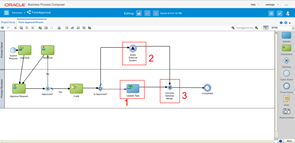
Oracle BPM tasks can be dynamically assigned to an individual user, application role, and / or an LDAP group depending on the human task’s incoming data. 

They did not have to be separate strings, but for clarity these three human task data elements have corresponding process data objects mapped into the human task in this Oracle BPM 12.2.1.2 application.  Based on which one(s) is populated, the task’s assignment is made.

These are set in the activity’s input data association from corresponding process data objects.

The process data objects are set in the output data association of an activity upstream of the activity in the process. Read the complete article here.

OA & BPM Partner Community

For regular information on Oracle SOA Suite become a member in the SOA & BPM Partner Community for registration please visit www.oracle.com/goto/emea/soa (OPN account required) If you need support with your account please contact the Oracle Partner Business Center.

Blog Twitter LinkedIn image[7][2][2][2] Facebook clip_image002[8][4][2][2][2] Wiki

Technorati Tags: SOA Community,Oracle SOA,Oracle BPM,OPN,Jürgen Kress

Migrating Oracle BPM customers to PCS – never say never by Andre Boaventura

image

Some of you might recall this blog post at Migrating your Oracle BPM assets into Oracle Process Cloud Service (PCS) that I published last year for some customers that wanted to move their assets to Oracle Cloud. However, as you likely can recall too, this was only targeted for customers that were only using BPM Composer for modeling and documentation purposes only.
Early this year, a new BPM customer in Brazil, that automated their business processes on top of Oracle BPM, came up with the same request, that was essentially to take all their assets to Oracle PaaS. However, this time, the challenge was much bigger than before, since more than just translate Oracle BPMN process to their respective notations in Oracle PCS, I had to deal with many other concerns like integration with legacy systems (EBS, Oracle DB) running on their datacenter, OSB services being called by their Oracle BPM processes on-premises, business KPIs used by Oracle BPM for integration with Oracle BAM, security issues around being needed to expose their OSB services to the internet to be able to be consumed by PCS, etc.
Initially, I thought that this could be an impossible task given all the very known restrictions and caveats for this kind of job, but even so, I decided to embark on this journey, since I knew it that I could go further, given everything I had done so far for other customers around this topic, and also due to a life lesson that I learned from my parents: “never say never”.

That said, now I am coming to you to share the outcome of that POC that I successfully finished for that customer. Happy to share the great news that I managed to figure out how to migrate Oracle BPM for process automation in a smoothly way to our Oracle PaaS services, since I managed to improve my BPM conversion framework(more details in my blog post) to be able to deal also with scenarios used by process automation in Oracle BPM(that weren’t covered in my original blog post), that turned the BPM migration process to OIC into an even more ease and streamlined task, even for more complex scenarios where automation and integration with backend systems are needed as well.

As such, I have decided to share all steps used to take that BPM application integrated with OSB, BAM and documents to our respective blueprint on Oracle PaaS.  I have recorded a series of 6 videos describing in details on how one can perform that migration to Oracle OIC and take advantage to leverage other key solutions to make a more comprehensive PaaS architecture by using other PaaS services like ICS, CEC, and Integration Analytics.
These are the videos I have recorded for this migration task:

Design Time

  • Part 1 – BPM to PCS/OIC Migration: This is the first step towards generate the first BPM project to be imported into PCS/OIC. It walks you through the original Oracle BPM application(BPM Composer and Studio) and shows how to create the first migratable project on Oracle PCS by leveraging the migration framework available at my blog.
  • Part 2 – ICS: This step demonstrates how to install and setup ICS connectivity agent to be used by integrations that require access to customer’s Oracle database tables. Also, it shows how to build an integration from scratch in ICS to access customer database tables and then expose them as REST services to be consumed by Oracle PCS.
  • Part 3 – PCS & ICS Integration: This video demonstrates how to leverage services created in ICS to replace those from the original process created with Oracle DB adapter within a SOA composite. Also, it showcases how to link those ICS services to PCS service call activities and how to map inbound and outbound data. Also, it shows the first deployable version to be tested and run on PCS.
  • Part 4 – Integration Analytics: This video guides you on how to create a Business Insight model with milestones, business metrics(measures and dimensions), assign them to their respective milestones and finally expose those milestones APIs to be consumed by Oracle PCS.
  • Part 5 – PCS-Business Insight Integration: This video shows how to enable and link Business Insight within PCS and also deploy the final version to be used and tested in run-time.

Run Time

This video walks you through all products described earlier like PCS, ICS, Business Insight and CEC, but now looking from the run-time perspective. It starts showing a process instance kicked-off through a PCS web forms, then an approval by a Mobile app, integration with Content experience cloud. Also, it guides you through all default and custom dashboards created on Business Insight as well as how to monitor integrations and track process integration instances in ICS. This is a comprehensive and seamlessly integrated demo that highlights how these 4 PaaS(PCS, ICS, CEC, and Business Insight) services can work together and bring more value and benefits for customers that have the same or a similar use case.


SOA & BPM Partner Community

For regular information on Oracle SOA Suite become a member in the SOA & BPM Partner Community for registration please visit www.oracle.com/goto/emea/soa (OPN account required) If you need support with your account please contact the Oracle Partner Business Center.

Blog Twitter LinkedIn image[7][2][2][2] Facebook clip_image002[8][4][2][2][2] Wiki

Technorati Tags: SOA Community,Oracle SOA,Oracle BPM,OPN,Jürgen Kress
Adding a Link using the New PCS Web Form Tool by Dan Atwood

image

There is an issue you need to be aware of when adding link fields to Oracle’s Process Cloud Service (PCS) web forms using the new web form design tool.  This blog provides a fairly simple workaround to the problem.

At runtime, the problem is that the value stored in the link’s data element is lost once the form is submitted.  This means that the process data object cannot then map or use the element in the process downstream.

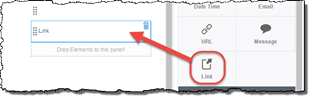
Follow these steps to workaround this issue.  In this example, the data element that actually contains the desired URL is called uRL.  First open the form in the web form design tool, and create a new element named uRLCalculated by dragging Link from the Basic Palette tab onto the form.

Instead of using the original uRL element for the field’s data binding, use uRLCalculated as the Value Binding for the field on the form.

So that the correct link will displayed to the end user at runtime on the form, set the Label property to Dynamic and set the binding to use the original uRL data element for the field’s Label Binding property.

Under the Value Binding property, click the Computed Value checkbox -> click the Edit button beside it. Read the complete article here.

SOA & BPM Partner Community

For regular information on Oracle SOA Suite become a member in the SOA & BPM Partner Community for registration please visit www.oracle.com/goto/emea/soa (OPN account required) If you need support with your account please contact the Oracle Partner Business Center.

Blog Twitter LinkedIn image[7][2][2][2] Facebook clip_image002[8][4][2][2][2] Wiki

Technorati Tags: SOA Community,Oracle SOA,Oracle BPM,OPN,Jürgen Kress
Month End Close by Avio

image

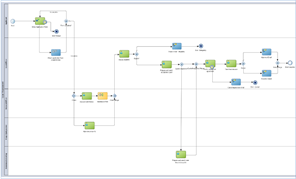
The power and water division of a major industrial manufacturer sought to bring sorely needed order and efficiency to a lengthy and chaotic month-end closing process.

Our Client’s Needs

Our client’s four-day month-end closing process required manually running ten to fifteen different programs for each subledger and each general ledger set, for each organizational unit configured in EBS. This meant that all these programs had to be run nearly 150 times times for each month-end close. It was a labor-intensive undertaking, driven by phone calls, emails, and trust. The six people required for its completion worked very long hours for several days each month while spending the remainder largely idle. Moreover, a lack of visibility meant that there was no way to identify process bottlenecks or performance issues.

With a plan to roll in additional organizational units, our client was also preparing to add over $10 billion in revenue to their existing $22 billion, which promised to expand an already inefficient process. They wanted to meet that increase without adding personnel, while also shortening the closings from four days to three. They needed a process that would more efficiently coordinate their people and systems, with the visibility necessary to track progress and to pinpoint and resolve issues.

AVIO’s Solution

We used Oracle SOA Suite to create an accurate and reliable process for orchestrating the numerous program executions. We automated most of these, and harnessed Oracle BPM to both route exceptions to the appropriate individuals for resolution and to provide a single location for accessing and addressing them. Read the complete article here.


SOA & BPM Partner Community

For regular information on Oracle SOA Suite become a member in the SOA & BPM Partner Community for registration please visit www.oracle.com/goto/emea/soa (OPN account required) If you need support with your account please contact the Oracle Partner Business Center.

Blog Twitter LinkedIn image[7][2][2][2] Facebook clip_image002[8][4][2][2][2] Wiki

Technorati Tags: SOA Community,Oracle SOA,Oracle BPM,OPN,Jürgen Kress

Putting BPM Change Management into the Hands of the Business by Mark Peterson

image

Business Process Management (BPM) is an important part of many organizations. Many experts agree that BPM is not only important for business operations, it is a necessary component for handling change. There can be changes in assignments, changes in back-end systems and changes in workflow are just some examples. However when changes occur, it has been up to IT to implement and up to the business managers to manage the fallout. We all know change is painful, and the more we can place change control in the hands of the business managers, the better the organization can manage change.

AVIO has developed a framework that gives managers control over changes to their business processes.  To see how this works, let’s first characterize the types of changes we typically see within an organization and their business processes.

Process Changes

  • A new assignment (for example, approving a work item) is added or removed to an existing task.
  • New decision points are added or removed that branch the process in different ways.
  • A new back-end service is added, removed or changed.
  • A new sequential or parallel activity is added or removed.
  • A new sub-process is added or removed.

Business Data Changes

  • A business parameter (such as the amount of the invoice) is added that changes the path in the process.
  • A new business parameter (such as region) or value for a given parameter (such as a new region) is added that changes the process flow.

Notice that not all changes involve process changes. Some changes are data-related.  Whether process-related or data-related, these changes can cause problems within your organization.  Typically, a one-size fits all solution, is applied to the problem. New process versions are developed and deployed, and the business is faced with the fallout. Read the complete article here.

SOA & BPM Partner Community

For regular information on Oracle SOA Suite become a member in the SOA & BPM Partner Community for registration please visit www.oracle.com/goto/emea/soa (OPN account required) If you need support with your account please contact the Oracle Partner Business Center.

Blog Twitter LinkedIn image[7][2][2][2] Facebook clip_image002[8][4][2][2][2] Wiki

Technorati Tags: SOA Community,Oracle SOA,Oracle BPM,OPN,Jürgen Kress
Save Your Seat: Free Training On-demand – Oracle SOA Suite 12c and Oracle BPM 12C Implementation Specialists Boot Camps April 2018

imageTraining On Demand: Oracle SOA Suite 12c Implementation Specialists AND Oracle Business Process Management 12C

Register for Apr 02 – Apr 27 free SOA Bootcamp

Register for Apr 02 – Apr 27 free BPM Boocamp

Oracle SOA Suite 12c Implementation Specialists

Oracle SOA Suite 12c is the latest version of the industry’s most complete and unified application integration and SOA solution. With simplified cloud, mobile, on premises and Internet of Things (IoT) integration capabilities, all within a single platform, Oracle SOA Suite 12c delivers faster time to integration, increased productivity and lower TCO.
The Oracle SOA Suite 12c Implementation Boot Camp provides relevant insight to current and prospective SOA implementers and for those companies interested on becoming Oracle SOA Suite 12c Specialized. Participants will learn how to develop and implement solutions using SOA Suite 12c that will drive their customer organizations run more effectively and efficiently.
Learn To:

  • Create, deploy, and manage cross-application process orchestration with BPEL Process Manager
  • Describe tasks for users or groups to perform with Human Task Service
  • Define and modify business logic without programming by using Business Rules
  • Create dashboards, alerts, and reports in real time with no coding using Business Activity Monitoring (BAM)
  • Implement SOA Services with Web Services Manager
  • Manage and monitor integration flow with Enterprise Manager
  • Use Adapters to connect to enterprise applications
  • Convert complex point-to-point application integration into simplified, agile, and reusable shared service application infrastructure with Service Bus

Audience

  • SOA Architects
  • System Integrators
  • Technical Consultants Administrator

Register for Apr 02 – Apr 27 Session


Oracle Business Process Management 12C

This boot camp is an ideal starting point for an implementer who is planning to learn Oracle BPM Suite 12c and use it on BPM projects. The course provides a combination of lecture segments that present conceptual and feature background and hands-on labs that provide practice with the tooling.
It introduces process developers to Oracle BPM Suite 12c. It covers the key concepts, features and processes needed to begin using the design-time and run-time capabilities on BPM projects. Throughout the training, you will benefit from hands-on exercises based upon two case studies. At the conclusion of the course, you should feel comfortable to start using BPM Suite 12c for process modeling, simulation, analytics, business rules and human workflow.
Learn To:

  • Use BPMN modeling notation to document business process
  • Simulate a process model to identify bottlenecks
  • Create business rules that condition flow through a model
  • Develop a sophisticated human workflow task routing
  • Define key performance metrics
  • Build a dashboard containing charts that show key performance metrics

Audience

  • Process Developers
  • Application Developers
  • Application Architects
  • SOA Architects
  • System Analysts
  • Technical Consultant

Register for Apr 02 – Apr 27 Session

Oracle BAM 12c Security by Dan Atwood

image

Oracle Business Activity Monitoring (BAM) 12c comes with Oracle SOA Suite and BPM, and it is a very powerful tool that should be used on most projects.  Organizations are using it successfully today to graphically visualize trends in their data to make operational decisions and to send alerts before issues occur.

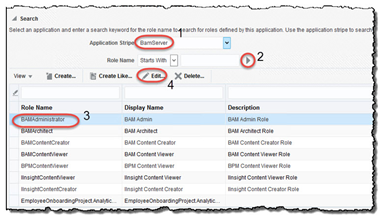
One of the difficulties organizations initially have after installing Oracle BAM 12c is determining how to define the security levels and permissions for its different types of users.  Oracle BAM has both coarse grained security defined at the application role level down to very fine grained security defined at individual BAM artifact and data object row levels.
BAM Coarse Grained Security – BAM Application Roles
For many organizations today, different parts of the organization will each access and share the same BAM domain. For some, the coarse grained predefined BAM security groups and roles assignments will suffice. When left to the default coarse grained security, these three types of BAM users will exist:

  1. BAM Administrators in an organization are able to access and edit any data object, EMS, or projects that other teams have created
  2. BAM Designers in an organization can access and edit any BAM project and their queries, views, dashboards and alerts that other teams have created
  3. BAM End Users in an organization can view any dashboard as long as they know the URL for the dashboard. Read the complete article here.

BAM Alerts by Marcel van de Glind

image

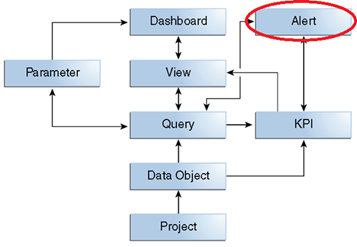
This post (next in the BAM series) is about BAM Alerts. Alerts were not part of the POC, but in the blog series I also wanted to pay attention to it, resulting in this post. I have made a very small example to get some feeling in there and will not get into all the details of alerts.

As usual, first a piece of theory from the Oracle documentation:

An alert performs one or more actions when launched by an event and filtered by one or more conditions. An event can be an amount of time, a specific time, a date and time, a repeating event between two dates, a change in a data object, output from a continuous query, or a manual event. A condition restricts the alert to an event occurring between two times or dates or to a specific day of the week. An action can send a notification, perform a data object operation, invoke a web service, call an external method, or launch other alerts. Read the complete article here