Rolling Up a BPM KPI into Business Architecture Models by Vikram

clip_image002


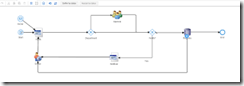
In BPM 12c, Key Performance Indicators (KPIs) can be used to measure the performance of the business process. You can use KPIs to improve the business process by identifying potential issues and addressing them. You can also roll up KPIs from an executable BPM process into a Business Architecture model.

To do this you need to publish your BPM project to the Process Asset Manager (PAM). You can add KPIs to the BPM Project in the Business Process Composer and then deploy the project. You can roll up this BPM KPI into a Business Architecture Model that links to it. This video walks through an example of how a KPI is rolled up into a Value Chain Model. It also does a quick walk through of the Process Criticality Report.

Video on Rolling up a BPM KPI into Business Architecture Models Watch the video here.

SOA & BPM Partner Community

For regular information on Oracle SOA Suite become a member in the SOA & BPM Partner Community for registration please visit www.oracle.com/goto/emea/soa (OPN account required) If you need support with your account please contact the Oracle Partner Business Center.

Blog Twitter LinkedIn image[7][2][2][2] Facebook clip_image002[8][4][2][2][2] Wiki

PaaS Podcast Series – The Oracle Process Cloud by Leon Smiers and Jeroen van Essen

clip_image002


In this series we will walk through different cloud products and how SaaS and PaaS can be combined together and their use in different projects.
In this podcast we would like to introduce you to Oracle Process Cloud to a wider audience. Oracle Process Cloud is the part of Oracle PaaS Cloud and it focuses on delivering processes in Cloud.

This episode features Leon Smiers, Solution Architect in Capgemini and Oracle ACE and Jeroen van Essen, Capgemini BPM Specialist. Listen to the podcast here.

SOA & BPM Partner Community

For regular information on Oracle SOA Suite become a member in the SOA & BPM Partner Community for registration please visit www.oracle.com/goto/emea/soa (OPN account required) If you need support with your account please contact the Oracle Partner Business Center.

Blog Twitter LinkedIn image[7][2][2][2] Facebook clip_image002[8][4][2][2][2] Wiki

Error in getting XML input stream with Oracle Business Rules 12.2.1 by Jan van Zoggel

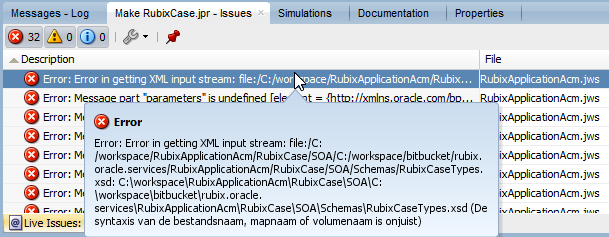
When trying to compile a Oracle ACM/BPM 12.2.1 project (with Oracle Business Rules) the following message throws up: “Error in getting XML input stream”

clip_image001

When Oracle Business Rules 12.2.1 generates it’s default XSD it uses the full system path instead of a relative path for it’s imports. So make sure to manually change the import configuration. Read the complete article here.

SOA & BPM Partner Community

For regular information on Oracle SOA Suite become a member in the SOA & BPM Partner Community for registration please visit www.oracle.com/goto/emea/soa (OPN account required) If you need support with your account please contact the Oracle Partner Business Center.

Blog Twitter LinkedIn image[7][2][2][2] Facebook clip_image002[8][4][2][2][2] Wiki

Process Cloud Service (PCS) – Release 16.1.3 (February) and Process Mobile App 2.0 is available

clip_image002


What’s New!

  • New Pricing Metrics
  • Sample Apps
  • Process Conversations
  • Enhanced Local and Remote App Deployment
  • New Tablet App
  • Start Process App from Mobile

New Pricing Metrics:

PCS pricing has moved to a 3-tier hosted named user model to accommodate varying levels of process service interaction from those who require full access to composition and management capabilities, to participants assigned review and approval tasks, to those whose interactions are limited to making service requests. This new pricing model helps maintain competitive pricing in use cases where there are large numbers of casual users. Below are the subscription pricing details. Metered pricing uses the same metrics at 2x the cost.

Oracle Process Cloud:

· $100 per Hosted Named User per Month

· Defined as a named user who can access analytics, compose applications and manage lifecycle

· Required minimum of 10 Users, 12-Months minimum contract

· Requires Oracle Process Cloud – Participant User

Oracle Process Cloud – Participant User:

· $30 per Hosted Named User per Month

· Defined as a named user who can participate in process approvals and tracking

· Required minimum of 10 Users, 12-Months minimum contract

· Requires Oracle Process Cloud

Oracle Process Cloud – Invocation User:

· $3 per Hosted Named User per Month

· Defined as a named user who can initiate a process and query status and notifications

· No minimum required – minimum of 100 Users if purchased, 12-Months minimum contract

· Requires Oracle Process Cloud

Sample Apps:

Sample Apps provide a quick and easy way to create and configure fully functional Process Apps with minimal technical knowhow. PCS includes a catalog of predefined ready to run Sample Apps that can be used both to provide first time designers a quick introduction to creating Process Apps and Business IT users easy to configure tailor made apps for a variety of use cases. IT and partners can publish their Process Apps as Sample Apps with specific pre-defined configurations allowing Business IT to quickly create, configure and deploy tailor made Process Apps.

Process Conversations:

Process Apps now support the addition of a process level conversation within the context of assigned tasks to allow stakeholders and participants to collaborate and streamline getting work done. Process Conversations also support various options to configure process activity stream messages that automatically update the conversation with process milestones.

Enhanced Local and Remote App Deployment:

Process App deployment has been enhanced to support complete segregation of test and production data. Test and Player functionality has been simplified to allow designers to either step through the Process App one activity at a time or run the Process App from the Workspace in Test Mode to experience the app from the perspective of an end-user. Production deployment has been enhanced to support deploying the Process App to the local environment or directly to remote environments.

New Tablet App:

A new universal Process Mobile App now supports native tablet form factors for both iOS and Android platforms. The tablet app takes advantage of the larger screen real-estate to provide an improved experience for managing tasks and initiating process requests.

Start Process App from Mobile:

Process participants can now remotely initiation process requests directly from their mobile App. Onboard camera support allows the user to capture pictures that are uploaded to Documents Cloud Service and displayed in context to downstream task participants.

Learn More:

Learn more about Oracle Process Cloud Service at https://cloud.oracle.com/process

SOA & BPM Partner Community

For regular information on Oracle SOA Suite become a member in the SOA & BPM Partner Community for registration please visit www.oracle.com/goto/emea/soa (OPN account required) If you need support with your account please contact the Oracle Partner Business Center.

Blog Twitter LinkedIn image[7][2][2][2] Facebook clip_image002[8][4][2][2][2] Wiki

Oracle Fusion Middleware 12c (12.2.1.2.0) Released

clip_image001


We are proud to announce the release of Oracle Fusion Middleware 12c (12.2.1.2.0). Media is available for download on the Oracle Technology Network (OTN), My Oracle Support (MOS) and the Oracle Software Delivery Cloud (OSDC). This includes the following products:

  • Oracle SOA Suite and Business Process Management 12c (12.2.1.2.0)
    • Oracle B2B and Healthcare 12c (12.2.1.2.0)
    • Oracle Service Bus 12c (12.2.1.2.0)
    • Oracle Stream Analytics 12c (12.2.1.2.0)
    • Oracle Managed File Transfer 12c (12.2.1.2.0)
  • Oracle WebLogic Server 12c (12.2.1.2.0)
  • Oracle Coherence 12c (12.2.1.2.0)
  • Oracle TopLink 12c (12.2.1.2.0)
  • Oracle Fusion Middleware Infrastructure 12c (12.2.1.2.0)
  • Oracle HTTP Server 12c (12.2.1.2.0)
  • Oracle Traffic Director 12c (12.2.1.2.0)
  • Oracle Fusion Middleware WebLogic Server Plug-In 12c (12.2.1.2.0)
  • Oracle MapViewer 12c (12.2.1.2.0)
  • Oracle Data Integrator 12c (12.2.1.2.0)
  • Oracle Enterprise Data Quality 12c (12.2.1.2.0)
  • Oracle Enterprise Pack for Eclipse 12c (12.2.1.2.0)
  • Oracle GoldenGate Studio 12c (12.2.1.2.0)
  • Oracle GoldenGate Monitor 12c (12.2.1.2.0)
  • Oracle GoldenGate Veridata 12c (12.2.1.2.0)
  • Oracle JDeveloper Studio 12c (12.2.1.2.0)
  • Oracle Forms and Reports 12c (12.2.1.2.0)
  • Oracle WebCenter Portal 12c (12.2.1.2.0)
  • Oracle WebCenter Content 12c (12.2.1.2.0)
  • Oracle WebCenter Sites 12c (12.2.1.2.0)
  • Oracle Business Intelligence 12c (12.2.1.2.0)

Here is the related information for these releases:

You can also visit the Oracle Fusion Middleware page on OTN to find more information about the products.

Partner Resources (community membership required):

SOA & BPM Partner Community

For regular information on Oracle SOA Suite become a member in the SOA & BPM Partner Community for registration please visit www.oracle.com/goto/emea/soa (OPN account required) If you need support with your account please contact the Oracle Partner Business Center.

Blog Twitter LinkedIn image[7][2][2][2] Facebook clip_image002[8][4][2][2][2] Wiki

PaaS free trial accounts ICS and PCS, IoT and PaaS for SaaS

image

As part of our communities we do offer free PaaS accounts (only for partners in Europe, Middle East and Africa. In case you are not part of EMEA please contact your local partner manager):

· Integration Cloud Service & Process Cloud Service & SOA Cloud & IoT & PaaS for SaaS Service PaaS Demo Accounts  (Community membership required)

· Java Cloud Service & Application Cloud Container Service & Mobile Cloud Service PaaS Demo Accounts (Community membership required)

Watch the GSE Overview Video! Get an overview of what GSE is and how you can use GSE to help you sell. You can also get long running dedicated PaaS instances, therefore please send us details about your use cases. For instant access please request a sandbox demo

SOA & BPM Partner Community

For regular information on Oracle SOA Suite become a member in the SOA & BPM Partner Community for registration please visit www.oracle.com/goto/emea/soa (OPN account required) If you need support with your account please contact the Oracle Partner Business Center.

Blog Twitter LinkedIn image[7][2][2][2] Facebook clip_image002[8][4][2][2][2] Wiki

Technorati Tags: PaaS,Cloud,ICS,PCS,PaaS4SaaS,SOA Community,Oracle SOA,Oracle BPM,OPN,Jürgen Kress

How to Recover BPM Process Instances from a MDS 00054 Error in Oracle BPM 12.1.3 (Part 1) by Siming Mu

clip_image001


Introduction

There is an issue in Oracle SOA Suite Fabric layer in version 11.1.x. and 12.1.3. The issue is documented in Bug# 20517579: “Composites Lost Completely after redeployment and server restart”. This bug is fixed in version 12.2.1. A few customers have run into this bug. Once this bug is encountered, BPM server usually shows “MDS 00054: The file to be loaded oramds:/deployed-composites/CompositeName_rev1.0/composite.xml does not exist” error during server startup. The composite is no longer visible in EM and all User Tasks from this composite are not visible in BPM Workspace either. The composite appears to be lost.

One work-around for this issue is deploying the same composite as a higher version. Or customers can manually un-deploy their problematic version of the composite using WLST script and then deploy the same composite again. In either case, customers will lose all running instances of this composite. If this outcome is not desirable, we need to find a way to recover all running instances.

This multi-part blog will present one way to manually recover those instances. To make this process more understandable to readers, a very simple BPM composite is used to take you through the processes of deployment/undeployment, reproduction of the bug# 20517579 and MDS 00054 errors, and finally steps to recover instances. Along the way, we will look at changes in MDS and SOAINFRA tables due to normal life cycles of the sample composite and bug# 20517579.

Even though this bug is fixed in 12.2.1, I think the information documented in this blog will provide a valuable resource for understanding MDS and SOAINFRA schema.

What happens in MDS when a composite is deployed?

First, let’s take a look what happens in MDS when a BPM composite is deployed. To do that, we need a tool like MDS Explorer. Before any BPM composite is deployed, your MDS should look empty similar to the following image.

Now we will deploy a very simple BPM composite to check for changes in MDS. We can use a BPM composite similar to the following for our testing purposes.

Notice that I created two human tasks but only have one interactive activity in my BPM process. We will only use human task 1 for now and the other one will be used to generate the MDS 00054 error later.

After deploy this composite, the MDS  should look like this: Read the complete article here.

SOA & BPM Partner Community

For regular information on Oracle SOA Suite become a member in the SOA & BPM Partner Community for registration please visit www.oracle.com/goto/emea/soa (OPN account required) If you need support with your account please contact the Oracle Partner Business Center.

Blog Twitter LinkedIn image[7][2][2][2] Facebook clip_image002[8][4][2][2][2] Wiki

The BPM 12c Process Monitor Dashboard in 5 Minutes by Jaideep

clip_image002

The Oracle BPM 12c Workspace offers two dashboards right out of the box. The Process Monitor and the Standard Dashboard. In this video we’ll go over how to use the process monitor.

Process monitor dashboards enable you to monitor and optimize business process execution. It can be a very helpful tool to be able to see process statistics like how many instances are currently running, how many have completed, how many have faulted etc over a time interval. It displays alerts that can help to identify process issues that are affecting performance. It also displays two performance graphs, the Workload per Activity and Performance per Activity.

Watch this video to get a quick overview of what the process monitor looks like and how to use it. Watch the video here.

SOA & BPM Partner Community

For regular information on Oracle SOA Suite become a member in the SOA & BPM Partner Community for registration please visit www.oracle.com/goto/emea/soa (OPN account required) If you need support with your account please contact the Oracle Partner Business Center.

Blog Twitter LinkedIn image[7][2][2][2] Facebook clip_image002[8][4][2][2][2] Wiki

PCS: Form rules in human tasks by Rubén Rodríguez Santiago

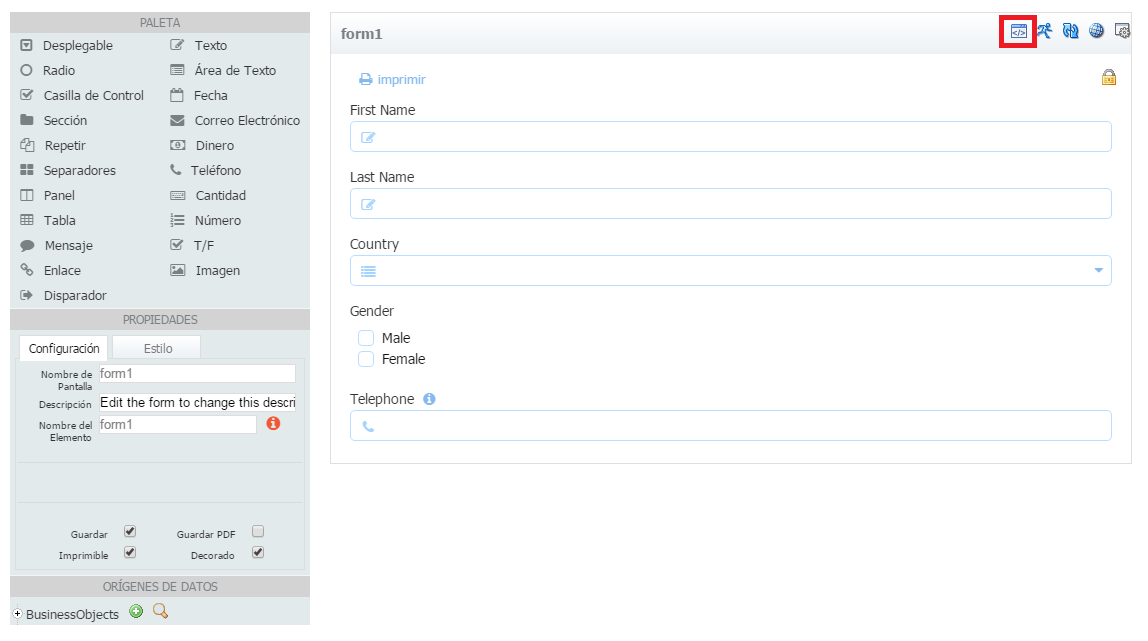
clip_image001In Oracle BPM it is possible to use Oracle ADF to implement Human Tasks, but in Oracle Process Cloud Service you can only create a form using web forms. Creating a form is an easy task and it offers us to define rules that it gives us a lot of flexibility to achieve complex requirements.
Having this simple form. We can navigate to rules clicking on the marked button.

For each of the elements we have a number of properties or events that we can manage,
For example we can manage form load event, or get if a field value is valid…

To build the rules we have to use JavaScript and we can get code snippets if we click on the button next to each of the properties.

Let’s build a couple of rules so you can see how easy it is.
Having this combo with this value.

We can build a rules that populates that combo and also add some kind of value change listener so if its value is "Spain" we can set the country code in Telephone field.
If we have any syntax errors, will be displayed in the bottom of the editor. Read the complete article here.

SOA & BPM Partner Community

For regular information on Oracle SOA Suite become a member in the SOA & BPM Partner Community for registration please visit www.oracle.com/goto/emea/soa (OPN account required) If you need support with your account please contact the Oracle Partner Business Center.

Blog Twitter LinkedIn image[7][2][2][2] Facebook clip_image002[8][4][2][2][2] Wiki

PCS: Starting a process instance remotely by Rubén Rodríguez Santiago


clip_image001

While implementing an Oracle Process Cloud Service PoC we had the requirement to allow users to start an instance using a form in their custom mobile application and also using the workspace.

We have a ‘Form Start Event’ so users can start the instance thought the workspace. We also added a ‘Message Start Event’ in order to publish it as a web service.

Having that process deployed, if we head to ‘Deployed Applications’ in workspace main page.

And click on the button in ‘Actions’ column.

We can see the web services exposed.

If we use that wsdl url in soapui we see that we have 2 operations, one for each of the start events.

Executing both, we can see that even using ‘Form Start Event’ we can start a process instance remotely as an operation is automatically created in the web service, so we can remove the ‘Message Start Event’ as we can meet both requirements just using the ‘Form Start Event’. Read the complete article here.

SOA & BPM Partner Community

For regular information on Oracle SOA Suite become a member in the SOA & BPM Partner Community for registration please visit www.oracle.com/goto/emea/soa (OPN account required) If you need support with your account please contact the Oracle Partner Business Center.

Blog Twitter LinkedIn image[7][2][2][2] Facebook clip_image002[8][4][2][2][2] Wiki