Importance of Transparency in Government by Kellsey Ruppel

clip_image002

Open government is not a new concept – its modern roots can be traced back to efforts by democratic societies to bring openness to government dealings. In the United States, Freedom of Information Act (FOIA) dates back to the mid 1960’s. Today, most national governments, states, provinces, municipalities and other government jurisdictions have committed to increased transparency. Most recognize that a transparent government is an essential element of a free and democratic society. The White House issued a Memorandum titled “Transparency and Open Government” that states “Openness will strengthen our democracy and promote efficiency and effectiveness in Government.” The memorandum lists three key principles:

  1. Government should be transparent.
  2. Government should be participatory.
  3. Government should be collaborative.

Open Government policies are already helping to contribute to the awareness off citizens and public entities, the success of partnering organizations (such as sub-agencies and authorities) and innovation of new government services. With open data and service policies in place, we are faced with the fundamental requirement to apply those policies to our daily operations as easily and cost-effective as possible.

How is information shared and accessed in State and Local government?

The Sunlight Foundation is a national, nonpartisan, nonprofit organization that uses the tools of civic tech, open data, policy analysis, and journalism to make our government and politics more complete, equitable and effective democratic participation. Let’s use this foundation’s guiding best-practices as a model to lay out how information is being made available for sharing and re-use.

  • Sharing qualitative data in the form of objective reporting
  • Building informative and intuitive websites and mobile apps
  • Providing access to APIs that power existing applications to be re-used by others

In order to deliver these Open Government services, there are intrinsic technology needs to:

  • Secure document collaboration and distribution
  • Rapidly develop mobile friendly user experiences
  • Manage and measure the performance of access to disparate systems
  • Automate self-service requests to data and services

Implementing cloud-based solutions can not only make government more efficient and cost-effective, but also improve the accessibility to information and data.

Oracle and Open Government

Oracle offers a wide variety of Cloud technology and application products that can support government transparency efforts in these key areas:

  1. Technology infrastructure
  2. Information access and presentation
  3. Service performance
  4. Budget/financial Information
  5. Access to Public Documents
  6. Read the complete article here.

SOA & BPM Partner Community

For regular information on Oracle SOA Suite become a member in the SOA & BPM Partner Community for registration please visit www.oracle.com/goto/emea/soa (OPN account required) If you need support with your account please contact the Oracle Partner Business Center.

Blog Twitter LinkedIn image[7][2][2][2] Facebook clip_image002[8][4][2][2][2] Wiki

BPM 12c Subprocesses (Part 3 of 3): Event Subprocess by Antonis Antoniou

clip_image001


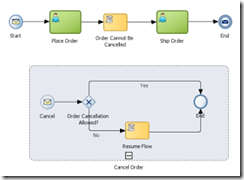
In this third and last part of a three part series on subprocesses we will explore a special type of subprocess referred to as an “Event” subprocess.
This type of subprocess is triggered by an event that can occur anytime during the execution of a process flow that allows you to interrupt the normal flow of an instance.
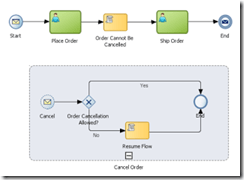
Such capability can be applicable in various use cases. For example, an error might occur in the process, or you can very well define various service level agreements to delineate execution times or you can even have a business requirement to cancel a flow (for example cancel an order).
You can use the “Event” subprocess to implement such requirements (i.e. handle system and business exceptions).
“Event” subprocesses posses various unique characteristics. One of them is that, by configuration, you can have an “Event” subprocess either as interrupting, that is interrupting the normal process flow execution or have an “Event” subprocess running in parallel (concurrently) to the main flow of your process.
Another really nice and useful characteristics of an “Event” subprocess is that it shares the same context as the main flow of the process, meaning that from the “Event” subprocess you can have access to all the data objects that are used by the main process (and of course update their state).
An “Event” subprocess resembles like an embedded subprocess (except that it’s displayed in a dashed-line boarder), however an “Event” subprocess cannot have outgoing or incoming sequence flows. And just as with the other types of subprocesses an “Event” subprocess can define data objects that are local to its scope.We will implement a very simple process that will make use of the event sub-process to simulate the functional use case depicted by the image above; the scenario is straightforward, you can cancel an order as long as it’s not shipped. Read the complete article here.

SOA & BPM Partner Community

For regular information on Oracle SOA Suite become a member in the SOA & BPM Partner Community for registration please visit www.oracle.com/goto/emea/soa (OPN account required) If you need support with your account please contact the Oracle Partner Business Center.

Blog Twitter LinkedIn image[7][2][2][2] Facebook clip_image002[8][4][2][2][2] Wiki

Process Timers – Controlling the time in which your process executes by Jose Rodrigues

clip_image002


Following up a series of questions around setting timers in the Oracle Community forums, I decided to write this article to try and guide their use and how these can be used to control process execution.

Let’s start!

The Use Case

We’ll begin by setting up the scenario in which we’ll have to control our process flow.

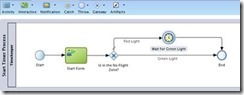
Imagine that you want to have a part of your process that executes immediately if the current time is between 08:00am and 04:00pm (16:00 hours for us Europeans), or wait until 08:00am if it’s outside that interval.

It’s frequent to have some kind of control in parts of the processes, for instance when you want to send SMS to your customers. You certainly don’t want to do it at 03:00am.

How will we make this?

We should use a Catch Timer event, of course, and XPATH’s DateTime functions to check the current time and to set the timer to way for next morning’s 08:00.

The Catch Timer event has several ways to be configured (triggered at specific dates and times, on a specific schedule – every day at 10:28:00 (repeatable), or in a time cycle – every 2 minutes), but we’ll focus on the one where we configure the timer to wait for a specific time and date. More on the others perhaps in another article.

We’ll illustrate the use of timers with an example process. You can, of course, adapt it to your needs.

Defining the execution conditions

So you start by defining a gateway that will split the execution between:

  • Immediate
  • Wait for 08:00am
    • This will have to be split into prior to midnight and after midnight. but for now, we’ll consider the scenario of only two options.

So, you set the expression on the conditional flow that will do the immediate execution, leaving the condition that must wait for 08:00 as the unconditional (default) branch.

The expression should be something like this: Read the complete article here.

SOA & BPM Partner Community

For regular information on Oracle SOA Suite become a member in the SOA & BPM Partner Community for registration please visit www.oracle.com/goto/emea/soa (OPN account required) If you need support with your account please contact the Oracle Partner Business Center.

Blog Twitter LinkedIn image[7][2][2][2] Facebook clip_image002[8][4][2][2][2] Wiki

Business Activity Monitoring videos by Stefan Wörmke


This is a series of 8 short videos explaining how to create a BPM application using Oracle Process Cloud Services. Part 1 will show how to login and create a new application:

clip_image002Part 1

Part 2

Part 3

Part 4

Part 5

Part 6

Part 7

Part 8

The tutorial is also available at our Community blog Business Process Modelling and Business Activity Monitoring by Stefan Wörmcke

SOA & BPM Partner Community

For regular information on Oracle SOA Suite become a member in the SOA & BPM Partner Community for registration please visit www.oracle.com/goto/emea/soa (OPN account required) If you need support with your account please contact the Oracle Partner Business Center.

Blog Twitter LinkedIn image[7][2][2][2] Facebook clip_image002[8][4][2][2][2] Wiki

Getting started with Process Cloud Service by Waslley Souza

clip_image002


If you know and use Oracle BPM Suite, you will like to try the new cloud solution called Oracle Process Cloud Service or PCS. With PCS you can modeling your processes through the cloud without the need to install Oracle BPM Suite. Go to PCS section within the Oracle Cloud website to learn more about or try it: http://cloud.oracle.com/process.

In this post we will create a basic process to create and approve employees.
Download the sample application: CreateEmployeeApplication.zip.

Log in to Oracle Process Cloud Service.
Click Create button, and then select New Application.

Name the application as Create Employee Application.
Select New Space option, and then name it as HR.

In this step, we will create the process and we have many options to create it.
Select the Form Approval Pattern option.

Name the process as Create Employee Process.

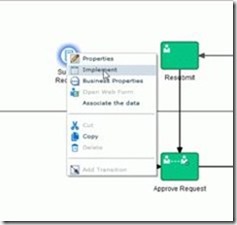
In the Create Employee Process, right-click Submit Request, and then select Implement. Read the complete article here.

SOA & BPM Partner Community

For regular information on Oracle SOA Suite become a member in the SOA & BPM Partner Community for registration please visit www.oracle.com/goto/emea/soa (OPN account required) If you need support with your account please contact the Oracle Partner Business Center.

Blog Twitter LinkedIn image[7][2][2][2] Facebook clip_image002[8][4][2][2][2] Wiki

PCS Travel Request Management – Process Form Creation by Red Mavericks

clip_image001


The fourth video by Red Mavericks (http://www.redmavericks.com) addresses the use of Oracle’s Process Cloud Service to build and deploy a full working Business Travel Request application in 40 minutes.
This is the first of a series of 4 videos that will guide you through the application creation process of a BPM application, using near zero code, which makes it particularly suitable for Business Analysts to also be engaged.

For this part, the focus is on Process Form Design using Oracle’s PCS Web Form builder, i.e. the process diagram that will guide the application’s general behavior. The use case was made for Link Consulting’s (http://www.linkconsulting.com/oracle) Process Cloud Event, held on July 2015. Watch the video here.

SOA & BPM Partner Community

For regular information on Oracle SOA Suite become a member in the SOA & BPM Partner Community for registration please visit www.oracle.com/goto/emea/soa (OPN account required) If you need support with your account please contact the Oracle Partner Business Center.

Blog Twitter LinkedIn image[7][2][2][2] Facebook clip_image002[8][4][2][2][2] Wiki

Pharma and Automotive BPM Solutions by OpRiskSolutions International Ltd

clip_image002


Our partner OpRiskSolutions developed two solutions based on BPM Suite 12c:

Aria4Automotive Aria4Automotive is a comprehensive solution, designed to address the specific requirements of Project Schedule Management in the Automotive Industry. The solution supports specific automotive industry planning concepts, such as enterprise-wide scheduling.
Aria4Pharma Aria4Pharma is a comprehensive enterprise solution that addresses the specific needs, planning concepts and processes of drug development in the pharmaceutical industry.

For more information about the Solutions Catalog & Cloud Marketplace please see the blog post: Free advertisement for Oracle partners – all details about Solutions Catalog & Cloud Marketplace

SOA & BPM Partner Community

For regular information on Oracle SOA Suite become a member in the SOA & BPM Partner Community for registration please visit www.oracle.com/goto/emea/soa (OPN account required) If you need support with your account please contact the Oracle Partner Business Center.

Blog Twitter LinkedIn image[7][2][2][2] Facebook clip_image002[8][4][2][2][2] Wiki

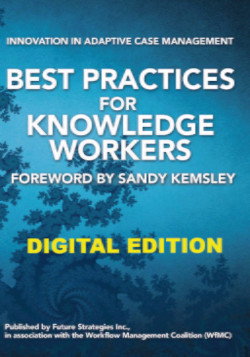
Adaptive Case Management Methodology published in Best Practices for Knowledge Workers (digital edition)

image

Working on an Adaptive Case Management (ACM) opportunity? Read the ACM Methodology published in the Best Practices for Knowledge Workers (Digital edition) book.

BPM-based solutions have brought major advances to work organization and automation. However, given BPM’s strong basis on formal workflow definition, oftentimes BPM solutions are not well suited for work scenarios where a precise workflow cannot be strictly defined. Work in such scenarios is highly dependent on knowledge-based decisions about activities and outcomes, leading to multiple work paths and business rules that can become quite complex or even unfeasible to model and completely automate. In these cases, a different technology support approach is required. The focus is not to isolate and automate decisions and rules, but rather to deliver opportunistic information support to the knowledge worker to accomplish them. Adaptive Case Management (ACM) rises as a successful design pattern for this. Get the eBook here.

SOA & BPM Partner Community

For regular information on Oracle SOA Suite become a member in the SOA & BPM Partner Community for registration please visit www.oracle.com/goto/emea/soa (OPN account required) If you need support with your account please contact the Oracle Partner Business Center.

Blog Twitter LinkedIn image[7][2][2][2] Facebook clip_image002[8][4][2][2][2] Wiki

What’s new in Oracle BPM and Process Cloud Service? SOA & BPM Partner Community Webcast – July 26th 2016

imageAttend our July edition of the SOA & BPM Partner Community Webcast live on July 26th 2016 at 16:00 CET.

What’s new in Oracle BPM and Process Cloud Service? Digital Process Apps made Simple

During this session, we will be joined by Sujan Balachandran, Product Manager for Oracle BPM and Process Cloud Service (PCS). The session will cover

· Empower Business User using BPM Composer

· What is Business Architecture? How can it help Enterprises organize Business Process with Organization’s Goals and Objectives?

· What is Process Cloud Service? When and how to position On-Prem BPM vs PCS?

· Oracle BPM and PCS Roadmap

For those who are new to Process Cloud Service, PCS is the next-gen Process Management tool built and optimized for the Cloud. It is a Business User friendly Low Code Environment to build Process Automation applications.

imageSujan Balachandran

Senior Principal Product Manager

LinkedIn & Twitter

Visit the registration page here.

Call ID: 5566478 Call Passcode: 333111

Austria: +43 (0) 192 865 12
Belgium: +32 (0) 240 105 28
Denmark: +45 327 292 22
Finland: +358 (0) 923 193 923
France: +33 (0) 15760 2222
Germany: +49 (0) 692 222 161 06
Ireland: +353 (0) 124 756 50
Italy: +39 (0) 236 008 198

Netherlands: +31 (0) 207 143 543
Spain: +34 914 143 755
Sweden: +46 (0) 856 619 465
Switzerland: +41 (0) 445 804 003
UK: +44 (0) 208 118 1001
United States: 140 877 440 73
More Local Numbers

Schedule:

July 26th 2016 at 16:00-17:00 CET

Visit the registration page here.

Missed our SOA & BPM Partner Community Webcast? – watch the on-demand versions:

· Sales Plays Webcast June 9th 2016

· Real-Time Integration Business Insight May 31st 2016

· Integration Strategy sales and marketing campaign update

· Microservices

· Stream Explorer

· Process Cloud Service V2

· SOA Suite 12.2.1

· Oracle OpenWorld 2015 update

· SOA & API Cloud Service

· Solutions Catalog & Cloud Marketplace

· GSE demo systems

· Hybrid sales plays

For the latest information please visit Community Updates Wiki page (SOA Community membership required).

SOA & BPM Partner Community

For regular information on Oracle SOA Suite become a member in the SOA & BPM Partner Community for registration please visit www.oracle.com/goto/emea/soa (OPN account required) If you need support with your account please contact the Oracle Partner Business Center.

Blog Twitter LinkedIn image[7][2][2][2] Facebook clip_image002[8][4][2][2][2] Wiki

BPM 12c Subprocesses (Part 3 of 3): Event Subprocess by Antonis Antoniou

clip_image001

In this third and last part of a three part series on subprocesses we will explore a special type of subprocess referred to as an “Event” subprocess.
This type of subprocess is triggered by an event that can occur anytime during the execution of a process flow that allows you to interrupt the normal flow of an instance.
Such capability can be applicable in various use cases. For example, an error might occur in the process, or you can very well define various service level agreements to delineate execution times or you can even have a business requirement to cancel a flow (for example cancel an order).
You can use the “Event” subprocess to implement such requirements (i.e. handle system and business exceptions).
“Event” subprocesses posses various unique characteristics. One of them is that, by configuration, you can have an “Event” subprocess either as interrupting, that is interrupting the normal process flow execution or have an “Event” subprocess running in parallel (concurrently) to the main flow of your process.
Another really nice and useful characteristics of an “Event” subprocess is that it shares the same context as the main flow of the process, meaning that from the “Event” subprocess you can have access to all the data objects that are used by the main process (and of course update their state).
An “Event” subprocess resembles like an embedded subprocess (except that it’s displayed in a dashed-line boarder), however an “Event” subprocess cannot have outgoing or incoming sequence flows. And just as with the other types of subprocesses an “Event” subprocess can define data objects that are local to its scope.We will implement a very simple process that will make use of the event sub-process to simulate the functional use case depicted by the image above; the scenario is straightforward, you can cancel an order as long as it’s not shipped. Read the complete article here.

SOA & BPM Partner Community

For regular information on Oracle SOA Suite become a member in the SOA & BPM Partner Community for registration please visit www.oracle.com/goto/emea/soa (OPN account required) If you need support with your account please contact the Oracle Partner Business Center.

Blog Twitter LinkedIn image[7][2][2][2] Facebook clip_image002[8][4][2][2][2] Wiki