Process Timers – Controlling the time in which your process executes by Jose Rodrigues

clip_image002


Following up a series of questions around setting timers in the Oracle Community forums, I decided to write this article to try and guide their use and how these can be used to control process execution.

Let’s start!

The Use Case

We’ll begin by setting up the scenario in which we’ll have to control our process flow.

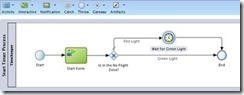
Imagine that you want to have a part of your process that executes immediately if the current time is between 08:00am and 04:00pm (16:00 hours for us Europeans), or wait until 08:00am if it’s outside that interval.

It’s frequent to have some kind of control in parts of the processes, for instance when you want to send SMS to your customers. You certainly don’t want to do it at 03:00am.

How will we make this?

We should use a Catch Timer event, of course, and XPATH’s DateTime functions to check the current time and to set the timer to way for next morning’s 08:00.

The Catch Timer event has several ways to be configured (triggered at specific dates and times, on a specific schedule – every day at 10:28:00 (repeatable), or in a time cycle – every 2 minutes), but we’ll focus on the one where we configure the timer to wait for a specific time and date. More on the others perhaps in another article.

We’ll illustrate the use of timers with an example process. You can, of course, adapt it to your needs.

Defining the execution conditions

So you start by defining a gateway that will split the execution between:

  • Immediate
  • Wait for 08:00am
    • This will have to be split into prior to midnight and after midnight. but for now, we’ll consider the scenario of only two options.

So, you set the expression on the conditional flow that will do the immediate execution, leaving the condition that must wait for 08:00 as the unconditional (default) branch.

The expression should be something like this: Read the complete article here.

SOA & BPM Partner Community

For regular information on Oracle SOA Suite become a member in the SOA & BPM Partner Community for registration please visit www.oracle.com/goto/emea/soa (OPN account required) If you need support with your account please contact the Oracle Partner Business Center.

Blog Twitter LinkedIn image[7][2][2][2] Facebook clip_image002[8][4][2][2][2] Wiki

Process Cloud Service videos by Stefan Wörmke


This is a series of 8 short videos explaining how to create a BPM application using Oracle Process Cloud Services. Part 1 will show how to login and create a new application:

clip_image002Part 1

Part 2

Part 3

Part 4

Part 5

Part 6

Part 7

Part 8

SOA & BPM Partner Community

For regular information on Oracle SOA Suite become a member in the SOA & BPM Partner Community for registration please visit www.oracle.com/goto/emea/soa (OPN account required) If you need support with your account please contact the Oracle Partner Business Center.

Blog Twitter LinkedIn image[7][2][2][2] Facebook clip_image002[8][4][2][2][2] Wiki

Getting started with Process Cloud Service by Waslley Souza


clip_image002If you know and use Oracle BPM Suite, you will like to try the new cloud solution called Oracle Process Cloud Service or PCS. With PCS you can modeling your processes through the cloud without the need to install Oracle BPM Suite. Go to PCS section within the Oracle Cloud website to learn more about or try it: http://cloud.oracle.com/process.

In this post we will create a basic process to create and approve employees.
Download the sample application: CreateEmployeeApplication.zip.

Log in to Oracle Process Cloud Service.
Click Create button, and then select New Application.

Name the application as Create Employee Application.
Select New Space option, and then name it as HR.

In this step, we will create the process and we have many options to create it.
Select the Form Approval Pattern option.

Name the process as Create Employee Process.

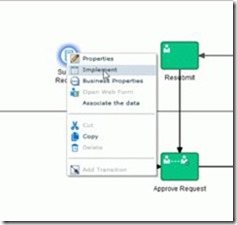
In the Create Employee Process, right-click Submit Request, and then select Implement. Read the complete article here.

SOA & BPM Partner Community

For regular information on Oracle SOA Suite become a member in the SOA & BPM Partner Community for registration please visit www.oracle.com/goto/emea/soa (OPN account required) If you need support with your account please contact the Oracle Partner Business Center.

Blog Twitter LinkedIn image[7][2][2][2] Facebook clip_image002[8][4][2][2][2] Wiki

PCS Travel Request Management – Process Form Creation by Red Mavericks


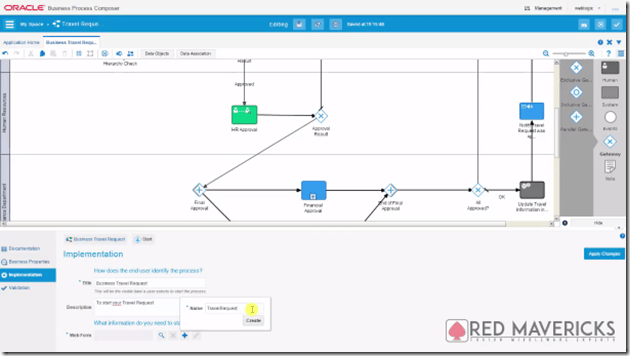
The fourth video by Red Mavericks (http://www.redmavericks.com) addresses the use of Oracle’s Process Cloud Service to build and deploy a full working Business Travel Request application in 40 minutes.
This is the first of a series of 4 videos that will guide you through the application creation process of a BPM application, using near zero code, which makes it particularly suitable for Business Analysts to also be engaged.

clip_image001

For this part, the focus is on Process Form Design using Oracle’s PCS Web Form builder, i.e. the process diagram that will guide the application’s general behavior. The use case was made for Link Consulting’s (http://www.linkconsulting.com/oracle) Process Cloud Event, held on July 2015. Watch the video here.

SOA & BPM Partner Community

For regular information on Oracle SOA Suite become a member in the SOA & BPM Partner Community for registration please visit www.oracle.com/goto/emea/soa (OPN account required) If you need support with your account please contact the Oracle Partner Business Center.

Blog Twitter LinkedIn image[7][2][2][2] Facebook clip_image002[8][4][2][2][2] Wiki

Pharma and Automotive BPM Solutions by OpRiskSolutions International Ltd

clip_image002

Our partner OpRiskSolutions developed two solutions based on BPM Suite 12c:

Aria4Automotive Aria4Automotive is a comprehensive solution, designed to address the specific requirements of Project Schedule Management in the Automotive Industry. The solution supports specific automotive industry planning concepts, such as enterprise-wide scheduling.
Aria4Pharma Aria4Pharma is a comprehensive enterprise solution that addresses the specific needs, planning concepts and processes of drug development in the pharmaceutical industry.

For more information about the Solutions Catalog & Cloud Marketplace please see the blog post: Free advertisement for Oracle partners – all details about Solutions Catalog & Cloud Marketplace

SOA & BPM Partner Community

For regular information on Oracle SOA Suite become a member in the SOA & BPM Partner Community for registration please visit www.oracle.com/goto/emea/soa (OPN account required) If you need support with your account please contact the Oracle Partner Business Center.

Blog Twitter LinkedIn image[7][2][2][2] Facebook clip_image002[8][4][2][2][2] Wiki

Middleware Summer Camps free virtual training SOA Suite 12c, BPM Suite 12c & WebLogic 12c: August & September 2016


VirtualSummerCamps2016small

You are working on large Fusion Middleware & PaaS opportunities & projects? Oracle is pleased to invite you to the  Middleware Summer Camps 2016. For technical experts we offer live virtual classes:

SOA Suite 12c Training On Demand

BPM Suite 12c Training On Demand

WebLogic 12c Training On Demand


SOA & BPM Partner Community

For regular information on Oracle SOA Suite become a member in the SOA & BPM Partner Community for registration please visit www.oracle.com/goto/emea/soa (OPN account required) If you need support with your account please contact the Oracle Partner Business Center.

Blog Twitter LinkedIn image[7][2][2][2] Facebook clip_image002[8][4][2][2][2] Wiki

SOA & BPM 12.2.1 Installation and Configuration Workshop by John VanSant


clip_image002Overview of Workshop

This workshop will guide the participant through the installation of a non-development environment for SOA and BPM Suite v12.2.1. This workshop won’t cover the installation of the SOA Quickstart install, but the installation of the production software. Some notable differences between the Quickstart install and production bits are:

  • The Quickstart installer doesn’t require an Oracle Database but uses a Java Database. In order to use BAM, an Oracle Database is required so the edelivery installation packages should be used if BAM is going to be used with SOA and/or BPM.
  • The Quickstart installer limits domains to a single managed server.
  • The Quickstart installer doesn’t support B2B domains.
  • The Quickstart installer also doesn’t support the ESS (Enterprise System Scheduler)

The overall steps in this workshop are:

1. Download the software and install Java SE

2. Install Fusion Middleware 12c Foundation

3. Install Oracle Database 12c Enterprise Edition

4. Install SOA and BPM Suite 12c

5. Patch the SOA and BPM 12c installation

6. Create the required Database Schemas to support a domain

7. Create & Configure a test domain

8. Smoke-test the new domain

Read the complete article here. (Community membership required)

SOA & BPM Partner Community

For regular information on Oracle SOA Suite become a member in the SOA & BPM Partner Community for registration please visit www.oracle.com/goto/emea/soa (OPN account required) If you need support with your account please contact the Oracle Partner Business Center.

Blog Twitter LinkedIn image[7][2][2][2] Facebook clip_image002[8][4][2][2][2] Wiki

Case for case management by Leon Smiers


clip_image001A case for case management with Léon Smiers and Greger Wikstrand. They discuss BPM and case management, how they differ and how the complement each other. Léon also talks about why they wrote their latest book, Oracle Case Management Solutions and the benefits with case management.

Léon Smiers works as a Solution Architect for Capgemini, The Netherlands in the area of Oracle Technology and Architecture, where he is one of the leading Oracle specialists. He has done a lot of work and research in the field of integration and new technologies, like RFID, SOA, EDA, BPM, and case management, on which he wrote articles and presented at international conferences.

You can follow them on twitter as @LeonSmiers and @GregerWikstrand

Links:

· Oracle Case Management Solutions (ISBN: 978-1482223828) by Léon Smiers, Manas Deb, Joop Koster and Prasen Palvankar
Léon Smiers blog
Miljarder i potten för CSN efter dom

· Knowledge Worker Enablement on Premises and in the Cloud

SOA & BPM Partner Community

For regular information on Oracle SOA Suite become a member in the SOA & BPM Partner Community for registration please visit www.oracle.com/goto/emea/soa (OPN account required) If you need support with your account please contact the Oracle Partner Business Center.

Blog Twitter LinkedIn image[7][2][2][2] Facebook clip_image002[8][4][2][2][2] Wiki

BPM 12c Subprocesses (Part 2 of 3): Embedded Subprocess by Antonis Antoniou

clip_image001

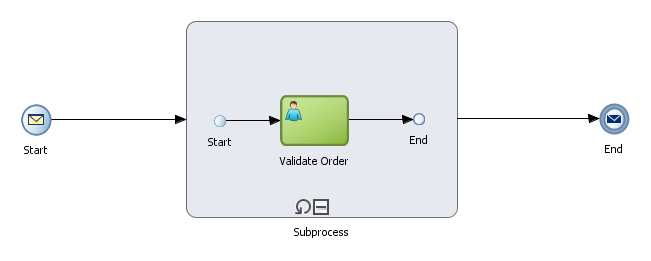
In this second blog on sub-processes we will explore the embedded sub-processes, also referred to as inline sub-processes and as the name implies this is a sub-process type that consists of a series of activities (for example tasks, gateways, events, etc.) that resides within the parent process.

An embedded sub-process has certain distinct characteristics such as they always begin with a none start event and end with a non end event, they do not contain swimlanes and most importantly they share their parent’s context, meaning they can access parent process data which simplifies things since you are not required to define input and output parameters and pass them as data objects. If required you can defined data objects that are local to your embedded sub-process.
An embedded sub-process is mainly used to simplify the process model by grouping activities together into an embedded sub-process that can be collapsed or expanded to hide and show the implementation details.
Another common use of the embedded sub-process is to define loops which will be the case with the sample process that we will implement as part of this blog post.
We will be implementing a very simple process which will make use of the embedded sub-process to loop through a list of order items for review.
Create the basic BPM application and BPM project (i named it OracleBPM12cEmbeddedSubProcessDemoApp and OracleBPM12cEmbeddedSubProcessDemo respectively) and choose "Empty Composite" in step 3 of the "Create BPM Application" wizard since we will first create the the XSD schema file to describe our process’s input and output parameters. Read the complete article here.

SOA & BPM Partner Community

For regular information on Oracle SOA Suite become a member in the SOA & BPM Partner Community for registration please visit www.oracle.com/goto/emea/soa (OPN account required) If you need support with your account please contact the Oracle Partner Business Center.

Blog Twitter LinkedIn image[7][2][2][2] Facebook clip_image002[8][4][2][2][2] Wiki

Running Business Processes in the Cloud by Antonis Antoniou


clip_image002My article on Oracle Process Cloud Service has just been published by OTech Magazine in its Fall 2015 "OpenWorld Special" edition. Oracle has been releasing a number of different cloud products, including Oracle Process Cloud Service (PCS) as an addition to its on-premise Oracle BPM Suite offering. This article briefly explains what PCS is about.
Read the complete article here

SOA & BPM Partner Community

For regular information on Oracle SOA Suite become a member in the SOA & BPM Partner Community for registration please visit www.oracle.com/goto/emea/soa (OPN account required) If you need support with your account please contact the Oracle Partner Business Center.

Blog Twitter LinkedIn image[7][2][2][2] Facebook clip_image002[8][4][2][2][2] Wiki