Groovy Time! How to use XML dateTime and duration in BPM 12c by Jan Kettenis


clip_image001

In this article I show some examples of handling XML dateTime and durations in Groovy in the context of a Oracle BPM 12c application. Working with dates and durations in Java has always been painful. Mainly because date and time is a complex thing, with different formats and time zones and all, but I sometimes wonder if it has not been made overly complex. Anyway. Working with XML dates is even more complex because the limited support by XPath functions. Too bad because in BPM applications that work with dates this has to be done very often, and as a result I very often see the need to create all kinds of custom XPath functions to mitigate that.
This issue of complexity is no different for Groovy scripting in Oracle BPM 12c. And let handling of dates be a typical use case for using Groovy scripting because of this limited support by XPath. Therefore, to get you started (and help myself some next time) I would like to share a couple of Groovy code snippets for working with XML dates and durations that may be useful. These example are based on working with the XML dateTime type, and do not handle with the complexity of time zones and different formats. In my practice this is 99% of the use cases that I see.
In my opinion you still should limit using Groovy to handle dates and to the minimum, and rather use custom XPath functions, or create a Java library which you can can import in Groovy. But when you have to, this just might come in handy.

Instantiate an XML Date

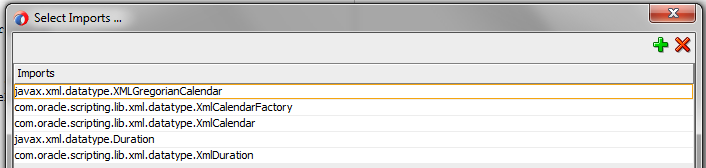
If you have an XML element of type dateTime, you use an XmlCalender object. An XmlCalender object with the current time can instantiated as shown below: Read the complete article here.

SOA & BPM Partner Community

For regular information on Oracle SOA Suite become a member in the SOA & BPM Partner Community for registration please visit www.oracle.com/goto/emea/soa (OPN account required) If you need support with your account please contact the Oracle Partner Business Center.
BPM 12c SKIP / BACK Exception Handling Lessons Learned by Dan Atwood

clip_image002

The new Oracle BPM 12c SKIP / BACK feature has some interesting facets that are not commonly known.  This describes what it can be used for as well as three cautions to be aware of when using it.

Use Cases for SKIP / BACK

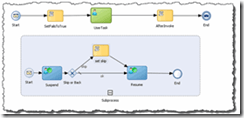
The new Oracle BPM 12c SKIP / BACK feature greatly assists exception handling in a processes. Although Oracle BPM 11g was able to catch exceptions in processes, once caught in an error event subprocess the only option was then to exit the process.  Oracle BPM 12c’s SKIP / BACK gives us some essential functionality we have needed in the product. It not only catches exceptions thrown in a process in an Error event subprocess, but now you are able to:

  • Set the “action” predefined variable to either “skip” or “back” to send the instance back to the point in the process where the exception occurred (“back”) or to send the instance back to the activity after where the exception occurred (“skip”).
  • What is not commonly known is that after the exception is thrown and when the instance is in the event subprocess, variable information can be set in the event subprocess. When the instance is returned to the process, the process payload’s information is changed as well.

To download an Oracle BPM 12c project that demonstrates this new capability click here. Oracle ACE Associate Antonis Antoniou has written an excellent blog post that takes you through the steps needed to create a project with SKIP / BACK:  “Oracle BPM 12c Advanced Error Handling and Recovery – Part 1”.

Three Cautions When Using SKIP / BACK

SKIP / BACK is a powerful new feature, but there are three things you need to be aware of when using it.

  1. As Antonis mentions in his blog, be very careful when using the BACK action. If the original problem has not been corrected that caused the exception to occur in the main process, an infinite loop can easily occur between the work item instance in the process main process and the event subprocess. Read the complete article here.

SOA & BPM Partner Community

For regular information on Oracle SOA Suite become a member in the SOA & BPM Partner Community for registration please visit www.oracle.com/goto/emea/soa (OPN account required) If you need support with your account please contact the Oracle Partner Business Center.

Blog Twitter LinkedIn image[7][2][2][2] Facebook clip_image002[8][4][2][2][2] Wiki

Hybrid Process Applications hands-on workshop at Fusion Middleware & PaaS Partner Community Forum March 2016 Valencia

As part of the Fusion Middleware & PaaS Partner Community Forum 2016 we will offer a Hybrid Process Applications hands-on workshop.

Agenda Highlights

Process Cloud Service & Document Cloud Service & BPM Suite

Build, deploy and run an application on Oracle Process & Document Cloud Service. Use the mobile PCS app to manage your application. On the second day you will learn how to re-deploy a PCS application on BPM Suite 12.2.1and extend your om-premises application

 Trainers:

Chris Peytier and Ralf Müller

clip_image004For details please visit the registration page here.

SOA & BPM Partner Community

For regular information on Oracle SOA Suite become a member in the SOA & BPM Partner Community for registration please visit www.oracle.com/goto/emea/soa (OPN account required) If you need support with your account please contact the Oracle Partner Business Center.

Blog Twitter LinkedIn image[7][2][2][2] Facebook clip_image002[8][4][2][2][2] Wiki

Introduction to BPM 12c Verbal Rules by Jaideep

clip_image002

If you are new to Oracle BPM 12c and want to learn about the new BPM 12c Verbal Rules, this video is for you. If you are completely new to Oracle Business Rules you may want to check our Introduction to Oracle Business Rules first. This video is an excerpt from one of our Oracle BPM Training courses. It walks you through creating a simple verbal rule and then unit testing it JDeveloper 12c. Watch the video here.

SOA & BPM Partner Community

For regular information on Oracle SOA Suite become a member in the SOA & BPM Partner Community for registration please visit www.oracle.com/goto/emea/soa (OPN account required) If you need support with your account please contact the Oracle Partner Business Center.

Blog Twitter LinkedIn image[7][2][2][2] Facebook clip_image002[8][4][2][2][2] Wiki

Video – How to import a Visio model (or any other) into BPM 12c by Red Mavericks

clip_image002

Welcome to Red Maverick’s first video.

In this video, we’ll guide you on how to import an existing Visio BPMN model into Oracle BPM12c, using Process Composer.

Watch the video here.

SOA & BPM Partner Community

For regular information on Oracle SOA Suite become a member in the SOA & BPM Partner Community for registration please visit www.oracle.com/goto/emea/soa (OPN account required) If you need support with your account please contact the Oracle Partner Business Center.

Blog Twitter LinkedIn image[7][2][2][2] Facebook clip_image002[8][4][2][2][2] Wiki

How to withdraw tasks and handle them in Oracle BPM by Jan van Zoggel


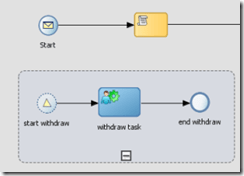
clip_image001If you want to withdraw a Human Task in Oracle BPM there are multiple options. This blog post will first show 3 options and then explain how to model your Oracle BPM process to anticipate on the result of a withdrawn task.

1. The BPM Workspace

Using the default Oracle BPM WorkSpace to withdraw a task:

2. Using the TaskService

If you use a custom front-end (instead of the default Oracle BPM Workspace) you can use the Oracle SOA Suite TaskQueryService & TaskService to handle your tasks. In the TaskService there are operations named withdraw and withdrawTasks to either withdraw 1 or multiple tasks. The example below shows a withdrawTask operation request message. Read the complete article here.

SOA & BPM Partner Community

For regular information on Oracle SOA Suite become a member in the SOA & BPM Partner Community for registration please visit www.oracle.com/goto/emea/soa (OPN account required) If you need support with your account please contact the Oracle Partner Business Center.

Blog Twitter LinkedIn image[7][2][2][2] Facebook clip_image002[8][4][2][2][2] Wiki

Oracle and Adaptive Case Management: Part 2 by Jan Kettenis


clip_image001This posting is the second of a series about Oracle Adaptive Case Management. The first one can be found here. I discuss the different options to define an activity, and the setting you can use to configure when and how activities are started.
There are two ways to implement an activity in ACM. The first one is by creating a Human Task and then "promote" it (as it is called) to an activity. The other way is to create a business process and promote that as an activity. As far as I know there are also plans to use a BPEL process to implement an activity, but that option is not there yet.
When using a Human Task the limitations of it (obviously) are that of a human task, meaning that the means to do some to do some pre- or post-processing for the activity are very limited. There are only a few hooks for Java call outs and XPath expressions, but as processing of that happens on the Human Workflow Engine this won’t show up in Enterprise Manager, and error handling will be hard if not impossible. So, when you for example need to call a service before or after a human task (like sending a notification email) you better use a process. Read the complete article here.

SOA & BPM Partner Community

For regular information on Oracle SOA Suite become a member in the SOA & BPM Partner Community for registration please visit www.oracle.com/goto/emea/soa (OPN account required) If you need support with your account please contact the Oracle Partner Business Center.

Blog Twitter LinkedIn image[7][2][2][2] Facebook clip_image002[8][4][2][2][2] Wiki

Financial Services Sector Demands Investment in BPM, SOA by Brandon Dean


clip_image001Recently we’ve talked a lot about the customer experience and why it’s so critical to ensuring the future of a business’ success. A perfect example of this can be found in the financial services sector. Customers are getting used to technologies that allow them to do things a certain way—and simply won’t settle for anything less.

People want to check their balance, deposit checks and transfer funds while sitting on the subway. An old-school online banking system or homegrown loan processing application from 2001 is likely to face a real uphill climb in the mind of today’s consumer. In order to differentiate your products and services in a timely manner, organizations need to be able to quickly launch new solutions that meet customer demands.

Business Process Management (BPM) technology offers incredible promise to companies in the financial services sector. BPM software promises to increase efficiency, visibility and agility. It removes the complexity from managing business processes. Integrated with Service-Oriented Architecture (SOA), disparate applications can be linked across diverse groups of business lines and functions, and IT architecture—improving overall process efficiency. BPM and SOA technology can: Read the complete article here.

SOA & BPM Partner Community

For regular information on Oracle SOA Suite become a member in the SOA & BPM Partner Community for registration please visit www.oracle.com/goto/emea/soa (OPN account required) If you need support with your account please contact the Oracle Partner Business Center.

Blog Twitter LinkedIn image[7][2][2][2] Facebook clip_image002[8][4][2][2][2] Wiki

Process Cloud Service – Applications by Marcel van de Glind

clip_image002In my previous post I wrote about spaces (PCS – Spaces). In this post I will go into the next step: ‘Applications’. I will describe how to create, download, import, export, deploy, delete, etc. an application.

Create a new Application

Click the Create button at the top-left corner of the home page and select New Application from the choices. The following window appears:

In here you have to specify a name for the application and in which space to create it. Optionally you can also enter a description. After that click the Create button. The new Empty application is created in the specified space.
Delete an Application

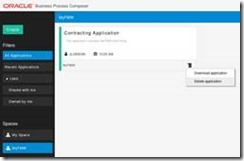
On the top level in the Business Process Composer the Applications in the currently selected space are shown. From here it is possible to delete an Application. For this click the Options button in the bottom right corner of the Application. A menu pop’s up from where you can select ‘Delete application’. Note: this options it only available if you are the owner of the space.

Read the complete article here.

SOA & BPM Partner Community

For regular information on Oracle SOA Suite become a member in the SOA & BPM Partner Community for registration please visit www.oracle.com/goto/emea/soa (OPN account required) If you need support with your account please contact the Oracle Partner Business Center.

Blog Twitter LinkedIn image[7][2][2][2] Facebook clip_image002[8][4][2][2][2] Wiki

4 Reasons You Should Look at Process Management in the Cloud by Kris Nelsonnter a post title

clip_image001


Process management in the cloud offers several compelling advantages for both the business and IT teams. I see the pressure to move faster, innovate faster and deliver value immediately to our customers all around us.  Process management in the cloud offers some great ways to enable that agility in your organization. In addition to the reasons you should be looking at this, I will offer a few common use cases we are seeing as Oracle’s Process Cloud Service (PCS) begins to roll out.

Reason 1:  Business-Focused

Cloud solutions like PCS provide a comprehensive process development platform, from modeling to form development through to deployment. This is in a zero-code environment, allowing the business to define, create and manage their own business processes. One example from PCS is the play, test and validate cycle. This allows allows users to see the end-to-end application and walk through the various activities in different process roles. Features like these will allow the business to bring common business processes to market quickly. 

Reason 2:  Zero Footprint

This reason is usually listed #1, as it is one of the main drivers to move applications and systems to the cloud. Being able to quickly provision and standup a process management tool in the cloud has some compelling benefits:

  • Reduced cost to get started:  Reduce the initial capital outlay or help to move dollars from capital to expense spending, depending on your organization’s needs.
  • Faster time to provision: Zero installation means increased speed to market so that you can take advantage of opportunities to either reduce costs with process or differentiate in the marketplace. You can start in a more agile fashion, start smaller and prove things out quickly. Read the complete article here.

SOA & BPM Partner Community

For regular information on Oracle SOA Suite become a member in the SOA & BPM Partner Community for registration please visit www.oracle.com/goto/emea/soa (OPN account required) If you need support with your account please contact the Oracle Partner Business Center.

Blog Twitter LinkedIn image[7][2][2][2] Facebook clip_image002[8][4][2][2][2] Wiki