The Micro Process Feature Making Life Easier by Jan Kettenis

image

In this article I discuss the Micro Process feature in the Oracle Integration Cloud (OIC). With some price I can take credit for being the name giver of this feature, which makes applying the Microprocess Architecture in OIC a bit simpler. But even when you are not applying that architecture, it still is a feature worth being aware of.

A few releases ago the Micro Process feature has been introduced in the Oracle Integration Cloud (OIC). Simply put, it provides a convenience for calling a Structured Process from a different process application.

"What a great feature that sounds, why did you not write about it before?", I can hear you thinking. Well, there were a few issues with it which mostly have been fixed since OIC release (20.2.3.0.0 (200705.0200.36413)). That’s why.

"What is this "Microprocess Architecture?", I hear some others thinking. In short, the Microprocess Architecture is about constructing a process application by having (typically but not necessarily) 1 main process that orchestrates / choreographs activities of which each of them is implemented as separate, decoupled process applications. It is not the same but inspired by many of the solid principles behind the Microservices Architecture, hence the name.

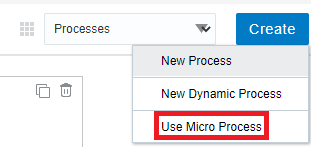
When applied to the Oracle Integration Cloud, every activity in the main process is implemented by an (asynchronous) Structured Process called a "Delegator" that does nothing but start some other Structured Process using a Send activity and then wait for the outcome in a Receive activity. There are a few deviations, but basically that’s it and what the "Use Micro Process" feature supports.

Before this, you as a developer first had to configure the external process as External SOAP Integration and provide the URL to the WSDL (or upload it), and secondly you had to create the Delegator yourself. Now you just point and click and off you go. When using it in a Dynamic Process, a Delegator is automatically created and hidden in the background.

Microprocesses are configured from the Processes tab.

You select the Structured Process to use from a picklist. Be aware that only Structured Processes are shown from activated Process Applications. For bigger Microprocess applications there can be many of them, so it is good that you can filter them with a Search box. Also mind that it shows Structured Processes from all the default revisions of the Process Applications containing them. Read the complete article here.

PaaS Partner Community

For regular information on Oracle PaaS become a member in the PaaS (Integration & Process) Partner Community please register here.

clip_image003 Blog clip_image005 Twitter clip_image004 LinkedIn image[7][2][2][2] Facebook clip_image002[8][4][2][2][2] Wiki

Technorati Tags: SOA Community,Oracle SOA,Oracle BPM,OPN,Jürgen Kress

Connecting PBCS applications with OAC to Create Analyses and Visualizations by Bhuvaneswari Duraisamy

image

Oracle Planning and Budgeting Cloud Service (PBCS) is a popular planning solution on the cloud. It is the first Hyperion EPM product on cloud which is more suitable for enterprise wide planning, budgeting and forecasting on the cloud. Organizations often use PBCS to compare the budget and forecast numbers against actuals from transactional system. Oracle supports direct connectivity between PBCS and OAC without any connection adapter options.

In this blog, I will walk you through a series of steps to use PBCS applications as source to create reports/Visualizations in Oracle Analytics Cloud.

  • Download and install Oracle BI Administration Tool V12.2.2.0.0 or later.
  • Navigate to admintool.cmd file and edit the file to add INSTANCE_NAME=%DOMAIN_HOME%

The admintool.cmd file can be found in a location similar to this: Read the complete article here.

PaaS Partner Community

For regular information on Oracle PaaS become a member in the PaaS (Integration & Process) Partner Community please register here.

clip_image003 Blog clip_image005 Twitter clip_image004 LinkedIn image[7][2][2][2] Facebook clip_image002[8][4][2][2][2] Wiki

Technorati Tags: SOA Community,Oracle SOA,Oracle BPM,OPN,Jürgen Kress
Process Cloud Service (PCS) Overview by Surbhi Sharma

image

This blog is aimed at the beginner who has started to learn Oracle Integration Cloud (OIC) and want to get familiar with Process Cloud Service (PCS). To learn more about Oracle Integration and its sub-parts then check our blog posts, containing all the key points a beginner should know about Oracle Integration Cloud (OIC).

What Is Process Cloud Service?

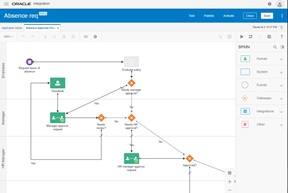
Oracle Process Cloud Service is used for process automation, its a subscription-based cloud service for process automation. Allowing you to easily extend your existing SaaS and On-Premise.

PCS offers insights and management of business processes, and a full lifecycle process management environment including development, test, and production.

Process Cloud Service Overview

PCS offers rapid design, automate, and manage business processes in the cloud.

It utilizes two work environments the design-time environment used for developing and testing applications, and the runtime environment used for monitoring process applications.

Design-Time Environment:
  • User-friendly UI for designing process, rules, forms, data, and metrics
  • Includes QuickStart Apps to quickly create custom business applications
  • Provides test environments for refining and testing processes
  • Allows process applications (metadata and data) from cloud to on-premises
The Runtime Environment:
  • Makes it easy for you to view, complete, reassign, and delegate tasks
  • Lets you stay organized with filters
  • Lets you share documents and collaborate with others on your team
  • Provides tools to track process flows, view detailed audit trails, troubleshoot, and fix processes

The design-time environment is also called Composer, and the runtime environment is also called the Workspace. The terms design time and Composer, and runtime and Workspace are used interchangeably throughout this guide.

PCS Composer Page

When you click Develop Processes on the Home page, the Composer page opens.
The Composer page is a core component of the design-time environment. It provides access to common application-related features.

When you sign in for the first time, the system automatically creates a default space called My Space which will be used for creating the process. Read the complete article here.

PaaS Partner Community

For regular information on Oracle PaaS become a member in the PaaS (Integration & Process) Partner Community please register here.

clip_image003 Blog clip_image005 Twitter clip_image004 LinkedIn image[7][2][2][2] Facebook clip_image002[8][4][2][2][2] Wiki

Technorati Tags: SOA Community,Oracle SOA,Oracle BPM,OPN,Jürgen Kress
Integration & Process Partner Community Newsletter February 2021

Dear Partner Community

The quarterly Oracle Integration upgrade is released in February. New functionality include API lead integration. SaaS consultants use pre-build adapters to connect while Developers integrate custom build applications via APIs. Now it’s easier to combine OIC with API gateway. The OIC release also includes productivity enhancements and connectivity enhancements. Antony published the release details here, and join the webcast with him on February 23rd 2021.

Thanks to the community for sharing all the integration articles: Oracle Integration Playground permanent service for Partners free of charge! & & Explore and Design Patterns and Best Practices & Integrate and Modernize Applications to Rapidly Advance your Business on-demand webinar & OIC and Oracle Hospitality (OHIP) & API Gateway Integration: Quick and Easy & Protecting your OIC apis with OCI API Gateway & B2B Trading Partner Management & Automatic reactivation of Integration after a connection update & Invoke BI Report in OIC &Read BI Report base64 encoded response & Embedding Oracle Integration Insight dashboards : Quickly and Easily & Replace Trigger in Orchestration & Unlock new patterns of integration by controlling the HTTP Response status in OIC REST based integrations & Simple Fusion ERP – OIC Demo & Identity Propagation – VBCS > IC > Fusion Apps

JSON Obfuscation & FTP Polling using FTP JCA adapter in OSB 12c & Get away with that paper using SOA Suite and E-Post/Docuguide & Cut the Clutter: SOA Upgrade from 12.2.1.x to 12.2.1.4.

In the process & innovation section Mani published an article about unified task lists for Oracle applications and Niall about process archiving. Want to know what’s coming for Enterprise Blockchain? Read the 2021 vision from Mark.

For a short summery of our monthly key information watch the PaaS Partner Updates on YouTube. The February edition highlights the OIC February Update and the Oracle Video Hub. In this month’s community webcast Antony Reynolds will present an update on Oracle Integration Scalability and Resilience. Please join the Partner Community Webcast on February 23rd 2021. On-demand webcast recordings are available at the Oracle Video Hub.

Want to publish your best practice article & news in the next community newsletter? Please feel free to send it via Twitter @soaCommunity #PaaSCommunity.

To read the newsletter please visit www.bit.ly/PaaSNewsFebruary2021

Please like and share the newsletter at Twitter and LinkedIn.

PaaS Community Newsletter small February 2021

PaaS Partner Community

For regular information on Oracle PaaS become a member in the PaaS (Integration & Process) Partner Community please register here.

clip_image003 Blog clip_image005 Twitter clip_image004 LinkedIn image[7][2][2][2] Facebook clip_image002[8][4][2][2][2] Wiki

Technorati Tags: newsletter,SOA Community newsletter,SOA Community,Oracle,OPN,Jürgen Kress

Business Process Automation using Oracle Process Cloud Service by Lalitha Selvaraj

image

Why do we need Process Cloud Service?

Oracle Process Cloud Service lets you automate business processes in the cloud. A business flow can be created through PCS which goes through multiple/single approval process and can also send email notifications for single/multiple users through mail to approve or reject the process flows through online. Turn your company’s specific processes into process applications by creating process models that includes requests, approvals, decision paths and roles for each task. Process cloud mainly used for Healthcare to improve patient care. Endless forms with personal details, medical history, medical tests, diagnoses and treatments. Not only it is difficult to collect patient form data, save and manage these databases, but it’s also difficult to quickly access them. PCS enables you to configure and customize emails sent as notifications to human workflow task assignee’s (the default email notification is too basic, containing only a link to the Workspace app). You can create your own email templates that can include payload information, task information, links and comments.

Integrating Oracle Process Cloud service with Oracle Integration Cloud Service:

Integrating Oracle Process Cloud Service with Oracle Integration Cloud Service which uses REST service to fetch the data from on-premise applications or cloud applications. Process applications can communicate and exchange data with local and remote applications that are exposed as either SOAP or REST. The ICS Integration is available for use from any service task. Using the known Data Association feature, you can map a data object to either hold the information that you want to send to the ICS or hold the information sent back by the ICS. Read the complete article here.

PaaS Partner Community

For regular information on Oracle PaaS become a member in the PaaS (Integration & Process) Partner Community please register here.

clip_image003 Blog clip_image005 Twitter clip_image004 LinkedIn image[7][2][2][2] Facebook clip_image002[8][4][2][2][2] Wiki

Technorati Tags: SOA Community,Oracle SOA,Oracle BPM,OPN,Jürgen Kress

Try Our Advanced Filtering in Process Forms by Kalyn Chang

image

We have recently added more powerful filtering functionalities in Forms. Previously, you were limited to combining filter conditions with Or logic only, and you couldn’t filter existing filters further. Additionally, we have expanded our logging capabilities so users can see the return values of filters.

Now you can:

· Combine filter conditions with and logic

· Filter other filters

· Debug Filters with Logs

Combine Filter Conditions with And Logic

When defining a filter, you can define any number of filter conditions. For example, if you have a connector call for employees at a company, you can filter the employees based on their zip code, level, or any other property in the employee json object. Previously, you could only combine filter conditions with or logic. For example, you can filter the employees with direct reports or who work at the company’s California office. Now, you can combine filters with and logic. For example, you can filter the employees with direct reports and who work at the company’s California office. Adding the and logic opens up many more combinations of filter conditions. Read the complete article here.

PaaS Partner Community

For regular information on Oracle PaaS become a member in the PaaS (Integration & Process) Partner Community please register here.

clip_image003 Blog clip_image005 Twitter clip_image004 LinkedIn image[7][2][2][2] Facebook clip_image002[8][4][2][2][2] Wiki

Technorati Tags: SOA Community,Oracle SOA,Oracle BPM,OPN,Jürgen Kress

Integration & Process Partner Community Newsletter January 2021

Dear Partner Community

Every day we publish a blog post with the latest integration and process automation news. Subscribe to our blog to receive the updates. You want to share your best practices and success stories? Please send them via twitter #PaaSCommunity. We will like and retweet and promote them here in our monthly newsletter. Thanks for all your excellent contributions in 2021! In total we had 161.096 views in 2020. Congratulations to the top blog post in 2020:

1. Change date time format in Oracle Integration Cloud by Ankur Jain

2. Oracle Fusion Middleware 12c (12.2.1.4.0) Released

3. Oracle SOA Suite on Kubernetes by Michel Schildmeijer

The quarterly release Oracle Integration Update February 2021 features API led integration, connectivity and developer productivity enhancements. OIC accelerates SaaS connectivity with pre-build adapters for Oracle SaaS like HCM, ERP and CX. Additional OIC offers pre-build third party adapters e.g. for SAP integration.

Thanks to the community for sharing all the integration articles: Oracle Integration Playground permanent service for Partners free of charge! & Insight –> embeddable Dashboards & Protecting your OIC apis with OCI API Gateway & OIC Backups & Invoking Oracle Functions from OIC & Data Stitch Append for Complex Content Elements & Twilio Adapter – send SMS / WhatsApp from Oracle Integration & Oracle SOA Modernization – Move and Improve Oracle SOA Suite – Webcast #1 Recap & New Release of Oracle SOA Suite Docker Image & On-demand Webinar: Maximize the Potential of Oracle Integration Cloud with FlexDeploy & Identity Propagation – VBCS > IC > Fusion Apps by Greg Mally & Create Delimited String from XML Nodes and Vice Versa in SOA 12c & Import and Export MDS artifacts in SOA 12c.

In the process & innovation section Jan published a micro process article and the consequences of this new architecture. Large volumes of data are generated during the life of each process instance. This data needs to be archived and purged.

For a short summery of our monthly key information watch the PaaS Partner Updates on YouTube. The January edition highlights the top 2020 blog posts and our social media channels. In this month’s community webcast Sandhya Lakshmi Gopalan and Ravi Pinto Angelo Santagata will present and update on Oracle SOA Suite. Please join the SOA Suite Modernization Partner Community Webcast January 27th 2021.

Want to publish your best practice article & news in the next community newsletter? Please feel free to send it via Twitter @soaCommunity #PaaSCommunity.

To read the newsletter please visit www.tinyurl.com/PaaSNewsJanuary2021

Please like and share the newsletter at Twitter and LinkedIn.

PaaS Community Newsletter small January 2021

PaaS Partner Community

For regular information on Oracle PaaS become a member in the PaaS (Integration & Process) Partner Community please register here.

clip_image003 Blog clip_image005 Twitter clip_image004 LinkedIn image[7][2][2][2] Facebook clip_image002[8][4][2][2][2] Wiki

Technorati Tags: newsletter,SOA Community newsletter,SOA Community,Oracle,OPN,Jürgen Kress

OIC Process Form VBCS decision tree by Sushil Shukla

image

This blog will help you in deciding when to use process web form and and when to use VBCS form. Instead of long post with lot of content, this post uses approach of decision tree. Very specific decision point, and how should you decide  between two options. Read the complete article here.

PaaS Partner Community

For regular information on Oracle PaaS become a member in the PaaS (Integration & Process) Partner Community please register here.

clip_image003 Blog clip_image005 Twitter clip_image004 LinkedIn image[7][2][2][2] Facebook clip_image002[8][4][2][2][2] Wiki

Technorati Tags: SOA Community,Oracle SOA,Oracle BPM,OPN,Jürgen Kress
Oracle Process Cloud – linking to a process instance by Niall Commiskey

image

Use case here – Customer wants a process creator to be notified when a process has completed.
In this case, an email containing a link to the process history in Workspace. The link should bring me here.

The link has the following format – (thanks to my esteemed colleagues Eduardo and Sudhakar for this) I try this out with the my instance id. Read the complete article here.

PaaS Partner Community

For regular information on Oracle PaaS become a member in the PaaS (Integration & Process) Partner Community please register here.

clip_image003 Blog clip_image005 Twitter clip_image004 LinkedIn image[7][2][2][2] Facebook clip_image002[8][4][2][2][2] Wiki

Technorati Tags: SOA Community,Oracle SOA,Oracle BPM,OPN,Jürgen Kress

OIC DMN VBCS decision tree by Sushil Shukla

image

This blog will help you in deciding when to use DMN and and when to use VBCS business rules. Instead of long post with lot of content, this post uses approach of decision tree. Very specific decision point, and how should you decide  between two options. Read the complete article here.

PaaS Partner Community

For regular information on Oracle PaaS become a member in the PaaS (Integration & Process) Partner Community please register here.

clip_image003 Blog clip_image005 Twitter clip_image004 LinkedIn image[7][2][2][2] Facebook clip_image002[8][4][2][2][2] Wiki

Technorati Tags: SOA Community,Oracle SOA,Oracle BPM,OPN,Jürgen Kress