Oracle API Cloud Services – Part I: Web APIs: A Pillar of Digital Transformation by Rolando Carrasco

image

Web APIs have turned into a key enablerÑ — indeed, a key pillar — for digital transformation. Final consumers make use of Web APIs all the time, without even realizing it. Most mobile apps use APIs, without which they would not exist.

Developers also make use of them. They are a key input for the creation of new apps, a key element for the innovation that developers are constantly pursuing.

API providers generate a new economy when they publish APIs and offer them to 3rd parties. When those providers can monetize them, a new income for their organizations is created, creating a new business and increasing the investment in publishing new APIs.

In fact, the perception is that an organization that can offer APIs for 3rd parties is de facto an innovative organization.

But how do we publish APIs? How can we do it in an orderly way? What do we need to get started?

These questions might seem easy at first glance, but it is not so. If you can pass a set of challenges, you will be in a position to identify which APIs make sense to be publishedÑin other words, which of them can be monetized.

Throughout the process to meet those challenges, there will always be a technology element present so that you can:

  1. Deploy a Web Portal
    1. that lets developers look up your APIs
    2. that lets developers register their applications and link them to your APIs
    3. that lets you publish the APIs you would like the developer to use
    4. that lets you share appropriate information for your APIs to be well understood and discovered. Read the complete article here.

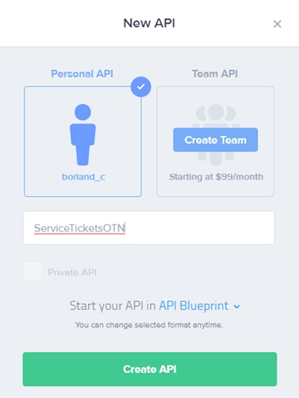
Play with our APIs by RubiconRed

image

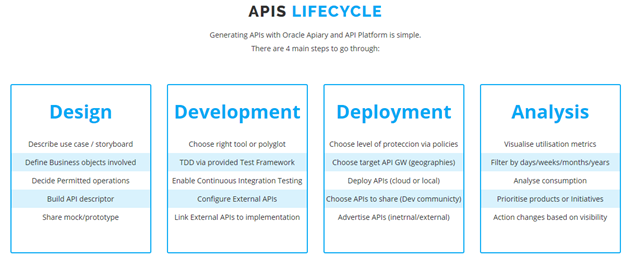
Our main purpose is to build a space where we can share with you, all you need to know to get started exposing and sharing APIs securely with others.

We built a playpen with real APIs for you to play and interact with. The idea is to give you a quick experience on what APIs can do for you. Read the complete article here.


When Screen Scraping became API calling – Gathering Oracle OpenWorld Session Catalog with Node by Lucas Jellema

image

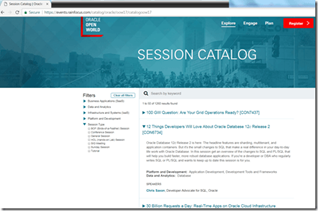
A dataset with all sessions of the upcoming Oracle OpenWorld 2017 conference is nice to have – for experiments and demonstrations with many technologies. The session catalog is exposed at a website here.

With searching, filtering and scrolling, all available sessions can be inspected. If data is available in a browser, it can be retrieved programmatically and persisted locally in for example a JSON document. A typical approach for this is web scraping: having a server side program act like a browser, retrieve the HTML from the web site and query the data from the response. This process is described for example in this article – https://codeburst.io/an-introduction-to-web-scraping-with-node-js-1045b55c63f7 – for Node and the Cheerio library.

However, server side screen scraping of HTML will only be successful when the HTML is static. Dynamic HTML is constructed in the browser by executing JavaScript code that manipulates the browser DOM. If that is the mechanism behind a web site, server side scraping is at the very least considerably more complex (as it requires the server to emulate a modern web browser to a large degree). Selenium has been used in such cases – to provide a server side, programmatically accessible browser engine. Alternatively, screen scraping can also be performed inside the browser itself – as is supported for example by the Getsy library.

As you will find in this article – when server side scraping fails, client side scraping may be a much to complex solution. It is very well possible that the rich client web application is using a REST API that provides the data as a JSON document. An API that our server side program can also easily leverage. That turned out the case for the OOW 2017 website – so instead of complex HTML parsing and server side or even client side scraping, the challenge at hand resolves to nothing more than a little bit of REST calling. Read the complete article here.

Oracle API Platform Cloud Service Overview by Rolando Carrasco

image

Oracle API Platform Cloud Services – API Design This is the first video of a series to showcase the usage of Oracle API Platform Cloud Services.
API Management Part 1 of 2. Oracle API Cloud Services This is the second video of a series to show case the usage of the brand new Oracle API Platform CS.
This is part one of API Management
Oracle API Platform Cloud Services – API Management part 2 This is the 3rd video of the series. In specific here we will see the second part of the API Management functionality focused on Documentation.
Oracle API Platform CS – How to create an app This is the 4th video of this series. In this video you will learn how to create an application.
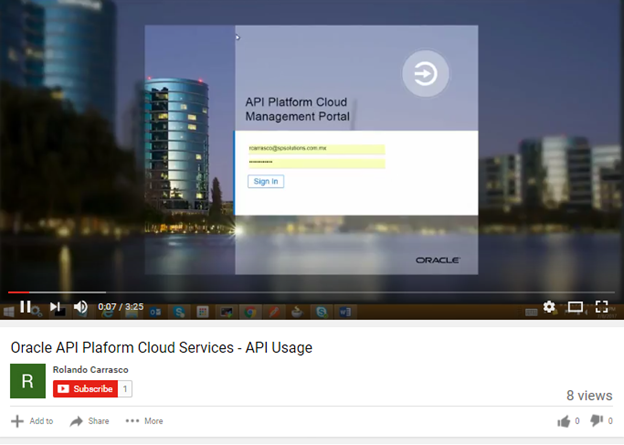
Oracle API Plaform Cloud Services – API Usage This is the fifth video of this series. In this video I will showcase how you will interact with the APIs that are deployed in APIPCS.


ADVISOR WEBCAST: Cloud Integration Service Administration (OIC, SOACS, MFTCS, APICS) – May 23rd 2018 by Antonella Giovannetti

image

Schedule: Wednesday, May 23, 2018 05:00 PM (Central European Time)

Abstract:

This one-hour advisor webcast is recommended for technical users, system administrators and database administrators who are going to create and maintain a Cloud Integration Service (OIC, SOACS, MFTCS, APICS). In the webcast we will go through the most important administration tasks, best practices and common issues encountered.

Topics Include:

  • Provisioning and Instance Creation
  • Service Outage and Maintenance
  • Instance Backup
  • Purging
  • Patching and Upgrade

Register for the webcast here.

How We Added a Spoon of Agility to a Large Oracle Service Bus Project by Pavel Samolysov

image

Several months ago I already shared how to ensure guaranteed delivery for 5.000.000 messages handled per day by Oracle Service Bus (OSB). In the case, OSB is heavy used to integrate a customer relationship management application (the CRM) in a solid environment with many regional billing systems, provisioning, ERP and ordering management system (OMS), etc. Also, the integration solution is deployed across four ex-standalone corporations, each of which has its own IT infrastructure, and this circumstance makes the project more and more interesting.
The common problem from a manager’s point of view is to provide consistency among services deployed on the bus, the main client application (the CRM), and numerous 3rd party applications. Also, there is a time lag in development and end up to production these parts of the infrastructure. And the development team forever must have guaranteed stable and ready to deploy code of the service bus.
The situation is usual for almost all integration projects in the World. The releases of an enterprise service bus must be delivered in a reliable way, no one integration flow (neither the client -> service bus nor the service bus -> 3rd party application communication) must fail after the release is deployed to the production environment.
Let me explain the features of our project.

  1. A one pizza size development team, not more than 5 developers are there.
  2. Hovewer, the team has developed and delivered 13 services and 46 adapters to a wide range of enterprise applications. The services provide very different business logic – from just wrapping a stored procedure into a SOAP-based web service till a complex orchestration employing the Splig-Join component of Oracle Service Bus.
  3. SVN is utilized as a source code management tool.
  4. Oracle Service Bus out of the box provides no capability for service versioning, so it’s impossible to expose numerous versions of the same service simultaneously. Although the main service client, CRM application, is developed by a team working for the same company, we are able to deliver releases of the service bus regardless of this capability. Read the complete article here.

Check Composite State of Oracle SOA Suite by Command Line by Dirk Nachbar

image 

I was currently fighting a bit with the monitoring of Oracle SOA Suite 12c Composites.
The goal was to check the state of deployed Composites on an Oracle SOA Suite 12c with following requirements/dependencies:

  • No Oracle Cloud Control
  • Capture only Active Composites and not Retired Composites

After some discussions with colleagues and a lot of Google and serveral tests with Python Scripts in wlst, I came to following solution:

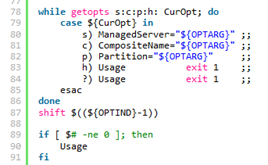
  • one main Pythin Script, called check_composite_state.py which is checking the State of a non retired given Composite Name for a given Partition|Folder and a given Managed Server
  • one property file called domain.properties which will be used by the Python Script in order to build the required connect string to the Admin Server of the SOA Suite
  • one wrapper Shell Script, which takes the required 3 Arguments (Name of Managed Server, Composite Name and Partition|Folder Name). Read the complete article here.

Jump-Start your Oracle SOA Projects in FlexDeploy by Dan Reynebeau

image

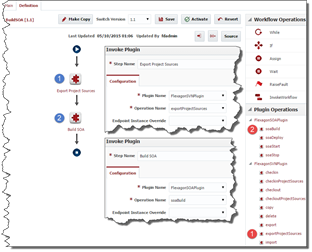
In an effort to simplify the population of existing composites on a server into FlexDeploy projects, we have provided a utility to extract composites from a SOA server into a comma delimited file. This file can then be the basis for a spreadsheet that can be loaded directly into FlexDeploy, through the use of templates, and all of the composite projects can be created in seconds. I will talk about templates in another blog post.

The composite extraction from a SOA server can be done with the attached zip file (extractComposites).  There are three components in the zip file:

  • Property file that contains the userName, password, hostName and hostPort for the targeted SOA server
  1. #Weblogic server username and password
  2. server.user=weblogic
  3. server.password=welcome1
  4. #server.host=
  5. server.host=soalt06.flexagon
  6. #server.port=
  7. server.port=8001
  • CompositeMgmt.jar that contains the code that interrogates the targeted server
  • ExtractComposites.sh that contains the script that manages the jvm and classpath

Read the complete article here.

Avoiding Service Call Failures in Oracle Service Bus and Oracle SOA Suite by Rolando Carrasco

image

Introduction

This article is targeted at Oracle Service Bus (OSB) developers and architects who want to learn/validate their strategies for avoiding service call failures within their integration pipelines.

Having dual roles as architects and developers the authors have seen many projects in which the developer or the architect didn’t design or implement a good exception/failure management strategy.

This article will streamline a series of strategies to avoid such failures.

Some of the ideas in this article are were originally presented by our colleague David Hernández in a December 2015 session at a Microservices and API Management Symposium in Lima, Peru. That session focused on various strategies for mitigating failures in the development of Services:

  1. Circuit breakers
  2. Bulkheads
  3. Timeouts
  4. Redundancy

In this article we will apply these strategies to Oracle Service Bus.

These strategies can be implemented using OSB and Oracle SOA Suite (composites). Some features of the current latest release (12.2.1) will help you to facilitate the implementation; other strategies are very basic configurations in OSB that many people skip and therefore struggle to maintain stability in their Service Bus implementation.

Let’s always keep in mind that the Service Bus is a core element in any infrastructure that implements it. CIOs and managers sometimes do not give that specific weight to this platform and wonder why, if the OSB/SOA Suite is not available, the infrastructure crashes. Or sometimes they wonder why the OSB struggles when a platform is not available or is under heavy load. The answer is simple: OSB is the integration pipeline within your infrastructure and architecture. Imagine if a water pipeline in your house breaks: you don’t see it, but a real mess is happening behind your walls or beneath the floor. The same idea applies here.

Let’s also bear in mind that 60% of the development of a service is related to exception management and the ability to avoid failures. If we don’t take care of this, or expect that someone else will take care of it, we are wrong. You need to be able to identify the following scenarios: Read the complete article here.

Purging Strategies in Oracle SOA Suite 12c – Part II by Arturo Viveros

image

In my earlier post about purging the Oracle SOA product database, I mentioned that this is one of the most critical tasks when it comes to ensuring the stability and performance of SOA/BPM Suite production environments.

Read the 1st part here

This means that you should never neglect this or expect it to magically take care of itself.

So let’s take a look at a couple of extra tips to get a better grip on this:

In 12c we have auto-purge, which can be configured and scheduled from the EM console. Unfortunately, EM still lacks a reporting / alerting feature to provide purging statistics or at least make sure the jobs are actually running successfully. So, if you’re blindly trusting this feature, it could very well be that instances are piling up by the millions without you noticing until it becomes a problem.

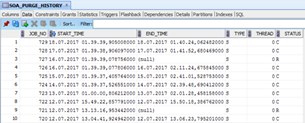
Luckily, there’s a very simple way to find out and keep track, just by looking into the SOA_PURGE_HISTORY table inside the SOAINFRA schema:

This table is pretty straightforward, as it will tell us the start & end time, if it was the single or the parallel script and the final status: C (Completed) or R (Rollbacked).

The out-of-the-box scripts are quite sensitive and enforce a lot of validations, which means that if anything goes wrong they will rollback everything and no instances will be purged whatsoever. So in case there’s a malfunction it’s good to be able to know and take the necessary steps to correct it before everything blows up. Read the complete article here.