Stream Analytics platform

clip_image002


Stream Analytics platform provides a compelling combination of an easy-to-use visual façade to rapidly create and dynamically change Real Time Streaming Analytics (Fast Data) applications, together with a comprehensive run-time platform to manage and execute these solutions. Completely abstracting the entire development and deployment processes, it simplifies the rapid creation of event driven applications for any type of real time business solution, enabling the Enterprise to really immerse itself in next generation real time applications, with times to market of minutes, rather than days or weeks.
Oracle Stream Analytics embraces an industry focus approach with features to leverage preexisting patterns of well known event processing implementations, the definition of Streams that represent the connection to the most popular protocols and methodologies, References which allow immediate joining of streaming data to relational databases and Explorations that provide a stunning visual representation of real time disparate event data flows providing customers with insightful data interrogation in real-time so that downstream applications, service oriented architectures and event-driven architectures are driven by true, real-time intelligence.
Oracle Stream Analytics provides organizations with a complete “top-down” solution for designing, defining, developing and implementing Event Stream Processing applications that not only meet business requirements but perform to the highest levels of the enterprise expectation. Built on the latest industry-standards including ANSI SQL, Java, Spring DM and OSGi, the Oracle Stream Analytics Event Processing runtime component provides an open architecture for sourcing, processing, and publishing complex events throughout the enterprise.  Now together with this ease-of-use web tooling and a visual development environment, as well as standard Java-based tooling, this ensures that your IT and line of business teams can be developing event-driven applications without the hurdle of specialized training or unique skill-set investment. Read the complete article here.

SOA & BPM Partner Community

For regular information on Oracle SOA Suite become a member in the SOA & BPM Partner Community for registration please visit www.oracle.com/goto/emea/soa (OPN account required) If you need support with your account please contact the Oracle Partner Business Center.

Blog Twitter LinkedIn image[7][2][2][2] Facebook clip_image002[8][4][2][2][2] Wiki

Importing SOA VM to Amazon Cloud – Part 1 by Grzegorz Lysko

clip_image002

Introduction

Aldough Oracle is pushing it’s own cloud solutions agresivly there are still other cloud providers in the market that can be used to build similar functionality. Migration of existing infrastructure to the comercial cloud is a scenario worth considering. Today I will show how to use Amazon Cloud Services (AWS) to move an existing SOA suite VM to Amazon Elastic Compute Cloud (Amazon EC2). For this porpuose I will use a Oracle Pre-built Virtual Machine for SOA Suite 12.2.1 and import it to AWS. After the import I will create a running instance that can be used further deployment and development of integration solutions.

Prerequsites for the tasks

  1. Installed 7 zip
  2. Oracle VM Virtualbox
  3. Amazon web services account with administrative rights

Downloading and preparing the VM

Before importing the VM from oracle some adjustemnts have to be made for the import to succed. The main reason for the adjustment is the fact that the import task will not allow Oracle Unbreakable Enterprise Kernel. Also aldough previous versions where of the VM where in the OVA format the current version is in an OVF (Open Virtualization Format) package. For the amazon import OVA is better so after adjusting the VM i will prepare an OVA file.

  • Download the VM
  • After the download extract the files using 7 zip
Importing and starting the VM in Oracle VM Virtualbox
  • Start Oracle VM VirtualBox
  • Import the VM ( go to File-> Import Appliance)
  • Chose the Integration_12.2.1_OTN.ovf file and start the import

Read the complete article here.

SOA & BPM Partner Community

For regular information on Oracle SOA Suite become a member in the SOA & BPM Partner Community for registration please visit www.oracle.com/goto/emea/soa (OPN account required) If you need support with your account please contact the Oracle Partner Business Center.

Blog Twitter LinkedIn image[7][2][2][2] Facebook clip_image002[8][4][2][2][2] Wiki

Cloud Integration Part 4: Design Patterns by Joel Perez and Arturo Viveros

clip_image002

In this fourth and last chapter of the Oracle Cloud Integration Series, we will go through a series of design patterns, which should facilitate the implementation of scenarios similar to those explained in chapters 2 and 3.

These patterns are proven solutions to the multiple challenges posed by Cloud Integration requirements. Besides explaining them, we’ll also attempt to establish a relationship between them and the toolset provided by the Oracle stack.

We’ll review the following patterns:

Multi-Device Broker

  • Service State Management
  • Service Agent Architecture

All of these patterns also support and comply with the characteristics, deployment and delivery models mentioned in the first chapter, so let’s describe them one by one:

Multi-Device Broker

Cloud integration will most likely require our services, whether they are cloud-based or on-premise, to interact with multiple devices, components, channels and protocols. This can automatically lead to lack of inter-operability among the various elements of such scenarios, necessitating conversion/transformation logic as part of our integration workflows, and surfacing hidden integration costs–and, in some cases, tight coupling and vendor lock-in.

Take a look at the following interface-enabled, Enterprise Application Integration(EAI) style architecture for a cloud integration scenario: Read the complete article here.

SOA & BPM Partner Community

For regular information on Oracle SOA Suite become a member in the SOA & BPM Partner Community for registration please visit www.oracle.com/goto/emea/soa (OPN account required) If you need support with your account please contact the Oracle Partner Business Center.

Blog Twitter LinkedIn image[7][2][2][2] Facebook clip_image002[8][4][2][2][2] Wiki

Integration Cloud Service (ICS) – How to use Upsert Operation by Shalindra Singh

clip_image001

Oracle launches ICS around April, 2015 and is being accepted by customer well. As customers started using ICS for  Salesforce Integration,  one question was observed and asked by lots of customers, is related to Upsert operation usage. We will dig deep into this in this blog.

Salesforce to ERP Integration common scenarios are –

  1. Account and Contact Sync
  2. Product and Price Sync
  3. Opportunity or Quote to Order (Sales Order)
  4. Order Status Update back to Salesforce.com
  5. Invoice Data Transfer to Salesforce.com

Other Integration flows include, History, Attachments,  Warranty, Cases, etc…

In most of the scenarios where data needs to be inserted or updated into Salesforce.com, recommended operation is Upsert to be used. When Upsert Operation is leveraged, Salesforce SOAP API automatically check based on external Id defined whether incoming record exists or not; if it does exist then record gets updated or else inserted. Click here for more information on upsert operation.

But when you start using Upsert operation with any standard or custom objects from Salesforce.com, by default, external id is not defined in Salesforce.com. So if you have decided to use upsert operation in an integration flow, first thing to do is to define / create external id in the object(s) you are planning to use with upsert operation.

Creation of External ID:

External Id is important parameter for upsert operation. To avoid data duplication external id should be created with utmost care. Best practice suggests to use foreign key (unique key) as an external key. if foreign key is composite key, external key should also be composite. It allows you to create or update a record and relate it to another existing record in a single step instead of querying the parent record ID first.

Let’s take an example here. consider I am working on Account Sync and I am bringing customers master data from ERP to Salesforce.com. So to create external id in Account object, login to Salesforce.com and then navigate to setup -> App Setup -> Customize -> Account -> Fields. To create a new fields, click on new button on this page. Select the data type (for example Text) and click to Next. Provide name for this external id field (appending ext_id in the name is considered best practice) and select external id check box on this page as shown in the below diagram. Read the complete article here.

SOA & BPM Partner Community

For regular information on Oracle SOA Suite become a member in the SOA & BPM Partner Community for registration please visit www.oracle.com/goto/emea/soa (OPN account required) If you need support with your account please contact the Oracle Partner Business Center.

Blog Twitter LinkedIn image[7][2][2][2] Facebook clip_image002[8][4][2][2][2] Wiki

Integration Cloud Service (ICS) Security & Compliance by Greg Mally

clip_image002

The attached white paper is the product of a joint A-Team effort that included Deepak Arora, Mike Muller, and Greg Mally.  Oracle Integration Cloud Service (ICS) runs within the Oracle Cloud where the architecture is designed to provide customers with a unified suite of Cloud Services with best-in-class performance, scalability, availability, and security. The Cloud Services are designed to run on a unified data center, hardware, software, and network architecture. This document is based on the Cloud Security Assessment section of the Security for Cloud Computing: 10 Steps to Ensure Success V2.0 document, which is produced by the Cloud Standards Customer Council where Oracle is a member. Read the complete article here.

SOA & BPM Partner Community

For regular information on Oracle SOA Suite become a member in the SOA & BPM Partner Community for registration please visit www.oracle.com/goto/emea/soa (OPN account required) If you need support with your account please contact the Oracle Partner Business Center.

Blog Twitter LinkedIn image[7][2][2][2] Facebook clip_image002[8][4][2][2][2] Wiki

Integration Cloud Service: How to keep all data residing in your applications in sync? by Philipp Langer

clip_image002


Because things in IT change fast, it’s sometimes difficult to distinguish the important trends from the less important. And that’s true for Oracle as well. It’s not that long ago when Oracle CEO Larry Elisson thought of Cloud Computing as just another short-living fashion trend (great audio by the way). But that began to change soon. And at least since Oracle OpenWorld 2015 we know for sure how serious Oracle became about Cloud Computing.

“The computer industry is the only industry that is more fashion-driven than women’s fashion.” – Larry Ellison, chairman, Oracle

Today, Oracle’s stack on the Cloud is complete. From infrastructure as a service (IaaS) to software as a service (SaaS) there is everything. But especially with all those wonderful SaaS products being available (and probably being used by your line of businesses) new challenges arise: How to keep all the data residing in those applications in sync? In other words: How to integrate those products? A neat way to address this is the Oracle Integration Cloud Service (ICS) which I would like to introduce to you in this blog post.

Besides ICS I’m also going to mention two other integration services provided by Oracle namely SOA Suite Cloud Service (SSCS) and Process Cloud Service (PCS). Though for this blog post I won’t go into much detail there.

Integration Cloud Service

The main reason to use Oracle ICS is to map and synchronize data between all different kinds of SaaS applications. For example, you might use Salesforce as your primary CRM application but another one for ERP activities such as order and invoice tracking. In such a case, if a new customer is created in Salesforce it should be created in the ERP application as well – automatically and immediately.

The attentive reader might be wondering whether Oracle ICS is limited to cloud integrations. The answer is no. Hybrid integrations are supported as well but more on this later.

ICS Components

Based on the main menu, functionality in ICS is organized into four main views: home page, designer portal, monitoring (dashboard) and administration. Before going into detail of monitoring functionality and administration, let’s have a look at the Designer.

As you can see, the designer portal in turn is organized into five views: Integrations, Connections, Lookups, Packages and Agents. You might notice as well how clear and simple the UI appears. That clearly indicates the target audience of ICS: not only developers and IT but LOB users as well. Read the complete article here.

SOA & BPM Partner Community

For regular information on Oracle SOA Suite become a member in the SOA & BPM Partner Community for registration please visit www.oracle.com/goto/emea/soa (OPN account required) If you need support with your account please contact the Oracle Partner Business Center.

Blog Twitter LinkedIn image[7][2][2][2] Facebook clip_image002[8][4][2][2][2] Wiki

Benefits of Automated Oracle FMW Provisioning by Arturo Viveros

clip_image002

Oracle Fusion Middleware provisiong is always a critical prerequisite which will substantially influence the success or failure of our development projects. Those of us who have spent many years working with this toolset in its many versions, should know for sure what a distressful experience it is to work with sloppily or incorrectly provisioned environments.

Provisioning can also consume a lot of our precious time, whether it is performed locally or in controlled environments belonging to our organization / customer. As the components have evolved, setup options have also become increasingly complex and diverse (although maybe friendlier from a UI perspective), and even though we may have mastered this craft and are capable of producing a nice and shiny configuration, replicating this consistently and for multiple environments where we can expect high variance regarding product versions, particular requirements, limitations and criticality levels, is without any doubt a very challenging and potentially error-prone endeavor. Add dependencies, intangibles and deadlines to the mix and this can become as complicated as any other project task.

Nevertheless, for the time being and with all the tools at our disposal, this provisioning processes can be easily streamlined and automated, so we can stop the suffering while also learning some really exciting stuff and providing value to our organization / customer.

Automated provisioning: what are we looking for?

This “value” we’ve mentioned may represent lots of things when talking about an optimized provisioning cycle, for example:

  • Agility / Speed: which will also translate into developer productivity, time to market and enhanced DR / scaling capabilities.
  • Consistency / Standardization: so we can focus mostly on resolving business-oriented challenges rather than tripping up with environment-related issues.
  • Change management: being able to evolve our environments by patching, upgrading and fine tuning in an orderly fashion, and without the fear of it collapsing like a house of cards at the minimum alteration.
  • Competency building: so your team will be able to learn, perform and improve well-delimited and highly repeteable tasks rather than playing “heroball” (where everyone and everything ends up depending on a single engineer’s prowess and availability, sound familiar?)

So, which options do we have?

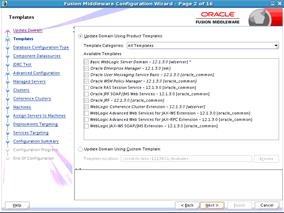
There are so many, but let’s talk about some of them and provide some examples and references. For instance, we will always have the good old config wizard: Read the complete article here.

SOA & BPM Partner Community

For regular information on Oracle SOA Suite become a member in the SOA & BPM Partner Community for registration please visit www.oracle.com/goto/emea/soa (OPN account required) If you need support with your account please contact the Oracle Partner Business Center.

Blog Twitter LinkedIn image[7][2][2][2] Facebook clip_image002[8][4][2][2][2] Wiki

Oracle publishes official Chef and Puppet samples on github by Mark Nelson and Edwin Biemond

clip_image002


Oracle official sample Chef cookbooks and Puppet modules are now available on Oracle’s official GitHub page at https://github.com/oracle/chef-samples and https://github.com/oracle/puppet-samples for Java, WebLogic and Fusion Middleware.

Chef and Puppet are arguably the most popular provisioning frameworks and we would like to help you with your WebLogic and Fusion Middleware provisioning by publishing samples for Chef and Puppet.  The Chef and Puppet sample modules and cookbooks are almost the same and are using the same development frameworks.

We start this series of posts with an introduction what these cookbooks and modules can do and provide a simple quickstart how to create a WebLogic domain in Chef or Puppet on a Windows, Linux or Solaris host. In the following posts we will install FMW software, patch and extend a domain with FMW software.

These Chef cookbooks and Puppet modules allow you install WebLogic together with Fusion Middleware on any Linux, Solaris or Windows host. The cookbooks should work in Chef 11 & 12 and can be used with Chef server or with Chef Solo. The modules should work on Puppet 3 & 4 and it should not matter if you use Puppet Enterprise, an agent or just use puppet apply.

The first release on github will contain the following cookbooks and modules:

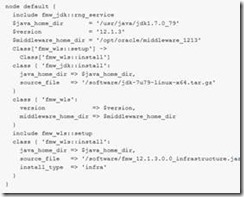
  • fmw_jdk, installs JDK 7 or 8 and optionally configures the urandom random number generator service for Linux distributions.
  • fmw_wls, installs WebLogic 11g or 12c and optionally create thes Oracle user and group on solaris and linux.
  • fmw_bsu, patches a WebLogic 11g middleware home.
  • fmw_opatch, patches WebLogic 12c or any Fusion Middleware 11g, 12c product.
  • fmw_inst, installs FMW 11g, 12c product including Oracle SOA Suite, Service Bus, MFT, OIM, ADF Runtime, and WebCenter.
  • fmw_rcu, creates a 11g, 12c Common or SOA Suite FMW repository on an Oracle Database.
  • fmw_domain, creates a domain in development mode, configures the node manager, start the admin server and extend the domain with ADF/JRF, Service Bus, SOA Suite and optionally with BAM and Enterprise Scheduler.

A couple of important notes about these cookbooks and modules:

  • They don’t download any (free or licensed) software from OTN, Oracle support or edelivery, this is the responsibility of the user/customer.
  • Oracle Support won’t support these cookbooks or modules but you can raise issues or send us pull requests on github.
  • Binaries should be locally accessible in a directory or a network share.
  • They will create a domain only in development mode.
  • They won’t do multi-node provisioning like pack/unpack of a domain on cluster nodes.
  • Passwords in Chef can be defined in databags and in Puppet you need to do it yourself in Hiera.
  • They have dependencies to each other and will automatically include or require the depended manifest or recipe.
  • The default recipe/manifest does not do anything, you have to use the specific recipes or manifests. In Puppet the default manifest will be used to set some module defaults.

Detailed overview

These cookbooks and modules contains recipes and manifests with resource/providers in Chef and type/providers for Puppet. The recipes and manifest are a quick way to get you started and these minimal recipes are just calling the matching resource/type providers. You can call these yourself in one of your own cookbooks. Read the complete article here.

SOA & BPM Partner Community

For regular information on Oracle SOA Suite become a member in the SOA & BPM Partner Community for registration please visit www.oracle.com/goto/emea/soa (OPN account required) If you need support with your account please contact the Oracle Partner Business Center.

Blog Twitter LinkedIn image[7][2][2][2] Facebook clip_image002[8][4][2][2][2] Wiki

XA Transactions with SOASuite JMS Adapter by Martien van den Akker

clip_image001


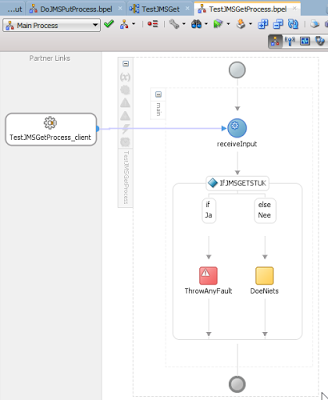
JMS is perfect for setting transaction boundaries and in OSB it is pretty clear on how JMS transactions are handled. However, in SOASuite using the JMS adapter the SOA Infrastructure is handling your JMS transactions by default; and messages are removed from the queue rightaway because the Get’s are Auto-acknowledged. If something fails, you would expect that messages are rolled back to the JMS queue and eventually moved to the error queue. But, again by default, not with the SOASuite/JMS Adapter. In that case the BPEL process, for instance, fails and get’s in a recovery state, to be handled in the ‘Error Hospital’in Enterprise Manager. But I want JMS to handle it! (Says the little boy…)
So how do we accomplish that? Today I got the chance to figure that out.
Start with a JMS setup with a JMS Server, Module and a Queue with an Error Queue that is configured to be the error destination on the first queue. On the first queue set a redelivery limit to 3 and a redelivery delay on for instance 60000 ms (or something like that). I’m not going in to that here.
Create also a Connection Factory in the JMS Module with a proper jndi, something like ‘jms/myApplicationCF’.
In the JMS adapter on SOASuite there are several OutboundConnectionFactories already pre-configured. It is quite convenient to use the one with JNDI ‘eis/wls/Queue’. But if you look into that, you’ll see that it uses the default WebLogic JMS Connection factory ‘weblogic.jms.XAConnectionFactory’. Not much wrong with that, but you can’t configure that for your own particular situation. But more over it is configured with ‘AcknowledgeMode’ = ‘AUTO_ACKNOWLEDGE’. As you can read in the docs there are three values for the AcknowledgeMode:

  • DUPS_OK_ACKNOWLEDGE, for consumers that are not concerned about duplicate messages
  • AUTO_ACKNOWLEDGE, in which the session automatically acknowledges the receipt of a message
  • CLIENT_ACKNOWLEDGE, in which the client acknowledges the message by calling the message’s acknowledge method

So create a new outbound connection factory, with a JNDI like ‘eis/jms/MyApp’. 
Now, apparently we don’t want  ‘AUTO_ACKNOWLEDGE’, because that would cause the message-get acknowledged ‘On Get’. So you could rollback until ‘Saint Juttemis’ (as we say in our family) but it won’t go back on the queue. Dups aren’t ok with me, so I’ll choose ‘CLIENT_ACKNOWLEDGE’ here. Then there’s another option: ‘IsTransacted’. I want that one on ‘true’. Then in ConnectionFactoryLocation, you’d put the JNDI of your JMS Connection factory, in my example ‘jms/myApplicationCF’. So you’ll get something like: Read the complete article here.

SOA & BPM Partner Community

For regular information on Oracle SOA Suite become a member in the SOA & BPM Partner Community for registration please visit www.oracle.com/goto/emea/soa (OPN account required) If you need support with your account please contact the Oracle Partner Business Center.

Blog Twitter LinkedIn image[7][2][2][2] Facebook clip_image002[8][4][2][2][2] Wiki

SOA & BPM Partner Community Webcast – January 31st 2017 Oracle B2B and evolution to API Driven B2B

image

Attend our January edition of the SOA & BPM Partner Community Webcast live on January 31st 2017 at 16:00 CET.

Oracle B2B and evolution to API Driven B2B

This session will present an overview of Oracle B2B platform and show a demo of the current functionality. Oracle B2B is a highly available, high-performing B2B platform that is being used by major customers across different verticals such as retail, supply chain, and utilities. Hear from Product Management about the product overview, architecture, and best practices. Also hear about how B2B integration is evolving into an API driven B2B and hear about Oracle’s vision and roadimage map.

Krishnaprem Bhatia
Twitter: KrishnapremB

Krishnaprem Bhatia is product manager in the Cloud Integration product management team focusing on B2B, Healthcare and API Management products. He has over 15 years of work experience in software development and product management. As a product manager at Oracle he has worked extensively with customers and partners worldwide in all industry verticals. He holds Computer Science & Engineering and MBA degrees and loves to read, travel and work out.

Call ID: 6965489 Call Passcode: 333111

UK: +44 (0) 208 118 1001 & United States: 140 877 440 73

More Local Numbers

Schedule:

January 31st 2017 at 16:00-17:00 CET

Visit the registration page here.


Missed our SOA & BPM Partner Community Webcast? – watch the on-demand versions:

· SOA 12 & BPM Suite 12c Roadmap update November 29th 2016

· Microservices October 25th 2016

· Oracle OpenWorld 2016 update September 27th 2016

· API Cloud Platform Service August 30th 2016

· BPM Suite & PCS Update July 26th 2016

· Integration Cloud Service June 28th 2016

· Sales Plays Webcast June 9th 2016

· Real-Time Integration Business Insight May 31st 2016

For the latest information please visit Community Updates Wiki page (SOA Community membership required).

SOA & BPM Partner Community

For regular information on Oracle SOA Suite become a member in the SOA & BPM Partner Community for registration please visit www.oracle.com/goto/emea/soa (OPN account required) If you need support with your account please contact the Oracle Partner Business Center.

Blog Twitter LinkedIn image[7][2][2][2] Facebook clip_image002[8][4][2][2][2] Wiki

Technorati Tags: SOA Community,Oracle SOA,Oracle BPM,OPN,Jürgen Kress,webcast