Handling inbound Attachments by Service Bus by Apostolos Varsamis


clip_image002Introduction

Oracle Service Bus message context is a set of properties, so called context variables, that hold message content as well as information about messages as they are routed through Oracle Service Bus (OSB). The Message Context Schema specifies the element types for the predefined message context variables.

Such a predefined context variable is the variable attachments.

Fig. 1 shows in an excerpt of the Message Context Schema the definition of the element attachmens.

Obviously the attachment body can hold either a reference of the content or the content itself!

In this article we analyze what contains exactly the element /mc:attachments/mc:attachment/mc:body and how we can handle its contents.

First of all let us focus on the variables

  • Content-Types
  • Content-Transfer- Encoding

their meanings and their possible values.

Content-Type

According to the W3 specifications (s. [1]) Fig. 2 contains an excerpt of the main characteristics of the variable Content-Type: Read part 1 here and Read part 2 here

SOA & BPM Partner Community

For regular information on Oracle SOA Suite become a member in the SOA & BPM Partner Community for registration please visit www.oracle.com/goto/emea/soa (OPN account required) If you need support with your account please contact the Oracle Partner Business Center.

Blog Twitter LinkedIn image[7][2][2][2] Facebook clip_image002[8][4][2][2][2] Wiki

Error Resilient Adapters – SOA 12.2.1 Resiliency Feature by Kevin King


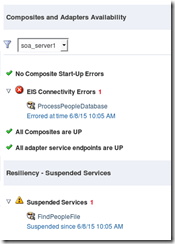
clip_image001New to SOA 12.2.1 is the concept of Resiliency.  Oracle has introduced functionality that shuts down adapters when their composite failure meets a certain threshold. In effect, an error circuit breaker!  This is extremely helpful to prevent filling up the error hospital with an abundance of errors.  When suspended, the failed composite will retry the composite at a defined interval in an attempt to un-suspend the service adapter.  The idea is to suspend any inbound adapters so that messages can be queued whenever an error is present and then processed later when the service is fixed.

Currently, resiliency currently only works for a small subset of adapters.  These adapters include EDN, File, FTP, AQ, and JMS. 

My Example – File Adapter

I deployed a sample project that used a file adapter to read a file and insert those records into a database table.  Once the global resiliency policy was configured for the server, there is no special setup or additional configuration needed at the process/project level. 

I dropped a few files into the staging area that the file adapter read, and off they went.  All the records were inserted into the database as expected.  To cause a failure, I renamed the database table.  Now, my database adapter will no longer be able to find the table it needs to insert into.  I copied a few more files into the staging directory and, as expected, they disappeared and faulted instances showed up.  However, because I had configured the global resiliency to trigger with three errors in two minutes the file adapter now shows as suspended. Read the complete article here.

SOA & BPM Partner Community

For regular information on Oracle SOA Suite become a member in the SOA & BPM Partner Community for registration please visit www.oracle.com/goto/emea/soa (OPN account required) If you need support with your account please contact the Oracle Partner Business Center.

Blog Twitter LinkedIn image[7][2][2][2] Facebook clip_image002[8][4][2][2][2] Wiki

SOA 12.2.1 New Feature – End to End JSON and Javascript Example by Krishna Hanumantharao


clip_image002SOA 12.2.1 provides support for end-to-end JSON and Javascript. We don’t have do internal mapping between XML and JSON as in 12.1.3.

As part of this post, let us implement a simple REST service to demonstrate this new feature – End to End JSON with Javascript.

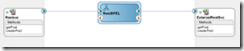
Let us create a very simple SOA Composite which exposes a JSON based REST interface, manipulates the values using Javascript and calls an external JSON based service.

Rest Service

External JSON Service Setup

For external JSON based REST service let us use a dummy JSON Server. Read the complete article here.

SOA & BPM Partner Community

For regular information on Oracle SOA Suite become a member in the SOA & BPM Partner Community for registration please visit www.oracle.com/goto/emea/soa (OPN account required) If you need support with your account please contact the Oracle Partner Business Center.

Blog Twitter LinkedIn image[7][2][2][2] Facebook clip_image002[8][4][2][2][2] Wiki

Processing large XML files in the SOA Suite by Emiel Paasschens


clip_image002Read large XML files in chunks

Introduction

At my current project, XML files are uploaded by the end-user to be processed in the Oracle SOA Suite. The XML files contain information about employers and their employees. Because an employer can have hundreds and even thousands of employees, these XML files can be quite large.
Processing such large XML files consumes a lot of memory and can be a bottleneck especially when multiple end users are uploading large XML files at the same time. It even can cause a server to crash because of an OutOfMemory problem.
The best way to solve is, is to read and process the large XML files in chunks, so read and process XML fragments instead of the full XML file.
My colleague, Aldo Schaap, already did and describes this for CSV files in his blog “Processing large files through SOA Suite using Synchronous File Read“. I thankfully used his blog to do the same for XML processing. However, a few things are slightly different in reading XML instead of CSV, so that’s the reason for this blog.
Another reason is that I ran into another problem, which I will describe later on in this blog. To be able to solve this problem I have to ‘pre transform’ the XML file. This means the XML file needs to be transformed before it is read by the SOA Suite. To achieve this I used the pre processing features of the file adapter with a custom (Java) valve. This pre en post processing is described in the blog “SOA Suite File Adapter Pre and Post processing using Valves and Pipelines” by Lucas Jellema.
The combination of these two blogs provided me the solution for my problem.

Problem Description

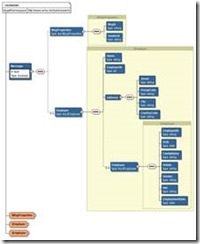
Back to my problem. The large XML files, which have to be parsed, contain one ‘Message’ element as root. This root element contains one or more employers with some basic employers information and each employer can contain multiple employee elements, up to thousands, with employee information and employment information. In the real use case the XML structure contains Dutch element names and the XML is very specific about the business problem. For the purpose of this blog, I’ve reduced the problem to a basic XML structure with English names and used some basic sample data. XSD source: Read the complete article here.

SOA & BPM Partner Community

For regular information on Oracle SOA Suite become a member in the SOA & BPM Partner Community for registration please visit www.oracle.com/goto/emea/soa (OPN account required) If you need support with your account please contact the Oracle Partner Business Center.

Blog Twitter LinkedIn image[7][2][2][2] Facebook clip_image002[8][4][2][2][2] Wiki

SOA & BPM 12.2.1 Installation and Configuration Workshop by John VanSant


clip_image002Overview of Workshop

This workshop will guide the participant through the installation of a non-development environment for SOA and BPM Suite v12.2.1. This workshop won’t cover the installation of the SOA Quickstart install, but the installation of the production software. Some notable differences between the Quickstart install and production bits are:

  • The Quickstart installer doesn’t require an Oracle Database but uses a Java Database. In order to use BAM, an Oracle Database is required so the edelivery installation packages should be used if BAM is going to be used with SOA and/or BPM.
  • The Quickstart installer limits domains to a single managed server.
  • The Quickstart installer doesn’t support B2B domains.
  • The Quickstart installer also doesn’t support the ESS (Enterprise System Scheduler)

The overall steps in this workshop are:

1. Download the software and install Java SE

2. Install Fusion Middleware 12c Foundation

3. Install Oracle Database 12c Enterprise Edition

4. Install SOA and BPM Suite 12c

5. Patch the SOA and BPM 12c installation

6. Create the required Database Schemas to support a domain

7. Create & Configure a test domain

8. Smoke-test the new domain

Read the complete article here. (Community membership required)

SOA & BPM Partner Community

For regular information on Oracle SOA Suite become a member in the SOA & BPM Partner Community for registration please visit www.oracle.com/goto/emea/soa (OPN account required) If you need support with your account please contact the Oracle Partner Business Center.

Blog Twitter LinkedIn image[7][2][2][2] Facebook clip_image002[8][4][2][2][2] Wiki

Master Oracle SOA Suite 12c by Lucas Jellema

clip_image002

Design, implement, manage, and maintain a highly flexible service-oriented computing infrastructure across your enterprise using the detailed information in this Oracle Press guide. Written by an Oracle ACE director, Oracle SOA Suite 12c Handbook uses a start-to-finish case study to illustrate each concept and technique. Learn expert techniques for designing and implementing components, assembling composite applications, integrating Java, handling complex business logic, and maximizing code reuse. Runtime administration, governance, and security are covered in this practical resource.

  • Get started with the Oracle SOA Suite 12c development and run time environment
  • Deploy and manage SOA composite applications
  • Expose SOAP/XML REST/JSON through Oracle Service Bus
  • Establish interactions through adapters for Database, JMS, File/FTP, UMS, LDAP, and Coherence
  • Embed custom logic using Java and the Spring component
  • Perform fast data analysis in real time with Oracle Event Processor
  • Implement Event Drive Architecture based on the Event Delivery Network (EDN)
  • Use Oracle Business Rules to encapsulate logic and automate decisions
  • Model complex processes using BPEL, BPMN, and human task components
  • Establish KPIs and evaluate performance using Oracle Business Activity Monitoring
  • Control traffic, audit system activity, and encrypt sensitive data

For more information please visit the website here. For additional books please visit our SOA wiki here.

SOA & BPM Partner Community

For regular information on Oracle SOA Suite become a member in the SOA & BPM Partner Community for registration please visit www.oracle.com/goto/emea/soa (OPN account required) If you need support with your account please contact the Oracle Partner Business Center.

Blog Twitter LinkedIn image[7][2][2][2] Facebook clip_image002[8][4][2][2][2] Wiki

SOA Cloud Service & Hybrid Integration updated presentations

clip_image002

At the SOA Community Workspace (SOA Community membership required) we posted the latest details about SOA Suite Cloud Service:

· SOACloudGoLiveOfficeHours-Final.pptx

· Hybrid Integration – CloudWorld-MexicoCity.pptx

· SOA Suite customer success deck 09.2015.pptx

· Oracle Integration Office Hours – PM ICS Roadmap and Demo.ppt

For more information please visit the SOA Cloud Service tag here.

SOA & BPM Partner Community

For regular information on Oracle SOA Suite become a member in the SOA & BPM Partner Community for registration please visit www.oracle.com/goto/emea/soa (OPN account required) If you need support with your account please contact the Oracle Partner Business Center.

Blog Twitter LinkedIn image[7][2][2][2] Facebook clip_image002[8][4][2][2][2] Wiki

HCL & Samsung Bring Unique Business-Focused Wearable Apps and Enterprise Solutions to Oracle OpenWorld 2015


clip_image001At Oracle OpenWorld 2015, Samsung Electronics is showcasing premier enterprise solutions created for Samsung’s top-rated mobile devices and developed on Oracle’s industry-leading architecture. Together, Samsung and Oracle are improving the end-user experience by delivering solutions unique to Samsung devices and Oracle Mobile Cloud Service.

From smartphones to tablets to wearables, Samsung and Oracle are driving enterprise mobility and enabling professionals to be more productive. The new Cordova plug-in for Samsung developers, also on display at Oracle OpenWorld, makes enterprise app development easier through the packaging of key APIs for one of the best Android business experience on the market. The Cordova plug-in integrates into Oracle’s developer tools, while granting access to Samsung’s unique hardware features such as multi-window and S Pen.

“As two of the world’s leading drivers of enterprise mobility, Samsung and Oracle are positioned to deliver an ideal user experience that pushes the boundaries of productivity in the workplace,” said Rick Segal, Vice President of Enterprise Business Team, IT & Mobile Communications Business at Samsung Electronics. “Our alliance with Oracle is not only powering professionals and businesses through mobility, but also enabling developers and systems integrators to produce unique enterprise solutions that help organizations reach new levels of growth and success.” Read the complete article here. Watch the video here

SOA & BPM Partner Community

For regular information on Oracle SOA Suite become a member in the SOA & BPM Partner Community for registration please visit www.oracle.com/goto/emea/soa (OPN account required) If you need support with your account please contact the Oracle Partner Business Center.

Blog Twitter LinkedIn image[7][2][2][2] Facebook clip_image002[8][4][2][2][2] Wiki

API Management Implementation Case Study by Bob Rhubart


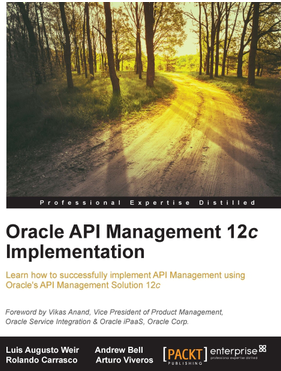
imageRead this complete sample chapter from the book Oracle API Management 12c Implementation, written by Oracle ACE Director Luis Weir, Oracle ACE Rolando Carraso, Oracle ACE Associate Arturo Viveros, and Andrew Bell. OAPI_Mgmt_Implement_Case_Study.pdf (1.3 MB)


SOA & BPM Partner Community

For regular information on Oracle SOA Suite become a member in the SOA & BPM Partner Community for registration please visit www.oracle.com/goto/emea/soa (OPN account required) If you need support with your account please contact the Oracle Partner Business Center.

Blog Twitter LinkedIn image[7][2][2][2] Facebook clip_image002[8][4][2][2][2] Wiki

Integrate Oracle SOA Healthcare and Oracle SOA Suite back-end composites across segregated domains by Bruno Neves Alves

clip_image001When implementing a composite with JDeveloper, one of the available adapters – since early versions of the 11g release of Oracle SOA Suite – is the Healthcare Adapter. This adapter allows to connect, both as exposed service (inbound) and as reference (outbound), to an Oracle SOA Suite for Healthcare Integration (SSHI) installation enabling document trading with other applications in the healthcare ecosystem.

The SSHI is mostly used for  HL7 documents exchange between back-end healthcare solutions and its satellite applications. However, in some other cases, SSHI is even implemented as a hub for document exchange, connecting heterogeneous healthcare applications.

The Healthcare adapter comes in two integration type flavors:

  • Default – in memory integration;
  • JMS – integration based on AQ or JMS queues.

The first one, based in memory, allows the SSHI application to integrate with the composites through the Healthcare Adapter using the JVM memory – what makes the integration quite efficient and fast – however, with one limitation: both SSHI and the SOA composites have to be deployed in the same domain.

Now, one of the best practices that should be taken in consideration when architecturing a large scale integration platform with SSHI and SOA Suite is to deploy the SSHI and the SOA back-end composite application in separated domains, favoring:

  • Tuning and configuration – domain configuration isolation is key to reach the sweet spot in such implementation. The domain where the composites are being deployed will likely demand different configuration compared with the SSHI dedicated one. This segregation will allow to apply different tuning strategies to one another.
  • Database partitioning – The fact that the SSHI and back-end composite application are persisting into separated SOA_INFRA schemas promotes separated database grow management strategies. This empowers an adequate data partitioning and purging strategies for each of the domains.

As explained, for an in memory integration, both domains needs to rely over the same JVM, therefore, separating the domains will presuppose two separated JVMs leaving the Default options as unusable.

This article demonstrates how the JMS integration can be implemented between SSHI and the back-end application available from two separated domains.
For questions of demonstrability it will follow a simplistic SSHI as a hub implementation. Because of that, the article additionally covers all the necessary steps to implement the integration scenario between two healthcare MLLP endpoints through a composite back-end.

Ingredients
  • 2 separated SOA Suite domains with cross domain authentication active
  • 1 inbound Weblogic JMS queue and connection factory
  • 1 outbound Weblogic JMS  queue and connection factory
  • 1 composite with two Healthcare Adapters, one as exposed service and another one as reference
  • 1 SSHI MLLP inbound endpoint
  • 1 SSHI MLLP outbound endpoint
  • 1 “Send to Internal” Internal Delivery Channel
  • 1 “Receive from Internal” Internal Delivery Channel

Read the complete article series here Part 1 and Part 2 and Part 3


SOA & BPM Partner Community

For regular information on Oracle SOA Suite become a member in the SOA & BPM Partner Community for registration please visit www.oracle.com/goto/emea/soa (OPN account required) If you need support with your account please contact the Oracle Partner Business Center.

Blog Twitter LinkedIn image[7][2][2][2] Facebook clip_image002[8][4][2][2][2] Wiki