Fusion Middleware 12.2.1 is available

clip_image002
We are proud to announce the release of Oracle Fusion Middleware 12c (12.2.1.0.0). Media is being made available for download on the Oracle Technology Network (OTN), and the Oracle Software Delivery Cloud (OSDC). This includes the following products:

· Oracle WebLogic Server 12c (12.2.1.0.0)

· Oracle Coherence 12c (12.2.1.0.0)

· Oracle TopLink 12c (12.2.1.0.0)

· Oracle Fusion Middleware Infrastructure 12c (12.2.1.0.0)

· Oracle HTTP Server 12c (12.2.1.0.0)

· Oracle Traffic Director 12c (12.2.1.0.0)

· Oracle SOA Suite and Business Process Management 12c (12.2.1.0.0)

· Oracle MapViewer 12c (12.2.1.0.0)

· Oracle B2B and Healthcare 12c (12.2.1.0.0)

· Oracle Service Bus 12c (12.2.1.0.0)

· Oracle Stream Explorer 12c (12.2.1.0.0)

· Oracle Managed File Transfer 12c (12.2.1.0.0)

· Oracle Data Integrator 12c (12.2.1.0.0)

· Oracle Enterprise Data Quality 12c (12.2.1.0.0)

· Oracle GoldenGate Monitor and Veridata 12c (12.2.1.0.0)

· Oracle JDeveloper 12c (12.2.1.0.0)

· Oracle Forms and Reports 12c (12.2.1.0.0)

· Oracle WebCenter Portal 12c (12.2.1.0.0)

· Oracle WebCenter Content 12c (12.2.1.0.0)

· Oracle WebCenter Sites 12c (12.2.1.0.0)

· Oracle Business Intelligence 12c (12.2.1.0.0)

Here is the related information for these releases:

· Product Download (OTN, OSDC)

· Certification (OTN, My Oracle Support – MOS)

· Documentation

· Useful Support Note

You can also visit the Oracle Fusion Middleware page on OTN to find more information about the products.

SOA & BPM Partner Community

For regular information on Oracle SOA Suite become a member in the SOA & BPM Partner Community for registration please visit www.oracle.com/goto/emea/soa (OPN account required) If you need support with your account please contact the Oracle Partner Business Center.

Blog Twitter LinkedIn image[7][2][2][2] Facebook clip_image002[8][4][2][2][2] Wiki

Tweets SOA Suite 12.2.1

Please send your tweets @soaCommunity and use the #soaSuite12c & #soaCommunity

clip_image001

clip_image002Robert van Mölken

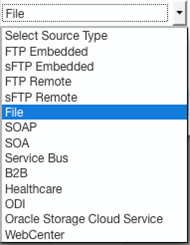
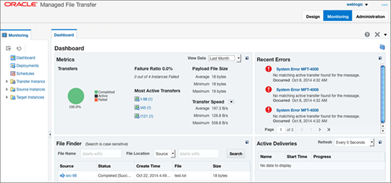
In 12.2.1 #OracleMFT can transfer Files to #cloud & #webcenter, redesigned in #AltaUI, new build-in actions & more!

clip_image005Rolando Carrascoclip_image004

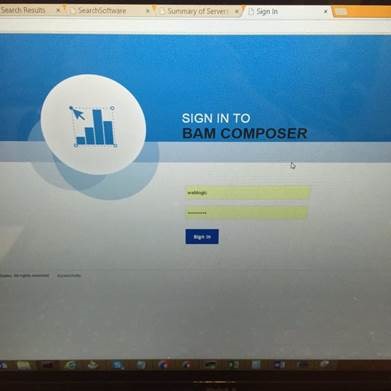
We’ve upgraded 12.1.3.3 to 12.2.1. @ratoncita_nay here are some images @soacommunity

SOA & BPM Partner Community

For regular information on Oracle SOA Suite become a member in the SOA & BPM Partner Community for registration please visit www.oracle.com/goto/emea/soa (OPN account required) If you need support with your account please contact the Oracle Partner Business Center.

Blog Twitter LinkedIn image[7][2][2][2] Facebook clip_image002[8][4][2][2][2] Wikiclip_image007

Fusion Middleware 12c – Selective tracing by Michel Schildmeijer


clip_image002For doing a good diagnosis in case of a problem in your Oracle Fusion Middleware Product, the platform offers you many methods and techniques to do your investigation. The disadvantage from some of these methods is that they have some impact on your system, such as if you would raise the log or debuglevel or use diagnostic snapshots.

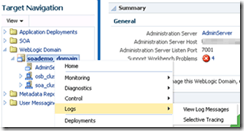
Selective Tracing is a facility available through Enterprise Manager to limit the scope of trace logging.This allows for debugging of a production system without overloading the system with logging activity. To use Selective Tracing, perform the following method:

1. On the left expand ‘WebLogic Domain’
2. Open Enterprise Manager: http://<your host>:7001/em

3. Right click your domain name -> Logs -> Selective Tracing. This will bring you to the following screen where you can configure your Selective Tracing session. Click on add fields and select as below: Read the complete article here.

SOA & BPM Partner Community

For regular information on Oracle SOA Suite become a member in the SOA & BPM Partner Community for registration please visit www.oracle.com/goto/emea/soa (OPN account required) If you need support with your account please contact the Oracle Partner Business Center.

Blog Twitter LinkedIn image[7][2][2][2] Facebook clip_image002[8][4][2][2][2] Wiki

OSB – Comparing Transformation Performance by Over de Auteur


clip_image001Introduction

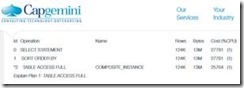
In this post, I am looking into the relative performance of the transformation technologies in Service Bus 12c. Having searched the internet, I could not find a lot of specific information regarding the performance in Oracle Service Bus, but only qualitative opinions like “XSLT performs better for large documents”, or “Service Bus is optimized for XQuery”, without any supporting data [ORAFORUM].

Background

In an attempt to offload some of the production load from the SOA clusters, a migration project has been initiated to migrate services implemented in SOA Suite 11g (as BPEL processes) to the Oracle Service Bus cluster.

Although these services are not directly exposed to consumers, the intention is to reuse – without modification- as much artefacts as possible, including WSDL, JCA adapter definitons and the transformation logic – currently implemented in XSLT. Fortunately, the XSLT is version 1.0 since our Service Bus 11.1.1.6 does not yet support version 2.0.

Environment Setup

Although the environment where the question originates currently runs SOA/OSB 11g, migration to 12c is being planned. Liking life on the bleeding edge of technology, I decided to setup a test for 12c.

To quickly create a (reproducible) SOA 12c installation, I have used the scripts [BIEMOND] provided by Edwin Biemond to leverage Vagrant for the creation of two virtual machines (one for the DB and one for the middleware) (). Since my laptop has enough memory available, I have assigned 8 GB to the middleware virtual machine. Furthermore, the memory settings for the OSB-server have been increased to 1536 MB (initial = maximum memory).

On my laptop, I have also installed SoapUI [SOAPUI] (for functional testing – verifying that the testcase using different technologies yields the same result) and Apache Jmeter 2.13[JMeter] (for the actual performance testing).

Scenario Setup

For the time being I want to primarily focus on the relative performance of XQuery when compared to XSLT, over multiple transformations with varying payloads. So, the only metric I am interested in is the response time of the service, assuming that -with all other things being equal- equal actions will add equal overhead: the total response time of the service will be taken as the main indicator.

To support different transformations for testing, there should both be XQuery and XSLT versions of the transformation. Ideally, we should have different proxies per scenario and transformation technology, but actually I am too lazy to set up this scenario. Initially, I was thinking about setting up different testcases in the same proxy and switching between these testcases based on a value in the payload or operation, this has the suspicion that it works like a case statement (or nested if-then-else): evaluating the conditions for the fourth case might take more time than for the first case.

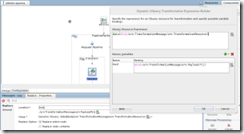
Fortunately, Service Bus also supports “Dynamic Transformations”[OSBDYNTRANS] for both XQuery and XSLT: this lets you dynamically assign the name of a transformation resource to apply, and also dynamically assign the payload to this transformation (see the Dynamic XQuery example below):

OSB Dynamic Assign Operation

The project I have come up with consists of a single proxy exposing a single operation and five pipelines: Read the whole article here.

SOA & BPM Partner Community

For regular information on Oracle SOA Suite become a member in the SOA & BPM Partner Community for registration please visit www.oracle.com/goto/emea/soa (OPN account required) If you need support with your account please contact the Oracle Partner Business Center.

Blog Twitter LinkedIn image[7][2][2][2] Facebook clip_image002[8][4][2][2][2] Wiki

SOA 12c–Creating ESS Job metadata by Siva


clip_image002In this post, We will use the EM Console to create ESS Job metadata  to call the Service Bus proxy services however the steps remain same for calling BPEL service too.

Configuration

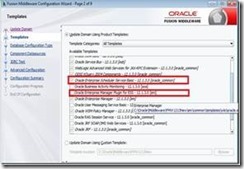
During domain creation, we should select the following options to create ESS Managed Server and EM Plugin for ESS. EM Plugin for ESS enable us to monitor and manage submitted ESS jobs.

You should see the EM Console as shown below on successful domain creation and starting the Admin and ESS servers. Observe that Scheduling Services is shown having ESSAPP. Read the complete article here.

SOA & BPM Partner Community

For regular information on Oracle SOA Suite become a member in the SOA & BPM Partner Community for registration please visit www.oracle.com/goto/emea/soa (OPN account required) If you need support with your account please contact the Oracle Partner Business Center.

Blog Twitter LinkedIn image[7][2][2][2] Facebook clip_image002[8][4][2][2][2] Wiki

Fusion Middleware 12C: Deploy the MDS using Maven by Hugo Hendriks


clip_image002In two previous posts here and here, I demonstrated how you can setup CI for OFM 12C projects. One of the things I hadn’t figured out yet was how I could deploy the MDS using Maven. After a vague hint on the internet, Oracle’s response that this feature wasn’t officially supported yet and some trial and error I came across the solution. It is actually quite simple.

Basically it comes down to this:

  • Create a zip file of the files you want to stick into the MDS
  • Use the com.oracle.soa.plugin:oracle-soa-plugin:deploy maven goal to deploy it

That wasn’t that hard as you can see clip_image003Let’s go into a bit more detail. You can use a command line to create the zip or use the maven-assembly-plugin to give you a bit more flexibility. I used the last option because I wanted to filter certain files. Within my Jenkins job, I checked out my MDS files and zipped them using the package goal into a file called sca-MDS_rev1.0.jar. Look in the plugin section in the pom file down below to see about the configuration of the assembly plugin. The pom file is just a copy of a normal soa composite project. Read the whole article here.

SOA & BPM Partner Community

For regular information on Oracle SOA Suite become a member in the SOA & BPM Partner Community for registration please visit www.oracle.com/goto/emea/soa (OPN account required) If you need support with your account please contact the Oracle Partner Business Center.

Blog Twitter LinkedIn image[7][2][2][2] Facebook clip_image002[8][4][2][2][2] Wiki

Accessing Oracle B2B metadata from your application by Tiago Teixeira


For some time now, Oracle B2B has exposed several methods of accessing it’s partner and message metadata from a custom application. This has been improved even further with B2B 12c.
In this post I’ll guide you through the 2 most common ways of accessing B2B’s metadata programmatically and some news of the 12c version.
The 2 main ways of accessing the metadata stored in B2B are:

  • Web Services exposed by B2B
  • Java API

Web Services exposed by B2B

You can access the WSDL’s for the available web services at the following URL:

http://host_name:port_number/b2b/services/

The most common services are:

  • Outbound Web Service – Works as an internal Listening Channel. Based on the details and headers in the soap:body, the agreement identification is done and the message is routed to the partner.
  • Translation Web Service – Allows to translate documents such as EDI and HL7 from Native to XML format (NativeToXMLService) and from XML to Native format (XMLToNativeService)
  • Query API (GetTPAConfigService) – Allows for retrieval of different metadata such as active agreements for a Trading Partner or checking if a Trading Partner has an agreement for a specific Document.

Read the complete article here.

SOA & BPM Partner Community

For regular information on Oracle SOA Suite become a member in the SOA & BPM Partner Community for registration please visit www.oracle.com/goto/emea/soa (OPN account required) If you need support with your account please contact the Oracle Partner Business Center.

Blog Twitter LinkedIn image[7][2][2][2] Facebook clip_image002[8][4][2][2][2] Wiki

Yes, Oracle API Gateway Can Protect Your Web Application, Too by Marcelo Parisi


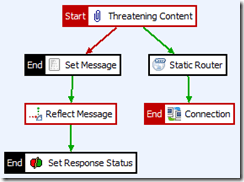
clip_image001This article by Marcelo Parisi examines basic concepts of web application security using Oracle API Gateway, using an XSS Injection issue and an SQL Injection issue to demonstrate how Oracle API Gateway can bring value to these scenarios.

The topic of Web application security never gets old. Some of the main associated challenges are related to detection and prevention of XSS Injection and SQL Injection. Such vulnerabilities are usually exploited through web application url parameters or user input fields in HTML forms.

While Oracle API Gateway has been used mainly to protect Web Services, RESTFul APIs and other kinds of services, its filtering and hardening mechanisms make it a powerful tool in a web application protection scenario.

In this article we’ll examine some basic concepts of web application security using Oracle API Gateway. We’ll work on an XSS Injection issue and on a SQL Injection issue to demonstrate how Oracle API Gateway can bring value to these scenarios.

The applications used here to demonstrate the issues were custom made for this article and are deployed in an Oracle WebLogic Server 12c environment with no clustering. The SQL Injection demonstration application uses a datasource connected to an Oracle Database 11gR2. The application reads data from the database’s simple three-column table and prints in the screen. The XSS Injection application prints only the user form input field value in the screen. These applications have no real-life use and are only some code samples for demonstration purposes.

We’ll not be covering infrastructure installation in this article. We’ll be using two servers, one with Oracle API Gateway installed on it, and the other one with the application running on Oracle WebLogic Server 12c.

Infrastructure

As mentioned before, building the infrastructure is out of this document’s scope. In this section we’ll just see what the infrastructure used to demonstrate the concepts looks like. Read the complete article here.

SOA & BPM Partner Community

For regular information on Oracle SOA Suite become a member in the SOA & BPM Partner Community for registration please visit www.oracle.com/goto/emea/soa (OPN account required) If you need support with your account please contact the Oracle Partner Business Center.

Blog Twitter LinkedIn image[7][2][2][2] Facebook clip_image002[8][4][2][2][2] Wiki

API Manager – OSB/OAC/OAG Integration Demo by Sharath Kumar


clip_image002Oracle API Manager is a new product which is built on the proven service virtualization capabilities of Oracle Service Bus to provide Creation, annotation and publication of APIs in the Oracle Service Bus console and Discovery, subscription and usage monitoring of APIs by developers in a new API Portal.

The demo image size is compressed: 23 GB and uncompressed: 42 GB please let myself know if you want to download the files are contact a local middleware pre-sales expert.

SOA & BPM Partner Community

For regular information on Oracle SOA Suite become a member in the SOA & BPM Partner Community for registration please visit www.oracle.com/goto/emea/soa (OPN account required) If you need support with your account please contact the Oracle Partner Business Center.

Blog Twitter LinkedIn image[7][2][2][2] Facebook clip_image002[8][4][2][2][2] Wiki