Introducing the Integration Cloud Service by Robert van Molken


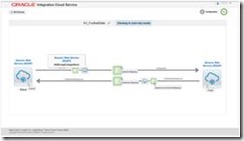
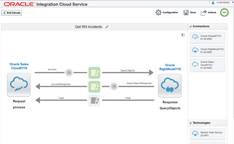
clip_image002Oracle released some more Cloud offerings and in this article we introduce the Integration Cloud Service. This cloud service lets your organization create integrations between cloud application, but also between cloud and on-premise applications. Create connections to well known and less known SaaS applications using a bunch of cloud adapters, publish or subscribe to the Messaging Cloud Service, or use industry standards like SOAP & REST. The available set of cloud adapters will certainly grow in the future when the marketplace is fully up-and-running.

Why should organizations consider the Cloud?
Let’s get started with the key benefits and features before diving into them more detailed. Why should organizations consider the Cloud?
In this day and age more and more software is going into the cloud, maybe they’re even developed with a cloud-first strategy. Thinks of your CRM, ERP of your HCM application. These applications do not do standalone business they communicate with each other, they exchange information. The Integration Cloud (fno ICS) provides this integrations and does it simplified.

The Cloud has a lot advantages, it is probably the most cost efficient method to use, maintain and upgrade an enterprise service bus.  It is available at much cheaper rates and hence, can significantly lower the company’s IT expenses. Besides, there are many pay-as-you-go and other scalable options available, which makes it very reasonable for your organization. Since all your data is stored in the cloud, backing it up and restoring the same is relatively much easier than storing the same on a physical device. Once you register yourself in the cloud, you can access the information from anywhere, where there is an Internet connection.

So what has the Integration Cloud Service to offer to meet these demands?

Simplified UI
ICS gives a web-based, point & click integration experience where you can easily create integrations between Cloud applications, public web services and on-premise applications.

Rich Connectivity
ICS has a standard library of Cloud & On-premise connectors which includes Oracle SaaS applications, but also connectors for the Messaging Cloud Service and industry standards like SOAP and REST.

Recommendations
The mapping builder to create the necessary mappings between the adapter connections has a build-in recommendation engine for guidance how to best map source to target fields.

Visibility & Error Detections
ICS as build-in a rich monitoring and error management. With advanced tracking you can easily spot inconsistencies and monitoring the usage and performance of integrations. It generates alerts, and even emails them, when connections fail to work. With the guided error handling the errors are easy to repair.

Overview of the Integration Cloud Service
Because it is fully web-based you only need to open a browser and go to the URL you received after creating your ICS instance. After signing in to the Integration Cloud Service you are welcomed by the home page. Read the complete article here.

SOA & BPM Partner Community

For regular information on Oracle SOA Suite become a member in the SOA & BPM Partner Community for registration please visit www.oracle.com/goto/emea/soa (OPN account required) If you need support with your account please contact the Oracle Partner Business Center.

Blog Twitter LinkedIn image[7][2][2][2] Facebook clip_image002[8][4][2][2][2] Wiki

Managed File Transfer Technical Hands-on Workshop Munich & London November 2015

clip_image002

Description

Oracle Managed File Transfer (Oracle MFT) enables secure file exchange and management with internal departments and external partners. It protects against inadvertent access to unsecured files at every step in the end-to-end transfer of files. It is easy to use especially for non technical staff so you can leverage more resources to manage the transfer of files. The built in extensive reporting capabilities allow you to get quick status of a file transfer and resubmit it as required.

These FREE hands-on workshops cover all the capabilities you need to build robust, reliable and agile managed file transfers.

Audience

  • Application Developers
  • Architect
  • Sales Consultants

For details please visit the registration page here:

Oracle Managed File Transfer Technical Hands-On Workshop

12 – 13 November, 2015: Munich, Germany

Register Here!

16 – 17 November, 2015: London, UK

Register Here!

SOA & BPM Partner Community

For regular information on Oracle SOA Suite become a member in the SOA & BPM Partner Community for registration please visit www.oracle.com/goto/emea/soa (OPN account required) If you need support with your account please contact the Oracle Partner Business Center.

Blog Twitter LinkedIn image[7][2][2][2] Facebook clip_image002[8][4][2][2][2] Wiki

Cloud Integration Workshop for Partners France and UK


clip_image002The Oracle team is pleased to invite your integration developers and consultants to a 3-days hands-on workshop on how to integrate applications with Oracle Cloud platform. Oracle will organize several 3-days Workshops between October 2015 – June 2016. We invite you to join the workshop InClass or Remotely (avoid travel time and travel costs by joining remotely). These Invite-Only hands-on workshops will be delivered by Oracle Development at No-Fee to Partners. A workshop consists of live presentations, live demos, and hands-on laboratory exercises.

IMPORTANT: These workshops are available to selected Oracle Partners with a current OPN Gold Level or higher membership. A fully executed Oracle Cloud Services Training Addendum is required for this workshop

Agenda

Oracle Integration Cloud Service

– Integration Basics
– Integration Patterns – cloud-to-cloud and cloud-to-on-premise

– Application Adapters
– Pre-built integration Flows
– Cloud SDK and APIs
– Administration.

Schedules

Workshop dates:

12th – 14th October, 2015 (Mon-Wed). Location: France, Colombes. Remote participation is possible.

9th – 11th November, 2015 (Mon-Wed). Location: UK, TVP. Remote participation is possible.

Target Audience

Integration Developers, Solution Architects, Technology Consultants.

Registration

Provide your submission to your local Alliances & Channels Manager. Alternatively, provide your submission to your local Alliances & Channels Enablement Manager. Provide the following information: Workshop, Workshop region, Workshop date, InClass or Remote, Partner Company, Participant’s name, Participant’s Corporate Email Address, Resident Country, Participant’s Manager’s Corporate Email Address.

France: jean-jacques.panissie@oracle.com and UK, Israel: kate.lynskey@oracle.com

SOA & BPM Partner Community

For regular information on Oracle SOA Suite become a member in the SOA & BPM Partner Community for registration please visit www.oracle.com/goto/emea/soa (OPN account required) If you need support with your account please contact the Oracle Partner Business Center.

Blog Twitter LinkedIn image[7][2][2][2] Facebook clip_image002[8][4][2][2][2] Wiki

Oracle Integration workshop: Service Bus & SOA 12c new features and products Friday October 23rd 2015 Belgium

The workshop will give an introduction to the new features and products of Oracle SOA 12c:

· First focus will be on Oracle Service Bus. How to expose services on the bus will be practiced, some new OSB 12c features will receive special attention.

· Second part of the workshop explores some new 12c products and their use in combination with the Oracle Service Bus.


· Oracle Service Bus 12c: Hands-on introduction to OSB12c with focus on 12c features: pipeline templates, dynamic validation, RESTfull services, Maven,…

· Oracle Stream Explorer: the different features of the new Oracle Stream Explorer will be explored and how it’s targeted to a service bus project.

· Oracle Managed File Transfer: Using MFT, a file transfer will be set up. Its combined use of the Oracle Service Bus will be looked into.

· Oracle API Manager: Oracle API Manager gives more flexibility and control in securing and exposing the services, which were built in our OSB exercises earlier on.


Schedule: Friday October 23rd 2015

For more information please visit the registration page here.

SOA & BPM Partner Community

For regular information on Oracle SOA Suite become a member in the SOA & BPM Partner Community for registration please visit www.oracle.com/goto/emea/soa (OPN account required) If you need support with your account please contact the Oracle Partner Business Center.

Blog Twitter LinkedIn image[7][2][2][2] Facebook clip_image002[8][4][2][2][2] Wiki

Business Rules in BPM Suite 12c by Waslley Souza

clip_image001If you use the Business Rules feature in Oracle BPM Suite 12c, the business rules you created can be modified at runtime using the BPM Composer. This way you do not need to spend time changing and re-deploying your application. This feature works the same way in BPM Suite and SOA Suite.

As a starting point, I will use the BPM application created here: Creating a simple BPM Manual Process. Download the sample application: BpmBusinessRulesApp.zip.

In the WebLogic Console, create the president user.

In the JDeveloper, open the AddEmployee process.
Right-click HrOfficer swimlane, choose Add Role and add the President role.

Change the Canonical Model, adding JobName and Salary elements. Read the complete article here.

SOA & BPM Partner Community

For regular information on Oracle SOA Suite become a member in the SOA & BPM Partner Community for registration please visit www.oracle.com/goto/emea/soa (OPN account required) If you need support with your account please contact the Oracle Partner Business Center.

Blog Twitter LinkedIn image[7][2][2][2] Facebook clip_image002[8][4][2][2][2] Wiki

SOA Cloud Service and API Manager Cloud Service are available!

imageSOA Cloud Service provides an integration platform as a service so that you can quickly provision your new platform, and then start developing and deploying your APIs and integration projects to enable your business to transition into Digital Business.


SOA CS presentation, whitepaper, video, datasheet & marketing kit At our SOA Community Workspace (SOA Community membership required) we posted

website SOA CS

ppt customer presentation SOA CS

click demo SOA CS

demo  SOA CS

FaQ SOA CS

eBook SOA CS

whitepaper cloud integration

YouTube videos Vika’s announcement & cloud integration video

Cloud Integration marketing kit


SOA CS demo system: We are in process to make the PaaS Services available via GSE. Please make sure that you request our GSE access here. SOA Specialized Partners and member of the SOA & BPM Partner Community can request demo accounts here and access SOA CS demo viewlets here.

SOA CS Partners: Looking for a SOA Specialized Partner which can support you with your ICS implementation? Visit the solutions catalog here, and search for your local SOA Specialized partner have trained & certified consultants and implemented successful SOA customer projects. Across EMEA more than 1000 companies are Specialized in SOA! Find local Specialized partners by product www.oracle.com/specialized & learn more about ICS here

SOA & BPM Partner Community

For regular information on Oracle SOA Suite become a member in the SOA & BPM Partner Community for registration please visit www.oracle.com/goto/emea/soa (OPN account required) If you need support with your account please contact the Oracle Partner Business Center.

Blog Twitter LinkedIn image[7][2][2][2] Facebook clip_image002[8][4][2][2][2] Wiki

Unleash the power of Java API’s on your WLST scripts! By Maarten Smeets


clip_image001Oracle SOA Suite and many other Oracle products have extensive Java API’s to expose their functionality. WLST can often be used for relatively course grained actions. WLST (the version supplied in Weblogic 12.1.3) uses Jython 2.2.1. Jython is the Python scripting language implemented on the Java Virtual Machine. Jython allows easy integration with Java. In this article I describe how you can unleash the power of these Java API’s on your WLST scripts!
Considerations

Why WLST and not Java?

For system operators, WLST is easier to work with than Java code. For Java code you need to supply all dependencies in the classpath and updating code requires recompilation. Also Java code can be a bit verbose compared to WLST code and requires (for most developers) more time to write. With a WLST script you do not need to provide dependencies since they are already present in the classpath set by the wlst.sh (of wlst.cmd) command used to start WLST scripts and you can more easily update the scripts without need for recompilation.

Why use Java classes in WLST?

In this example I wanted to create a script which undeployed composites which where not the default revision (are not called by default). Also I wanted to look at the instances. I did not want to undeploy composites which had running instances (long running instances like BPM and ACM). WLST provides some nifty features to undeploy composites; https://docs.oracle.com/middleware/1213/soasuite/wlst-reference-soa/custom_soa.htm#SOACR2689 for example the sca_undeployComposite command. I did however not see WLST commands I could use to query instances.

Undeploying composites using Java

I started out with a piece of Java code shown below. In order to make the required classes available in your project, you need to import Weblogic Remote Client, JRF API and SOA Runtime (see here for a more elaborate example of using the Java API). With the Locator class you can find your composites and instances. By calling the MBean oracle.soa.config:Application=soa-infra,j2eeType=CompositeLifecycleConfig,name=soa-infra method removeCompositeForLabel you can undeploy composites from Java. This is based on what I found at Read the complete article here.

SOA & BPM Partner Community

For regular information on Oracle SOA Suite become a member in the SOA & BPM Partner Community for registration please visit www.oracle.com/goto/emea/soa (OPN account required) If you need support with your account please contact the Oracle Partner Business Center.

Blog Twitter LinkedIn image[7][2][2][2] Facebook clip_image002[8][4][2][2][2] Wiki

SOA Cloud Service update September 29th 2015 16:00 CET

image This month we invite Yogesh Sontakke, Oracle Integration Product Manager to share with us two of Oracle’s exciting upcoming Cloud Services in the Oracle Integration portfolio.

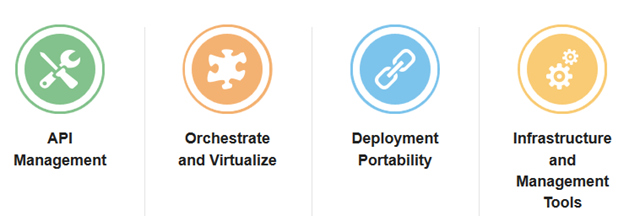
Oracle SOA Cloud Service, a comprehensive service in the cloud with the core SOA Suite including Service Bus, BPEL and more, with flexible deployment options and lift-and-shift capabilities with existing SOA Suite environments. Together with the recently released and already popular Integration Cloud Service, this new Cloud offering enriches Oracle’s Hybrid Integration capabilities to a new level providing business speed, agility and flexibility leveraging Cloud and on-premise like never before.

Oracle API Manager Cloud Service, the API platform for innovation and speed in the Digital business. With this new Cloud Service, businesses can get API visibility in the Cloud, protection for their backend services and the ability to expose and manage their on-prem as well as Cloud APIs. Running on a robust, well-proven platform with low maintenance and all benefits of the Cloud, the API Manager Cloud Service brings API Management to the Cloud for businesses, developers and IT operations.

Make sure you are signed up and tuned in to hear the latest and to be prepared ahead of the rest for these two very important Oracle Cloud Integration Services!

Yogesh Sontakke is a Principal Product Manager at Oracle Corporation in the PaaS and Fusion Middleware group, leading Oracle’s Integration portfolio –  Integration Cloud Service, SOA Suite, API Management, Stream Explorer and MFT – in the Europe, Middle East & Africa (EMEA) region. Prior to joining the Integration Product Management team, Yogesh worked in various roles in Development, Post-Sales and Pre-Sales where he gained his experience architecting, developing, integrating and enabling technology as a key driver to businesses. Yogesh is based in the UK, and tweets at @yogesh_sontakke.

Attend our September edition of the SOA & BPM Partner Community Webcast live on September 29th 2015 16:00 CET.

Visit the registration page here.

Call ID: 5566478 Call Passcode: 333111

Austria: +43 (0) 192 865 12
Belgium: +32 (0) 240 105 28
Denmark: +45 327 292 22
Finland: +358 (0) 923 193 923
France: +33 (0) 15760 2222
Germany: +49 (0) 692 222 161 06
Ireland: +353 (0) 124 756 50
Italy: +39 (0) 236 008 198
Netherlands: +31 (0) 207 143 543
Spain: +34 914 143 755
Sweden: +46 (0) 856 619 465
Switzerland: +41 (0) 445 804 003
UK: +44 (0) 208 118 1001
United States: 140 877 440 73
More Local Numbers

If you have difficulty logging in using the above link please go to: http://ouweb.webex.com/meetingcenter and join with session id: 597994333

Missed our SOA & BPM Partner Community Webcast? – watch the August edition here, July edition here, June edition here and May edition here . For the latest information please visit Community Updates Wiki page (SOA Community membership required).

SOA & BPM Partner Community

For regular information on Oracle SOA Suite become a member in the SOA & BPM Partner Community for registration please visit www.oracle.com/goto/emea/soa (OPN account required) If you need support with your account please contact the Oracle Partner Business Center.

Blog Twitter LinkedIn image[7][2][2][2] Facebook clip_image002[8][4][2][2][2] Wiki

SOA Suite 12c: solving a bug by Michel Schildmeijer


clip_image002For a customer in the Netherlands, in the healthcare division, Qualogy is implementing Oracle SOA Suite 12c(12.1.3) and Oracle Service Bus 12c(12.1.3). For connection with a WebService to a backoffice system, we enabled SSL and the OWSM Policy oracle/wss_username_token_over_ssl_service_policy:

We enabled SSL on domain level, created the necessary keystores regarding trust and Identity. After restarting the domain, all alerts in the Fusion Middleware Console seems to have dissappeared.

Oracle raised an official bug for this, Bug 20599654 – OSB Pipeline alerts are not displayed in EM console when SSL is enabled which is under investigation at Oracle Product Development since begin of march, upto now.

What we saw appearing in the logs was that, when we enabled SSL at domainlevel, the OSB aggregator, which aggregates all OSB alert data, was not able to connect over the t3s protocol WebLogic uses for internal applications to connect with eachother over RMI. We saw these messages: Read the complete article here.

SOA & BPM Partner Community

For regular information on Oracle SOA Suite become a member in the SOA & BPM Partner Community for registration please visit www.oracle.com/goto/emea/soa (OPN account required) If you need support with your account please contact the Oracle Partner Business Center.

Blog Twitter LinkedIn image[7][2][2][2] Facebook clip_image002[8][4][2][2][2] Wiki

Enable SOA Composer in SOA Suite 11g by Waslley Souza


clip_image001When you are developing your SOA Composites in SOA Suite 11g, probably you will use DVM or Business Rules components. You can change the values of these components at runtime, and to do it, you need to use an application called SOA Composer. By default the SOA Composer is disabled. As it is an application, all you have to do is go to Console from WebLogic Server and start it.

Go to WebLogic Server Console > > Deployments.
Click the composer application.

Click Targets tab, select all components and click the Change Targets button.

Read the complete article here.

SOA & BPM Partner Community

For regular information on Oracle SOA Suite become a member in the SOA & BPM Partner Community for registration please visit www.oracle.com/goto/emea/soa (OPN account required) If you need support with your account please contact the Oracle Partner Business Center.

Blog Twitter LinkedIn image[7][2][2][2] Facebook clip_image002[8][4][2][2][2] Wiki