Using the For Each action in Service Bus 12c by Jan van Zoggel


clip_image002In Oracle Service Bus 12c you can use the For-Each action to iterate multiple elements in your message.
While developing a service with For-Each functionality in Service Bus 12c I discovered that there are some subtle changes in the naming of the properties since 10g + 11g.
It took me half an hour to find out what I did wrong, documentation was not really helpful so hopefully this will spare you the trouble 🙂

In 11g the configuration looks like (screenshot from the OSB 11g Development Cookbook):

In 12c the configuration would look more like this: Read the complete article here.

SOA & BPM Partner Community

For regular information on Oracle SOA Suite become a member in the SOA & BPM Partner Community for registration please visit www.oracle.com/goto/emea/soa (OPN account required) If you need support with your account please contact the Oracle Partner Business Center.

Blog Twitter LinkedIn image[7][2][2][2] Facebook clip_image002[8][4][2][2][2] Wiki

SOA Suite in the Oracle Cloud! Learn more about Java Cloud Service – join our Webcast April 24th 2015

Join our Webcast on April 24th 2015!

Oracle Java Cloud Service is a part of the platform service offerings in Oracle Public Cloud Services. Powered by Oracle WebLogic Server, it provides a platform on top of Oracle’s enterprise-grade cloud infrastructure for developing and deploying new or existing Java EE applications.

Schedule: April 24th 2015 15:00-16:00 CET (Berlin time)

Presenters: Cosmin Tudor & Jürgen Kress

Registration: please visit our registration page here

In this eSeminar we will provide both an overview presentation and a short demo that will cover the new Oracle Java Cloud Services – Platform as a Service offerings and the integration with other Oracle Cloud offerings like: Developer Cloud Services, Database Cloud Services, Documents Cloud Services …

Do you want to learn more about innovative features, capabilities and roadmap of Oracle Java Cloud Services? Then this technical overview is for you.

Presentation Outline – 1 hour

  • Java Cloud Services:
    • Java Cloud Services PaaS and PaaS – Virtual Image
    • Java Cloud Services SaaS Extensions
    • Management and Administration:
      • Provisioning
      • Backup & Recovery
      • Patching
      • Scaling
      • REST API
    • Coherence Cloud Services
    • Storage Cloud Services
    • Compute Cloud Services
  • Developer Cloud Services
  • Database Cloud Services

Audience

  • Java/JavaEE/WebLogic Consultants & Architects

For details please visit our registration page here.

SOA & BPM Partner Community

For regular information on Oracle SOA Suite become a member in the SOA & BPM Partner Community for registration please visit www.oracle.com/goto/emea/soa (OPN account required) If you need support with your account please contact the Oracle Partner Business Center.

Blog Twitter LinkedIn image[7][2][2][2] Facebook clip_image002[8][4][2][2][2] Wiki

A Chef Cookbook for Fusion Middleware 12c by Jorge Quilcate


Provisioning tools have change the way we create software environments: How much time we spend installing OS, databases, configuring platforms, applications? Now you can translate this steps into code, getting the software development benefits and challenges into infrastructure: versioning, reuse, continuous improvement.

In this post, I will show you how to provision Oracle SOA Suite 12c using a Chef cookbook that I created and shared it on Chef Supermarket.

Provisioning with Chef

Chef is a provisioning tool, based on Ruby. Let you organize your "infrastructure" recipes on Cookbooks. Here you can find the Chef Supermarket. For a Chef tutorial go here

Chef Cookbooks and Recipes

Chef Cookbooks are groups of Recipes, and a Recipe is a sequence of instructions called Resources. Directory, Execute, Service, Package are some resources.

For instance: If you want to install an HTTP Server, first you should install a Package, and then start HTTP Service.

Oracle Fusion Middleware Cookbook

I’ve created this cookbook: oracle-fmw. The idea is to have a group of recipes to provide Fusion Middleware environments with different products like: SOA, BPM, BAM, OSB, and so on.

In the first release, this cookbook includes the following recipes:

· prepare-infrastructure-12c: Creates the required OS user and group, installs the required OS packages and execute some scripts to set required parameters.

· install-bpm_qs-12c: Installs Oracle BPM 12c which includes the following products (12.1.3): JDeveloper, Oracle SOA, Oracle OSB, Oracle BAM, Oracle BAM and others.

· create-rcu_repository-12c: Creates RCU repositories on Oracle Database instance.

· create-domain-12c: Creates a WebLogic Domain with these (optional) products: SOA, BAM, BPM, OSB.

Read the complete article here

SOA & BPM Partner Community

For regular information on Oracle SOA Suite become a member in the SOA & BPM Partner Community for registration please visit www.oracle.com/goto/emea/soa (OPN account required) If you need support with your account please contact the Oracle Partner Business Center.

Blog Twitter LinkedIn image[7][2][2][2] Facebook clip_image002[8][4][2][2][2] Wiki

Set-up a 12c SOA/BPM Infrastructure by Rene van Wijk


In this post, we will show how to create automation scripts in order to set-up middleware environments.

Preparation

In the example, we will use the following software

· Oracle JDK

· Fusion Middleware Infrastructure (fmw_12.1.3.0.0_infrastructure.jar) which can be obtained from the Oracle Software Delivery Cloud

· Oracle SOA Suite (fmw_12.1.3.0.0_soa.jar) which can be obtained from the Oracle Software Delivery Cloud

First, we have to decide which directory structure we are going to use. Below an example is given in which the binaries (that create the run-time) are separated from the configuration.

1.  ${BASE_DIRECTORY}
2.      /soa12.1.3
3.          /configuration
4.              /applications
5.                  /base_domain
6.              /domains
7.                  /base_domain
8.              /nodemanagers
9.                  /base_domain
10.                                     /installation (directory that contains all the software)
11.                                         /coherence
12.                                         /em
13.                                         /oracle_common
14.                                         /osb
15.                                         /soa
16.                                         /wlserver
17.                                     /jdk1.7.0_55

Installation

To install an Oracle SOA Suite Infrastructure (that uses Oracle JDK as the Java Virtual Machine) we can use the following script

Read the complete article here.

SOA & BPM Partner Community

For regular information on Oracle SOA Suite become a member in the SOA & BPM Partner Community for registration please visit www.oracle.com/goto/emea/soa (OPN account required) If you need support with your account please contact the Oracle Partner Business Center.

Blog Twitter LinkedIn image[7][2][2][2] Facebook clip_image002[8][4][2][2][2] Wiki

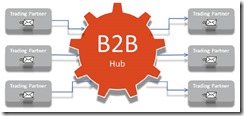
SOA Suite/B2B as a Critical Mission Hub for a High Volume Message Use Case by Bruno Alves


clip_image002

In this article, you will find described high availability solution architecture, covering B2B and core SOA Suite components as BPEL, along with Business Rules, Mediator and BAM integration, as well as lessons learned in conducting such a complex and mission-critical project starting from a set of legacy applications. Read the complete article here.

SOA & BPM Partner Community

For regular information on Oracle SOA Suite become a member in the SOA & BPM Partner Community for registration please visit www.oracle.com/goto/emea/soa (OPN account required) If you need support with your account please contact the Oracle Partner Business Center.

Blog Twitter LinkedIn image[7][2][2][2] Facebook clip_image002[8][4][2][2][2] Wiki

SOA 12c – EDN Logging by Siva


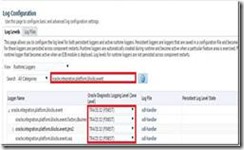
clip_image002In 12c EDN uses Weblogic JMS to publish and deliver the Business Events. So edn-db-log (which we use in 11g) will not work when Weblogic JMS is used.

In 12c, you can enable EDN logging navigating to soa-infra –> Logs –> Log Configuration and search for logger oracle.integration.platform.blocks.event as shown below. Set the logging level as you desired.

Read the complete article here.

SOA & BPM Partner Community

For regular information on Oracle SOA Suite become a member in the SOA & BPM Partner Community for registration please visit www.oracle.com/goto/emea/soa (OPN account required) If you need support with your account please contact the Oracle Partner Business Center.

Blog Twitter LinkedIn image[7][2][2][2] Facebook clip_image002[8][4][2][2][2] Wiki

B2B 12c – What’s New! by Tiago Teixeira


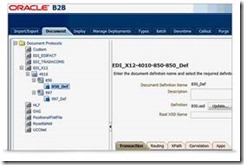
clip_image002This post serves as the first of a series of posts dedicated to Oracle B2B. What better way to start this series than to highlight the many new features have been added to Oracle B2B 12c which can change the landscape of the target usage for B2B.
Let’s look at some of these new features:

· Document Translation Callout Framework

o Introduced Document Callout for custom document parsing (inbound), validation and construction (outbound)

· Regular Expression Document Identification

· Trading Partner Metadata API

o Parameters, Identifiers and TP Agreements accessible via Java API and WS

· SSL Support for SMTP

· Trading Partner Identifier via Regular Expression

· Batching of Custom Documents

· xPath payload extraction from SOAP Body

· xEngine (B2B Native Parser) API for EDIFACT

· Bulk Listening Channel activation

· Enriched exchange information on message metadata

Read the complete article here.

SOA & BPM Partner Community

For regular information on Oracle SOA Suite become a member in the SOA & BPM Partner Community for registration please visit www.oracle.com/goto/emea/soa (OPN account required) If you need support with your account please contact the Oracle Partner Business Center.

Blog Twitter LinkedIn image[7][2][2][2] Facebook clip_image002[8][4][2][2][2] Wiki

B2B 12c – Listening Channel activation and deactivation in bulk Bruno Neves Alves


clip_image002With the version 12c of B2B the possibility to activate and deactivate all listening channels in one single command was introduced. Previously, it was necessary to provide the name of the listening channels to perform the action, what, in scenarios with a considerable number of listening channels, made the task ineffective.

Different scenarios can be pointed out where this functionality is extremely useful:

· After importing a B2B configuration the channels are always in deactivated status. This command can be then executed in order to activate all the listening channels in bulk;

· Deactivate all listening channels to stop momentously all message consumption for corrective or preventive reasons into B2B or back-end applications;

· Switching the message consumption between two environments;

The feature is also provided in a command line based approach since is an extension to the already existing feature of enable/disable a particular listening channel. Therefore it is respecting the same prerequisites.

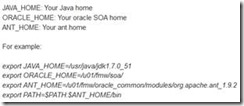
Prior to executing any B2B command line tool is necessary to set the following environment variables: Read the complete article here.

SOA & BPM Partner Community

For regular information on Oracle SOA Suite become a member in the SOA & BPM Partner Community for registration please visit www.oracle.com/goto/emea/soa (OPN account required) If you need support with your account please contact the Oracle Partner Business Center.

Blog Twitter LinkedIn image[7][2][2][2] Facebook clip_image002[8][4][2][2][2] Wiki

SOA Suite 12c: Topology Suggestions by Jay Kasi


In this article, I make some suggestions and provide opinions on topologies recommended in SOA Suite 12c.

· Typically Service Bus and SOA Suite belong in different tiers in an end to end architecture so they would be in separate domains. However if Service Bus is used primarily for mediating and providing routing for SOA Suite Composites in a domain, it could be in the same domain, but typically in separate clusters for optimum performance and scalability. However it  is possible starting in 12c to have Service Bus and SOA Suite in the same cluster.

· Governance products like OER and UDDI should not be in a SOA Suite or Service Bus domain. They should be in a separate domain. OER should be in a separate domain from UDDI.

· One consideration when deciding on topologies is that Upgrade is always domain wide. All products deployed to the domain must release in the same release train and you should be willing to upgrade all of them at the same time.

· You can target multiple products to the same cluster by targeting the appropriate user extensible server group to  the servers in the cluster.

1. SOA Suite is targeted to a server by targeting either the user extensible server group SOA-MGD-SVRS or SOA-MGD-SVRS-ONLY.

2. Service Bus is targeted to a server by targeting either the user extensible server group OSB-MGD-SVRS-COMBINED or OSB-MGD-SVRS-ONLY.

3. BAM is targeted to a server by targeting either the user extensible server group BAM12-MGD-SVRS or BAM12-MGD-SVRS-ONLY.

4. MFT is targeted to a server by targeting either the user extensible server group MFT-MGD-SVRS or MFT-MGD-SVRS-ONLY.

5. ESS is targeted to a server by targeting the user extensible server group ESS-MGD-SVRS. Read the complete article here

SOA & BPM Partner Community

For regular information on Oracle SOA Suite become a member in the SOA & BPM Partner Community for registration please visit www.oracle.com/goto/emea/soa (OPN account required) If you need support with your account please contact the Oracle Partner Business Center.

Blog Twitter LinkedIn image[7][2][2][2] Facebook clip_image002[8][4][2][2][2] Wiki

SaaS-OnPremise Integration with Fusion Middleware demo available


clip_image002To get access to the Oracle demo system please visit first OPN (OPN account required)

With the increasing popularity of software as a service (SaaS), there is a key imperative to quickly, efficiently and securely integrate the newer SaaS applications with their existing on-premise counterparts. Using an incident management/service delivery scenario, this demo shows how Oracle Fusion Middleware streamlines this integration via a unified framework of middleware components that masks the technical differences and enforces consistency via a common integration platform for SaaS and On-Premise applications.

Highlights

  • Incident management/service delivery scenario with multiple user personas to reflect real world use case
  • SOA Suite 12c with Oracle Cloud and On-Premise Adapters to integrate Oracle Service Cloud and E-Business Suite applications
  • Scalable and secure access management for cross-application processes and transactions via OAM Mobile and Social, OAG, OID
  • This demo is mostly an iPhone based demo.

Call to Action

For more information about SaaS integration attend our Multichannel Integration hands-on workshop at the Fusion Middleware Community Forum 2015 or visit the SOA Partner Community Workspace (Community membership required).

SOA & BPM Partner Community

For regular information on Oracle SOA Suite become a member in the SOA & BPM Partner Community for registration please visit www.oracle.com/goto/emea/soa (OPN account required) If you need support with your account please contact the Oracle Partner Business Center.

Blog Twitter LinkedIn image[7][2][2][2] Facebook clip_image002[8][4][2][2][2] Wiki