Using OSB 12.1.3 Resequencer by Derek Kam


clip_image002Resequencer feature has been added to Oracle Service Bus 12c (12.1.3), it utilises the same resequencer engine as Oracle Mediator.  The objective of this feature is to provide you with the ability to resequence the incoming messages that arrive in random order and send them to the target services in an orderly manner.  In this blog, I will give you a bit more information about this new feature in OSB and how to debug if you encounter an issue.

As mentioned in the official doc, the resequencer doest not support any XML and any SOAP service type, you need to define a WSDL in order to use the resequencer feature in OSB, and this WSDL must be only one-way, and must not contain any response elements.

The OSB Resequencer Strategies work in the same manner as Oracle Mediator;  it supports Standard, FIFO and Best Effort.  The differences between the resequencer implementation in Oracle Mediator and OSB are the ways in which both dispatch the message.  In OSB, pipeline acts as a Resequencer component. User cannot configure resequencer at any other OSB component.  After resequencing, the ordered messages will be processed further in the pipeline.  As soon as the message is pushed to the resequencer, caller will get a successful response. Though resequencer is part of the pipeline configuration, it will be invoked just before the pipeline is invoked.

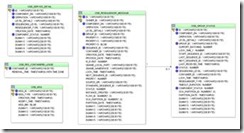
Just like the Oracle Mediator,  OSB Resequencer also relies on the database for processing messages.  The database tables are automatically created when you run the repository creation utility (RCU) while creating the OSB domain.  The JNDI name used by the OSB resequencer is jdbc/SOADataSource.  The tables used by the resequencer are shown below:

You can use the Enterprise Manager to configure the throughput for resequenced messages.  Following are the properties specific to OSB resequencer:

  • Resequencer Maximum Groups Locked : Maximum number of groups locked by Resequencer in each attempt it makes to obtain locks on the groups. Locks are obtained on the groups so that only one managed server node processes the group at a time.
  • Resequencer Locker Thread Sleep : The number of seconds the Resequencer would pause between each iteration to obtain locks on the groups.
  • Purge Completed Messages : Delete message after successful execution. The default value will be set as true.

Read the complete article here.

SOA & BPM Partner Community

For regular information on Oracle SOA Suite become a member in the SOA & BPM Partner Community for registration please visit www.oracle.com/goto/emea/soa (OPN account required) If you need support with your account please contact the Oracle Partner Business Center.

Blog Twitter LinkedIn image[7][2][2][2] Facebook clip_image002[8][4][2][2][2] Wiki

Service Bus: Obtaining a list of exposed SOAP HTTP endpoints by Maarten Smeets


The Oracle Service Bus is often used for service virtualization. Endpoints are exposed on the Service Bus which proxy other services. Using such an abstraction layer can provide benefits such as (among many other things) monitoring/logging, dealing with different versions of services, throttling/error handling and result caching. In this blog I will provide a small (Java) script, which works for SOA Suite 11g and 12c, which determines exposed endpoints on the Service Bus.

How to determine endpoints?

clip_image001In order to determine endpoints on the Service Bus, The Service Bus MBeans can be accessed. These MBeans can obtained from within a local context inside the Service Bus or remotely via JMX (when configured, see http://stackoverflow.com/questions/1013916/how-to-enable-jmx-on-weblogic-10-x). In this example I’ll use a remote connection to a Weblogic Server instance which runs on the same machine (JDeveloper IntegratedWeblogicServer). To browse MBeans, you can use jvisualvm (http://docs.oracle.com/javase/7/docs/technotes/guides/visualvm/) which is distributed as part of the Oracle JDK. JVisualVM has a plugin to browse MBeans.

When connected, the Service Bus MBeans are located under com.oracle.osb. The proxy services which define the exposed endpoints, can be recognized by the Proxy$ prefix. In order to determine the actual endpoint, you can look at the ResourceConfigurationMBean of the proxy service. Under configuration, transport-configuration you can find a property called url. The script also filters HTTP SOAP services since the url field is also used for other transports. A replace of // with / is done on the combination server:host/url since the url can start with a /. This causes no difference in functioning but provides better readable output. If you want WSDL’s, you can add ‘?wsdl’ to the obtained endpoint. Read the complete article here.

SOA & BPM Partner Community

For regular information on Oracle SOA Suite become a member in the SOA & BPM Partner Community for registration please visit www.oracle.com/goto/emea/soa (OPN account required) If you need support with your account please contact the Oracle Partner Business Center.

Blog Twitter LinkedIn image[7][2][2][2] Facebook clip_image002[8][4][2][2][2] Wiki

API Manager available for download

Description of subscribe.png followsThis is the initial release of the Oracle API Manager 12c. Please see the Documentation tab for Release Notes, Installation Guides and other release specific information. You can also view the Oracle SOA Release Notes Page provided for this release.

For more information please visit

SOA & BPM Partner Community

For regular information on Oracle SOA Suite become a member in the SOA & BPM Partner Community for registration please visit www.oracle.com/goto/emea/soa (OPN account required) If you need support with your account please contact the Oracle Partner Business Center.

Blog Twitter LinkedIn image[7][2][2][2] Facebook clip_image002[8][4][2][2][2] Wiki

Reducing the Cost of Operating


Enterprise Scale Middleware Environments by Pique Solutions

clip_image002A Customer Study on the Benefits of Oracle Enterprise Manager 12c for Managing Large Middleware Environments Powered by Oracle WebLogic Server and Oracle Service – Oriented Architecture (SOA

Get the report here.

SOA & BPM Partner Community

For regular information on Oracle SOA Suite become a member in the SOA & BPM Partner Community for registration please visit www.oracle.com/goto/emea/soa (OPN account required) If you need support with your account please contact the Oracle Partner Business Center.

Blog Twitter LinkedIn image[7][2][2][2] Facebook clip_image002[8][4][2][2][2] Wiki

Demonstration of SOA 12c Maven support by Mark Nelson


Mark Nelson’s video covers the Oracle Maven Syncronization Plug-in, the SOA 12.1.3 Maven Archetype, the Maven Import Wizard, Oracle SOA Maven Plug-in, and more. Watch the video here.

clip_image002

SOA & BPM Partner Community

For regular information on Oracle SOA Suite become a member in the SOA & BPM Partner Community for registration please visit www.oracle.com/goto/emea/soa (OPN account required) If you need support with your account please contact the Oracle Partner Business Center.

Blog Twitter LinkedIn image[7][2][2][2] Facebook clip_image002[8][4][2][2][2] Wiki

SOA 12c Debugger issue –> cannot initiate debugging by Niall Commiskey


clip_image002Check the following – thanks to Luis Weir – he also Tweeted this – I don’t like Twitter myself!
Too limiting, I am more into writing longer texts!
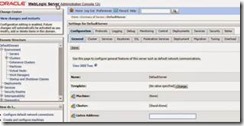
This issue may be caused by the debugger trying to use the ip address under which the SOA app was deployed.
1. Make sure the listen address is empty.
Read the complete article here.

SOA & BPM Partner Community

For regular information on Oracle SOA Suite become a member in the SOA & BPM Partner Community for registration please visit www.oracle.com/goto/emea/soa (OPN account required) If you need support with your account please contact the Oracle Partner Business Center.

Blog Twitter LinkedIn image[7][2][2][2] Facebook clip_image002[8][4][2][2][2] Wiki

MFT – Setting up SFTP Transfers using Key-based Authentication by Shub Lahiri


Executive Overview

clip_image002MFT supports file transfers via SFTP. Often MFT customers receive a public key from their partners and want to use them to receive files via SFTP. This blog describes the setup required to enable such an MFT flow that would receive files from partners using key-based authentication.

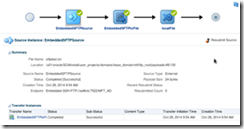
MFT includes an embedded SFTP server. We will configure it with the supplied public key to receive files from remote partners. Upon receipt of a file, a simple MFT transfer will initiate and place the file in a pre-defined directory within the local filesystem.

Solution Approach

Overview

The overall solution consists of the following steps:

  • Generate public-private key pair on the remote machine and copy the public key to MFT server
  • Generate public-private key pair on the machine running MFT server
  • Import the private key from MFT machine in MFT keystore
  • Import the public key from partner machine in MFT keystore
  • Configure SFTP server with private key alias
  • Configure MFT users and corresponding SFTP directories to be used by remote partners
  • Enter SSH Keystore password
  • Restart embedded SFTP Server
  • Create Embedded SFTP Source
  • Create File Target
  • Create an MFT transfer using the above source and target
  • Deploy and Test
Task and Activity Details

The following sections will walk through the details of individual steps. The environment consists of the following machines:

  • VirtualBox image running MFT 12c on OEL6 (oel6vb)
  • Remote Linux machine used for initiating the transfer via SFTP client (slc08vby)
I. Generate public-private key pair on the remote machine and copy the public key to MFT server

To generate a private-public key pair, we use the command-line tool ssh-keygen. The tool creates 2 files for private and public key. For our purposes in this exercise, we will only be using the public key by copying it to the MFT machine from here. As a common practice, all the key files are saved in $HOME/.ssh directory. A transcript of a typical session is shown below. Read the complete article here.

SOA & BPM Partner Community

For regular information on Oracle SOA Suite become a member in the SOA & BPM Partner Community for registration please visit www.oracle.com/goto/emea/soa (OPN account required) If you need support with your account please contact the Oracle Partner Business Center.

Blog Twitter LinkedIn image[7][2][2][2] Facebook clip_image002[8][4][2][2][2] Wiki

SOA 12c – Managed File Transfer Hands On by Vivek Garg


clip_image002MFT (Managed File Transfer) is out of box functionality introduced in Oracle SOA 12c. By using MFT we can securely exchange the files between two internal or external points. In this post, we will see how to transfer one sample file from one local folder to another local folder. You can also transfer the file to any other point like FTP, SFTP etc but for simplicity we took local folders.

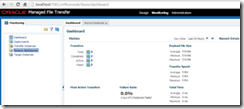
et’s start with the exercise, first open the MFT console by going to (http://host:port/mftconsole) link. You will see below screen, at the top you can see three links. Design link is used by developer to do define required parameters to transfer the file. Monitoring link is used to monitor the file transfer and administration link is used for administration purpose.

Click on Design link and now we define the source parameters where we place the sample file and MFT pick it from here. As mentioned earlier we are using local folder for source so we give source a name and choose “File” from drop down list. You also need to specify folder path. Read the complete article here.

SOA & BPM Partner Community

For regular information on Oracle SOA Suite become a member in the SOA & BPM Partner Community for registration please visit www.oracle.com/goto/emea/soa (OPN account required) If you need support with your account please contact the Oracle Partner Business Center.

Blog Twitter LinkedIn image[7][2][2][2] Facebook clip_image002[8][4][2][2][2] Wiki

EBS 12c Adapter calling PL/SQL by Jon Petter Hjulstad

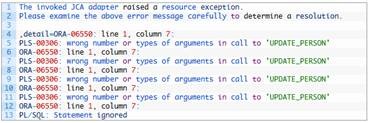
clip_image002I have used the EBS Adapter on version 12 – and encountered some problems. The EBS Adapter is for example packaged into Mobile Suite with OSB and is perfect for example mobile-enabling you EBS. Here is some more info: Youtube  or datasheet. The problem I encountered was during call to a PL/SQL API in EBS Adapter. It looked like this:

What should be expected here is that it call a wrapper package that is generated in the APPS schema, but it calls the original package. Here is a link to the documentation

and the WSDL anticipates that the boolean is now an int, but it calls the wrong package. This can also be verified by logging SQL by using this tip. So to fix this you must update the file myAppsReference_apps.jca manually: Read the complete article here.

SOA & BPM Partner Community

For regular information on Oracle SOA Suite become a member in the SOA & BPM Partner Community for registration please visit www.oracle.com/goto/emea/soa (OPN account required) If you need support with your account please contact the Oracle Partner Business Center.

Blog Twitter LinkedIn image[7][2][2][2] Facebook clip_image002[8][4][2][2][2] Wiki

Creating a Mobile-Optimized REST API Using Oracle Service Bus by Steven Davelaar

clip_image002

Fusion Middleware A-Team architect Steven Davelaar kicks off a new series that shows you how to use Oracle Service Bus (OSB) 12c to transform SOAP-based enterprise system interfaces into a mobile-optimized REST-JSON API.  Read part 1 and Read part 2

Introduction

To build functional and performant mobile apps, the back-end data services need to be optimized for mobile consumption. RESTful web services using JSON as payload format are widely considered as the best architectural choice for integration between mobile apps and back-end systems. At the same time, most existing enterprise back-end systems provide a SOAP-based web service application programming interface (API) or proprietary file-based interfaces. In this article series we will discuss how Oracle Service Bus (OSB) 12c can be used to transform these enterprise system interfaces into a mobile-optimized REST-JSON API. This architecture layer is sometimes referred to as Mobile Oriented Architecture (MOA) or Mobile Service Oriented Architecture (MOSOA). A-Team has been working on a number of projects with OSB 12c to build this architecture layer. We will explain step-by-step how to build this layer, and we will  share tips, lessons learned and best practices we discovered along the way. In this first part we will discuss how to design the REST API.

Main Article

Design Considerations

Let’s start with the first challenge: how do you design an API that is truly optimized for mobile apps? A common pitfall is to start with the back-end web services, and take that back-end payload as a starting point. While that may limit the complexity of transformations you have to do in OSB 12c (you could even use the automated “Publish-As-REST” function on a SOAP business service) it leads to an API which is everything but optimized for mobile. This brings us to our first recommendation:

The REST API design should be driven by the mobile developer.

He (or she) is the only one who can combine all the requirements, information and knowledge required for a good design:

  • he designs and builds the various screens, knows the supported form factors and knows exactly which data should be retrieved for which screen.
  • he knows the requirements for working in offline mode, and knows how this can be supported and implemented using his mobile development tool set.
  • he is responsible for data caching strategies to optimize performance in both online and offline scenarios
  • he decides which read and write actions can be performed in a background thread not impacting the user-perceived performance.

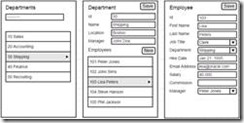
To illustrate how the above aspects impact the design of the API, we will introduce the sample “human resources” app that we will use throughout this article series. Lets start with the three screen mockups our API should support: Read the complete article here.

SOA & BPM Partner Community

For regular information on Oracle SOA Suite become a member in the SOA & BPM Partner Community for registration please visit www.oracle.com/goto/emea/soa (OPN account required) If you need support with your account please contact the Oracle Partner Business Center.

Blog Twitter LinkedIn image[7][2][2][2] Facebook clip_image002[8][4][2][2][2] Wiki