2 Minute Tech Tip: Industrial SOA

Why is Industrial SOA important for your SOA 12c project – Watch the video here.

clip_image002

SOA & BPM Partner Community

For regular information on Oracle SOA Suite become a member in the SOA & BPM Partner Community for registration please visit www.oracle.com/goto/emea/soa (OPN account required) If you need support with your account please contact the Oracle Partner Business Center.

Blog Twitter LinkedIn image[7][2][2][2] Facebook clip_image002[8][4][2][2][2] Wiki

A Dirty Dozen Questions on Oracle SOA 12c You Need Answered, but Feared to Ask….

clip_image002SOA 12c Webcast Q&A   
Last month’s webcast  “Simplify Multichannel Integration with Oracle SOA Suite 12c” was a tremendous success. Once again, we’d like to thank Oracle’s Robert Wunderlich for his insight and excellent demo.

As usual, we’re happy to bring you a transcript of the Q&A session of the webcast. But as interest in these questions goes far beyond the webcast audience, we’re taking the poetic license of calling them “A Dirty Dozen Questions on Oracle SOA 12c You Need Answered, but Feared to Ask….”
1. Does Oracle SOA 12c support batch-processing using OSB, without the need to purchase an additional ETL tool like ODI?
There are a couple of things we need to take into account when we are discussing batching. If you are talking about large payloads, like GBs or Tbs in a file, it is not recommended to go with OSB (Oracle Service Bus). That is the reason Oracle recommends ODI (Oracle Data Integrator): ODI will extract the data, chunk the file into to smaller pieces and hand it over to the OSB layer, and the OSB layer will take the data and process it.
2. Is XSLT 2.0 supported in both OSB and SOA? Today in 11g it’s only supported in SOA and not in OSB?
Yes, XSLT  (Extensible Stylesheet Language Transformations) are supported in both, and Oracle made many improvements on the XSLT mapper. The other thing to point out is on the XQuery side – using XQuery on both SOA Composite and Service BUS, and we have a mapper for that as well. The idea is that now, it becomes a developer’s choice in working between the two. Do you want to use XSLT or XQuery? You can use either one.
3. How much data volume can SOA handle? Read the complete article here.

SOA & BPM Partner Community

For regular information on Oracle SOA Suite become a member in the SOA & BPM Partner Community for registration please visit www.oracle.com/goto/emea/soa (OPN account required) If you need support with your account please contact the Oracle Partner Business Center.

Blog Twitter LinkedIn image[7][2][2][2] Facebook clip_image002[8][4][2][2][2] Wiki

MFT: SOA integration by Nicolas Fonnegra


    MFT (Managed File Transfer) is a new component introduced with the release of Oracle FMW 12c. Oracle MFT provides several mechanisms to transmit files, including very big ones, in a managed way; transfers can be monitored, paused and resubmitted. One of the many advantages of Oracle MFT is the ability it offers to provide and consume services from other FMW components. In the following example we are going to demonstrate how to integrate MFT with a SCA composite.

    Scenario

    This scenario will simulate the transfer of a consolidated report from a company’s headquarters into several of its regional offices. But before the transfer gets executed, it will have to be approved by a reviewer.

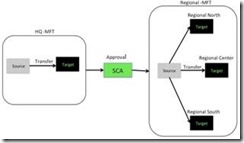
    For this implementation we will need two MFT transfers, one for sending the file from the headquarters to the SCA composite and another to send the file to the respective regional offices. In the middle the SCA composite will be in charge of interconnecting both transfers and the approval process. The following diagram shows the scenario.

    clip_image002MFT Scenario

    A MFT process consists of one or more sources, one or more targets and one transfer that interconnects the sources with the targets. This scenario will need the following elements:

    • Two MFT sources. One will use a file channel to obtain the report and the other one will receive the report from the SCA composite.

    • Four MFT targets: one for sending the report to the SCA composite and one for each of the regional offices (three in total).

    • Two transfers: one for sending the report the SCA target and another one for ending the report to the regional offices target.

    • An SCA composite that will have a Human Task for the approval process and will use the MFT adapters to receive and send the reports.

      • MFT Sources

        MFT comes with a web interface that allows the definition and management of sources, transfers and targets. The MFT console can be reached in the following url: http://<host&gt;:<port>/mftconsole/faces/login, where the host and the port are the ones from the managed server where MFT is installed.

        The MFT console has three different views, the design view for the definition of sources targets and transfers, the monitoring view for managing and tracking the current instances and the administrative view for configuring MFT.

        To create a new source, go to design mode and then select the sources item. Then click on the green ‘+’ to create a new source. Read the complete article here.

        SOA & BPM Partner Community

        For regular information on Oracle SOA Suite become a member in the SOA & BPM Partner Community for registration please visit www.oracle.com/goto/emea/soa (OPN account required) If you need support with your account please contact the Oracle Partner Business Center.

        Blog Twitter LinkedIn image[7][2][2][2] Facebook clip_image002[8][4][2][2][2] Wiki

      JSON is flowing through SOA’s veins by Laurens van der Starre

      This year’s Oracle Open World is again all about Cloud and Mobile. However, this year it is getting more and more concrete. Apart from all the announcements of Process Cloud and integration cloud services there will be more JSON support in Oracle’s SOA Suite.

      In Oracle SOA Suite 12C (12.1.3) the REST Adapter already made its appearance. This adapter makes it make your SCA component available as, and leverage REST services, using JSON. This JSON support starts and end with the REST adapter. Inside your SCA components, it is still XML.

      In the second release of Oracle SOA Suite 12C (12.1.4) there will be JSON flowing through all the veins of the SCA components. In Service Bus, you will be able to have JSON context variables. Instead of only having xpath operations on your context variables, you have the ability to use JavaScript. There will also be a JavaScript activity which lets you write JavaScript “transformations” on your context variables.

      The same goes for BPEL. BPEL is heavily based on XML, but here also the JSON support will be end-to-end. Pretty exiting, but also scary because of the “unstructuredness” of JSON.

      Oracle SOA Suite 12.1.4 will probably available in H1 of 2015.

      SOA & BPM Partner Community

      For regular information on Oracle SOA Suite become a member in the SOA & BPM Partner Community for registration please visit www.oracle.com/goto/emea/soa (OPN account required) If you need support with your account please contact the Oracle Partner Business Center.

      Blog Twitter LinkedIn image[7][2][2][2] Facebook clip_image002[8][4][2][2][2] Wiki

      O-box at Oracle OpenWorld 2014 by Simon Haslam

      At this year’s Oracle OpenWorld conference I presented during two sessions. Firstly, I co-presented “Oracle WebLogic on Oracle Database Appliance: Combining High Availability and Simplicity [CON8004]” with Frances Zhao-Perez from Oracle. I have been presenting with Frances for several years now – originally about GridLink for RAC, then Application Continuity and most recently WebLogic on ODA – and always thoroughly enjoy it (though we both invariably run out of time!).

      For this session Frances discussed the WebLogic on ODA implementation, what’s new in the 12.1.3 release, and the up-coming Enterprise Manager 12c plug-in for ODA. I then described what you needed to do to install SOA (and so other ‘upper stack’ Fusion Middleware products) on the ODA.

      clip_image002Frances & Simon presenting. Oracle teddy bears & other goodies were given away in raffle!
      Photo credit: O-Tech Magazine

      In summary, if you’re looking to install SOA on ODA using the WebLogic on ODA implementation, you need to tackle:

      • Disk space, in particular the middleware home which only comes with 3GB and you’ll need at least 5GB for SOA (fortunately ODA 12.1.2 now has an API to add extra disk space so you no longer need the trickery we had to do for O-box)
      • Packages: you need to install another 17-43 RPMs (depending on version)
      • Tuning to suit SOA WebLogic instances (the default managed server heap is 3GB but you’ll probably want to increase that)
      • Installing Fusion Middleware Infrastructure for SOA 12c
      • Port management as the VMs have firewalls enabled out of the box
      • Domain design and how to add extra SOA environments (i.e. domains) later
      • Licensing and setting up CPU pools
      • Status of VMs and their lifecycle management (currently only possible via CLI)
      • SSL certificates as by default WebLogic on ODA uses Demo Certificates which aren’t suitable for production use
      • Automating patches and updates, e.g. for the JDK quarterly security updates

      These are most of the areas we have been working on since the O-box proof of concept back in May 2013. We hope that if you’re looking for SOA on ODA you’ll consider the O-box SOA Appliance, but otherwise tackling these steps should help you to provision a SOA platform for yourself.

      SOA & BPM Partner Community

      For regular information on Oracle SOA Suite become a member in the SOA & BPM Partner Community for registration please visit www.oracle.com/goto/emea/soa (OPN account required) If you need support with your account please contact the Oracle Partner Business Center.

      Blog Twitter LinkedIn image[7][2][2][2] Facebook clip_image002[8][4][2][2][2] Wiki

      SOA 12c Service Bus Resequencer by Vivek Garg

      clip_image002We often come under such situation when we receive message from source system which are not in proper sequence but target system need to receive that in proper sequence. To resolve this we need to re-sequence the messages and process them in proper sequence.   Re-sequencing is term used when we need to process incoming messages in sequence which are not coming in proper sequence. Design and developer need to think on this re-sequencing when they encounter such requirement as e described above. E.g. suppose we are receiving sales orders from source system, sales order contain one field with the name sales order number, suppose source system sends sales order in this sequence ( 1, 4,3,2,5,6,7 ) but target system need sales order in this sequence (1,2,3,4,5,6,7) , in this case we need to do re-sequencing of message.

      In 11g version of Oracle SOA Suite, re-sequencing was there in Mediator component but this feature was not available for BPEL and Service Bus. In 12c release, this feature is provided for service bus. We can set this feature either at pipeline level or at operation level. In this post, we will discuss on that. We will only discuss about pipeline level re-sequencer.

      We have three types of re-sequencing in Service Bus.

      Standard:  This sequencer is used when incoming message contain numeric identifier.  This numeric identifier is termed as Sequence Id. We may specify message Group also, that means incoming order can be Sales Order or purchase order, in this case we will have separate group for both Sales Order and purchase order. When source system send out of order messages then it store out-of-order message until complete order is received this is based on sequence Id.

      FIFO: This sequencer works based on message arrival time. Whichever message received first, will be processed first. Here you need to specify only Group. So all the messages which are there in one group processed based on message receive time.

      Best Effort: It is used when we receive large number of messages in a short period of time and cannot provide information to the re-sequencer about the identifier to use for sequencing. Typically, the identifier used for sequencing in such scenarios is of a dateTime type or numeric type.

      To configure re-sequencer in service bus, double click on the pipeline and choose configuration tab. Click on resequencer, to enable the resequencer check the “Enable Resequencer” checkbox. Once you enable the resequencer, you need to choose the resequencer level. Resequencer level can be set either pipeline or operation. Also choose the type of resequencer which you need to use.

      Read the complete article here.

      SOA & BPM Partner Community

      For regular information on Oracle SOA Suite become a member in the SOA & BPM Partner Community for registration please visit www.oracle.com/goto/emea/soa (OPN account required) If you need support with your account please contact the Oracle Partner Business Center.

      Blog Twitter LinkedIn image[7][2][2][2] Facebook clip_image002[8][4][2][2][2] Wiki

      SOA Suite 12c Developer Productivity Enhancements – One-click Install by Rick Cromer

      Oracle recently released a new version of the Oracle SOA Suite 12c. This release is built around 4 themes; Industrial SOA, Developer Productivity, Mobile and Cloud. The theme of developer productivity is the topic for this multi-series blog. Each blog in this series will describe one or more of these new and interesting changes.  When deciding which feature to cover first, it made sense to start with the first feature that would affect developers starting to use 12c, and that is the new one-click install. In reality, there are several clicks, but new for this release, all of the files required for a developer install comes from a single installation file.

      When installing prior versions of the Oracle SOA Suite, several potentially error prone steps where required in order to set up a development environment.  For example, the Oracle Database and WebLogic server had to be installed before you started installing the SOA runtime and created the database schemas. Besides making sure you had compatible versions, they had to be set up correctly for all of the parts to work correctly.

      For this blog post, the installation was performed on Windows 7.  Steps for Linux install and other platforms can be found on the JDeveloper download web page referenced in the URL below:

      http://www.oracle.com/technetwork/developer-tools/jdev/downloads/index.html

      The installation will be done in two parts, the first is to install the software onto your computer. The second part is to start JDeveloper and the integrated Weblogic Server and Service Bus and configure the domain.

      clip_image002Part 1 – JDeveloper Studio Installation

      Download the Windows 64-bit Install for Oracle JDeveloper 12c Studio Edition from the download page referenced above.  Downloading the Generic Installer jar file is smaller and can be used on other operating systems, but will need additional features added to complete the installation.  The Windows Installer contains the required JDK for JDeveloper Studio.

      Included in this install file are the necessary components for development with the core SOA Suite including BPEL, rules engine, human work flow, adapters and the Mediator.  Also new to the 12c release, the installer includes the service bus. Note that this installer doesn’t include Oracle BPM but is available as separate installation.  Another feature you might require which is not part of the installation file is BAM since BAM requires an Oracle Database.

      After the install file has been download, browse to the download location in Windows Explorer and right click on the file, select “Run as administrator” to run the installer.  This is an important step and if this file is run without doing this an error will occur during the installation.  There are several forum post with people who have tried this and ran into this error. Read the complete article here.

      SOA & BPM Partner Community

      For regular information on Oracle SOA Suite become a member in the SOA & BPM Partner Community for registration please visit www.oracle.com/goto/emea/soa (OPN account required) If you need support with your account please contact the Oracle Partner Business Center.

      Blog Twitter LinkedIn image[7][2][2][2] Facebook clip_image002[8][4][2][2][2] Wiki

      Creating a Mobile-Optimized REST API Using Oracle Service Bus – Part 1 by Steven Davelaar

      clip_image002

      Introduction

      To build functional and performant mobile apps, the back-end data services need to be optimized for mobile consumption. RESTful web services using JSON as payload format are widely considered as the best architectural choice for integration between mobile apps and back-end systems. At the same time, most existing enterprise back-end systems provide a SOAP-based web service application programming interface (API) or proprietary file-based interfaces. In this article series we will discuss how Oracle Service Bus (OSB) 12c can be used to transform these enterprise system interfaces into a mobile-optimized REST-JSON API. This architecture layer is sometimes referred to as Mobile Oriented Architecture (MOA) or Mobile Service Oriented Architecture (MOSOA). A-Team has been working on a number of projects with OSB 12c to build this architecture layer. We will explain step-by-step how to build this layer, and we will  share tips, lessons learned and best practices we discovered along the way. In this first part we will discuss how to design the REST API.

      Main Article

      Design Considerations

      Let’s start with the first challenge: how do you design an API that is truly optimized for mobile apps? A common pitfall is to start with the back-end web services, and take that back-end payload as a starting point. While that may limit the complexity of transformations you have to do in OSB 12c (you could even use the automated “Publish-As-REST” function on a SOAP business service) it leads to an API which is everything but optimized for mobile. This brings us to our first recommendation:

      The REST API design should be driven by the mobile developer.

      He (or she) is the only one who can combine all the requirements, information and knowledge required for a good design:

      • he designs and builds the various screens, knows the supported form factors and knows exactly which data should be retrieved for which screen.
      • he knows the requirements for working in offline mode, and knows how this can be supported and implemented using his mobile development tool set.
      • he is responsible for data caching strategies to optimize performance in both online and offline scenarios
      • he decides which read and write actions can be performed in a background thread not impacting the user-perceived performance.

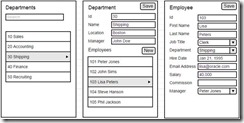
      To illustrate how the above aspects impact the design of the API, we will introduce the sample “human resources” app that we will use throughout this article series. Lets start with the three screen mockups our API should support: Read the complete article here

      SOA & BPM Partner Community

      For regular information on Oracle SOA Suite become a member in the SOA & BPM Partner Community for registration please visit www.oracle.com/goto/emea/soa (OPN account required) If you need support with your account please contact the Oracle Partner Business Center.

      Blog Twitter LinkedIn image[7][2][2][2] Facebook clip_image002[8][4][2][2][2] Wiki

      Using DB Adapter in SOA Suite 12c by Waslley Souza

      clip_image001When you have a BPEL Process, and it needs to perform an operation on a Database Table, for example, insert an employee, you have to use the Database Adapter. The Database Adapter exposes to SOA, tables and SQL transparently and non-intrusively.

      In this post, I will create a BPEL Process to insert employees into Employees table from HR Schema. Best practises, like the use of MDS and Mediator, are not the purpose of this post. Download the sample application: SOADBAdapterApp.zip.

      Create a SOA Application.

      In Step 1, set the Application Name and Application Package Prefix.

      In Step 2, set the Project Name. Read the complete article here.

      SOA & BPM Partner Community

      For regular information on Oracle SOA Suite become a member in the SOA & BPM Partner Community for registration please visit www.oracle.com/goto/emea/soa (OPN account required) If you need support with your account please contact the Oracle Partner Business Center.

      Blog Twitter LinkedIn image[7][2][2][2] Facebook clip_image002[8][4][2][2][2] Wiki

      Integration Adaptors including SAP R/3

      Acelerate Integration with your Cloud, On-Premise and Legacy Applications with Oracle Integration Adapters. clip_image002
      Oracle Integration Adapters provides a critical foundation for the Product, providing a Unified Connectivity Architecture, facilitating integration of information from several on-premise, legacy and cloud based applications and systems into a Service Oriented Architecture.They enables creation of Reusable service assets that publish to and extract information from disparate Cloud and On-Premise Applications such as Oracle E-Business Suite, SAP or Salesforce.com to simple but key technology assets such as FTP Servers or Databases. Oracle Integration Adapters facilitate an Integration and Extension Platform for your Applications.
      Whats New!
      The 12c release of SOA Suite positions the product as the only integration product in the market today that can support all major ongoing technology trends: mobile enablement via major REST & JSON improvements throughout the suite, cloud integration via the new line of cloud adapters and Internet-of-Things with Oracle Event Processing providing the impedance matching layer between devices and enterprise systems. While many vendors may boast similar claims in high-level positioning documents, Oracle goes beyond the hype by delivering tangible features to back up these assertions in SOA Suite 12c.
      Please goto the SOA Suite Product Overview page for more information on this new release.
      The 12c release also delivers exciting new connectivity capabilities including all new Adapters for Cloud and On-premise Integration. These include the all new Enterprise Application Adapters for SAP R/3 and JD Edwards World, and brand new Technology Adapters for integrating with Coherence, MSMQ and LDAP. Note that the new SAP R/3 and JD Edwards World Adapter have a rich and intuitive JDeveloper based design-time and advanced Runtime capabilities. The 12c release will also be the platform for several upcoming Cloud Adapters.  For more details, refer to the following document.

      Accelerate your SAP Integration with the new  Oracle Integration Adapter for SAP R/3

      clip_image004The Oracle Adapter for SAP R/3 provides comprehensive, bi-directional, standards-based, real-time connectivity to SAP R/3 systems. The Adapter supports both JCA and Web Service standards for creation of open and reusable service-oriented applications (SOA). High-speed, low-impact, non-intrusive access to and from SAP exposes the critical business logic and data contained with SAP for reuse: the key to building a successful e-business application or integrated enterprise. This Adapter, newly introduced in 12.1.3 is natively integrated with JDeveloper providing enhanced developer productivity and accelerated time-to-market. Refer to the following documents for more information.

      Read the complete article here.

      SOA & BPM Partner Community

      For regular information on Oracle SOA Suite become a member in the SOA & BPM Partner Community for registration please visit www.oracle.com/goto/emea/soa (OPN account required) If you need support with your account please contact the Oracle Partner Business Center.

      Blog Twitter LinkedIn image[7][2][2][2] Facebook clip_image002[8][4][2][2][2] Wiki