Logging Analytics for OIC by Niall Commiskey

image

With OIC on OCI we get a plethora of monitoring capabilities; we also have the ability to analyse logs and naturally push data to other analytics services such as Oracle Analytics Cloud. all of us are, hopefully, very familiar with the OOTB monitoring features of OIC. This post goes a little deeper to see what’s on offer at OCI level. This post discusses the OIC Metrics available at OCI service level. It also looks at the OCI Logging Analytics service and the value-add it provides. So let’s get going!

The above dashboard is a simple and basic example of what one can do with OIC logs in OCI Logging Analytics service.

There are 2 sources for the data shown above – let’s call them default and custom. Part 2 of my recent post discusses the former. You can check out the post here

So now to Logging Analytics – here is the main menu. Read the complete article here.

PaaS Partner Community

For regular information on Oracle PaaS become a member in the PaaS (Integration & Process) Partner Community please register here.

clip_image003 Blog clip_image005 Twitter clip_image004 LinkedIn image[7][2][2][2] Facebook clip_image002[8][4][2][2][2] Wiki

Technorati Tags: SOA Community,Oracle SOA,Oracle BPM,OPN,Jürgen Kress

Use Oracle Integration to connect E-Business Suite with SOA to Financials Cloud

image

Most deployments of Oracle E-Business Suite are integrated with other commercial or bespoke applications so companies can run their processes with agility. Oracle software-oriented architecture (SOA) Suite is a popular choice to provide integration to EBS for its broad connectivity options and EBS Adapter capabilities.

When you move your applications to the cloud, there are more opportunities to modernize and integrate with other cloud services and SaaS applications. Oracle Integration takes integration and connectivity capabilities beyond yet reusing what is developed and running on SOA Suite.

This architecture presents the end state of moving an EBS instance to OCI along with the integration built with SOA Suite in a secure setup and the components needed to connect Oracle Integration with SOA Suite and EBS. This architecture also shows integration with Oracle Financials Cloud.

Architecture

This architecture shows the deployment of Oracle E-Business Suite in a single availability domain inside a single Oracle Cloud Infrastructure region, along with existing integrations built using Oracle SOA Suite. Oracle Integration connects to SOA using the Integration connectivity agent to provide reuse of integrations built with SOA and connectivity to other SaaS applications and cloud technologies.

The architecture includes two compartments, both of which have Cloud Guard enabled to provide maximum security based on Oracle’s security best practices. In addition, the compartment where the database system and the autonomous database private endpoint are deployed is a security zone compartment.

Each compartment contains a virtual cloud network (VCN), which are connected through a local peering gateway, allowing network traffic between the two. Components are in different subnets and fault domains to provide high availability. The databases are accessed only through the bastion host and the application virtual machines (VMs) are accessed through the load balancers.

The database and the application instances that are deployed in their private subnets on OCI are backed up to OCI Object Storage by using a service gateway. A service gateway provides access to Object Storage without traversing the internet. You can use the automatic and on-demand database backups feature to back up applications and the database.

Use a network address translation (NAT) gateway to enable outbound connection from the application instances in the private subnets to the Internet to download patches and apply operating system and application updates. With a NAT gateway, the hosts in private subnet can initiate connections to the Internet and receive responses, but don’t receive inbound connections initiated from the internet. Read the complete article here

PaaS Partner Community

For regular information on Oracle PaaS become a member in the PaaS (Integration & Process) Partner Community please register here.

clip_image003 Blog clip_image005 Twitter clip_image004 LinkedIn image[7][2][2][2] Facebook clip_image002[8][4][2][2][2] Wiki

Technorati Tags: SOA Community,Oracle SOA,Oracle BPM,OPN,Jürgen Kress

Oracle Integration Cloud (OIC) & octet-stream MIME-type by Amy Simpson-Grange

image

I was recently working on an integration in Oracle Integration Cloud (OIC) which leveraged REST APIs exposed from Oracle HCM. I needed to retrieve details from the REST endpoint in the image below. The overall solution would take this REST response and write the data to an XML file to be consumed by another system.

REST Endpoint

Response headers: Content-Type = application/octet-stream

As you can see in the REST response headers above, the content-type of the response is application/octet-stream. This response type has been supported by the Oracle Integration REST adapter for a couple of years now and is configurable in the trigger request and response allowing the possibility to both invoke REST integrations using binary content and return binary content in a REST response.

What is application/octet-stream MIME attachments?

Effectively, a MIME attachment with the content type “application/octet-stream” is a binary file. Usually, the MIME attachment is an application file or document that may be opened in specific applications. For example, a spreadsheet .xlsx file would open in Microsoft Excel, a .docx file would open in Microsoft Word or an .exe file would indicate a Windows or DOS executable program. However, the application/octet-stream MIME type is used for unknown binary files and is in fact the default binary file. File contents will be preserved in binary but it requires the processor to understand and determine the specific file type (e.g, from a filename extension).

Using application/octet-stream in OIC

This feature can be used by selecting the “Raw” option within the invoke Request/Response page when configuring the REST adapter. Read the complete article here.

PaaS Partner Community

For regular information on Oracle PaaS become a member in the PaaS (Integration & Process) Partner Community please register here.

clip_image003 Blog clip_image005 Twitter clip_image004 LinkedIn image[7][2][2][2] Facebook clip_image002[8][4][2][2][2] Wiki

Technorati Tags: SOA Community,Oracle SOA,Oracle BPM,OPN,Jürgen Kress

Integrate SaaS hands-on Partner Bootcamp Webtraining US & Canada October 5th, 7th & 12th 2021

image

Oracle Product Management is pleased to invite Oracle Partners to attend a 3-days hands-on workshop on how to integrate with ERP & HCM applications using Oracle Integration Cloud. This Invite-Only hands-on workshop will be delivered at No-Fee to Partners. It will consist of presentations, demos, and hands-on labs.

Oracle Integration Cloud (OIC) offers Integration, Process Automation and Visual design capabilities that help business analysts and IT specialists to automate end to end business processes across departments. Oracle Integration Cloud offers a simple recipe to be successful in this application integration and process automation journey: Build, Integrate and Engage.

Schedule:

· US & Canada October 5th, 7th & 12th 2021

· Asia, September 21st, 23rd & 28th 2021

· EMEA October 19th , 21st & 26th 2021

· On-demand training

For additional location please visit our website here (community membership required).

PaaS Partner Community

For regular information on Oracle PaaS become a member in the PaaS (Integration & Process) Partner Community please register here.

clip_image003 Blog clip_image005 Twitter clip_image004 LinkedIn image[7][2][2][2] Facebook clip_image002[8][4][2][2][2] Wiki

Technorati Tags: SOA Community,Oracle SOA,Oracle BPM,OPN,Jürgen Kress

Integrate SaaS hands-on Bootcamps Webtraining Asia, September 21st, 23rd & 28th 2021

image

Oracle Product Management is pleased to invite Oracle Partners to attend a 3-days hands-on workshop on how to integrate with ERP & HCM applications using Oracle Integration Cloud. This Invite-Only hands-on workshop will be delivered at No-Fee to Partners. It will consist of presentations, demos, and hands-on labs.

Oracle Integration Cloud (OIC) offers Integration, Process Automation and Visual design capabilities that help business analysts and IT specialists to automate end to end business processes across departments. Oracle Integration Cloud offers a simple recipe to be successful in this application integration and process automation journey: Build, Integrate and Engage.

Schedule:

· On-demand training

· EMEA October 19th , 21st & 26th 2021

· US & Canada October 5th, 7th & 12th 2021

· Asia, September 21st, 23rd & 28th 2021

· South America, September 8th, 9th & 10th 2021

For additional location please visit our website here (community membership required).

PaaS Partner Community

For regular information on Oracle PaaS become a member in the PaaS (Integration & Process) Partner Community please register here.

clip_image003 Blog clip_image005 Twitter clip_image004 LinkedIn image[7][2][2][2] Facebook clip_image002[8][4][2][2][2] Wiki

Technorati Tags: SOA Community,Oracle SOA,Oracle BPM,OPN,Jürgen Kress
Using REST APIs to manage Connections in OIC by Pranav Davar

image

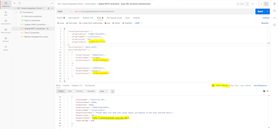
In cases, when we have many connections created on the OIC instance, it becomes hard to manage connections using the OIC console. Also, to achieve automation, manually going and updating each and every connection is never a feasible task. OIC provides various REST APIs to fetch connection details, update connection properties and delete connections. With the help of these APIs, we can overcome such scenarios.

In this blog, we will be discussing how to use various OIC connections REST APIs. A postman collection in the public workspace, which contains some of the use cases for this and can be forked, updated, and used accordingly.

Below are various REST APIs, that are covered in this blog.

  1. Retrieve Connections
  2. Retrieve a Connection
  3. Update a Connection
  4. Test a Connection
  5. Refresh Metadata for a Connection
  6. Delete a Connection

In this blog, we will be using Postman to test and run various APIs. Below is the link to the Postman collection, which will be helpful to try and test different REST APIs.

Authentication for REST APIs

To invoke OIC connections REST APIs, BASIC AUTH can be used to authenticate and authorize calls. The user whose credentials are used to call these APIs must have access to edit the connection.

OAuth can also be used to authenticate to REST APIs. In this blog, we will be using Basic Auth to authenticate/authorize API calls. Read the complete article here.

PaaS Partner Community

For regular information on Oracle PaaS become a member in the PaaS (Integration & Process) Partner Community please register here.

clip_image003 Blog clip_image005 Twitter clip_image004 LinkedIn image[7][2][2][2] Facebook clip_image002[8][4][2][2][2] Wiki

Technorati Tags: SOA Community,Oracle SOA,Oracle BPM,OPN,Jürgen Kress

Improving the performance of Oracle Integration flows that use REST calls by Nick Montoya

image

Oracle Integration connects disparate SaaS and on-premises applications to help businesses move faster. This interaction between Oracle Integration Cloud (OIC) and Oracle SaaS (or on-premise) applications needs to be carefully designed and planned for performance and scalability. Overloaded integration flows may run within acceptable timeframes during design phase. They may even pass User Acceptance Testing especially if testers are just going through functional testing. However, when testing for performance and scalability, problems may arise. It is imperative to design solutions that would meet expected peak volumes at runtime. This blog will provide some helpful pointers that you could use to make your solutions achieve better performance and scalability.

Identify Peak Volume Profile and test downstream systems

When designing an Oracle Integration solution for Performance and Scalability, it is very important to identify the peak-hour and peak-day volume. Knowing how many integrations will be running at peak hour will not only help you size your Production OIC environment accordingly, but also, it will help in the testing of your downstream (from OIC point of view) systems.

Testing of downstream systems with expected volumes early in the implementation cycle will help you validate a scalable implementation and/or identify performance bottlenecks in your design.

If these outbound calls take longer than a few seconds, then there is plenty of design work to do. Longer synchronous calls to outbound systems may cause OIC to wait for these calls to finish and it may block other processes from running in OIC. Therefore, end users may experience longer response times. Read the complete article here.

PaaS Partner Community

For regular information on Oracle PaaS become a member in the PaaS (Integration & Process) Partner Community please register here.

clip_image003 Blog clip_image005 Twitter clip_image004 LinkedIn image[7][2][2][2] Facebook clip_image002[8][4][2][2][2] Wiki

Technorati Tags: SOA Community,Oracle SOA,Oracle BPM,OPN,Jürgen Kress

Connecting securely from Oracle Integration to Autonomous database using network access list by Shreenidhi Raghuram

image

Introduction

Many integration use cases require the use of Autonomous database (ADB) as the parking lot datastore with Oracle Integration.

Oracle Integration provides various options to connect to ADB. The Oracle integration documentation table below summarizes these options.
* Cloud Database Connectivity Support

Options

In summary, 

  • Connecting to ADB dedicated instances (ADB-D) and ADB shared private endpoint DB requires an OIC connectivity agent.
  • Connecting to ADB Shared infrastructure (ADB-S) database uses JDBC over SSL and provides direct connectivity using wallet.

Note that this mode does not require connectivity agent to be deployed. Oracle integration connects using JDBC over SSL directly to the ADB-S public endpoint in this case.

Use case

Certain organizations’ security requirements or use cases may mandate that the database network traffic should only traverse through a private endpoint within a VCN. These use cases undoubtedly will need to use the ADB dedicated or ADB shared private endpoint databases. Oracle integration requires the connectivity agent to be deployed in the ADB VCN for these modes. Read the complete article here.

PaaS Partner Community

For regular information on Oracle PaaS become a member in the PaaS (Integration & Process) Partner Community please register here.

clip_image003 Blog clip_image005 Twitter clip_image004 LinkedIn image[7][2][2][2] Facebook clip_image002[8][4][2][2][2] Wiki

Technorati Tags: SOA Community,Oracle SOA,Oracle BPM,OPN,Jürgen Kress

Oracle Integration Message Packs and Pricing by Ankur Jain

image

Oracle Integration billing depends on the Message Pack you provide while provisioning the Oracle Integration instance. The minimum Message Pack for Oracle Integration is one. The maximum number of Message Pack depends on the License Type you choose while creating the Oracle Integration instance.

Oracle Integration offers two types of licenses you need to choose from and accordingly set the maximum number of message packs. The following figure shows the type of license and max threshold.

Oracle Integration license and max threshold

Pricing is based on the number of Message Pack/hour as shown in the following figure:

Oracle Integration pricing

Refer to the document for the latest pricing. Few pricing examples are given as per the following tables: Read the complete article here.

PaaS Partner Community

For regular information on Oracle PaaS become a member in the PaaS (Integration & Process) Partner Community please register here.

clip_image003 Blog clip_image005 Twitter clip_image004 LinkedIn image[7][2][2][2] Facebook clip_image002[8][4][2][2][2] Wiki

Technorati Tags: SOA Community,Oracle SOA,Oracle BPM,OPN,Jürgen Kress
Oracle HCM Cloud – Payroll Sync with the Oracle Integration Cloud by Daniel Teixeira

image

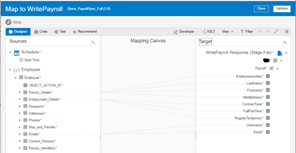
The most common use case I come across with Oracle HCM Cloud is Payroll Integration. Most organizations use 3rd party Payroll providers. Many of those have multiple payroll providers if they operate in multiple countries. This means that there are several different requirements for each of those providers.

With the Oracle Integration Cloud, we can provide and automated framework to manage the Integration with all Payroll providers and with ERP also (the bigger end to end process also touches ERP)

This post will show a sample implementation of this.

Create HCM Extract

First things first – We need to define an HCM Extract. This is the extract that contains all the required data to be sent to the Payroll providers. This is definitely not the job of the integration developer/architect, but we need to have this in place.

There are some options on how to do this:

1: One extract for all payrolls – OIC will do the proper mapping for each payroll.

2: Multiple extracts, one for each payroll – OIC will do minimum mapping. Read the complete article here.

PaaS Partner Community

For regular information on Oracle PaaS become a member in the PaaS (Integration & Process) Partner Community please register here.

clip_image003 Blog clip_image005 Twitter clip_image004 LinkedIn image[7][2][2][2] Facebook clip_image002[8][4][2][2][2] Wiki

Technorati Tags: SOA Community,Oracle SOA,Oracle BPM,OPN,Jürgen Kress