Integration, Process & Insight – Netsuite Data Sync Use Case by Niall Commiskey

image
Introduction

OIC is a toolkit – 4 main tools –
Integration – connect your apps
Process – intelligent human workflows – can be used to extend apps or for your own custom processes.
Insight – analyze what’s going on in Integration and Process, but this from a business user perspective. More details below.
Visual Builder – create net new apps on top of your apis.
For those who haven’t seen Insight before – the OraDocs provide the following succinct description of what it offers. Integration Insight in Oracle Integration provides a business-friendly experience, allowing users to model, collect, and monitor business-level metrics using web-based dashboards. Integration Insight works with business processes that are implemented using the Integrations or Processes features in Oracle Integration. At a high level, Integration Insight provides:
• A web-based interface to:
– Model business processes, including milestones
– Map models to a business processes implementation
– Monitor business progress through dashboards
• Efficient workflow requiring no development effort and minimal impact to runtime.
• Advanced analytics presented in both preconfigured and custom dashboards.

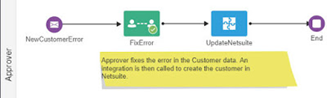
The following example leverages 3 of the OIC tools – Integration, Process and Insight in the context of a Netsuite data synchronisation use case. Please see my previous post here, for details of leveraging Visual Builder on top of Netsuite.

Integration

Let’s begin the with the integration that implements the data sync use case –
Commiskey Inc. uses SFDC for CRM and Netsuite for ERP. The company needs to ensure that customers and contacts are synced between the 2 SaaS apps. Read the complete article here.

PaaS Partner Community

For regular information on Oracle PaaS become a member in the PaaS (Integration & Process) Partner Community please register here.

clip_image003 Blog clip_image005 Twitter clip_image004 LinkedIn image[7][2][2][2] Facebook clip_image002[8][4][2][2][2] Wiki

Technorati Tags: SOA Community,Oracle SOA,Oracle BPM,OPN,Jürgen Kress
Swagger API document from Any WADL & Schema in Oracle SOA by Sandeep Pachauri

image

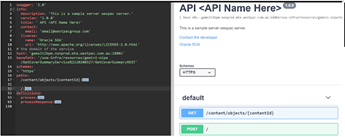
Hope everyone is doing well these days, Recently I started a project work over how to generate swagger API document for your any REST API, In case if you don’t know what is swagger please go and check "https://swagger.io/tools/swagger-editor/". It’s a great and easy to use tool which will help to create user friendly, human readable form API documentation with extension for generating API client in different languages with capability of testing your API from same.

What is swagger editor,

Design, describe, and document your API on the first open source editor fully dedicated to OpenAPI-based APIs. The Swagger Editor is great for quickly getting started with the OpenAPI (formerly known as the Swagger Specification) specification, with support for Swagger 2.0 and OpenAPI 3.0.

What benefits you will get by using swagger,

  • Runs Anywhere, The Editor works in any development environment, be it locally or in the web.
  • Smart Feedback, Validate your syntax for OAS-compliance as you write it with concise feedback and error handling. Read the complete article here.

PaaS Partner Community

For regular information on Oracle PaaS become a member in the PaaS (Integration & Process) Partner Community please register here.

clip_image003 Blog clip_image005 Twitter clip_image004 LinkedIn image[7][2][2][2] Facebook clip_image002[8][4][2][2][2] Wiki

Technorati Tags: SOA Community,Oracle SOA,Oracle BPM,OPN,Jürgen Kress
SOA Suite: SOAP Faults in BPEL and Mediator by Martien van den Akker

imageIn the past few months, at our current customer we are having a "robustness project" to improve our SOA Suite implementation. We had a lot of duplication and it turned out that we had a lot of WSDLs in our composite projects. Many of those are a result of BPEL projects from 10g. But some of them weren’t possible to move because it would break the project.

The first projects where I encountered the problem were projects with Mediators. After moving the WSDLs to MDS, most of our SoapUI/ReadyAPI unit test worked, except for those simulating a SOAP Fault. It seemed that the Mediator could not map the SOAP Fault. I searched "me an accident", we would say in Holland. But without any luck. Actually, I can’t find any documents that talks about catching SOAP Faults in SOASuite. Which is a weird thing, because in BPM Suite, sharing the same soa-infra and process engine, there is a preference for SOAP Faults. Because BPM can react with specific exception transitions on SOAP Faults.

So what is this weird behavior? Well actually, SOA Suite, apparently both BPEL and Mediator, interpret SOAP Faults as Remote Faults! So, in BPEL you can’t catch it as a SOAP Fault and Mediator can’t route it in the correct way. What you would suggest from the UI. However, just now I found a solution. That is, I found it earlier for Mediator, but couldn’t explain it. Since the same behavior can be seen in BPEL as well, I can write down my story. Read the complete article here.

PaaS Partner Community

For regular information on Oracle PaaS become a member in the PaaS (Integration & Process) Partner Community please register here.

clip_image003 Blog clip_image005 Twitter clip_image004 LinkedIn image[7][2][2][2] Facebook clip_image002[8][4][2][2][2] Wiki

Technorati Tags: SOA Community,Oracle SOA,Oracle BPM,OPN,Jürgen Kress

OIC – Monitoring API – Getting Activity Stream data by Niall Commiskey

image

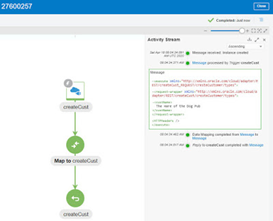
Simple example here – The above integration does little, receives a JSON request and maps that to a JSON response. But it will suffice to show how we can leverage the AI to retrieve activity stream data for an integration flow. Here is the monitoring view – Now to get this data, via the OIC REST API – The api is documented. Read the complete article here.

PaaS Partner Community

For regular information on Oracle PaaS become a member in the PaaS (Integration & Process) Partner Community please register here.

clip_image003 Blog clip_image005 Twitter clip_image004 LinkedIn image[7][2][2][2] Facebook clip_image002[8][4][2][2][2] Wiki

Technorati Tags: SOA Community,Oracle SOA,Oracle BPM,OPN,Jürgen Kress
Token required to provision an Oracle Integration Cloud instance by Ankur Jain

image

I have seen that most of the people are struggling to create an Oracle Integration Cloud instance due to the mandatory token parameter. The token is a mandatory parameter and without this, you can not create an OIC instance.

You may have seen in one of the OIC videos which show how to provision an OIC instance but in this video, the step is missing as while creating this video, this parameter was not required at all. Oracle has introduced this parameter recently which causing people to find out how to get this token.

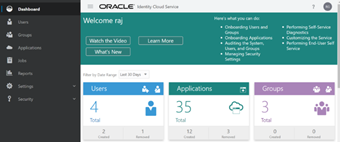
In this article, I will explain all the steps required to generate the token. The token can be extracted from Oracle Identity Cloud Service (IDCS) admin console. Hence you have to navigate to the IDCS console first.

Few links can be helpful

Provisioning the Oracle Integration Cloud (OIC) Instance

Oracle Autonomous Transaction Processing instance provisioning

There are a couple of ways to login to the IDCS admin console.

Login into the IDCS admin console

Solution-1: This is one of the shortest paths to login into the IDCS admin console. Read the complete article here.

PaaS Partner Community

For regular information on Oracle PaaS become a member in the PaaS (Integration & Process) Partner Community please register here.

clip_image003 Blog clip_image005 Twitter clip_image004 LinkedIn image[7][2][2][2] Facebook clip_image002[8][4][2][2][2] Wiki

Technorati Tags: SOA Community,Oracle SOA,Oracle BPM,OPN,Jürgen Kress
B2B – EDI Translation support by Niall Commiskey

image

Another compelling new feature for OIC – EDI X12 support. For those who never heard of X12 – think of it as a set of standard docs allowing companies to do business with each other, e.g. Company A sends an X12 850(Purchase Order) to Company B. You can see the full list of X12 docs here

So nothing like a simple example to illustrate our X12 support. Let’s begin with an Inbound X12 example. In this case, I receive a PO in EDI 850 format. I need to process this and post it to Netsuite, for example. Read the complete article here.

PaaS Partner Community

For regular information on Oracle PaaS become a member in the PaaS (Integration & Process) Partner Community please register here.

clip_image003 Blog clip_image005 Twitter clip_image004 LinkedIn image[7][2][2][2] Facebook clip_image002[8][4][2][2][2] Wiki

Technorati Tags: SOA Community,Oracle SOA,Oracle BPM,OPN,Jürgen Kress

Object Storage with Oracle Integration Cloud – Part 2 by Stan Tanev

image

The first part of this series explored how to setup a connection between Oracle Integration Cloud (OIC) and OCI Object Storage, and how to use Object Storage as a location to write files as part of an integration.

In this blog I will show you how to use Oracle Integration Cloud to consume objects from OCI Object Storage, including listing, reading and deleting those objects. To do this I have prepared an integration which showcases a common integration pattern; consuming a staged file in order to load data into an enterprise system. In this case, the integration will load financial data from Object Storage into Oracle’s ERP Cloud application. Specifically, this integration will:

  1. List Account Payable (AP) Invoice files available on OCI Object Storage
  2. For each source file that it finds in the cloud bucket, it will:
    1. Read & transform the file to the format required by Oracle ERP Cloud
    2. Upload the transformed file to ERP Cloud and trigger the required Import jobs in the application
    3. Delete the now processed file from the OCI Object Storage bucket

If the above flow seems familiar to you this is likely because you have come across requirements to integrate with ERP Cloud before and have used one of the File Based Data Import (FBDI) jobs to load data from a file into the application. Most FBDI import patterns utilize a FTP/SFTP server to host the transient files prior to upload in ERP Cloud. Read the complete article here.

PaaS Partner Community

For regular information on Oracle PaaS become a member in the PaaS (Integration & Process) Partner Community please register here.

clip_image003 Blog clip_image005 Twitter clip_image004 LinkedIn image[7][2][2][2] Facebook clip_image002[8][4][2][2][2] Wiki

Technorati Tags: SOA Community,Oracle SOA,Oracle BPM,OPN,Jürgen Kress
Creating net new apps on top of Netsuite with OIC Visual Builder by Niall Commiskey

image

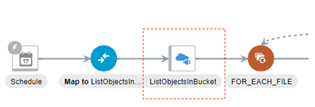
I am probably speaking to the converted here, but for all  those still not aware of the rich functionality OIC provides. OIC is a toolbox containing a set of tools:

1. Integration – to connect apps

2. Process – to extend apps or simply to implement your own custom business workflows

3. Visual Builder – to create net new apps on top of your apis

4. Insight (due soon) – to provide business user dashboards on top of your integrations and processes, e.g. giving HCM professionals insight into an onboarding process – how long it takes, where are the bottlenecks etc.

Today we look at Visual Builder in respect of Netsuite. For those new to VB, just click here for my posts on what it is and how you use it. The scenario today is very simple – allow salespeople to update customer contact data outside of Netsuite, either thru a simple web or mobile app. Read the complete article here.

PaaS Partner Community

For regular information on Oracle PaaS become a member in the PaaS (Integration & Process) Partner Community please register here.

clip_image003 Blog clip_image005 Twitter clip_image004 LinkedIn image[7][2][2][2] Facebook clip_image002[8][4][2][2][2] Wiki

Technorati Tags: SOA Community,Oracle SOA,Oracle BPM,OPN,Jürgen Kress
Netsuite Custom Field Discovery by Sandeep Deshpande

image

Prerequisite

Before using an already existing netsuite connection, refresh metadata needs to be done on it. Make sure the last refresh status is complete for the connection.

This feature exposes custom fields for standard objects as named fields in the mapper and during netsuite endpoint creation for advanced search and saved search operations. This feature applies to all basic(except delete) and search operations of netsuite. And for both sync and async processing modes.

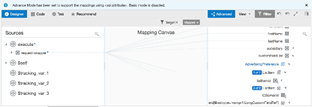
For Basic CRUD operations, the custom fields is exposed on the mapper as a named field. The custom field name is derived from the name given to custom field in netsuite. This makes it easier to map without needing to know the internalId and scriptId of a particular custom field for standard object. For eg, here is the mapping done for netsuite update operation. The image below shows a request mapping from Rest(trigger) to Netsuite Update operation on Customer Standard Object .

You can check that there are two fields that have been mapped for the netsuite update operation. ICSEmailId and AdvertisingPreferences. ICSEmailId is a simple type custom field, no further work is required on the part of the integration developer. Just use it like any other simpletype field. AdvertisingPreferences is a complex type custom field. It correlates to a multiselect custom field in netsuite. For complex type custom fields, listitemId correlates to the internalId of the listItem. For the invoke request to netsuite update operation to succeed, integration developer needs to ensure listItemId value is mapped. For mapping more than one listItem, just repeat the ListItem and do the required mapping. Read the complete article here.

PaaS Partner Community

For regular information on Oracle PaaS become a member in the PaaS (Integration & Process) Partner Community please register here.

clip_image003 Blog clip_image005 Twitter clip_image004 LinkedIn image[7][2][2][2] Facebook clip_image002[8][4][2][2][2] Wiki

Technorati Tags: SOA Community,Oracle SOA,Oracle BPM,OPN,Jürgen Kress
Kafka Adapter for OIC by Daniel Martins Teixeira

image

The Kafka adapter for Oracle Integration Cloud came out earlier this month, and it was one of the most anticipated releases.

So what is Kafka? You can find all about it on https://kafka.apache.org/, but in a nutshell:

Apache Kafka is a distributed streaming platform with three main key capabilities:
  • Publish and subscribe to streams of records.
  • Store streams of records in a fault-tolerant durable way.
  • Process streams of records as they occur.

Kafka is run as a cluster on one or more servers that can span multiple data centres. The Kafka cluster stores streams of records in categories called topics, and each record consists of a key, a value, and a timestamp.

Kafka Adapter Capabilities

The Apache Kafka Adapter enables you to create an integration in Oracle Integration that connects to an Apache Kafka messaging system for the publishing and consumption of messages from a Kafka topic.

These are some of the Apache Kafka Adapter benefits:

  • Consumes messages from a Kafka topic and produces messages to a Kafka topic.
  • Enables you to browse the available metadata using the Adapter Endpoint Configuration Wizard (that is, the topics and partitions to which messages are published and consumed).
  • Supports a consumer group. Read the complete article here.

PaaS Partner Community

For regular information on Oracle PaaS become a member in the PaaS (Integration & Process) Partner Community please register here.

clip_image003 Blog clip_image005 Twitter clip_image004 LinkedIn image[7][2][2][2] Facebook clip_image002[8][4][2][2][2] Wiki

Technorati Tags: SOA Community,Oracle SOA,Oracle BPM,OPN,Jürgen Kress