Integration Bootcamp Virtual Webtraing Europe, Middle East & Africa June 15th-17th 2020

Integrate SaaS Bootcamp Europe 06.2020Oracle Integration Bootcamp Europe, Middle East & Africa June 15th-17th 2020

SaaS solutions like HCM, CX and ERP Cloud need to be integrated and customized. Oracle Integration connects SaaS solutions with out of the box adapters.

Do you want to find out why Gartner named Oracle as a Leader in Magic Quadrant for three years in row? Are you able to innovate quickly in the new digital world? Are you looking for ways to integrate systems and data faster using a modern cloud integration platform? Attend the Oracle Integration Bootcamp, a three days hands-on training for Oracle partners!

Oracle Product Management is pleased to invite Oracle Partners to attend the 3-day hands-on workshop on how to integrate with ERP & HCM applications using Oracle Integration Cloud. This Invite-Only hands-on workshop will be delivered at No-Fee to Partners. It will consist of presentations, demos, and hands-on labs.

Schedule: June 15th-17th 2020

Workshop format:

  • Web based training with presentations, demos, and hands-on labs
  • Attendees will receive training environment login during the workshop

Audience:

  • Oracle SaaS partners who implement ERP, HCM and CX solutions
  • Consultants and Architect with technical background

For additional local training’s please visit the website here.

PaaS Partner Community

For regular information on Oracle PaaS become a member in the PaaS (Integration & Process) Partner Community please register here.

clip_image003 Blog clip_image005 Twitter clip_image004 LinkedIn image[7][2][2][2] Facebook clip_image002[8][4][2][2][2] Wiki

Technorati Tags: SOA Community,Oracle SOA,Oracle BPM,OPN,Jürgen Kress

Integration Designer Pages – Progressive Web App UI Experience by Harish Vinayachandran

image

Pre-requisites

Enable oic.ics.featureflag.spa.designer feature flag to see the new Integration designer pages.

What’s New

New UI is built using Oracle JavaScript Extension Toolkit (Oracle JET) utilizing full benefits of JavaScript, CSS3 and HTML5 design and development principles. This new UI is compliant with latest UX standards and offers consistent user experience across Integration designer pages.

Following are the highlights of the new features and enhancements included in the new UI:

  • Single configuration UI to view and configure dependent resources of an integration.
  • Inline edit of connection resource configuration.
  • Lookup editor enhancements for ease of editing large table sets using paging controls.
  • Single click callout library configuration.
  • Pre-filtered results on resource list page based on logged in username.
  • Enhancements on the resource list page to filter by created and last updated username.
  • Progressive loading of UI contents.
  • Continuous and smooth scrolling of resource list contents.
  • Ease of accessing primary actions on resources list page.

Changes in the top-level menu structure

The top level menu in Suite UI has been restructured to make way for the new UI. When the logged in user has access to designer pages, a click on the ‘Integrations’ menu now opens a sub-menu with links to designer landing pages instead of page re-direction. Click the sub-menu links displays the respective landing page. Read the complete article here.

PaaS Partner Community

For regular information on Oracle PaaS become a member in the PaaS (Integration & Process) Partner Community please register here.

clip_image003 Blog clip_image005 Twitter clip_image004 LinkedIn image[7][2][2][2] Facebook clip_image002[8][4][2][2][2] Wiki

Technorati Tags: SOA Community,Oracle SOA,Oracle BPM,OPN,Jürgen Kress

How to Encrypt/Decrypt Files in OIC by Bipin Kumar

image

Encrypt/Decrypt capabilities in Stage Files

You may have a scenario where the requirement is to retrieve an encrypted file from sFTP server and send that to external REST endpoint in encrypted/unencrypted mode with additional capabilities such as processing in the middle.

Stage File action in Integration canvas supports various file operations (list/read/write/zip/unzip). Existing OIC feature (oic.ics.stagefile.pgp.key.support) enables decrypt option while reading entire file and encrypt option while writing file. This feature is useful to process the file upto 10 MB size and doesn’t support decryption option while doing read file in segments. For more details, see blog: Using Stage File Read/Write operation to encrypt/decrypt files.

This blog explains the new feature(oic.ics.stagefile.firstclass.encrypt-decrypt ) which allows OIC user to encrypt or decrypt file of size up to 1GB.

Prerequisite

Enable following features:

  • oic.suite.settings.certificate  (It will allow user to manage certificate life cycle in OIC)
  • oic.ics.stagefile.firstclass.encrypt-decrypt (It will allow user to Encrypt or Decrypt a large file in stage file). Read the complete article here.

PaaS Partner Community

For regular information on Oracle PaaS become a member in the PaaS (Integration & Process) Partner Community please register here.

clip_image003 Blog clip_image005 Twitter clip_image004 LinkedIn image[7][2][2][2] Facebook clip_image002[8][4][2][2][2] Wiki

Technorati Tags: SOA Community,Oracle SOA,Oracle BPM,OPN,Jürgen Kress
Multiple resources with single REST: Oracle Integration by Ankur Jain

image

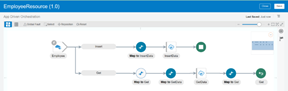
Struggling on how to expose a REST API with multiple resources in Oracle Integration Cloud. Here is the article which will help you to expose such REST APIs.

This feature is restricted with Feature Flag “oic.cloudadapter.adapter.rest.mvrp” which should be enabled on OIC pod before you start implementing the article.

See the article on feature flag.

Let’s gets started and see how to achieve this advance feature.

Use Case
  • Expose a single REST API to perform two operations
    • Insert employee details in DB
    • Get employee details from DB

Once the integration is completed it will look like below

PICK action in OIC

Step by step procedure to achieve the use case
  • Create a App Driven Orchestration integration with name “EmployeeResource
  • Drop the REST connection as a trigger point, provide information as below and click checkbox

PaaS Partner Community

For regular information on Oracle PaaS become a member in the PaaS (Integration & Process) Partner Community please register here.

clip_image003 Blog clip_image005 Twitter clip_image004 LinkedIn image[7][2][2][2] Facebook clip_image002[8][4][2][2][2] Wiki

Technorati Tags: SOA Community,Oracle SOA,Oracle BPM,OPN,Jürgen Kress

Integration Bootcamp Virtual Webtraing India June 1st-3rd 2020

Integrate SaaS Bootcamp India 06.2020Oracle Integration Bootcamp June 1st – 3rd 2020
SaaS solutions like HCM, CX and ERP Cloud need to be integrated and customized. Oracle Integration connects SaaS solutions with out of the box adapters.

Do you want to find out why Gartner named Oracle as a Leader in Magic Quadrant for three years in row? Are you able to innovate quickly in the new digital world? Are you looking for ways to integrate systems and data faster using a modern cloud integration platform? Attend the Oracle Integration Bootcamp, a three days hands-on training for Oracle partners!

Oracle Product Management is pleased to invite Oracle Partners to attend the 3-day hands-on workshop on how to integrate with ERP & HCM applications using Oracle Integration Cloud. This Invite-Only hands-on workshop will be delivered at No-Fee to Partners. It will consist of presentations, demos, and hands-on labs.

Schedule: June 1st – 3rd 2020

Workshop format:

  • Web based training with presentations, demos, and hands-on labs
  • Attendees will receive training environment login during the workshop

Audience:

  • Oracle SaaS partners who implement ERP, HCM and CX solutions
  • Consultants and Architect with technical background

For additional local training’s please visit the website here.

PaaS Partner Community

For regular information on Oracle PaaS become a member in the PaaS (Integration & Process) Partner Community please register here.

clip_image003 Blog clip_image005 Twitter clip_image004 LinkedIn image[7][2][2][2] Facebook clip_image002[8][4][2][2][2] Wiki

Technorati Tags: SOA Community,Oracle SOA,Oracle BPM,OPN,Jürgen Kress

OIC Integration: defining and using constants by Jan Kettenis

image

Oracle Integration Cloud does not have native support for constants, but it is easy to set this up. This post discusses how. For integrations there are two ways to define constants in the Oracle Integration Cloud:

  • Lookups
  • Variables

Lookups are initially meant to support mapping of values from one domain to another. For example, one domain has country code using two letters ("NL") whereas another domain uses three letters ("NLD"). The lookup can then be used to "translate" the value from one to the other ("NL" <-> "NLD"). The same feature can also be used to support configurable constants by providing a list of name-value pairs. For example, in the following SMColor lookup two different name-value pairs have been stored, "YELLOW" with value "yellow", and "BLUE" with value "blue":
In an integration you can use this lookup to get the value by name using an XPath lookup function. As I will show hereafter, there are two different XPath expressions, each being used in a different context.
Variables are set in an Integration using the Assign activity. You can define a variable with a specific name and a value. You can also use a combination of the two. In the following example you see the variable "red" being defined with value "red" and the variable "blue" is initiated using an XPath expression that on its turn gets the value from the lookup name-value pair with name "BLUE": Read the complete article here.

PaaS Partner Community

For regular information on Oracle PaaS become a member in the PaaS (Integration & Process) Partner Community please register here.

clip_image003 Blog clip_image005 Twitter clip_image004 LinkedIn image[7][2][2][2] Facebook clip_image002[8][4][2][2][2] Wiki

Technorati Tags: SOA Community,Oracle SOA,Oracle BPM,OPN,Jürgen Kress

SaaS Business Event Integration using Oracle ERP Adapter and Engagement Cloud Adapter in OIC–Webcast May 20th 2020

Rimageegister for this Webcast on May 20th 2020

This one-hour advisor webcast is recommended for technical users wanting to learn how to integrate Oracle ERP Cloud and Oracle Engagement Cloud) with other external applications using Business Event subscriptions using Oracle Integration Cloud.
Topics:
* Introduction: What is Business Event Integration
* Workflow for Configuring Business Event Integration
* Other Configuration Considerations
* Troubleshooting References
* Q&A

For details please visit the registration page here.

PaaS Partner Community

For regular information on Oracle PaaS become a member in the PaaS (Integration & Process) Partner Community please register here.

clip_image003 Blog clip_image005 Twitter clip_image004 LinkedIn image[7][2][2][2] Facebook clip_image002[8][4][2][2][2] Wiki

Technorati Tags: SOA Community,Oracle SOA,Oracle BPM,OPN,Jürgen Kress

Oracle Integration Cloud Service Lookups by Ankur Jain

image

Oracle Integration Cloud Service lookup associates values used by one application for a specific field to the values used by other applications for the same field. This provides the capability to map values across vocabularies or systems. For example, you can map country codes, city codes, currency codes, and so on.

In this short video, we are going to demonstrate as below:

  • Creating a Lookup
  • Adding Adapters or Domain Names to a Lookup
  • Cloning a Lookup
  • Deleting a Lookup
  • Export & Import Lookup
  • Updating Lookups in Active Integrations
  • Read the complete article here.

PaaS Partner Community

For regular information on Oracle PaaS become a member in the PaaS (Integration & Process) Partner Community please register here.

clip_image003 Blog clip_image005 Twitter clip_image004 LinkedIn image[7][2][2][2] Facebook clip_image002[8][4][2][2][2] Wiki

Technorati Tags: SOA Community,Oracle SOA,Oracle BPM,OPN,Jürgen Kress

Integration Patterns – Publish/Subscribe (Part2) by Daniel Martins Teixeira

image

In my previous blog post, I explained the integration pattern publish/subscribe, and how easy it is to make use of its power with Oracle Integration Cloud – all without the need to setup a messaging infrastructure.

The previous post covered the required steps to create the connection, the integration and the trigger (using Postman) to publish a message.

This second part will explain step-by-step how to consume those messages.

1. Create an Integration.

We will select the Type Subscribe To OIC.

Provide a name a description and optionally associate this integration with a package. Read the complete article here.

PaaS Partner Community

For regular information on Oracle PaaS become a member in the PaaS (Integration & Process) Partner Community please register here.

clip_image003 Blog clip_image005 Twitter clip_image004 LinkedIn image[7][2][2][2] Facebook clip_image002[8][4][2][2][2] Wiki

Technorati Tags: SOA Community,Oracle SOA,Oracle BPM,OPN,Jürgen Kress

Send Notification with attachment in Oracle Integration Cloud by Ankur Jain

image

In this article, we are going to showcase how to send Notification with attachment in Oracle Integration Cloud(OIC). This is new feature provided by Oracle and as of now it is controlled by feature flag. In order to use this feature, you have to raise a Service Request with Oracle to enable the feature flag “oic.ics.console.notification-attachment” into the OIC POD.
Once it is enabled, you can use notification activity to send notification along with attachments.

Let’s go ahead and see how to achieve this use case.

  • Create an App Driven Orchestration in OIC and give a name as “SendAttachment”
  • Drop the REST adapter as a trigger point and provide details as below:
    • What do you want to call your endpoint?: SendAttachment
    • What’s is the endpoint’s relative resource URI?: /attachment
    • What action do you want to perform on this endpoint: POST
    • Select Configure a request payload for this endpoint checkbox
    • Select Configure this endpoint to receive the response checkbox
    • Read the complete article here.

PaaS Partner Community

For regular information on Oracle PaaS become a member in the PaaS (Integration & Process) Partner Community please register here.

clip_image003 Blog clip_image005 Twitter clip_image004 LinkedIn image[7][2][2][2] Facebook clip_image002[8][4][2][2][2] Wiki

Technorati Tags: SOA Community,Oracle SOA,Oracle BPM,OPN,Jürgen Kress