Notifications from Oracle API Platform Cloud Service by Phil Wilkins

image

There are circumstances in which notifications from the Oracle API Platform CS could be seen as desirable.  For example, if you wish to ensure that the developers are defining good APIs and not accidentally implementing APIs that hit the OWASP Top 10 for APIs. Then you will probably configure things such that developer users can design the APIs, configure the policies, but only request an API to be deployed.

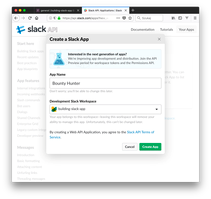
However, presently notifications through mechanisms such as email or via collaboration platforms such as Slack aren’t available.  But implementing a solution isn’t difficult.  For the rest of this blog we’ll explore how this might be implemented, complete with a Slack implementation.

The execution of any such activity effectively needs to follow the basic pattern of …

  1. detect the condition requiring a notification, such as a deployment request,
  2. gather the information so we can provide a meaningful request, for example, the API name being requested. Read the complete article here.

PaaS Partner Community

For regular information on Oracle PaaS become a member in the PaaS (Integration & Process) Partner Community please register here.

clip_image003 Blog clip_image005 Twitter clip_image004 LinkedIn image[7][2][2][2] Facebook clip_image002[8][4][2][2][2] Wiki

Technorati Tags: SOA Community,Oracle SOA,Oracle BPM,OPN,Jürgen Kress

Top tweets PaaS Partner Community April 2020

imageApril top tweets by PaaSCommunity

Send your tweets @soacommunity #PaaSCommunity and follow us at http://twitter.com/soacommunity. Make sure you share your content with the community!

PaaS Partner Community

For regular information on Oracle PaaS become a member in the PaaS (Integration & Process) Partner Community please register here.

clip_image003 Blog clip_image005 Twitter clip_image004 LinkedIn image[7][2][2][2] Facebook clip_image002[8][4][2][2][2] Wiki

Technorati Tags: SOA Community,Oracle SOA,Oracle BPM,OPN,Jürgen Kress, Twitter

API Management for Cloud Native Development by Robert Wunderlich

image

We’re pleased to announce the Limited Availability (LA) release of the Oracle Cloud Infrastructure API Gateway service.

This service is a highly available, fully managed gateway that enables developers to create governed HTTP/S interfaces for other Oracle Cloud Infrastructure services, including Oracle Functions, Container Engine for Kubernetes, and Compute.

The API Gateway service supports the delivery of APIs declaratively, as specified in the Cloud Native Computing Foundation’s definition of cloud native. In addition, this service provides support for the API Gateway pattern in a microservices context.

Cloud Native API Management Platform

The API Gateway service provides the following features:

  • HTTPS endpoint for Oracle Functions, which lets you write Oracle Functions and provide access to your users via RESTful API
  • RESTful APIs for any other HTTPS backends that you develop on Oracle Cloud Infrastructure
  • Resource server for AuthN/AuthZ that leverages functions to use any authorization server
  • Rate-limiting to protect your backends from spikes in volume
  • Interface filtering to protect your backends from unintended requests
  • Logging for monitoring your services by using Oracle Cloud Infrastructure common logging features

Common Use Cases

You can use the API Gateway service to address these common use cases:

  • Expose Oracle Functions as APIs: Applications built on Oracle Cloud Infrastructure and distributed applications on other clouds can access your Oracle Functions via RESTful APIs served by API Gateway. Using the gateway, you can provide an OAuth2 authenticated RESTful API for an Oracle Function. Read the complete article here.

PaaS Partner Community

For regular information on Oracle PaaS become a member in the PaaS (Integration & Process) Partner Community please register here.

clip_image003 Blog clip_image005 Twitter clip_image004 LinkedIn image[7][2][2][2] Facebook clip_image002[8][4][2][2][2] Wiki

Technorati Tags: SOA Community,Oracle SOA,Oracle BPM,OPN,Jürgen Kress

Simplified OAuth Config for Oracle Integration Cloud REST API using Postman! By Manish Kumar Gupta

image

This blog will be discussing very specific use case requirement which is more developer oriented and providing a quicker and efficient solution to invoke Oracle Integration REST API using OAuth access_token for testing purpose.

As an integration developer time to time you need to invoke Oracle Integration REST API to test API functionality. All the REST API in OIC needs a header parameter called “Authorization” which must needs to hold a valid access_token value in this format “Bearer access_token“.

In above format, “Bearer” is static world, However, access_token is the token value which we get after successfully OAuth Authentication from Oracle Identity Cloud Service.  Getting access_token from IDCS using code credentials flow is multi steps and cumbersome process.

However, developer can leverage Postman environment and variable features to simplify the process of getting access_token. That’s what, I will be covering in this blog.

Before I proceed further, I must redirect you to read my colleague blog which has greater in-depth explanation about what is IDCS, how IDCS govern security aspect of all Oracle PaaS products such as Oracle Integration Cloud, Analytics Cloud, Digital Assistant and so on and OAuth client and token generation process etc. I am recommending you to read his blog because I will be using few artefacts e.g. IDCS URL, Client ID, Client Secret etc which we need to get from IDCS OAuth Client Application as per the process given in his blog. Read the complete article here.

PaaS Partner Community

For regular information on Oracle PaaS become a member in the PaaS (Integration & Process) Partner Community please register here.

clip_image003 Blog clip_image005 Twitter clip_image004 LinkedIn image[7][2][2][2] Facebook clip_image002[8][4][2][2][2] Wiki

Technorati Tags: SOA Community,Oracle SOA,Oracle BPM,OPN,Jürgen Kress

Oracle Integration Cloud REST Adapter capabilities by Ankur Jain

image

Oracle Integration Cloud REST Adapter video will help you to understand about REST Adapter capabilities and limitations. This post might be interested for all who is just jumping into the Oracle Integration Cloud and want to understand how REST adapter works and how to create REST connection with the help of REST adapter in OIC. Here is the video for you which will help you to understand REST adapter in OIC. Read the complete article here.

PaaS Partner Community

For regular information on Oracle PaaS become a member in the PaaS (Integration & Process) Partner Community please register here.

clip_image003 Blog clip_image005 Twitter clip_image004 LinkedIn image[7][2][2][2] Facebook clip_image002[8][4][2][2][2] Wiki

Technorati Tags: SOA Community,Oracle SOA,Oracle BPM,OPN,Jürgen Kress

Using the next generation Activity Stream by Mamta Sangwan

image

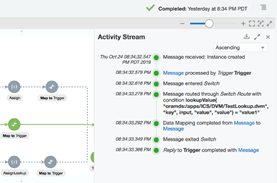
For debugging an instance or check payload in an instance, user had to use Audit Trail and Tracing on Tracking details screen. Since the information was scattered at two places, user had to keep switching between them to get the complete picture of the Instance. With this new Activity Stream, we are clubbing Audit Trail with Tracing information and showing more compact and easily readable Activity Stream.

Prerequisite for Activity Stream

  1. Enable feature flag: 

oic.ics.console.monitoring.tracking.improved-activity-stream

  1. The minimum Oracle Integration version required for the feature is 191030.0200.32180

Step By Step Guide to View Activity Stream

  1. Enable Tracing (with payload if required) for the integration. This is to view detailed payload information during development cycle. For production, it is recommended to keep Tracing turned off.
  2. Run the integration to create an instance.
  3. Navigate to Monitoring → Tracking page and check for the instance user wants to view Activity Stream. Read the complete article here.

PaaS Partner Community

For regular information on Oracle PaaS become a member in the PaaS (Integration & Process) Partner Community please register here.

clip_image003 Blog clip_image005 Twitter clip_image004 LinkedIn image[7][2][2][2] Facebook clip_image002[8][4][2][2][2] Wiki

Technorati Tags: SOA Community,Oracle SOA,Oracle BPM,OPN,Jürgen Kress

OIC – CPQ Integration part II by Niall Commiskey

image

Before looking more deeply at how one integrates with CPQ, let’s look at the product itself –

CPQ in 5 minutes…

CPQ has its own scripting tool – BML –

BML (BigMachines Extensible Language) is a scripting tool that is used to capture a company’s complex business logic within CPQ Cloud Configuration and Commerce. More in-depth info in the CPQ eBook here

In a nutshell – Oracle CPQ Cloud enables both enterprise and midsize companies to streamline the entire opportunity-to-quote-to-order process, including product selection, configuration, pricing, quoting, ordering, and approval workflows.

1. Configure -Create valid product configurations with user-friendly, dynamic interfaces – whether your customer needs simple bundles or more complex “engineered-to-order” scenarios. Read the complete article here.

PaaS Partner Community

For regular information on Oracle PaaS become a member in the PaaS (Integration & Process) Partner Community please register here.

clip_image003 Blog clip_image005 Twitter clip_image004 LinkedIn image[7][2][2][2] Facebook clip_image002[8][4][2][2][2] Wiki

Technorati Tags: SOA Community,Oracle SOA,Oracle BPM,OPN,Jürgen Kress

OIC – CPQ Integration by Niall Commiskey

imageHere is a short introduction to the OIC CPQ adapter. As a pre-requisite, I suggest you read the Oracle CPQ Cloud – Service descriptions It is available here
Now back to the OIC CPQ adapter – A short introduction from the adapter docs – available here
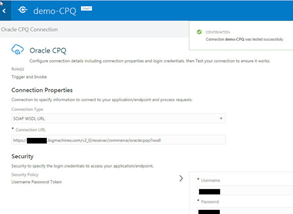
The Oracle Configure, Price, and Quote (CPQ) Cloud Adapter enables you to create an integration with an Oracle CPQ application. The Oracle CPQ Cloud Adapter enables you to convert sales opportunities into revenue by automating the quoting and sales order process with guided selling, dynamic pricing, and a workflow approval process. Oracle CPQ cloud extends sales automation to include the creation of an optimal quote, which enables sales personnel to configure and price complex products; select the best options, promotions, and deal terms; and include upsell and renewals, all using automated workflows.

The main use case for Oracle CPQ Cloud is as the trigger (source) in an integration in
which Oracle Sales Cloud is the invoke (target). This adapter replicates the point-to-point
integration that exists today between Oracle CPQ Cloud and Oracle Sales Cloud. Read the complete article here.

PaaS Partner Community

For regular information on Oracle PaaS become a member in the PaaS (Integration & Process) Partner Community please register here.

clip_image003 Blog clip_image005 Twitter clip_image004 LinkedIn image[7][2][2][2] Facebook clip_image002[8][4][2][2][2] Wiki

Technorati Tags: SOA Community,Oracle SOA,Oracle BPM,OPN,Jürgen Kress

Oracle Integration Cloud Navigation Walkthrough by Ankur Jain

image

Oracle Integration Cloud Navigation Walkthough video will help you to understand the different screen provided by OIC. This post might be interested for all who is just jumping into the Oracle Integration Cloud and struggling to learn Oracle Integration Cloud. When you start OIC, you will see lots of screen which might difficult for you to understand initially. Here is the video for you which will help you to understand each and every screen in OIC. Read the complete article here.

PaaS Partner Community

For regular information on Oracle PaaS become a member in the PaaS (Integration & Process) Partner Community please register here.

clip_image003 Blog clip_image005 Twitter clip_image004 LinkedIn image[7][2][2][2] Facebook clip_image002[8][4][2][2][2] Wiki

Technorati Tags: SOA Community,Oracle SOA,Oracle BPM,OPN,Jürgen Kress

OIC SOA Suite Adapter available as feature flag by Niall Commiskey

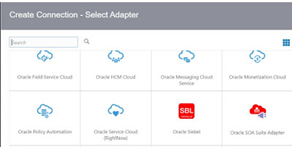
imageThe feature flag is called – oic.cloudadapter.adapters.soaadapter This can be activated on your OIC environment via an SR. Example to follow. Just downloading the latest and greatest SOA Suite version 12.2.1.4. from here. That was quick – SOA Suite Quick Start downloaded and configured/started within 30 minutes. Read the complete article here.

PaaS Partner Community

For regular information on Oracle PaaS become a member in the PaaS (Integration & Process) Partner Community please register here.

clip_image003 Blog clip_image005 Twitter clip_image004 LinkedIn image[7][2][2][2] Facebook clip_image002[8][4][2][2][2] Wiki

Technorati Tags: SOA Community,Oracle SOA,Oracle BPM,OPN,Jürgen Kress