What’s New in Oracle IoT Asset Monitoring by: Harish Gaur

image

At Oracle IoT Cloud, we pride ourselves on delivering product innovations at a fast pace. In fact, we release new capabilities monthly.  Here’s what’s been developed in Oracle IoT Asset Monitoring Cloud over the past 3 months (Q4 of Oracle FY18). We’ve added features across three key innovation vectors.

1. Digital Thread
IoT Apps enable frictionless hand-off of data across different stages of the supply chain — beginning with design & production and including transportation and field use.

We have also integrated IoT Apps with Oracle Engagement Cloud. Why is this important? Engagement Cloud provides a seamless service management interface that allows organizations to capture and track service requests, collaborate between sales and service, and follow-up with customers efficiently.  Customers electronically monitor connected assets for potential faults and issues and automatically create a service request in Engagement Cloud for proactive follow up by customer service teams. A dispatched agent is then able to review diagnostic data from the device directly from the service request page. This integration is two way, so when the service request is closed, the IoT Asset Monitoring Cloud will know about it immediately.

Integrations with Service Cloud, Maintenance Cloud, Application Builder Cloud Service have been released in the past.

2. Digital Twin
Digital Twinning can provide exceptional value to enterprises. By acting as proxy to the physical (& capital-intensive) equipment, digital twins offer complete insight into equipment performance.

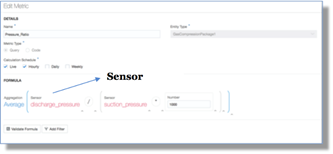
  • Customers can now choose what sensor data they wish to visualize from a connected asset. The attributes that are chosen, from the ones available in the device model, are made available for the assets in Oracle IoT Asset Monitoring Cloud. Sensor data could either be coming from a connected physical asset or from its digital twin
  • Oracle IoT Asset Monitoring Cloud Service now integrates with third-party map provider HERE maps. Read the complete article here.


PaaS Partner Community

For regular information on Oracle PaaS become a member in the SOA & BPM Partner Community for registration please visit www.oracle.com/goto/emea/soa (OPN account required) If you need support with your account please contact the Oracle Partner Business Center.

clip_image003 Blog clip_image005 Twitter clip_image004 LinkedIn image[7][2][2][2] Facebook clip_image002[8][4][2][2][2] Wiki

Technorati Tags: SOA Community,Oracle SOA,Oracle BPM,OPN,Jürgen Kress

Oracle AI Platform is Open Source and is supported by various data science and machine learning libraries that are a part of the Python ecosystem by Leon Smiers

image

Oracle’s Platform as a Service (PaaS) will now feature artificial intelligence (AI) capabilities. This platform provides fast and easy access to machine learning and data science capabilities from the cloud. As Oracle is embracing Open Source in this AI Cloud it brings together the power of the scientific and data science community and the strength of Oracle with all its integration capabilities.

This blog post is the first of a series in which we will look into different aspects of this upcoming Oracle AI Cloud. Although Oracle never provides promise dates, delivery will likely either be linked to a major event, or come as a surprise. Either way, we can already deduce quite a bit about the new offering from the short description on the Oracle PaaS Cloud website.

Open Source

The basis for the Oracle AI Platform is Open Source, supported by various data science and machine learning libraries that are part of the Python ecosystem. Oracle benefits here from all the work that is already done by the scientific and data science communities, as many of the libraries with complex functionality are already available. Oracle included the most prominent of these AI and machine learning capabilities into three areas:

  • Libraries and Tool, containing the Python libraries that are crucial for complex operations on large data sets
  • Deep learning Frameworks, with Tensorflow / Keras originating from Google supporting neural networks for deep analysis of data
  • Elastic AI and machine learning Infrastructure underpins the platform with a rich set of high performance components

Oracle rightly chose to reuse what is already available in the market with regards to AI and machine learning and combine that with its own strong integration capabilities. This platform delivers the capabilities to extend and improve existing cloud and on-premises applications based on data and usage figures. Three use cases demonstrate these capabilities: Read the complete article here.


PaaS Partner Community

For regular information on Oracle PaaS become a member in the SOA & BPM Partner Community for registration please visit www.oracle.com/goto/emea/soa (OPN account required) If you need support with your account please contact the Oracle Partner Business Center.

clip_image003 Blog clip_image005 Twitter clip_image004 LinkedIn image[7][2][2][2] Facebook clip_image002[8][4][2][2][2] Wiki

Technorati Tags: SOA Community,Oracle SOA,Oracle BPM,OPN,Jürgen Kress
OIC –> Process REST API by Niall Commiskey

image

Some simple examples of leveraging the API here

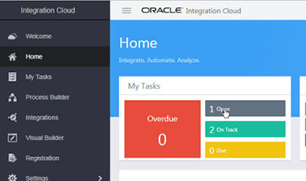
I am doing this to familiarize myself with things, before trying out Visual Builder CS integration with process. Here is a process instance in OIC –

Now to the REST API –

1.GET /ic/api/process/v1/processes
Retrieves process instance list.

Read the complete article here.

PaaS Partner Community

For regular information on Oracle PaaS become a member in the SOA & BPM Partner Community for registration please visit www.oracle.com/goto/emea/soa (OPN account required) If you need support with your account please contact the Oracle Partner Business Center.

clip_image003 Blog clip_image005 Twitter clip_image004 LinkedIn image[7][2][2][2] Facebook clip_image002[8][4][2][2][2] Wiki

Technorati Tags: SOA Community,Oracle SOA,Oracle BPM,OPN,Jürgen Kress

Some Tips for Working with Visual Builder UI Components in Oracle Integration Cloud by Siming Mu

image

Introduction

Oracle Integration Cloud Service (OIC) has now bundled several formally independent PAAS services into a single cloud service. One of these bundled services is Visual Builder (formerly VBCS). The 18.2.5 release of Visual Builder in OIC is more user friendly than prior releases. For example, in 18.2.5, users are not forced to write Javascript code to create a custom data type, and data mapping can be done with drag and drop. This release of Visual Builder also includes enhancements for Process application integration. While creating some test cases to demonstrate Process integration in Visual Builder, I encountered a few issues in working with some UI components. I would like to use this post to share some tips and work-arounds for these issues that might be helpful to other OIC developers working with Visual Builder.

Action Chain can be defined at application, flow and page level

Action chains can be defined at all three levels – application, flow, and page.  The chains defined at parent level can be used by the chains at sibling or child levels. The following pictures show action chains created at application, flow and page level respectively.

The following picture shows a page action chain that uses a Call Action Chain action to call a chain defined at flow level (parent) and application level (root level).

Leveraging this feature, we can define chains once at a higher level and share them with all child flows and pages. In this example, we created three common action chains at the application level. They perform navigation functions to previous page, to another flow, and to another page in a flow. These functions are frequently used in all parts of a web application.

Navigation to another flow

One way in Visual Builder to navigate to another page is by using a Navigate action in action chains. Once added to a chain, the Navigate action allows you to select a target to navigate to (see the picture below). Read the complete article here.


PaaS Partner Community

For regular information on Oracle PaaS become a member in the SOA & BPM Partner Community for registration please visit www.oracle.com/goto/emea/soa (OPN account required) If you need support with your account please contact the Oracle Partner Business Center.

clip_image003 Blog clip_image005 Twitter clip_image004 LinkedIn image[7][2][2][2] Facebook clip_image002[8][4][2][2][2] Wiki

Technorati Tags: SOA Community,Oracle SOA,Oracle BPM,OPN,Jürgen Kress
Migration from Oracle BPM to Oracle Autonomous Integration Cloud – Streamlining Process Automation in the Cloud by Andre Boaventura

image

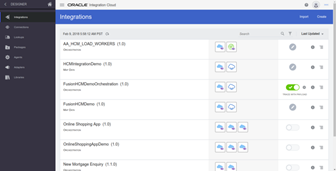
In my last blog post Migrating your Oracle BPM assets into Oracle Process Cloud Service (PCS), I have described and demonstrated how to migrate modeling assets (essentially BPMN models) by leveraging the conversion framework that you can find at my repository at GitHub.

As stated on the blog post above, the major use case was to demonstrate how customers using Oracle BPM Composer for modeling purposes *ONLY* could streamline their migration process from Oracle BPM into PCS. Also, as declared earlier, I have seen many customers that are using BPM for documentation purposes only, but at the other end, and as you might be likely asking yourself, there are many others that have already developed many projects and processes on top of the Oracle BPM not only for documentation purposes, but indeed for process automation, and obviously want to move them to the respective cloud version of Oracle BPM (aka PCS), given all the very known benefits of cloud adoption such as lower costs, greater agility, improved responsiveness and better resource utilization among other technical and business drivers.

Thus, with Process Automation in mind, asset migration from Oracle BPM to PCS becomes an even more serious matter, but the good news is that this is really possible.

As the major goal of my posts is to share experiences that I have seen with customers I have worked in the field, the following technique you will find below obviously could not avoid the rule. This exercise came as a challenge from a specific customer that was running in production all their processes on Oracle BPM for process automation purposes, so this means it also can be applied to many others since there is an increasing demand for this sort of migration given the high number of customers relying on Oracle BPM for process automation, and which at the same time, want to bring their processes to the Cloud as well. Look at the video below for a quick introduction about the Oracle BPM Path to the Cloud. Read the complete article here.


PaaS Partner Community

For regular information on Oracle PaaS become a member in the SOA & BPM Partner Community for registration please visit www.oracle.com/goto/emea/soa (OPN account required) If you need support with your account please contact the Oracle Partner Business Center.

clip_image003 Blog clip_image005 Twitter clip_image004 LinkedIn image[7][2][2][2] Facebook clip_image002[8][4][2][2][2] Wiki

Technorati Tags: SOA Community,Oracle SOA,Oracle BPM,OPN,Jürgen Kress

Jarvis Pizzeria: Custom Reports & Dashboards by Richard Olrichs & Marcel van de Glind & Marc Kuijpers

image

In our previous blog we showed the out of the box functionality of Dashboard & Reporting. Next to the default dashboards, you can also create your own custom dashboards. However, before we can create dashboards on this, we need to set up some indicators within our application. In the composer we have to go to the tab Indicators.

There are three types of indicators that you can create here:

  • A Dimension represents the grouping on the X axis,
  • A Measure will be the value of the Y Axis.
  • An Attribute, in turn, will act as a filter.

You can define customer indicators that you can bind to any data objects available in your process. They will become available for reporting alongside with the default system indicators.On the Indicators tab, we can create new indicators. Read the complete article here.

PaaS Partner Community

For regular information on Oracle PaaS become a member in the SOA & BPM Partner Community for registration please visit www.oracle.com/goto/emea/soa (OPN account required) If you need support with your account please contact the Oracle Partner Business Center.

clip_image003 Blog clip_image005 Twitter clip_image004 LinkedIn image[7][2][2][2] Facebook clip_image002[8][4][2][2][2] Wiki

Technorati Tags: SOA Community,Oracle SOA,Oracle BPM,OPN,Jürgen Kress
Case Management and the Microprocess Architecture by Jan Kettenis

image 

In this article I introduce the concept of the Microprocesses Architecture which addresses some important limitations of traditional monolith Case Management applications.
This article has been updated on 2018-05-21 to correct a link to a previous blog article.
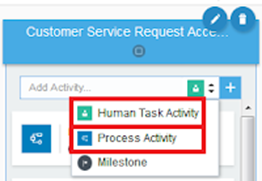
In the Oracle Integration Cloud a Case Management application consists of at least one Dynamic Process that on its turn consists of Case Activities. A Case Activity is implemented by a (structured) Process, or a Human Task. The unit of deployment is an Application, which consists of one or more Dynamic Processes plus the implementations of the activities (Processes, Human Tasks), and may also include a couple of Forms (plus some more).
The same application can have multiple revisions (versions) deployed at the same time, each having its own Revision Id. There can only be one default revision. It is important to realize that once an instance of a case is started, it stays running in the same revision. In contrast to the (on-premise) Oracle BPM Suite there (currently) is no way to move, or migrate as it is called, the instance from one revision to another. That holds for Dynamic Process as well as the implementation of its activities. Read the complete article here.

PaaS Partner Community

For regular information on Oracle PaaS become a member in the SOA & BPM Partner Community for registration please visit www.oracle.com/goto/emea/soa (OPN account required) If you need support with your account please contact the Oracle Partner Business Center.

clip_image003 Blog clip_image005 Twitter clip_image004 LinkedIn image[7][2][2][2] Facebook clip_image002[8][4][2][2][2] Wiki

Technorati Tags: SOA Community,Oracle SOA,Oracle BPM,OPN,Jürgen Kress
Oracle Service Bus 12.2.1.1.0: Service Exploring via WebLogic Server MBeans with JMX by Marc Lameriks

image

In a previous article I talked about an OSBServiceExplorer tool to explore the services (proxy and business) within the OSB via WebLogic Server MBeans with JMX. The code mentioned in that article was based on Oracle Service Bus 11.1.1.7 (11g).

In the meantime the OSB world has changed (for example now we can use pipelines) and it was time for me to pick up the old code and get it working within Oracle Service Bus 12.2.1.1.0 (12c).

This article will explain how the OSBServiceExplorer tool uses WebLogic Server MBeans with JMX in an 12c environment.

Unfortunately, getting the java code to work in 12c wasn’t as straightforward as I hoped.

For more details on the OSB, WebLogic Server MBeans and JMX subject, I kindly refer you to my previous article. In this article I will refer to it as my previous MBeans 11g article.]

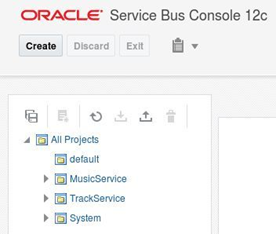
Before using the OSBServiceExplorer tool in an 12c environment, I first created two OSB Projects (MusicService and TrackService) with pipelines, proxy and business services. I used Oracle JDeveloper 12c (12.2.1.1.0) for this (from within a VirtualBox appliance).

For the latest version of Oracle Service Bus see:

If you want to use a VirtualBox appliance, have a look at for example: Pre-built Virtual Machine for SOA Suite 12.2.1.3.0
After deploying the OSB Projects that were created in JDeveloper, to the WebLogic server, the Oracle Service Bus Console 12c (in my case: http://localhost:7101/servicebus) looks like:

Before we dive into the OSBServiceExplorer tool , first I give you some detail information of the “TrackService” (from JDeveloper), that will be used as an example in this article. Read the complete article here.


PaaS Partner Community

For regular information on Oracle PaaS become a member in the SOA & BPM Partner Community for registration please visit www.oracle.com/goto/emea/soa (OPN account required) If you need support with your account please contact the Oracle Partner Business Center.

clip_image003 Blog clip_image005 Twitter clip_image004 LinkedIn image[7][2][2][2] Facebook clip_image002[8][4][2][2][2] Wiki

Technorati Tags: SOA Community,Oracle SOA,Oracle BPM,OPN,Jürgen Kress
My private Corner get a free cloud trial

banner

Prepration for the #PaaSForum are in full swing. It’s a big investment from you are partners to attend the conference. Therefore we want to make sure that you get the maximum out of it like new ideas & business case for our joint customers, market & promote your success and new cloud based service offerings, new demos & showcases and hands-on training & certification. For each attendee we plan to offer a 1+1 months free Oracle cloud trial worth up to $ 10.000! Join the emerging PaaS Partner Community Forum in Majorca and find out! #jkwc


PaaS Partner Community

For regular information on Oracle PaaS become a member in the SOA & BPM Partner Community for registration please visit www.oracle.com/goto/emea/soa (OPN account required) If you need support with your account please contact the Oracle Partner Business Center.

clip_image003 Blog clip_image005 Twitter clip_image004 LinkedIn image[7][2][2][2] Facebook clip_image002[8][4][2][2][2] Wiki

Technorati Tags: SOA Community,Oracle SOA,Oracle BPM,OPN,Jürgen Kress
SOA Suite 12c in Docker containers. Only a couple of commands, no installers, no third party scripts by Maarten Smeets

image 

For developers, installing a full blown local SOA Suite environment has never been a favorite (except for a select few). It is time consuming and requires you to download and run various installers after each other. If you want to start clean (and you haven’t taken precautions), it could be you have to start all over again.

There is a new and easy way to get a SOA Suite environment up and running without downloading any installers in only a couple of commands without depending on scripts provided by any party other than Oracle. The resulting environment is an Oracle Enterprise Edition database, an Admin Server and a Managed Server. All of them running in separate Docker containers with ports exposed to the host. The 3 containers can run together within an 8Gb RAM VM.

The documentation Oracle provides in its Container Registry for the SOA Suite images, should be used as base, but since you will encounter some errors if you follow it, you can use this blog post to help you solve them quickly.

A short history

QuickStart and different installers

During the 11g times, a developer, if he wanted to run a local environment, he needed to install a database (usually XE), WebLogic Server, SOA Infrastructure, run the Repository Creation Utility (RCU) and one or more of SOA, BPM, OSB. In 12c, the SOA Suite QuickStart was introduced. The QuickStart uses an Apache Derby database instead of the Oracle database and lacks features like ESS, split Admin Server / Managed Server, NodeManager and several other features, making this environment not really comparable to customer environments. If you wanted to install a standalone version, you still needed to go through all the manual steps or automate them yourself (with response files for the installers and WLST files for domain creation). As an alternative, during these times, Oracle has been so kind as to provide VirtualBox images (like this one or this one) with everything pre-installed. For more complex set-ups Edwin Biemond / Lucas Jellema have provided Vagrant files and blog posts to quickly create a 12c environment. Read the complete article here.


PaaS Partner Community

For regular information on Oracle PaaS become a member in the SOA & BPM Partner Community for registration please visit www.oracle.com/goto/emea/soa (OPN account required) If you need support with your account please contact the Oracle Partner Business Center.

clip_image003 Blog clip_image005 Twitter clip_image004 LinkedIn image[7][2][2][2] Facebook clip_image002[8][4][2][2][2] Wiki

Technorati Tags: SOA Community,Oracle SOA,Oracle BPM,OPN,Jürgen Kress