Invoking ACM from a Web Service by Aaron Dolan

image

Invoking Oracle ACM from a web service call is not difficult but unfortunately is also not well documented.  I know … you’re shocked.

To explain this as simply as possible, let’s use a Loan Origination process as a prototypical ACM example to review the high-level steps.

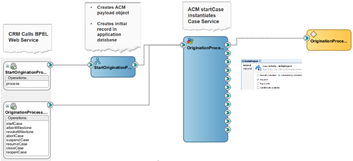
In this 11g process example, we’re invoking ACM from a CRM system via a web service call.  The web service will invoke a BPEL process which does the following:

  • Creates the initial record in the application database
  • Creates the ACM payload object
  • Invokes the ACM startCase service

When you first see the request schema for the ACM startCase service, it can be intimidating because of its size.  The good news is that the vast majority of this schema is entirely optional.

The unfortunate thing is that a few of the optional elements actually are NOT optional.  The following is what you really need:

The caseHeader element only requires one child element, the ecmFolder, which must as least be present — even if it is empty (as shown in this example). Read the complete article here.

SOA & BPM Partner Community

For regular information on Oracle SOA Suite become a member in the SOA & BPM Partner Community for registration please visit www.oracle.com/goto/emea/soa (OPN account required) If you need support with your account please contact the Oracle Partner Business Center.

Blog Twitter LinkedIn image[7][2][2][2] Facebook clip_image002[8][4][2][2][2] Wiki

Technorati Tags: SOA Community,Oracle SOA,Oracle BPM,OPN,Jürgen Kress
Integration Cloud Service Integration in Process Cloud Service by Antonis Antoniou

image

A new integration connector has been introduced with the latest release of Oracle Process Cloud Service that enables Oracle Process Cloud Service applications to communicate directly with Oracle Integration Cloud Service.
This is a very important "architectural" feature since it encourages a solution topology that includes a virtualization layer, an integral "ingredient" in integrations to avoid point-to-point connections through decoupling and abstraction.
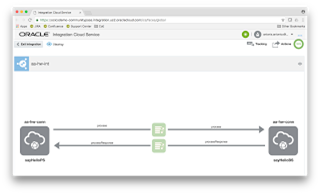
So let’s see how you can use the "ICS Connector" to connect to ICS and consume a SOAP endpoint.
The use case that I will use in this blog post is quite simple; I will call a "Hello World" ICS Service from an Oracle Process Cloud Service process utilizing the "ICS Connector".
I’ve already created "Hello World" synchronous SOA composite. The implementation is very simple. I’m just using an assign component with the "concat" function to assign a static text ("Hello ") and the input to the output element of my "Hello World" service.

My "Hello World" SOA service is deployed to Oracle SOA Cloud Service (SOA CS).

Moreover I’ve already virtualized the above service on Oracle Integration Cloud Service (ICS) by first creating a SOAP connection to my SOA CS service and then creating a basic map data integration that uses the SOAP connection as a trigger and an invoker, creating a basic data mapper for both request and response messages. Read the complete article here.

SOA & BPM Partner Community

For regular information on Oracle SOA Suite become a member in the SOA & BPM Partner Community for registration please visit www.oracle.com/goto/emea/soa (OPN account required) If you need support with your account please contact the Oracle Partner Business Center.

Blog Twitter LinkedIn image[7][2][2][2] Facebook clip_image002[8][4][2][2][2] Wiki

Oracle Fusion Middleware 12c (12.2.1.3.0) Released

We are proud to announce the release of Oracle Fusion Middleware 12c (12.2.1.3.0). Media is available for download on the Oracle Technology Network (OTN), My Oracle Support (MOS) and the Oracle Software Delivery Cloud (OSDC). This includes the following products:  image

    •     Oracle SOA Suite and Business Process Management 12c (12.2.1.3.0)
    •     Oracle Stream Analytics 12c (12.2.1.3.0)
  •     Oracle Fusion Middleware WebLogic Server Plug-In 12c    (12.2.1.3.0)
  •     Oracle B2B and Healthcare 12c (12.2.1.3.0)
    •     Oracle Real-Time Integration Business Insight 12c (12.2.1.3.0)
    •     Oracle Service Bus 12c (12.2.1.3.0)
  •     Oracle WebLogic Server 12c (12.2.1.3.0)
  •     Oracle Access Manager Access SDK 12c (12.2.1.3.0)
  •      Oracle Business Intelligence 12c (12.2.1.3.0)
  •     Oracle Coherence 12c (12.2.1.3.0)
  •     Oracle Data Integrator 12c (12.2.1.3.0)
  •     Oracle Enterprise Data Quality 12c (12.2.1.3.0)
  •     Oracle Enterprise Pack for Eclipse 12c (12.2.1.3.0)
  •     Oracle Forms and Reports 12c (12.2.1.3.0)
  •     Oracle Fusion Middleware Infrastructure 12c (12.2.1.3.0)
  •     Oracle GoldenGate Studio 12c (12.2.1.3.0)
  •     Oracle HTTP Server 12c (12.2.1.3.0)
  •     Oracle Identity and Access Management 12c (12.2.1.3.0)
  •     Oracle Internet Directory 12c (12.2.1.3.0)
  •     Oracle JDeveloper Studio 12c (12.2.1.3.0)
  •     Oracle Managed File Transfer 12c (12.2.1.3.0)
  •     Oracle MapViewer 12c (12.2.1.3.0)
  •     Oracle TopLink 12c (12.2.1.3.0)
  •     Oracle Traffic Director 12c (12.2.1.3.0)
  •     Oracle Unified Directory 12c (12.2.1.3.0)
  •     Oracle WebCenter Content 12c (12.2.1.3.0)
  •     Oracle WebCenter Portal 12c (12.2.1.3.0)
  •     Oracle WebCenter Sites 12c (12.2.1.3.0)


Partner Resources (community membership required):

SOA & BPM Partner Community

For regular information on Oracle SOA Suite become a member in the SOA & BPM Partner Community for registration please visit www.oracle.com/goto/emea/soa (OPN account required) If you need support with your account please contact the Oracle Partner Business Center.

Blog Twitter LinkedIn image[7][2][2][2] Facebook clip_image002[8][4][2][2][2] Wiki

Technorati Tags: Fusion Middleware 12.2.1.3.0,SOA Suite 12c,BPM Suite 12c,Oracle,SOA Community,Oracle SOA,Oracle BPM,OPN,Jürgen Kress
Top tweets SOA Partner Community – August 2017

image

August 2017 top tweets by soaCommunity

Send your tweets @soacommunity #soaCommunity and follow us at http://twitter.com/soacommunity. Make sure you share your content with the community!

SOA & BPM Partner Community

For regular information on Oracle SOA Suite become a member in the SOA & BPM Partner Community for registration please visit www.oracle.com/goto/emea/soa (OPN account required) If you need support with your account please contact the Oracle Partner Business Center.

Blog Twitter LinkedIn image[7][2][2][2] Facebook clip_image002[8][4][2][2][2] Wiki

Technorati Tags: twitter,SOA Community,Oracle SOA,Oracle BPM,OPN,Jürgen Kress,SOA Community twitter

PCS 16.4.5 New Features incl. Quickstart Masters, Automated Archive & Purge, REST connectors… by Niall Commiskey

image

Lots of great new features, just in time for the Holiday Season.
Thanks to my colleague Kathryn L.
I will be adding to this post over time, so, currently, it is not an exhaustive list.

1. Ability to see Conversations in Tracking

Note: the second icon on the right, under the docs icon.

2. Quickstart Master new functionality

For those of you who have yet to meet a Quickstart Master – here’s a quick intro.

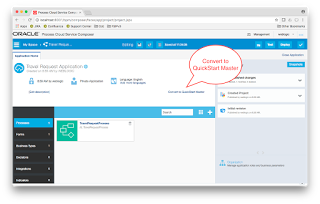
I take an existing process and convert it to a Quickstart Master. Read the complete article here.

SOA & BPM Partner Community

For regular information on Oracle SOA Suite become a member in the SOA & BPM Partner Community for registration please visit www.oracle.com/goto/emea/soa (OPN account required) If you need support with your account please contact the Oracle Partner Business Center.

Blog Twitter LinkedIn image[7][2][2][2] Facebook clip_image002[8][4][2][2][2] Wiki

Technorati Tags: SOA Community,Oracle SOA,Oracle BPM,OPN,Jürgen Kress

Templating in Process Cloud Service by Antonis Antoniou

image

Oracle Process Cloud Service released a new capability in the space of re-usability and templating called "QuickStart Master", a way to streamline application and process development by promoting your own applications as templates.

This feature is build on top of the existing QuickStart Apps capability, a very nice feature which part part of the very first release of Oracle PCS.
So let’s see how you can create a very simple application in Oracle Process Cloud Service and how you can promote it as a QuickStart app.
Create a new application in Oracle Process Cloud Service, give it a name and file it under a space (I’ve named it "Travel Request Application" under a custom space called "aantoniou").

Create also a sample process. For simplicity purposes I’ve created a process using the "Form" pattern and named it "TravelRequestProcess".Read the complete article here.

SOA & BPM Partner Community

For regular information on Oracle SOA Suite become a member in the SOA & BPM Partner Community for registration please visit www.oracle.com/goto/emea/soa (OPN account required) If you need support with your account please contact the Oracle Partner Business Center.

Blog Twitter LinkedIn image[7][2][2][2] Facebook clip_image002[8][4][2][2][2] Wiki

Technorati Tags: SOA Community,Oracle SOA,Oracle BPM,OPN,Jürgen Kress

Process Cloud Service: new features! By Lykle Thijssen

image

During Oracle Open World 2016, the latest release of Oracle Process Cloud Service got presented. The product has been making huge progress in all aspects, so here’s an overview of all the new and improved features.

Oracle Process Cloud Service

For those of you unfamiliar with the product: Oracle Process Cloud Service (PCS) is Oracle’s BPM solution for the cloud. While development on Oracle BPM Suite has pretty much come to an end, Oracle Process Cloud Service is the way forward and the platform for all new features related to Business Process Management. This meant that the product that was originally positioned as BPM for the citizen developer had to improve and mature to a full-blown BPM solution. It needs to support long running processes, improve its integration strategy and support case management, to mention some important subjects. While case management is not there yet, it will certainly come to Oracle Process Cloud Service and many other features are already there with the latest release.

Modelling Processes

As it used to be, modelling processes is done in the browser. This makes it easy for business and IT to collaborate on processes, because you only need an internet connection to get access. No need for development tools, code repositories and a powerful work station to get started. The main improvement in the process modelling is that Oracle has abandoned the usage of Flash. This makes the process modeller faster and easier to use, creating a far more pleasant and performant development experience.

Selecting integrations

When creating a Service Call, whether it’s synchronous or asynchronous, you can now select an Integration from Oracle Integration Cloud Service. Obviously, this is much more practical than dealing with WSDL imports and all the technical stuff related to that, but it also has a bigger meaning. It’s clearly showing that Integration Cloud Service has been strategically positioned as the way to go for process integrations. It’s putting the technical know-how of integration where it belongs, so you will no longer feel tempted to take that kind of complexity into a business process. Therefore, I strongly recommend following this approach as suggested by Oracle, instead of trying to work out your own integrations in PCS. Use these products for their purpose. Read the complete article here.

SOA & BPM Partner Community

For regular information on Oracle SOA Suite become a member in the SOA & BPM Partner Community for registration please visit www.oracle.com/goto/emea/soa (OPN account required) If you need support with your account please contact the Oracle Partner Business Center.

Blog Twitter LinkedIn image[7][2][2][2] Facebook clip_image002[8][4][2][2][2] Wiki

Technorati Tags: SOA Community,Oracle SOA,Oracle BPM,OPN,Jürgen Kress
IoT for an Eco-Friendly Rental Business by Eric Jacobsen

image

In today’s world, billions of connected devices, from smart vehicles to smart meters and even electric scooters, generate ever-increasing quantities of valuable data. By using data from devices, many businesses have started to look at new business models like delivering their products as a service to attract new customers and help reduce costs.

SoftBank, the Japanese telecommunications and technology company, and PS Solutions, a subsidiary of SoftBank, this year launched an eco-friendly electric scooter sharing service called Setouchi Karen that leverages Oracle IoT Cloud.

Read this Forbes article and watch the video below to learn how a novel IoT use case for ‘mobility-as-a-service’ is enabling SoftBank to realize efficiencies and improvements in customer experience. Watch the video here.

SOA & BPM Partner Community

For regular information on Oracle SOA Suite become a member in the SOA & BPM Partner Community for registration please visit www.oracle.com/goto/emea/soa (OPN account required) If you need support with your account please contact the Oracle Partner Business Center.

Blog Twitter LinkedIn image[7][2][2][2] Facebook clip_image002[8][4][2][2][2] Wiki

Technorati Tags: SOA Community,Oracle SOA,Oracle BPM,OPN,Jürgen Kress
Management Cloud – Application Performance Monitoring for Java EE, ADF & SOA Suite applications by Lucas Jellema

image

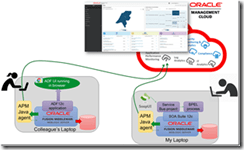
In a recent article, I shared my first steps (small step for mankind, big steps for me) with Oracle Management Cloud: First steps with Oracle Management Cloud – Application Performance Management for Node (JS) applications. In that article, I have explained in broad terms the purpose of Application Performance Monitoring in the scope of OMC:

Application Performance Monitoring (APM) is clearly indispensable to any organization adopting a DevOps approach – and frankly required for any organization in general running applications to support business objectives. APM provides insight in the non-functional behavior of applications – or better yet: of the business functions provided by these applications. It alerts administrators to functions that have unacceptable response times or are at risk to display poor performance and it allows us to analyze these situations to figure out where in the application stack – front end, services, integration flows, database, etc. – and in which specific component the problems have arisen. After performing this type of root cause analysis, resolving the problem still needs to be done, but is kick started as early as possible and with as much analysis details as possible.

In that earlier article, I also demonstrated how monitoring can be set up for Node (JS) applications. In this article, I will work with the APM Java agent. This agent can be installed and configured for a range of Java EE application servers – including Oracle WebLogic Server, Apache Tomcat Server, JBoss/WildFly, IBM WebSphere Server. It will observe the activity in the JVM and derive meaningful metrics from its observations. These metrics are forwarded to the OMC cloud where they are stored, processed, visualized and analyzed.

In this article I will apply the APM Java Agent to an existing Oracle WebLogic plus SOA Suite environment. After installing and configuring the agent, I have to make one small change to the WebLogic startup script, (re)start the server and subsequently and activity on that server is reported to OMC and exposed in the APM Dashboard and analysis screens. Subsequently my colleague executed the same steps on his personal laptop, using an agent with the same registration key and applying this agent to a WebLogic Server running an ADF application against a local database. Within minutes, the metrics from his machine and his ADF application appeared in the APM section of OMC, ready to be analyzed. (this particular ADF application is intentionally equipped with a number of performance black holes, for training and demonstration purposes; OMC APM was capable of identifying most of them. Read the complete article here.

SOA & BPM Partner Community

For regular information on Oracle SOA Suite become a member in the SOA & BPM Partner Community for registration please visit www.oracle.com/goto/emea/soa (OPN account required) If you need support with your account please contact the Oracle Partner Business Center.

Blog Twitter LinkedIn image[7][2][2][2] Facebook clip_image002[8][4][2][2][2] Wiki

Technorati Tags: SOA Community,Oracle SOA,Oracle BPM,OPN,Jürgen Kress
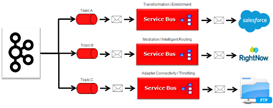
Service Bus Transport for Apache Kafka by Ricardo Ferreira

image

Introduction

This sample provides a native transport for OSB (Oracle Service Bus) that allows connectivity with Apache Kafka. By using native APIs, the transport allows resilient and high speed access to Apache Kafka clusters. Integration developers can benefit from this transport in the implementation of use cases that requires the integration to/from Apache Kafka with applications (SaaS and On-Premise) supported by OSB, as well as technologies such as JMS, HTTP, MSMQ, Coherence, Tuxedo, FTP, etc.

Using the Kafka Transport for Inbound Processing (From Kafka to the World)
Using the Kafka Transport for Outbound Processing (From the World to Kafka)

This is an Open-Source project maintained by Oracle.

Features and Benefits:

The OSB Transport for Apache Kafka provides inbound and outbound connectivity with Apache Kafka. But this is definetely a oversimplification of what this transport can really do. The list below summarizes the most important features found in this implementation.

  • Supports multiple Apache Kafka versions such as 0.9.X, 0.10.X and above.
  • It works with the enterprise version of Kafka (Confluent Platform) as well.
  • Designed to work with 12c versions of OSB. Compatible with 12.1.3 and 12.2.1. Get the code here.

SOA & BPM Partner Community

For regular information on Oracle SOA Suite become a member in the SOA & BPM Partner Community for registration please visit www.oracle.com/goto/emea/soa (OPN account required) If you need support with your account please contact the Oracle Partner Business Center.

Blog Twitter LinkedIn image[7][2][2][2] Facebook clip_image002[8][4][2][2][2] Wiki

Technorati Tags: SOA Community,Oracle SOA,Oracle BPM,OPN,Jürgen Kress