Using Oracle Integration Cloud Service tutorial

clip_image001


When you subscribe to Oracle Integration Cloud Service, you also have the option to install an on-premises version of Oracle Integration Cloud Service in your local environment. This enables you to use on-premises Oracle Integration Cloud Service as a proxy server that sits between your internal company server hidden behind a fire wall and the cloud version of Oracle Integration Cloud Service. After installation, you can create users and assign roles to these users on the Users page of on-premises Oracle Integration Cloud Service. Read the tutorial here. & REST API for Oracle SOA Cloud Service tutorial here.

SOA & BPM Partner Community

For regular information on Oracle SOA Suite become a member in the SOA & BPM Partner Community for registration please visit www.oracle.com/goto/emea/soa (OPN account required) If you need support with your account please contact the Oracle Partner Business Center.

Blog Twitter LinkedIn image[7][2][2][2] Facebook clip_image002[8][4][2][2][2] Wiki

Agent for simplifying Integration between Cloud and On-Premises apps by Robert van Molken


clip_image001In the last few months I mentioned that Oracle is developing an Agent. The Agent easily integrates your on-premises application(s) with the Oracle Cloud Services. The Agent is rolling out on all production instances next week. It was publicly announced by Bruce Tierney on the 3rd of January. He is the Director of Product Marketing for Cloud Integration and SOA. You can read his announcement on the Oracle Integration blog.

In this first article about the Agent I will go into the architectural basics,  which components are included and how it will connect Cloud to On-premises applications. The article is based on information I presented about during OpenWorld 2015.

Current / classic integration approach

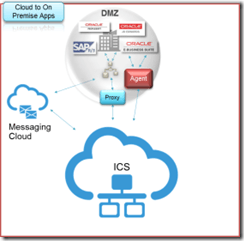
The current approach for connecting Cloud / Internet hosted applications with On-premises applications is usually through one or more firewalls, and the use of a reverse proxy, Oracle API Gateway or OHS. For this a variety of expertise is needed for example to open up inbound ports in the firewall, expose a private SOAP/REST service and configure the network routing. The SOAP/REST service can for example be implemented with SOA Suite to for example communicate with the CRM to retrieve customer data.

Let look at the current / classic approach in the diagram below:

This is going to change a lot when using the Agent. It will simplify above diagram.

Common Cloud to On-Premises Integration Patterns

Currently there are three common patterns for Cloud to On-Premises integrations. They are 1. using messaging, 2. through a proxy and 3. using an agent. Read the complete article here.

SOA & BPM Partner Community

For regular information on Oracle SOA Suite become a member in the SOA & BPM Partner Community for registration please visit www.oracle.com/goto/emea/soa (OPN account required) If you need support with your account please contact the Oracle Partner Business Center.

Blog Twitter LinkedIn image[7][2][2][2] Facebook clip_image002[8][4][2][2][2] Wiki

Content-Based Routing with Integration Cloud Service by Robert van Molken

clip_image002

In my previous article I discussed the fall updates of Integration Cloud Service. One of the features in this update is the possibility for content-based routing within integrations. I came across this feature during UKOUG Tech 15 in the beginning of December. In an two our hands-on lab I had some time to play with the content-based routing feature. The amazing thing is that it did it all on my iPad. In this article I will describe the feature and the steps to implement a common use-case.

What does Content-Based Routing mean?

The fall updates introduced content-based routing, which essentially mean that based on a value in the payload a different flow is executed. A use-case for this type of routing is the possibility to retrieve data from a different application based on the country code. With Integration Cloud Service is as easy as adding a filter on the request operation of the source connection.

Step 1: Adding a filter to route on

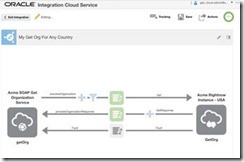
The first step is adding a filter to route the request on. To demonstrate this I’m using an already existing integration. This integration receives a GET request for retrieving the information of an organization. The current integration always retrieves the organization from the US site.

To add a filter a user would click on the funnel icon. Clicking on this icon will open the Expression Builder. In the Expression Builder a user can set an expression to filter requests on. This can simply be done by drag n drop the field to filter on. Read the complete article here.

SOA & BPM Partner Community

For regular information on Oracle SOA Suite become a member in the SOA & BPM Partner Community for registration please visit www.oracle.com/goto/emea/soa (OPN account required) If you need support with your account please contact the Oracle Partner Business Center.

Blog Twitter LinkedIn image[7][2][2][2] Facebook clip_image002[8][4][2][2][2] Wiki

Setting up SSH tunnels for cloud to on-premise with SOA Cloud Service clusters by Christian


clip_image002Executive Overview

With the current release of SOA Cloud Service (SOACS) a common requirement often requested is to connect to an on-premise  database from the cloud SOACS instance. SSH tunnels can be used to establish cloud to on-premise communications, allowing SOA Cloud Service to access resources from on-premise applications.

Companion post : Single host SSH tunneling

My colleague, Shub Lahiri has written an excellent article as well, he discusses the simpler configuration where there isn’t a cluster of managed servers in the cloud- this is much simpler to setup,more suited for a development environment but cannot work with a cluster set up in the cloud.

Overview

This post expands on the concept of ssh tunneling using a more advanced setup to allow connection of a SOA Cloud cluster to a on-premise database. In principle this setup could be configured to access any tcp based service on-premise.

Motivation

Every managed server requires access to the on-premise database or other resource, for composite flows using the resource to function, as work is almost universally load-balanced between managed server nodes. Unfortunately, that means either we have multiple on-premise ssh connections to the cloud, or we have this solution. Multiple connections requires every managed server have a unique public IPV4 address. Unfortunately, IPV4 addresses are a scarce resource and as such, SOACS does not provision one for every managed server node.

Network topology

For this example, we will be tunneling database traffic, allowing a Database Adapter deployed in the cloud to access an on-premise Oracle Database. The SOA Suite cluster will be running on 2 compute nodes (a 2 node SOA cluster) with the standard SOA CS setup – an LBR node as the front end gateway, and a Database Cloud Service node for SOA Suite persistence.

The diagram shows the basic idea of the network topology. SSH is used from the database server on-premise to connect the database node of the SOA cluster in the cloud. The specific choice of the databases is technically incidental – this approach will work with the bridge between any two hosts on-premise and cloud, but it seems the most natural fit for a tunneled database connection to use the databases.

The DB host on-premise runs a reverse SSH tunnel to the DB host in the cloud. Traffic for the on-premise database flows (green lines) from the managed servers, via the SSH tunnel to the DB on-premise. The apparent connectivity is to the DB host in the cloud, but in reality SSH is back-hauling the traffic through the tunnel to on-premise.

Setting up

Unlike the single managed server usecase, we need to tweak some components of the cloud setup to allow the shared SSH tunnel to work.

First, we need to clarify some terminology:
The SSH server host – the endpoint in the cloud to which ssh connectivity is established. In the diagram above, it is the “DB” node in the cloud.
The SSH client – the endpoint on-premise from which ssh connectivity is established. In the diagram above it is the “OnPremise DB” node.
The managed servers – the hosts in the cloud which require access to the SSH tunnel to communicate to on-premise. In the diagram above, they are identified as MS1 and MS2. Read the complete article here.

SOA & BPM Partner Community

For regular information on Oracle SOA Suite become a member in the SOA & BPM Partner Community for registration please visit www.oracle.com/goto/emea/soa (OPN account required) If you need support with your account please contact the Oracle Partner Business Center.

Blog Twitter LinkedIn image[7][2][2][2] Facebook clip_image002[8][4][2][2][2] Wiki

Starting out with Oracle SOA CS – my first steps on a fairly advanced PaaS service by Lucas Jellema on January


clip_image002One of the platform offerings in the Oracle Public Cloud is the SOA Cloud Service. This service offers various flavors of SOA Suite 12c (Service Bus, SOA Suite, Technology Adapters) and API Manager 12c, automatically provisioned on the cloud. This service builds on top of a pre-existing DBaaS instance and Storage CS container and implicitly creates a JCS instance and several compute nodes on IaaS Compute CS – as shown in the figure to the right.

This article describes my first steps in getting started with SOA CS. In less than two hours, I had my first simple Service Bus project running on the SOA CS instance. From SoapUI on my local laptop, I could run a load test against the service exposed by the Service Bus, accessed via the automatically provisioned Load Balancer. The average response time was 60 ms, consisting to a large extent of the network latency from my laptop to Oracle’s data center.

Preparation

Before you can request provisioning of a SOA CS instance, you need to have gone through some preparations (also see documentation):

  • you need a (trial) subscription to SOA CS
  • you need a running DBaaS instance – a database instance that will host the SOA Infra schema, the MDS schema and other SOA Suite components (see this article about preparing such as DBaaS instance)
  • you need a (trial) subscription to Storage Cloud Service and you need to prepare a storage container on this service – to host the back ups of the SOA CS instance
  • you need to have prepared an SSH public/private key pair (which you also need to do for the DBaaS instance) and have access to the public key

Additionally, you need to decide what kind of environment you want to have provisioned: just SOA [SCA engine} or just Service Bus – or both? A single node environment or a multi-node cluster? Do you also [or only]need API Manager? The provision wizard will ask you for the answers to these questions.

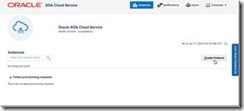
The starting situation before running the provision wizard is shown here:

I have navigated to the Service Console for the SOA CS service in my identity domain. It would list all my instances – if I had any. Since I do not, all I can do is press the Create button to start a request to have an instance provisioned for me: The first step is the selection of the Domain Type. The options are self explanatory. Read the complete article here.

SOA & BPM Partner Community

For regular information on Oracle SOA Suite become a member in the SOA & BPM Partner Community for registration please visit www.oracle.com/goto/emea/soa (OPN account required) If you need support with your account please contact the Oracle Partner Business Center.

Blog Twitter LinkedIn image[7][2][2][2] Facebook clip_image002[8][4][2][2][2] Wiki

Integration Cloud Service free online training & free presales certification

clip_image002


Integration Cloud Service Guided Learning path was created to provide the presales consultant with a detailed understanding of key product features to prepare him/her to do product demos and be involved in proof-of-concept projects.

It starts with the ICS product overview and moves into technical details with short modules on:

· Integrating Applications with Oracle Integration Cloud Service (4 mins)

· Connecting to Applications with Oracle Integration Cloud Service (3 mins)

· Creating Connections in Oracle Integration Cloud Service (2 mins)

· Creating Integrations in Oracle Integration Cloud Service (3 mins)

· Mapping Data in Oracle Integration Cloud Service (2 mins)

· Mapping Data Between Applications with Oracle Integration Cloud Service (3 mins)

· Monitoring Integrations in Oracle Integration Cloud Service (2 mins)

· Monitoring Integrations (2 mins)

· Packaging Integrations with Oracle Integration Cloud Service (2 mins)

· Using Packages in Integration Cloud Service (4 mins)

· Using Lookups in Oracle Integration Cloud Service (2 mins)

· Integrating Oracle RightNow and Oracle Sales Cloud Using Oracle Integration Cloud Service (6 mins)

After going through these on-line modules, you can test what you learnt by taking the assessment test at the end. Attend the online training here.

SOA & BPM Partner Community

For regular information on Oracle SOA Suite become a member in the SOA & BPM Partner Community for registration please visit www.oracle.com/goto/emea/soa (OPN account required) If you need support with your account please contact the Oracle Partner Business Center.

Blog Twitter LinkedIn image[7][2][2][2] Facebook clip_image002[8][4][2][2][2] Wiki

Additional new content SOA & BPM Partner Community


clip_image002

· This month: Where do you fit in the Cloud? Cloud computing played a big role at Oracle OpenWorld 2015 in San Francisco, and it’s likely to play a big role in your future. For that reason, two items in this newsletter will be of particular interest. The New Cloud You, an article from the latest edition of Oracle Magazine, features insight from community members on how they’re handling the transition to the cloud. The latest OTN ArchBeat Podcast, Cloud Architect – Rising to the Role, features a roundtable discussion by six community leaders about what it takes to find success in this emerging role. Also on the topic of cloud computing, replays of the September OTN Virtual Technology Summit middleware track sessions are now available via a dedicated group space on the OTN Community website. These sessions presented how-to technical content focused on Oracle PaaS services, including Mobile Cloud Service, Process Cloud Service, and Java Cloud Service. To view these replays, just join the group space. Membership is free. As a member, you’ll be able to interact with session presenters and other community members to find answers to your PaaS questions. Join the group now.

· Call for Papers: Session proposals are being accepted for future OTN Virtual Technology Summit events. Submit your proposal for Middleware track sessions in the OTN Virtual Technology Summit Middleware Ideas Space, part of the OTN Community Platform. Watch the Twitter hashtag #OTNVTS for the latest information. Talk Back: As always, your feedback is essential to the success of this publication and of OTN in general. If you have comments or suggestions regarding this newsletter or any of the resources for middleware pros available on OTN, please share your thoughts: bob.rhubart@oracle.com.

· Resource Library: IT Strategies from Oracle You may have heard of the IT Strategies from Oracle (ITSO)collection of reference architectures, solution designs, and technology strategy documents, and you may have taken advantage of some of those resources in the past. But you may not know that access to the complete ITSO library no longer requires registration. The whole shebang is freely available on the OTN Community website. Browse the library.

· Article: The New Cloud You: Adapting Skill Set and Mindset for Success in the Cloud Does the technological disruption brought on by cloud computing carry with it a commensurate skill disruption? How is the widespread adoption of cloud computing affecting architects, developers, and others in IT, and what are they doing to adapt their skills to the unique characteristics of cloud-based solutions? Insight from community members. Read the article.

· Podcast: Cloud Architect – Rising to the Role Recorded during Oracle OpenWorld, the latest OTN ArchBeat Podcast features Oracle ACE Directors Ron Batra, Simon Haslam, Ronald van Luttikhuizen, Frank Munz, and Sten Vesterli, plus Oracle ACE Associate Arturo Viveros in a free-flowing, wide-ranging conversation about the emerging role of the Cloud Architect. Listen to the podcast.

· Larry Ellison at OOW15: New Oracle Cloud Services and Ease-of-Use Advances Oracle Executive Chairman and CTO Larry Ellison introduced more than a dozen new Oracle Cloud services and capabilities in the opening keynote presentation at Oracle OpenWorld 2015 in San Francisco’s Moscone Center. Get the details.

· Introducing Oracle Integration Continuous Availability Features Oracle SOA Suite 12.2.1 offers a new set of operational features including availability, performance, scalability, diagnostic and other operational aspects. Take a deep dive in this post from Jay Kasi Get the details.

· Oracle Launches Oracle BPM & Oracle WebCenter 12.2.1 The new Oracle BPM includes a full set of REST API that enable applications built with any technology to leverage BPM Suite as an engine for workflow management, service integration, and process orchestration. The new Oracle WebCenter provides a refreshingly new user experience that is cohesive, responsive and device friendly across Oracle WebCenter Sites, Oracle WebCenter Portal and Oracle WebCenter Content and Oracle BPM Suite. Get the details.

· Oracle Cloud Platform Brief: Meet Your Platform for Success clip_image003

· Ebook: Public PaaS for Dummies clip_image003[1]

· Oracle Integration Cloud Service Videos clip_image003[2]

· On-Demand Webcast Series: Oracle Cloud Platform clip_image003[3]

· OTN Virtual Technology Summit Replay and New Community Groups Available on Demand | Online Events

SOA & BPM Partner Community

For regular information on Oracle SOA Suite become a member in the SOA & BPM Partner Community for registration please visit www.oracle.com/goto/emea/soa (OPN account required) If you need support with your account please contact the Oracle Partner Business Center.

Blog Twitter LinkedIn image[7][2][2][2] Facebook clip_image002[8][4][2][2][2] Wiki

Technorati Tags: SOA Community,Oracle SOA,Oracle BPM,OPN,Jürgen Kress

Learn about UX highlights in Release 10


The Oracle Applications User Experience (OAUX) team is shifting its focus to the second part of our “simplicity, mobility, extensibility” story for Release 10. The linchpin to that part of the story? Increasing the participation of users. We know that if users don’t find value in the application, they won’t use it, which could cost customers time and money. Check out the posts below for more on the user experience highlights in each product family:

Release 10 highlights include a gorgeously updated, consistent, mobility-focused user experience, even more ways to make the experience look like your company for your users, seamless customization with our UI developer toolkit, and an ongoing investment in refining, adding to, and updating the experience based on customer feedback. Read about the Oracle OpenWorld 2015 perspective on these benefits in “Oracle Banks on CX Cloud Verticals.” For more highlights of Oracle HCM Cloud Release 10, see this video.

STRATEGY: On Forbes.com, check the Oracle Voice blog for “5 Best Practices In Application User Experience” to read takeaways from OAUX Vice President Jeremy Ashley’s OpenWorld presentations. Ashley is also quoted in “Digital Disruption: Hype And Sensibility,” where he talks about the cloud and the simplicity needed for user experience design.

HCM CLOUD: What does “user experience” mean in the Oracle HCM Cloud? Aylin Uysal, Oracle Senior Director, HCM Cloud User Experience, discusses Oracle’s strategy and approach to defining the user experience for Oracle’s HCM Cloud on HCM Talk Radio, a podcast in which experts and guests share the latest in HCM Cloud best practices and knowledge.

SOA & BPM Partner Community

For regular information on Oracle SOA Suite become a member in the SOA & BPM Partner Community for registration please visit www.oracle.com/goto/emea/soa (OPN account required) If you need support with your account please contact the Oracle Partner Business Center.

Blog Twitter LinkedIn image[7][2][2][2] Facebook clip_image002[8][4][2][2][2] Wiki

PaaS 4 SaaS webcast on-demand

clip_image002

Maximize the Value of Your CX Investments with Oracle Cloud Platform

With Oracle CX Cloud, companies not only get the most comprehensive CX offering, but also an innovative and powerful cloud platform to extend, analyze and integrate these applications with the rest of the enterprise resources, as well as to optimize them for every user.  This session outlines the Cloud Platform (PaaS & IaaS) solutions that Oracle provides to streamline cloud development and empowers you to deliver enterprise-grade solutions rapidly and cost effectively. Join this event if you are interested in the most advanced way to extend, analyze and integrate the Oracle CX solutions. In subsequent webinars, we will drive you through further Integration Solutions’ details. Watch the webcast on-demand here.

SOA & BPM Partner Community

For regular information on Oracle SOA Suite become a member in the SOA & BPM Partner Community for registration please visit www.oracle.com/goto/emea/soa (OPN account required) If you need support with your account please contact the Oracle Partner Business Center.

Blog Twitter LinkedIn image[7][2][2][2] Facebook clip_image002[8][4][2][2][2] Wiki

BPM Suite 12c Server using Ansible by Christos Vezalis

clip_image001

This article describes a way to automate the installation of Oracle BPM 12.2.1 on Linux 7 server. I’m using Ansible to automate the configuration of Linux server and install the software. I’m also using Vagrant with Oracle Virtual Box to automatically provision a Linux 7 server and run the Ansible playbook on the virtual machine automatically for testing.
You can download the sample code in my GitHub account: https://github.com/cvezalis/ansible.oracle.bpm.12c

The sample source code contains an Ansible playbook and configuration for Vagrant. Before you run it you need to download the supported JDK 8 installation file (for example jdk-8u66-linux-x64.tar.gz) and put it on roles/linux-jdk/files folder, Fusion Middleware Infrastructure 12.2.1 installation file and put it on roles/fmw-software/files folder and Oracle BPM suite 12.2.1 installation and put it on roles/soa-software/files from Oracle support.
You need to have an Oracle Database up and running. If you do not have one or you want to create one with Ansible you can use my playbook for Oracle Database. Links are at the end of this article.
For run it you need to have installed Ansible, Vagrant and Virtual Box and then just do:
$ vagrant up
Playbook is idempotent so you can run it again in the same server several times to have your server in the expected status.
You can configure your infrastructure parameters on infra-vars.yml. As minimum (if you do not use my ansible playbook for create the database) you need to configure the database connection settings.
You can also set custom passwords on secrets.yml file. For oracle Linux user you need to set the password encrypted. On a Linux system use the following to create the encrypted password: Read the complete article here.

SOA & BPM Partner Community

For regular information on Oracle SOA Suite become a member in the SOA & BPM Partner Community for registration please visit www.oracle.com/goto/emea/soa (OPN account required) If you need support with your account please contact the Oracle Partner Business Center.

Blog Twitter LinkedIn image[7][2][2][2] Facebook clip_image002[8][4][2][2][2] Wiki