Enable SOA Composer in SOA Suite 11g by Waslley Souza


clip_image001When you are developing your SOA Composites in SOA Suite 11g, probably you will use DVM or Business Rules components. You can change the values of these components at runtime, and to do it, you need to use an application called SOA Composer. By default the SOA Composer is disabled. As it is an application, all you have to do is go to Console from WebLogic Server and start it.

Go to WebLogic Server Console > > Deployments.
Click the composer application.

Click Targets tab, select all components and click the Change Targets button.

Read the complete article here.

SOA & BPM Partner Community

For regular information on Oracle SOA Suite become a member in the SOA & BPM Partner Community for registration please visit www.oracle.com/goto/emea/soa (OPN account required) If you need support with your account please contact the Oracle Partner Business Center.

Blog Twitter LinkedIn image[7][2][2][2] Facebook clip_image002[8][4][2][2][2] Wiki

SOA & BPM Partner Community Webcast – September 29th 2015

clip_image001Attend our September edition of the SOA & BPM Partner Community Webcast live on September 29th 2015 16:00 CET.

Visit the registration page here.

Call ID: 5566478 Call Passcode: 333111

Austria: +43 (0) 192 865 12
Belgium: +32 (0) 240 105 28
Denmark: +45 327 292 22
Finland: +358 (0) 923 193 923
France: +33 (0) 15760 2222
Germany: +49 (0) 692 222 161 06
Ireland: +353 (0) 124 756 50
Italy: +39 (0) 236 008 198

Netherlands: +31 (0) 207 143 543
Spain: +34 914 143 755
Sweden: +46 (0) 856 619 465
Switzerland: +41 (0) 445 804 003
UK: +44 (0) 208 118 1001
United States: 140 877 440 73
More Local Numbers

If you have difficulty logging in using the above link please go to: http://ouweb.webex.com/meetingcenter and join with session id: 597994333

Missed our SOA & BPM Partner Community Webcast? – watch the August edition here, July edition here, June edition here and May edition here . For the latest information please visit Community Updates Wiki page (SOA Community membership required).

SOA & BPM Partner Community

For regular information on Oracle SOA Suite become a member in the SOA & BPM Partner Community for registration please visit www.oracle.com/goto/emea/soa (OPN account required) If you need support with your account please contact the Oracle Partner Business Center.

Blog Twitter LinkedIn image[7][2][2][2] Facebook clip_image002[8][4][2][2][2] Wiki

Technorati Tags: Webcast,Community,SOA Community,Oracle SOA,Oracle BPM,OPN,Jürgen Kress

BPEL-> Mediator -> BPEL: Passing Business Errors back thru Mediator by Niall Commiskey


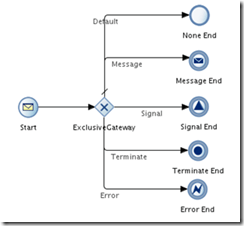
clip_image002Scenario:

Sync BPEL1 calls Mediator that calls Sync BPEL2.

SyncBPEL2 throws a Business Error, Mediator needs to pass this back to SyncBPEL1.

In the following example I have the following components –

Sync BPEL 1 = BPELProcess3

Mediator = Route2BPEL1

Sync BPEL 2 = ErrorThrower

Here they are, in all their grandeur –

ErrorThrower

Note the explicit definition of the fault in the wsdl –

Read the complete article here.

SOA & BPM Partner Community

For regular information on Oracle SOA Suite become a member in the SOA & BPM Partner Community for registration please visit www.oracle.com/goto/emea/soa (OPN account required) If you need support with your account please contact the Oracle Partner Business Center.

Blog Twitter LinkedIn image[7][2][2][2] Facebook clip_image002[8][4][2][2][2] Wiki

OSB Release Management Utility by Joao Moura


clip_image002Agile methodologies have increased radically the numbers of release events in organisations where it has been adopted.  Both development and operations teams need to collaborate more closely during production release events requiring more than ever the right supporting tools.

How many times have you been asked what has been deployed in environment X?

If you are using CI tools and doing release management properly it should be a straightforward answer. However, software deployment comprises a set of steps involving multiple parties. As a result, the process isn’t entirely automated requiring human intervention which is susceptible to errors.

Imagine you have just delivered an OSB Production bundle to the operations guys (DBAs, Weblogic Admins…).

How can you prove that the expected jar has been deployed without looking at the source code or running any tests ?

We are using a custom Release Management Utility that saves us a lot of time and headaches ☺

· No third-party software required; It uses Hudson, SVN, Maven and OSB

· Allows users without technical knowledge to view what’s deployed

· Identifies project changes between sprints

· Track back to source code based on SVN revision

· Displays build date and version for each individual project

Read the complete article here.

SOA & BPM Partner Community

For regular information on Oracle SOA Suite become a member in the SOA & BPM Partner Community for registration please visit www.oracle.com/goto/emea/soa (OPN account required) If you need support with your account please contact the Oracle Partner Business Center.

Blog Twitter LinkedIn image[7][2][2][2] Facebook clip_image002[8][4][2][2][2] Wiki

espresseo & integration – Opitz events 01.10 Frankfurt, 29.10 München & 25.11 Hamburg

Beginnen Sie den Tag mit einem tollen Frühstück sowie leckeren Kaffeespezialitäten und erfahren Sie bei unserem IT|espresso mehr zum Thema "Systemintegration". Unter der Fragestellung "Wie wird meine Integrationslandschaft modern, nutzbringend, wartbar und preiswert", möchten wir mit Ihnen und anderen Experten in lockerer Atmosphäre über Erfolgsfaktoren sowie Trends und deren Implikationen z.B. wie man eine Cloud Application integriert, diskutieren. Nutzen Sie die Chance zum Gedanken- und Erfahrungsaustausch mit unseren Experten Torsten Winterberg und Dr. Hendrik Voigt sowie den anderen Teilnehmern und gestalten Sie die Agenda mit Ihren aktuellen Themen.

Seien Sie dabei:  01.10. Frankfurt, 29.10. München, 25.11. Hamburg

Weitere Details zur Veranstaltungsreihe

SOA & BPM Partner Community

For regular information on Oracle SOA Suite become a member in the SOA & BPM Partner Community for registration please visit www.oracle.com/goto/emea/soa (OPN account required) If you need support with your account please contact the Oracle Partner Business Center.

Blog Twitter LinkedIn image[7][2][2][2] Facebook clip_image002[8][4][2][2][2] Wiki

Searching Service Bus Pipeline Alert contents by Maarten Smeets


clip_image001There are several ways monitor messages passing through the Service Bus. Using pipeline alerts is one of them. Pipeline alerts can be searched in the Enterprise Manager based on several parameters such as summary or when they have occurred. Usually an important part of the message payload is saved in the content of the alert. This content can not be searched from the Enterprise Manager. In this post I will provide an example for logging Service Bus request and response messages using pipeline alerts and a means to search alert contents for a specific occurrence. The example provided has been created in SOA Suite 12.1.3 but the script also works in SOA Suite 11.1.1.6.
Service Bus Pipeline Alerts

The Oracle Service Bus provides several monitoring mechanisms. These can be tweaked in the Enterprise Manager.

In this example I’m going to use Pipeline Alerts. Where you can find them in the Enterprise Manager has been described on: https://technology.amis.nl/2014/06/27/soa-suite-12c-where-to-find-service-bus-pipeline-alerts-in-enterprise-manager-fusion-middleware-control/. I’ve created a small sample process called HelloWorld. This process can be called with a name and returns ‘Hello name’ as a response. The process itself has a single AlertDestination and has two pipeline alerts. One for the request and one for the response. These pipeline alerts write the content of the header en body variables to the content field of the alert.

When I call this service with ‘Maarten’ and with ‘John’, I can see the created pipeline alerts in the Enterprise Manager. Read the complete article here.

SOA & BPM Partner Community

For regular information on Oracle SOA Suite become a member in the SOA & BPM Partner Community for registration please visit www.oracle.com/goto/emea/soa (OPN account required) If you need support with your account please contact the Oracle Partner Business Center.

Blog Twitter LinkedIn image[7][2][2][2] Facebook clip_image002[8][4][2][2][2] Wiki

Docker image for Oracle SOA Suite 12c by Jorge Esteban Quilcate Otoya

clip_image002

Cool news came from Oracle a couple of weeks ago: Oracle WebLogic Server is now supported on Docker!.

This is very cool. Docker is a disruptive platform that ship everything inside a container (OS, Configurations, Platform, Application) and let you run it (almost) everywhere! To learn more about Docker

So, WebLogic on Docker is great, but I’d like to go further and Dockerize SOA and BPM products (as Guido Schmitz made with Oracle Stream Explorer)

I used Oracle’s Docker repository as a base to create a Oracle SOA Suite 12c image (with the product installed – no domain included), and a sample Docker configuration to create a Docker image with a domain with SOA and OSB.

Get the repository

To try this post you should have a machine with Docker installed.

To get started you can download the repository: http://github.com/jeqo/oracle-docker

The repository includes images for MySQL, WebLogic and Coherence. These images comes from Oracle repository.

My contribution is into the ‘OracleSOA’ directory.

Feel free to fork and create "pull-requests"!

Creating the SOA Suite 12c image

Now you should download Oracle SOA Suite 12c Quick Start installer, and put it into OracleSOA/dockerfiles/12.1.3. Also, you should download Java Development Kit 7, and put it in the same folder.

Open a terminal into OracleSOA directory, go to dockerfiles, run the script buildDockerImage.sh with the -d argument because we are installing the Quick Start version of SOA Suite 12c: Read the complete article here.

SOA & BPM Partner Community

For regular information on Oracle SOA Suite become a member in the SOA & BPM Partner Community for registration please visit www.oracle.com/goto/emea/soa (OPN account required) If you need support with your account please contact the Oracle Partner Business Center.

Blog Twitter LinkedIn image[7][2][2][2] Facebook clip_image002[8][4][2][2][2] Wiki

A First Glance at Oracle Stream Explorer 12c by Arturo Viveros


clip_image002The brand new Oracle Stream Explorer 12c has been released today. The idea behind this product, which gives it a lot of relevance, is to bring simplicity, usability and enterprise readiness to Event Processing.
We have talked before about Industrial SOA, and the impact that such concepts as: IoT, Social Media, Mobile, Fast Data bring to the table. With this in mind, we have to acknowledge that enterprises nowadays, constantly find themselves dealing with huge, endless amounts of data in motion.
Oracle’s pitch in this sense, with Oracle SX, is to put this Real Time Streaming Intelligence in the hands of Business Users and Integrators, who can instantly determine the business value of the information and its relevance as business opportunities and threats.
So let’s take a look at the product istself:

As you can see, Oracle SX looks really cool!!, and the first thing we must say in this regard, is that the product’s user interface has been entirely built using Alta UI. Hence we are practically guaranteed a very favorable user experience which is not only nice, but will also help us position the tool in our clients.
Functionality-wise, SX abstracts event processing capabilities to a degree in which the user requires no knowledge whatsoever of Real Time Event Driven Architectures, Continuous Query Language (CQL), Java Event Server or the semantics of Event Stream Processing Application Models.
Basically, Stream Explorer introduces three main concepts that we must understand in order to configure the scenarios we want: Read the complete article here.

SOA & BPM Partner Community

For regular information on Oracle SOA Suite become a member in the SOA & BPM Partner Community for registration please visit www.oracle.com/goto/emea/soa (OPN account required) If you need support with your account please contact the Oracle Partner Business Center.

Blog Twitter LinkedIn image[7][2][2][2] Facebook clip_image002[8][4][2][2][2] Wiki

Virtual Technology Summit September 16th 2015 – free Cloud training including Process Cloud Service!


clip_image002

The Oracle Technology Network invites you to register for our new Virtual Technology Summit – September 16th, 9:30 am to 1:00 pm PT. It’s all about the Cloud! Hear from Oracle ACEs, Java Champions and Oracle Product Experts, as they share their insights and expertise through Hands-on-Labs, highly technical presentations and demos that enable you to master the skills you need to meet today’s IT challenges.

Middleware: Middleware in the Cloud: PaaS Gets Real – The middleware track puts the spotlight on Oracle’s Mobile Cloud Service (MCS), Process Cloud Service (PCS), and Java Cloud Service (JCS), three of the more than two dozen new services available on the Oracle Cloud Platform. In each of the three deep-dive sessions a recognized expert from the OTN community demonstrates how you can use these PaaS services, and compares each to its on-premise counterparts. PaaS services loom large in the future for developers and architects, so if you’re developing enterprise mobile applications, or working with Oracle BPM or WebLogic, you’ll want to make sure these #OTNVTS sessions are on your calendar.

For details please visit the registration page here

SOA & BPM Partner Community

For regular information on Oracle SOA Suite become a member in the SOA & BPM Partner Community for registration please visit www.oracle.com/goto/emea/soa (OPN account required) If you need support with your account please contact the Oracle Partner Business Center.

Blog Twitter LinkedIn image[7][2][2][2] Facebook clip_image002[8][4][2][2][2] Wiki

SOA Suite 12c – Create, Deploy, Attach and Configure a Custom OWSM Policy – to report on service execution by Lucas Jellema


clip_image002This article describes how to develop a straightforward custom assertion that can be used as part of custom OWSM policy to be attached to Web Services in WebLogic, such as services exposed by SOA Composite applications and Service Bus projects as well as custom JAX-WS or ADF BC Web Services. The custom assertion that I demonstrate here reports the execution of web service operations to a JMS Destination and/or the system output. It shows how to access property values set on the policy binding (values specific for the service the policy is attached to) and how to inspect the headers and contents of the request and response messages. Most custom assertions will use a subset of the mechanisms shown in this example. As always, the source code is available for download. Note: this article was edited on April 6th to reflect better code structure.

Custom assertions can be used in policies that are applied to web services. Depending on the type and configuration of the policy and assertions, they can be triggered at different moments and perform different tasks. These assertions are similar to aspects (in AOP) that take care of cross cutting concerns and that do not interfere with the internals of a service. Policies are attached (and detached) at runtime by the administrators. The assertion discussed in this article is to be attached to the service binding at the inbound end of a SOA composite application (or at a Service Bus proxy service that serves the same purpose). The assertion will report every incoming request as well as each response returned from the service binding. This information can be leveraged outside the scope of this article to monitor the runtime service environment.

The steps describes in this article in the process of creating and putting into action the custom assertion are:

  • Create Custom Policy:
    • Assertion Java Class
    • Policy XML File
    • Policy Configuration XML File
  • Deploy Policy Artifacts to Runtime Fusion Middleware platform (and restart the WebLogic Servers)
  • Import Policy Definition into Runtime Fusion Middleware platform
  • Attach the Policy to a Service Binding in an existing SOA Composite application and configure the policy binding properties
  • Invoke the service exposed by the [Service Binding in the existing] SOA Composite application
  • Verify the results produced by the policy attachment
Create the Custom Policy

The main part of the custom assertion definition is a Java class. See for details the sources that can be downloaded from GitHub.The project contains a helper class – CustomAssertion – that takes care of some generic plumbing that are required for the AssertionExecutor superclass that needs to be extended. Read the complete article here.

SOA & BPM Partner Community

For regular information on Oracle SOA Suite become a member in the SOA & BPM Partner Community for registration please visit www.oracle.com/goto/emea/soa (OPN account required) If you need support with your account please contact the Oracle Partner Business Center.

Blog Twitter LinkedIn image[7][2][2][2] Facebook clip_image002[8][4][2][2][2] Wiki