SOA Suite 12c and the OPSS Keystore Service by Adam Desjardin


clip_image002When working with a colleague on a sample SOA 12c project recently I noticed a change in 12c that I had not seen mentioned anywhere yet.  In the sample project we were integrating with the Atlassian OnDemand service in order to provision users for Confluence and JIRA.  The integration is performed using a SOAP service over SSL.  In this situation, like at many of our customers, we needed to import additional trusted certificates into the trust store in order to make the service call over SSL.  At many of our customers this is an internal Root CA they use to sign their own certificates for internal use.

When looking at the default settings of the IntegratedServer in JDeveloper 12c we can now see below that it is configured by default to use the OPSS Keystore Service and not a JKS Trust Store.

You can see above that instead of a filesystem URI to a JKS file you now see a kss:// URI.  This URI shows that we are using the trust store called "trust" in the system strip of the Keystore Service.

The OPSS Keystore Service is meant to provide a single location for Keystores and Trust stores for all applications running within the Weblogic domain.  The only pre-requisite for using the service is that the JRF templates have been applied to your domain, which should be the case for any SOA 12c domain.

Using this service you can now manage all of your certificates through Fusion Middleware Control and WLST.  You can navigate to the Security -> Keystore menu under your domain in FMW Control as shown below. Read the complete article here.

SOA & BPM Partner Community

For regular information on Oracle SOA Suite become a member in the SOA & BPM Partner Community for registration please visit www.oracle.com/goto/emea/soa (OPN account required) If you need support with your account please contact the Oracle Partner Business Center.

Blog Twitter LinkedIn image[7][2][2][2] Facebook clip_image002[8][4][2][2][2] Wiki

SOA Suite 12c New Features: Creating SOA Project Templates for Reusing SOA Composite Designs by Joe Greenwald

clip_image002In SOA Suite 12c, we create application integrations and business processes designed as services composed of processing logic, data transformation and routing, dynamic business rules and human tasks in the form of XML-based metadata. The graphical representations of these services are created in JDeveloper using its graphical editors. Since these services are composed of individual, separately configurable components, we call this a composite service. Once deployed to and hosted by Oracle SOA Suite, this service looks and acts like any other web service to its clients.
It would be highly productive and desirable to be able to easily create templates for service designs that could be reused across teams and projects. Using quality designs and tested patterns as the starting point for new services speeds up development while also supporting widespread adoption of quality and standards in service design.

SOA Suite 12c automates creation and management of templates of service composites, as well as individual service components. The service project templates we create will be stored and managed in the file-based MDS, so they can easily be shared with other developers.
We have an existing service composite that we would like to clone or use as the basis of new service composite. Once we create the new service based on the template, we’ll be able to make modifications to it as needed.
Here is the current Service:
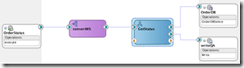
The service exposes a web service entry point, OrderStatus whose interface is implemented by convertWS mediator. ConvertWS transforms the incoming message as needed and routes the message to be processed by GetStatus, a Business Process Execution Logic (BPEL)-based component. The BPEL process accesses the database through the database adapter, OrderDB, to check order status and then writes the status to a flat file via the file adapter, writeQA.

Read the complete article here

SOA & BPM Partner Community

For regular information on Oracle SOA Suite become a member in the SOA & BPM Partner Community for registration please visit www.oracle.com/goto/emea/soa (OPN account required) If you need support with your account please contact the Oracle Partner Business Center.

Blog Twitter LinkedIn image[7][2][2][2] Facebook clip_image002[8][4][2][2][2] Wiki

2 Minute Tech Tip: BPM Process Patterns using BPMN

Watch the tech tip with Dan Atwood here.

clip_image002

SOA & BPM Partner Community

For regular information on Oracle SOA Suite become a member in the SOA & BPM Partner Community for registration please visit www.oracle.com/goto/emea/soa (OPN account required) If you need support with your account please contact the Oracle Partner Business Center.

Blog Twitter LinkedIn image[7][2][2][2] Facebook clip_image002[8][4][2][2][2] Wiki

BPM 12c Gateways (Part 2 of 5): Inclusive Gateway by Antonis Antoniou

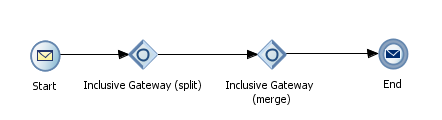
clip_image002The inclusive gateway, just like the exclusive gateway, enables you to split your process into two or more paths. The intrinsic difference between an exclusive gateway and an inclusive gateway is that in an exclusive gateway, the process only continues down one of several paths (if multiple outgoing sequence flows are present) while in an inclusive gateway a process will follow all conditional paths whose expressions are evaluated to true.

Furthermore, in an inclusive gateway a process will only follow the default path only if no conditional expressions evaluate to true. Because of this particular characteristic the notation of an inclusive gateway consist of a split and a merge inclusive gateway.

An inclusive gateway can consist multiple outgoing conditional sequence flows for an inclusive gateway split. However, an inclusive gateway must define a default sequence flow. All conditional expressions that evaluate to true are executed; otherwise the default sequence flow is executed.

At run time, the BPM engine generates a token for each conditional sequence that evaluates to true. If none of the conditional sequence flows evaluate to true then a token gets generated for the default sequence flow. The process will pause and will resume only when all tokens have reached the merge

So let’s see how you can use an inclusive gateway in a process. I have created a new BPM application using the "BPM Application" JDeveloper template and in the "Project SOA Settings" step i have selected "Composite with BPMN Process". Read the complete article here.

SOA & BPM Partner Community

For regular information on Oracle SOA Suite become a member in the SOA & BPM Partner Community for registration please visit www.oracle.com/goto/emea/soa (OPN account required) If you need support with your account please contact the Oracle Partner Business Center.

Blog Twitter LinkedIn image[7][2][2][2] Facebook clip_image002[8][4][2][2][2] Wiki

SOA Suite 11g and 12c: Determining composite dependencies to the level of operations by Maarten Smeets

clip_image001In large companies, often there are many services and dependencies between services. It is important to track service dependencies in order to for example estimate the impact of changes. Design documents or architecture views can be used for this but as everybody knows, there is often a gap between theory and practice (design and implementation).

In this blog post I provide code to determine dependencies between composites to the level of operation calls. In order to achieve this, I’ll parse the composite.xml files, JCA files (used by adapters) and also the BPEL and BPMN files in order to determine the operations. The script can be used for SOA Suite 11g and 12c composites.

The above picture shows different parts of which a composite is composed and how they are linked. The script first determines references. The references specify which external services are called. Then by using wires, the relevant components are determined. Based on the component type, specific logic is used to extract the operation. Not shown in this picture is how database dependencies can also be determined by the script by parsing the JCA files specified in the reference. If you’re in a hurry, you can go to the ‘Executing the script’ part directly and skip the explanation.

Composites

This blog will focus on composites (which can contain components like BPEL and BPM) using the shared SOA infrastructure and not on for example the Service Bus. Composites use the Software Component Architecture (http://www.oasis-opencsa.org/sca) to wire different components together in a consistent way. Oracle uses XML files to describe composites, components and references. These files can easily be parsed and correlated.

Introduction composite.xml

The main file describing a composite is the composite.xml file. Below is a small sample of a HelloWorld composite containing a single component, a BPEL process. Read the complete article here.

SOA & BPM Partner Community

For regular information on Oracle SOA Suite become a member in the SOA & BPM Partner Community for registration please visit www.oracle.com/goto/emea/soa (OPN account required) If you need support with your account please contact the Oracle Partner Business Center.

Blog Twitter LinkedIn image[7][2][2][2] Facebook clip_image002[8][4][2][2][2] Wiki

2 Minute Tech Tip: Industrial SOA

Why is Industrial SOA important for your SOA 12c project – Watch the video here.

clip_image002

SOA & BPM Partner Community

For regular information on Oracle SOA Suite become a member in the SOA & BPM Partner Community for registration please visit www.oracle.com/goto/emea/soa (OPN account required) If you need support with your account please contact the Oracle Partner Business Center.

Blog Twitter LinkedIn image[7][2][2][2] Facebook clip_image002[8][4][2][2][2] Wiki

Fusion Middleware Partner Community Forum 2015

clip_image002clip_image004Our Fusion Middleware Partner Community Forum 2015 is almost booked out! Please make sure you register asap if you want to attend! We are excited to announce the keynote speakers Andrew Sutherland and Amit Zavery. In the case you build a solution based on Fusion Middleware like o-box SOA Suite for ODA and you want to promote this solution to our Fusion Middleware Partner Community you can showcase this solution at our conference. All partners we offer to exhibit at our Partner Exchange your solutions, frameworks or partnerships. Partners who are interested to exhibit please contact Jürgen Kress. Part of the exhibition will be also demo points for our fusion middleware products and an Internet of Things (IoT) playground!

For our Java Cloud and Developer Cloud Service and the Multichannel Enablement Bootcamp we do have free seats! The Multichannel Enablement Bootcamp showcase the integration between cloud and on-premises for applications like eBusiness Suite, Siebel for Taleo and RightNow. For more details please visit our remigration page here.

SOA & BPM Partner Community

For regular information on Oracle SOA Suite become a member in the SOA & BPM Partner Community for registration please visit www.oracle.com/goto/emea/soa (OPN account required) If you need support with your account please contact the Oracle Partner Business Center.

Blog Twitter LinkedIn image[7][2][2][2] Facebook clip_image002[8][4][2][2][2] Wiki

Top SOA articles at OTN –thanks to the Community

Thanks for all the SOA Community articles in the top 10 of OTN SOA Articles in 2014clip_image001. See the Top 10 Most Popular OTN SOA Articles in 2014 here. Special thanks to Bob for the excellent work & collaboration! Make sure you also contribute in 2015. Please send me your articles via E-mail – see my LinkedIn profile here or best via twitter #soaCommunity. We love to promote your middleware articles at our Oracle blogs, Community newsletter and social media. Thanks for sharing and Happy Holiday! Jürgen Kress

SOA & BPM Partner Community

For regular information on Oracle SOA Suite become a member in the SOA & BPM Partner Community for registration please visit www.oracle.com/goto/emea/soa (OPN account required) If you need support with your account please contact the Oracle Partner Business Center.

Blog Twitter LinkedIn image[7][2][2][2] Facebook clip_image002[8][4][2][2][2] Wiki

A Dirty Dozen Questions on Oracle SOA 12c You Need Answered, but Feared to Ask….

clip_image002SOA 12c Webcast Q&A   
Last month’s webcast  “Simplify Multichannel Integration with Oracle SOA Suite 12c” was a tremendous success. Once again, we’d like to thank Oracle’s Robert Wunderlich for his insight and excellent demo.

As usual, we’re happy to bring you a transcript of the Q&A session of the webcast. But as interest in these questions goes far beyond the webcast audience, we’re taking the poetic license of calling them “A Dirty Dozen Questions on Oracle SOA 12c You Need Answered, but Feared to Ask….”
1. Does Oracle SOA 12c support batch-processing using OSB, without the need to purchase an additional ETL tool like ODI?
There are a couple of things we need to take into account when we are discussing batching. If you are talking about large payloads, like GBs or Tbs in a file, it is not recommended to go with OSB (Oracle Service Bus). That is the reason Oracle recommends ODI (Oracle Data Integrator): ODI will extract the data, chunk the file into to smaller pieces and hand it over to the OSB layer, and the OSB layer will take the data and process it.
2. Is XSLT 2.0 supported in both OSB and SOA? Today in 11g it’s only supported in SOA and not in OSB?
Yes, XSLT  (Extensible Stylesheet Language Transformations) are supported in both, and Oracle made many improvements on the XSLT mapper. The other thing to point out is on the XQuery side – using XQuery on both SOA Composite and Service BUS, and we have a mapper for that as well. The idea is that now, it becomes a developer’s choice in working between the two. Do you want to use XSLT or XQuery? You can use either one.
3. How much data volume can SOA handle? Read the complete article here.

SOA & BPM Partner Community

For regular information on Oracle SOA Suite become a member in the SOA & BPM Partner Community for registration please visit www.oracle.com/goto/emea/soa (OPN account required) If you need support with your account please contact the Oracle Partner Business Center.

Blog Twitter LinkedIn image[7][2][2][2] Facebook clip_image002[8][4][2][2][2] Wiki

MFT: SOA integration by Nicolas Fonnegra


    MFT (Managed File Transfer) is a new component introduced with the release of Oracle FMW 12c. Oracle MFT provides several mechanisms to transmit files, including very big ones, in a managed way; transfers can be monitored, paused and resubmitted. One of the many advantages of Oracle MFT is the ability it offers to provide and consume services from other FMW components. In the following example we are going to demonstrate how to integrate MFT with a SCA composite.

    Scenario

    This scenario will simulate the transfer of a consolidated report from a company’s headquarters into several of its regional offices. But before the transfer gets executed, it will have to be approved by a reviewer.

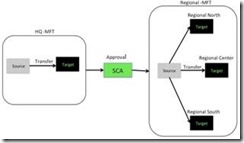
    For this implementation we will need two MFT transfers, one for sending the file from the headquarters to the SCA composite and another to send the file to the respective regional offices. In the middle the SCA composite will be in charge of interconnecting both transfers and the approval process. The following diagram shows the scenario.

    clip_image002MFT Scenario

    A MFT process consists of one or more sources, one or more targets and one transfer that interconnects the sources with the targets. This scenario will need the following elements:

    • Two MFT sources. One will use a file channel to obtain the report and the other one will receive the report from the SCA composite.

    • Four MFT targets: one for sending the report to the SCA composite and one for each of the regional offices (three in total).

    • Two transfers: one for sending the report the SCA target and another one for ending the report to the regional offices target.

    • An SCA composite that will have a Human Task for the approval process and will use the MFT adapters to receive and send the reports.

      • MFT Sources

        MFT comes with a web interface that allows the definition and management of sources, transfers and targets. The MFT console can be reached in the following url: http://<host&gt;:<port>/mftconsole/faces/login, where the host and the port are the ones from the managed server where MFT is installed.

        The MFT console has three different views, the design view for the definition of sources targets and transfers, the monitoring view for managing and tracking the current instances and the administrative view for configuring MFT.

        To create a new source, go to design mode and then select the sources item. Then click on the green ‘+’ to create a new source. Read the complete article here.

        SOA & BPM Partner Community

        For regular information on Oracle SOA Suite become a member in the SOA & BPM Partner Community for registration please visit www.oracle.com/goto/emea/soa (OPN account required) If you need support with your account please contact the Oracle Partner Business Center.

        Blog Twitter LinkedIn image[7][2][2][2] Facebook clip_image002[8][4][2][2][2] Wiki