ICS Update – On premise Agent now Available by Arturo Viveros

clip_image001


Hello appreciated readers, here’s hoping to a fun and successful 2016 for you all!!

And for us Oracle FMW practitioners, there are some very exciting news to begin the year:
Yours truly has been following for a while the development and growth of Oracle’s iPaaS platform: "Integration Cloud Service". And it’s been a long wait, but at long last the ultra hyped On-Premise Agent has been released and is now available for all ICS subscriptions.
There are some other cool and useful new features in this release (e.g. content based routing, new adapters, etc.), which we will surely discuss during the next few weeks in a different post. However, in our humble opinion the Agent is a transcendent piece of the puzzle, which will open up a whole new set of use cases and possibilities for the implementation of cloud-driven integrations with ICS. So, what does this mean?, let’s look at it graphically:

Oracle ICS was an already powerful yet simple to implement tool, suited perfectly for Cloud to Cloud Integrations but somehow limited in its potential to participate in hybrid solutions (those which also include on-prem interaction). The obvious problem here is that we know Hybrid Architectures are still predominant among organizations in the midst of a cloud adoption strategy. And that’s why the Agent is a real game-changer: Read the complete article here.

SOA & BPM Partner Community

For regular information on Oracle SOA Suite become a member in the SOA & BPM Partner Community for registration please visit www.oracle.com/goto/emea/soa (OPN account required) If you need support with your account please contact the Oracle Partner Business Center.

Blog Twitter LinkedIn image[7][2][2][2] Facebook clip_image002[8][4][2][2][2] Wiki

New Agent Simplifies Cloud to On-premises Integration by Bruce Tierney


clip_image002Oracle Integration Cloud Service has generated a lot of enthusiasm since the June 2015 Oracle PaaS launch by Larry Ellison.  A major reason for this enthusiasm was the introduction of simplicity to cloud integration…historically a complex process only possible by integration specialists.  We are very pleased to introduce to Integration Cloud Service this same level of simplicity to the integration of on-premises applications allowing for faster and easier integration of existing on-premises applications with cloud SaaS applications.  

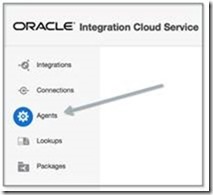
As shown in the image to the right, the new Agent feature within Oracle Integration Cloud Service eliminates common security and complexity issues previously associated with integrating on-premises applications from outside the firewall.   For example, there is no need to open an inbound port to communicate with on-premise systems and no need to expose any private SOA-based Web services.  Access the new Agent from the menu shown in the image below and let the agent simply and securely handle the communication. 

Furthermore, new adapters have been added to Integration Cloud Service to simplify the integration to on-premises applications.  These adapters are for Oracle E-Business Suite, Oracle Siebel Customer Relationship Management, SAP, Oracle Database, and the SOAP technology adapter.  The SOAP adapter can be used to connect to any Web service enabled application, including services exposed on Oracle SOA Suite or other on-premises integration platforms.clip_image006

Prior to creating the Agent or Agents, create your "Connections" to your applications.   Simply select and configure from a wide range of Oracle Applications such as Oracle CPQ Cloud, Sales Cloud, Service Cloud, HCM Cloud to name a few, 3rd party applications such as Salesforce.com, NetSuite and now with this release to on-premises applications.  See the image below to see some of the adapter choices: Read the complete article here.

SOA & BPM Partner Community

For regular information on Oracle SOA Suite become a member in the SOA & BPM Partner Community for registration please visit www.oracle.com/goto/emea/soa (OPN account required) If you need support with your account please contact the Oracle Partner Business Center.

Blog Twitter LinkedIn image[7][2][2][2] Facebook clip_image002[8][4][2][2][2] Wiki

Mobile & IoT Showcase @ OpenWorld Moscone South, #109

clip_image001

If you’ve been following Oracle’s mobile (r)evolution, we’ve been trending some impressive growth and mobile chops worth bragging about. The recent updates to Oracle Mobile Cloud Service, with the addition of Oracle MAX codeless development, new Location Based Services, bringing highly granular contextual apps (Manchester Airports Groupcomes to mind) and helping extend existing Forms based apps to Mobile First apps (New York MTA), we’re truly helping to mobilize our customers. Come see all of this, plus new mobile innovations and much more. Visit the Mobile & IoT Showcase at Moscone South, 109. Here’s a bit of a preview:

· Mobile Platform – catch the latest demo showcasing Oracle MCS latest features, Oracle MAX and Location Based Services

· Oracle JET, Oracle’s JavaScript Extension Toolkit. It’s open source. Yeah, that’s right, open source.

· Customer Insight and Engagement capabilities with multi-channel analytics, analysis, churn prediction & engagement

· Mobile innovations around chatbots, mobile beacons, and perhaps some interesting proof of concept apps created by Oracle’s A-Team

· Kick back at the Mobile & IoT Theatre to watch some in-depth presentations by technical experts in their field

For a great overview on what’s new and the Oracle Mobile roadmap catch this key OpenWorld session:

Mobile Now and in the Future: Location, Cognitive Insights, Chatbots, and Much More [CON7881]

clip_image001

SOA & BPM Partner Community

For regular information on Oracle SOA Suite become a member in the SOA & BPM Partner Community for registration please visit www.oracle.com/goto/emea/soa (OPN account required) If you need support with your account please contact the Oracle Partner Business Center.

Blog Twitter LinkedIn image[7][2][2][2] Facebook clip_image002[8][4][2][2][2] Wiki

Using Oracle Integration Cloud Service tutorial

clip_image001


When you subscribe to Oracle Integration Cloud Service, you also have the option to install an on-premises version of Oracle Integration Cloud Service in your local environment. This enables you to use on-premises Oracle Integration Cloud Service as a proxy server that sits between your internal company server hidden behind a fire wall and the cloud version of Oracle Integration Cloud Service. After installation, you can create users and assign roles to these users on the Users page of on-premises Oracle Integration Cloud Service. Read the tutorial here. & REST API for Oracle SOA Cloud Service tutorial here.

SOA & BPM Partner Community

For regular information on Oracle SOA Suite become a member in the SOA & BPM Partner Community for registration please visit www.oracle.com/goto/emea/soa (OPN account required) If you need support with your account please contact the Oracle Partner Business Center.

Blog Twitter LinkedIn image[7][2][2][2] Facebook clip_image002[8][4][2][2][2] Wiki

Setting up SSH tunnels for cloud to on-premise with SOA Cloud Service clusters by Christian


clip_image002Executive Overview

With the current release of SOA Cloud Service (SOACS) a common requirement often requested is to connect to an on-premise  database from the cloud SOACS instance. SSH tunnels can be used to establish cloud to on-premise communications, allowing SOA Cloud Service to access resources from on-premise applications.

Companion post : Single host SSH tunneling

My colleague, Shub Lahiri has written an excellent article as well, he discusses the simpler configuration where there isn’t a cluster of managed servers in the cloud- this is much simpler to setup,more suited for a development environment but cannot work with a cluster set up in the cloud.

Overview

This post expands on the concept of ssh tunneling using a more advanced setup to allow connection of a SOA Cloud cluster to a on-premise database. In principle this setup could be configured to access any tcp based service on-premise.

Motivation

Every managed server requires access to the on-premise database or other resource, for composite flows using the resource to function, as work is almost universally load-balanced between managed server nodes. Unfortunately, that means either we have multiple on-premise ssh connections to the cloud, or we have this solution. Multiple connections requires every managed server have a unique public IPV4 address. Unfortunately, IPV4 addresses are a scarce resource and as such, SOACS does not provision one for every managed server node.

Network topology

For this example, we will be tunneling database traffic, allowing a Database Adapter deployed in the cloud to access an on-premise Oracle Database. The SOA Suite cluster will be running on 2 compute nodes (a 2 node SOA cluster) with the standard SOA CS setup – an LBR node as the front end gateway, and a Database Cloud Service node for SOA Suite persistence.

The diagram shows the basic idea of the network topology. SSH is used from the database server on-premise to connect the database node of the SOA cluster in the cloud. The specific choice of the databases is technically incidental – this approach will work with the bridge between any two hosts on-premise and cloud, but it seems the most natural fit for a tunneled database connection to use the databases.

The DB host on-premise runs a reverse SSH tunnel to the DB host in the cloud. Traffic for the on-premise database flows (green lines) from the managed servers, via the SSH tunnel to the DB on-premise. The apparent connectivity is to the DB host in the cloud, but in reality SSH is back-hauling the traffic through the tunnel to on-premise.

Setting up

Unlike the single managed server usecase, we need to tweak some components of the cloud setup to allow the shared SSH tunnel to work.

First, we need to clarify some terminology:
The SSH server host – the endpoint in the cloud to which ssh connectivity is established. In the diagram above, it is the “DB” node in the cloud.
The SSH client – the endpoint on-premise from which ssh connectivity is established. In the diagram above it is the “OnPremise DB” node.
The managed servers – the hosts in the cloud which require access to the SSH tunnel to communicate to on-premise. In the diagram above, they are identified as MS1 and MS2. Read the complete article here.

SOA & BPM Partner Community

For regular information on Oracle SOA Suite become a member in the SOA & BPM Partner Community for registration please visit www.oracle.com/goto/emea/soa (OPN account required) If you need support with your account please contact the Oracle Partner Business Center.

Blog Twitter LinkedIn image[7][2][2][2] Facebook clip_image002[8][4][2][2][2] Wiki

Starting out with Oracle SOA CS – my first steps on a fairly advanced PaaS service by Lucas Jellema on January


clip_image002One of the platform offerings in the Oracle Public Cloud is the SOA Cloud Service. This service offers various flavors of SOA Suite 12c (Service Bus, SOA Suite, Technology Adapters) and API Manager 12c, automatically provisioned on the cloud. This service builds on top of a pre-existing DBaaS instance and Storage CS container and implicitly creates a JCS instance and several compute nodes on IaaS Compute CS – as shown in the figure to the right.

This article describes my first steps in getting started with SOA CS. In less than two hours, I had my first simple Service Bus project running on the SOA CS instance. From SoapUI on my local laptop, I could run a load test against the service exposed by the Service Bus, accessed via the automatically provisioned Load Balancer. The average response time was 60 ms, consisting to a large extent of the network latency from my laptop to Oracle’s data center.

Preparation

Before you can request provisioning of a SOA CS instance, you need to have gone through some preparations (also see documentation):

  • you need a (trial) subscription to SOA CS
  • you need a running DBaaS instance – a database instance that will host the SOA Infra schema, the MDS schema and other SOA Suite components (see this article about preparing such as DBaaS instance)
  • you need a (trial) subscription to Storage Cloud Service and you need to prepare a storage container on this service – to host the back ups of the SOA CS instance
  • you need to have prepared an SSH public/private key pair (which you also need to do for the DBaaS instance) and have access to the public key

Additionally, you need to decide what kind of environment you want to have provisioned: just SOA [SCA engine} or just Service Bus – or both? A single node environment or a multi-node cluster? Do you also [or only]need API Manager? The provision wizard will ask you for the answers to these questions.

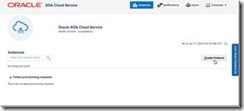
The starting situation before running the provision wizard is shown here:

I have navigated to the Service Console for the SOA CS service in my identity domain. It would list all my instances – if I had any. Since I do not, all I can do is press the Create button to start a request to have an instance provisioned for me: The first step is the selection of the Domain Type. The options are self explanatory. Read the complete article here.

SOA & BPM Partner Community

For regular information on Oracle SOA Suite become a member in the SOA & BPM Partner Community for registration please visit www.oracle.com/goto/emea/soa (OPN account required) If you need support with your account please contact the Oracle Partner Business Center.

Blog Twitter LinkedIn image[7][2][2][2] Facebook clip_image002[8][4][2][2][2] Wiki

Integration Cloud Service free online training & free presales certification

clip_image002


Integration Cloud Service Guided Learning path was created to provide the presales consultant with a detailed understanding of key product features to prepare him/her to do product demos and be involved in proof-of-concept projects.

It starts with the ICS product overview and moves into technical details with short modules on:

· Integrating Applications with Oracle Integration Cloud Service (4 mins)

· Connecting to Applications with Oracle Integration Cloud Service (3 mins)

· Creating Connections in Oracle Integration Cloud Service (2 mins)

· Creating Integrations in Oracle Integration Cloud Service (3 mins)

· Mapping Data in Oracle Integration Cloud Service (2 mins)

· Mapping Data Between Applications with Oracle Integration Cloud Service (3 mins)

· Monitoring Integrations in Oracle Integration Cloud Service (2 mins)

· Monitoring Integrations (2 mins)

· Packaging Integrations with Oracle Integration Cloud Service (2 mins)

· Using Packages in Integration Cloud Service (4 mins)

· Using Lookups in Oracle Integration Cloud Service (2 mins)

· Integrating Oracle RightNow and Oracle Sales Cloud Using Oracle Integration Cloud Service (6 mins)

After going through these on-line modules, you can test what you learnt by taking the assessment test at the end. Attend the online training here.

SOA & BPM Partner Community

For regular information on Oracle SOA Suite become a member in the SOA & BPM Partner Community for registration please visit www.oracle.com/goto/emea/soa (OPN account required) If you need support with your account please contact the Oracle Partner Business Center.

Blog Twitter LinkedIn image[7][2][2][2] Facebook clip_image002[8][4][2][2][2] Wiki

Video – How to build a Process Cloud Service Application (Business Travel Requests) in 40 minutes – Part III – Business Rules Setup by Jose Rodrigues

clip_image002

Welcome to Red Maverick’s fifth video, the third of the Business Travel Request Management Series.

In this series we’ll guide you on how to build a complete, working BPM application using  Oracle’s Process Cloud Service.

For this part, the focus is on setting Business Rules using Oracle’s PCS, to fine tune the process flow path, depending on process data.

This scenario and video was first prepared by me for Link Consulting‘s Process Cloud event, that was held in July 2015. Watch the video here.

SOA & BPM Partner Community

For regular information on Oracle SOA Suite become a member in the SOA & BPM Partner Community for registration please visit www.oracle.com/goto/emea/soa (OPN account required) If you need support with your account please contact the Oracle Partner Business Center.

Blog Twitter LinkedIn image[7][2][2][2] Facebook clip_image002[8][4][2][2][2] Wiki

Basic integration of Process Cloud Service with Document Cloud Service by Lykle Thijssen

clip_image001


Recently, Oracle had released a new version of Process Cloud Service. It mainly contains some minor improvements, but also has one major update: Oracle Process Cloud Service can now use Oracle Document Cloud Service for working with documents in business processes. This blog will show you how to make it happen.

Establishing the connection

In the main page of Oracle Process Cloud Service, click on your user in the right-top corner and select “Administration”. On the Administration page, you click “Settings” under Configuration, which will get you where you want to be. Here you can fill in the URL of your Document Cloud Service, as well as username and password of the admin user. You can test the configuration immediately and click “Save” in the upper right corner when the integration was successful.

Once the connection has been established, we can proceed to using documents in our processes immediately!

Developing the process

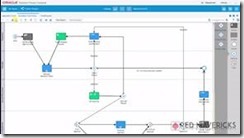
For this blog, I have created a small sample process for insurance claims. An employee of an insurance company will enter some details through a web form and attach a bill sent by a client. Then, if the bill is over $1000, a manager needs to approve or reject the claim. After this, the process will end. The small sample process looks as follows:

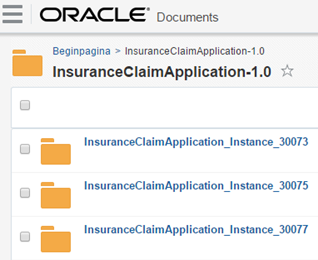
During development of the process, I have done nothing related to documents, this comes automatically! Of course, it is possible to work on document settings: for example, you can set access rights while implementing the human task. You can also create document folders on the application level of Process Cloud, but for now, I have decided to go with the default setting of one folder for my application, which will automatically be created in Document Cloud. For every instance of the process, a subfolder is automatically created too, so from Document Cloud side, it looks as follows: Read the complete article here.

SOA & BPM Partner Community

For regular information on Oracle SOA Suite become a member in the SOA & BPM Partner Community for registration please visit www.oracle.com/goto/emea/soa (OPN account required) If you need support with your account please contact the Oracle Partner Business Center.

Blog Twitter LinkedIn image[7][2][2][2] Facebook clip_image002[8][4][2][2][2] Wiki

Getting started with Process Cloud Service by Waslley Souza

clip_image002


If you know and use Oracle BPM Suite, you will like to try the new cloud solution called Oracle Process Cloud Service or PCS. With PCS you can modeling your processes through the cloud without the need to install Oracle BPM Suite. Go to PCS section within the Oracle Cloud website to learn more about or try it: http://cloud.oracle.com/process.

In this post we will create a basic process to create and approve employees.
Download the sample application: CreateEmployeeApplication.zip.

Log in to Oracle Process Cloud Service.
Click Create button, and then select New Application.

Name the application as Create Employee Application.
Select New Space option, and then name it as HR.

In this step, we will create the process and we have many options to create it.
Select the Form Approval Pattern option.

Name the process as Create Employee Process.

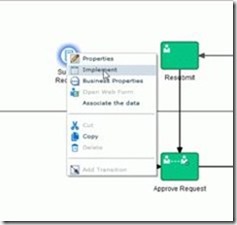
In the Create Employee Process, right-click Submit Request, and then select Implement. Read the complete article here.

SOA & BPM Partner Community

For regular information on Oracle SOA Suite become a member in the SOA & BPM Partner Community for registration please visit www.oracle.com/goto/emea/soa (OPN account required) If you need support with your account please contact the Oracle Partner Business Center.

Blog Twitter LinkedIn image[7][2][2][2] Facebook clip_image002[8][4][2][2][2] Wiki