Using Oracle Integration Cloud Service tutorial

clip_image001


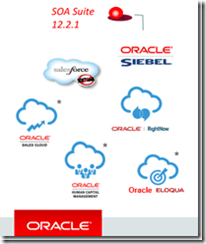
When you subscribe to Oracle Integration Cloud Service, you also have the option to install an on-premises version of Oracle Integration Cloud Service in your local environment. This enables you to use on-premises Oracle Integration Cloud Service as a proxy server that sits between your internal company server hidden behind a fire wall and the cloud version of Oracle Integration Cloud Service. After installation, you can create users and assign roles to these users on the Users page of on-premises Oracle Integration Cloud Service. Read the tutorial here. & REST API for Oracle SOA Cloud Service tutorial here.

SOA & BPM Partner Community

For regular information on Oracle SOA Suite become a member in the SOA & BPM Partner Community for registration please visit www.oracle.com/goto/emea/soa (OPN account required) If you need support with your account please contact the Oracle Partner Business Center.

Blog Twitter LinkedIn image[7][2][2][2] Facebook clip_image002[8][4][2][2][2] Wiki

Agent for simplifying Integration between Cloud and On-Premises apps by Robert van Molken


clip_image001In the last few months I mentioned that Oracle is developing an Agent. The Agent easily integrates your on-premises application(s) with the Oracle Cloud Services. The Agent is rolling out on all production instances next week. It was publicly announced by Bruce Tierney on the 3rd of January. He is the Director of Product Marketing for Cloud Integration and SOA. You can read his announcement on the Oracle Integration blog.

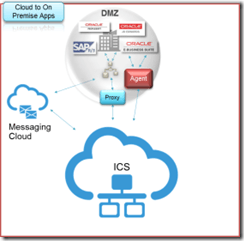
In this first article about the Agent I will go into the architectural basics,  which components are included and how it will connect Cloud to On-premises applications. The article is based on information I presented about during OpenWorld 2015.

Current / classic integration approach

The current approach for connecting Cloud / Internet hosted applications with On-premises applications is usually through one or more firewalls, and the use of a reverse proxy, Oracle API Gateway or OHS. For this a variety of expertise is needed for example to open up inbound ports in the firewall, expose a private SOAP/REST service and configure the network routing. The SOAP/REST service can for example be implemented with SOA Suite to for example communicate with the CRM to retrieve customer data.

Let look at the current / classic approach in the diagram below:

This is going to change a lot when using the Agent. It will simplify above diagram.

Common Cloud to On-Premises Integration Patterns

Currently there are three common patterns for Cloud to On-Premises integrations. They are 1. using messaging, 2. through a proxy and 3. using an agent. Read the complete article here.

SOA & BPM Partner Community

For regular information on Oracle SOA Suite become a member in the SOA & BPM Partner Community for registration please visit www.oracle.com/goto/emea/soa (OPN account required) If you need support with your account please contact the Oracle Partner Business Center.

Blog Twitter LinkedIn image[7][2][2][2] Facebook clip_image002[8][4][2][2][2] Wiki

Integration Cloud Service free online training & free presales certification

clip_image002


Integration Cloud Service Guided Learning path was created to provide the presales consultant with a detailed understanding of key product features to prepare him/her to do product demos and be involved in proof-of-concept projects.

It starts with the ICS product overview and moves into technical details with short modules on:

· Integrating Applications with Oracle Integration Cloud Service (4 mins)

· Connecting to Applications with Oracle Integration Cloud Service (3 mins)

· Creating Connections in Oracle Integration Cloud Service (2 mins)

· Creating Integrations in Oracle Integration Cloud Service (3 mins)

· Mapping Data in Oracle Integration Cloud Service (2 mins)

· Mapping Data Between Applications with Oracle Integration Cloud Service (3 mins)

· Monitoring Integrations in Oracle Integration Cloud Service (2 mins)

· Monitoring Integrations (2 mins)

· Packaging Integrations with Oracle Integration Cloud Service (2 mins)

· Using Packages in Integration Cloud Service (4 mins)

· Using Lookups in Oracle Integration Cloud Service (2 mins)

· Integrating Oracle RightNow and Oracle Sales Cloud Using Oracle Integration Cloud Service (6 mins)

After going through these on-line modules, you can test what you learnt by taking the assessment test at the end. Attend the online training here.

SOA & BPM Partner Community

For regular information on Oracle SOA Suite become a member in the SOA & BPM Partner Community for registration please visit www.oracle.com/goto/emea/soa (OPN account required) If you need support with your account please contact the Oracle Partner Business Center.

Blog Twitter LinkedIn image[7][2][2][2] Facebook clip_image002[8][4][2][2][2] Wiki

Integration with new Oracle Integration Cloud Service (ICS) by ec4u


clip_image002Since a few years cloud computing has become more and more popular. The main types of cloud computing are Infrastructure as a Service (IaaS), Platform as a Service (PaaS) and Software as a Service (SaaS). In the past, several subareas have been established in the market and pushed by research companies. One subarea is Integration PaaS (IPaaS)  and a variety of vendors have provided solutions. One advantage of IPaaS solutions is the simplified integration. Furthermore, IPaaS provides the capability to integrate cloud- and on-premise applications. Oracle announced Integration Cloud Service (ICS) as an IPaaS solution in June.
This article describes a first impression and the key components of ICS.

First experience with ICS

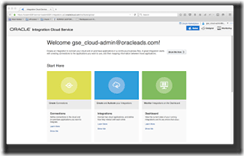
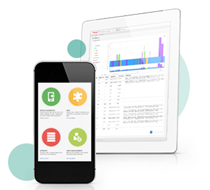
After the login to ICS, you will get greated with an organized and clean overview. The page provides an overview on the three main functional areas. Figure 1 shows the areas and the simple and tablet-friendly user interface. The functional areas are divided into Connections, Integrations and Dashboard.

Figure 1: ICS Start Page (click on the picture to see an enlarged version of the picture)

The Connections-area provides the capabilities to define configurations to specific application endpoints. These configurations are based on technology adapters such as SOAP, application adapters for on premise application e.g. eBusiness Suite and cloud adapters for cloud applications e.g. Oracle Sales Cloud. The connection could be used for several integrations and one of the main benefits is the reusability of the configuration. In addition, the integration developer does not need to know details about the service or application when using the preconfigured adapter.
The most important functional area is Integrations. It provides the functions to develop the integration flows and lookups. The overview page shows all integrations with the possibility to filter by status. The user interface to develop the integration is kept as simple as possible.
Figure 2 shows the integration development and the clean interface you will already know from the overview. Target, source and transformation are the key elements of an integration scenario. The source and target can be defined with preconfigured connections or technology adapters such as Rest or SOAP. The transformation for request and response messages is placed in the middle of the screen. Read the complete article here.

SOA & BPM Partner Community

For regular information on Oracle SOA Suite become a member in the SOA & BPM Partner Community for registration please visit www.oracle.com/goto/emea/soa (OPN account required) If you need support with your account please contact the Oracle Partner Business Center.

Blog Twitter LinkedIn image[7][2][2][2] Facebook clip_image002[8][4][2][2][2] Wiki

ICS Integration Patterns (Part 1 of 3): Map My Data by Antonis Antoniou

clip_image001

Oracle Integration Cloud Service (ICS) is another powerful yet simple Cloud platform offering by Oracle that simplifies the development of cloud and hybrid integrations (applications in the cloud and on premises).
The entire integration development and operational lifecycle is managed through a web based service console offering a point and click integration and monitoring experience without having to write a single line of code.
Furthermore Oracle ICS supports various industry standards like SOAP and REST and comes with a set of cloud adapters providing pre-integration capabilities with several SaaS applications (such as Oracle ERP Cloud, Oracle HCM Cloud, Oracle Sales Cloud, Oracle RightNow, Eloqua, NetSuite and Salesforce) shortening the time-to-market in integration projects.
The concepts in Oracle ICS are really simple; you create connections (using the pre-defined offered adapters) and leverage those connections to create integrations which you can then dashboard monitor to track the current state of your running integrations and fix any errors that might occur. Read the complete article here.

SOA & BPM Partner Community

For regular information on Oracle SOA Suite become a member in the SOA & BPM Partner Community for registration please visit www.oracle.com/goto/emea/soa (OPN account required) If you need support with your account please contact the Oracle Partner Business Center.

Blog Twitter LinkedIn image[7][2][2][2] Facebook clip_image002[8][4][2][2][2] Wiki

Five Ways Cloud-Based Integration Is Driving Innovation – Whitepaper


clip_image001With businesses adopting more and more cloud applications, mobile apps, and devices, integration has never been more important. Integrating these apps and tools with the rest of the systems is the key to a connected enterprise— one that supports real-time responsiveness, instant collaboration, and streamlined innovation. To keep up with these new integration demands, a new breed of solution has emerged—cloud-based integration platforms (also called integration platform as a service, or iPaaS for short). For businesses looking to gain all of the benefits of a connected enterprise, while also simplifying administration and accelerating time to market, they’re a game-changer. They’re fueling a hybrid approach to integration—one that combines on-premises integration with iPaaS

to respond to business requirements faster—but that’s just the start. Read on and discover five key ways cloud-based integration platforms are transforming the way organizations integrate, making innovation simpler than ever before. Get the whitepaper here.

SOA & BPM Partner Community

For regular information on Oracle SOA Suite become a member in the SOA & BPM Partner Community for registration please visit www.oracle.com/goto/emea/soa (OPN account required) If you need support with your account please contact the Oracle Partner Business Center.

Blog Twitter LinkedIn image[7][2][2][2] Facebook clip_image002[8][4][2][2][2] Wiki

ServiceCloud Rightnow Integration, XSLT Transformations! By Fabio Persico


clip_image002I’ve just roll out to a live environment, a SOA Integration project with Oracle Service Cloud Rightnow.

The customer needed to migrate from a in-house CRM to Oracle Service Cloud and with my company Infomentum we have helped them in taking this big step. Since that I have made lots of experience with OSC WebServices.

Here I just want to share the complex XSLT Transformation which we have implemented to communicate with the OSC WebServices, hopefully these can speed up any other SC integration projects.

There are 6 transformation in the ZIP package (we have implemented more):

XSLT Name

SC Object

Out of the box Object?

Operation Type

xsltContact2Update

CONTACT

Yes

UPDATE

xsltOrganisationToUpdate

ORGANIZATION

Yes

UPDATE

xsltProgrammeToUpdate

CO.PROGRAMME

No

UPDATE

xsltProgrammeTypeToUpdate

CO.PROGRAMMETYPE

No

UPDATE

xsltCourseToUpdate2

CO.COURSE

No

UPDATE

xsltSessionToUpdate

CO.SESSION

No

UPDATE

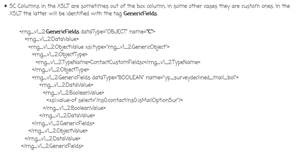
In the XSLTs you’ll find all the details about the TARGET columns (Oracle Service Cloud ones). Here are some important concepts I want to highlight:

  • SC Columns in the XSLT are sometimes out of the box column, in some other cases they are custom ones. In the XSLT the latter will be identified with the tag GenericFields. Read the complete article here.

SOA & BPM Partner Community

For regular information on Oracle SOA Suite become a member in the SOA & BPM Partner Community for registration please visit www.oracle.com/goto/emea/soa (OPN account required) If you need support with your account please contact the Oracle Partner Business Center.

Blog Twitter LinkedIn image[7][2][2][2] Facebook clip_image002[8][4][2][2][2] Wiki

HCM Cloud – Bulk Integration Automation Using SOA Cloud Service by Jack Desai


clip_image002Introduction

Oracle Human Capital Management (HCM) Cloud provides a comprehensive set of tools, templates, and pre-packaged integration to cover various scenarios using modern and efficient technologies. One of the patterns is the batch integration to load and extract data to and from the HCM cloud. HCM provides the following bulk integration interfaces and tools:

HCM Data Loader (HDL)

HDL is a powerful tool for bulk-loading data from any source to Oracle Fusion HCM. It supports important business objects belonging to key Oracle Fusion HCM products, including Oracle Fusion Global Human Resources, Compensation, Absence Management, Performance Management, Profile Management, Global Payroll, Talent and Workforce Management. For detailed information on HDL, please refer to this.

HCM Extracts

HCM Extract is an outbound integration tool that lets you select HCM data elements, extracting them from the HCM database and archiving these data elements as XML. This archived raw XML data can be converted into a desired format and delivered to supported channels recipients.

Oracle Fusion HCM provides the above tools with comprehensive user interfaces for initiating data uploads, monitoring upload progress, and reviewing errors, with real-time information provided for both the import and load stages of upload processing. Fusion HCM provides tools, but it requires additional orchestration such as generating FBL or HDL file, uploading these files to WebCenter Content and initiating FBL or HDL web services. This post describes how to design and automate these steps leveraging Oracle Service Oriented Architecture (SOA) Cloud Service deployed on Oracle’s cloud Platform As a Service (PaaS) infrastructure.  For more information on SOA Cloud Service, please refer to this.

Oracle SOA is the industry’s most complete and unified application integration and SOA solution. It transforms complex application integration into agile and re-usable service-based components to speed time to market, respond faster to business requirements, and lower costs.. SOA facilitates the development of enterprise applications as modular business web services that can be easily integrated and reused, creating a truly flexible, adaptable IT infrastructure. For more information on getting started with Oracle SOA, please refer this. For developing SOA applications using SOA Suite, please refer to this.

These bulk integration interfaces and patterns are not applicable to Oracle Taleo.

Main Article

HCM Inbound Flow (HDL)

Oracle WebCenter Content (WCC) acts as the staging repository for files to be loaded and processed by HDL. WCC is part of the Fusion HCM infrastructure.

The loading process for FBL and HDL consists of the following steps:

  • Upload the data file to WCC/UCM using WCC GenericSoapPort web service
  • Invoke the “LoaderIntegrationService” or the “HCMDataLoader” to initiate the loading process.

However, the above steps assume the existence of an HDL file and do not provide a mechanism to generate an HDL file of the respective objects. In this post we will use the sample use case where we get the data file from customer, using it to transform the data and generate an HDL file, and then initiate the loading process.

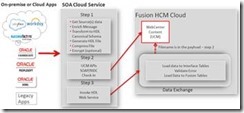
The following diagram illustrates the typical orchestration of the end-to-end HDL process using SOA cloud service: Read the complete article here.

SOA & BPM Partner Community

For regular information on Oracle SOA Suite become a member in the SOA & BPM Partner Community for registration please visit www.oracle.com/goto/emea/soa (OPN account required) If you need support with your account please contact the Oracle Partner Business Center.

Blog Twitter LinkedIn image[7][2][2][2] Facebook clip_image002[8][4][2][2][2] Wiki

Maximize the Value of Your CX Investments with Oracle Cloud Platform


clip_image001With Oracle CX Cloud, companies not only get the most comprehensive CX offering, but also an innovative and powerful cloud platform to extend, analyze and integrate these applications with the rest of the enterprise resources, as well as to optimize them for every user.  

This session outlines the Cloud Platform (PaaS & IaaS) solutions that Oracle provides to streamline cloud development and empowers you to deliver enterprise-grade solutions rapidly and cost effectively. Join this event if you are interested in the most advanced way to extend, analyze and integrate the Oracle CX solutions. In subsequent webinars, we will drive you through further Integration Solutions’ details.

Agenda:

§ Oracle Cloud Platform Overview

§ Practical use case to extend, analyze and integrate Oracle CX Cloud

§ CX extension & integration demo

§ Partner resources

Schedule:

December 17th 2015 10:00 am CET

For details please visit our registration page here!

SOA & BPM Partner Community

For regular information on Oracle SOA Suite become a member in the SOA & BPM Partner Community for registration please visit www.oracle.com/goto/emea/soa (OPN account required) If you need support with your account please contact the Oracle Partner Business Center.

Blog Twitter LinkedIn image[7][2][2][2] Facebook clip_image002[8][4][2][2][2] Wiki

PaaS free trial accounts ICS and PCS, IoT and PaaS for SaaS

image

As part of our communities we do offer free PaaS accounts (only for partners in Europe, Middle East and Africa. In case you are not part of EMEA please contact your local partner manager):

· Integration Cloud Service & Process Cloud Service & SOA Cloud & IoT & PaaS for SaaS Service PaaS Demo Accounts  (Community membership required)

· Java Cloud Service & Application Cloud Container Service & Mobile Cloud Service PaaS Demo Accounts (Community membership required)

Watch the GSE Overview Video! Get an overview of what GSE is and how you can use GSE to help you sell. You can also get long running dedicated PaaS instances, therefore please send us details about your use cases. For instant access please request a sandbox demo

SOA & BPM Partner Community

For regular information on Oracle SOA Suite become a member in the SOA & BPM Partner Community for registration please visit www.oracle.com/goto/emea/soa (OPN account required) If you need support with your account please contact the Oracle Partner Business Center.

Blog Twitter LinkedIn image[7][2][2][2] Facebook clip_image002[8][4][2][2][2] Wiki

Technorati Tags: PaaS,Cloud,ICS,PCS,PaaS4SaaS,SOA Community,Oracle SOA,Oracle BPM,OPN,Jürgen Kress