No More Hidden SOA Performance Problems by Kevin King
December 18, 2016 Leave a comment
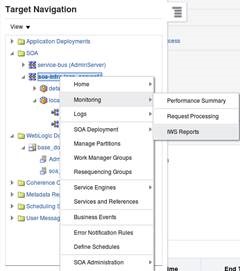 For anyone who has done performance and load testing in Oracle SOA suite, you know it can be frustrating and time consuming. However, our lives have just gotten much easier! Originally, quite a bit of manual work was needed to find or calculate how long composites took, what the problematic components were, and why instances just took too long. Fortunately, Oracle has introduced a new monitoring tool, Integration Workload Statistics (IWS). This tool creates a report very similar to an AWR report, but focuses on the SOA infrastructure. This feature was released with the new 12.2.1 version of SOA.
Integration Workload Statistics
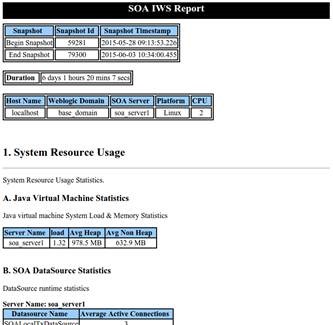 The IWS report is intended for reactive monitoring of your system. Enterprise Manager provides a few different tools for monitoring real-time performance and other metrics, however IWS was introduced to post-process poorly performing periods. Running a report over a one hour period where performance is a constant issue allows you to see what components are causing delays. The report details out statistics on components, composites, processes, adapters, endpoints, queues and more!
IWS works by taking periodic, configurable snapshots of server metrics. These metrics are stored to the database and are available for reporting. The reports are generated based on a start and end time and further filtering can be done by server, partition, and even specific composites. Oracle has provided an easy way to view this data with a generated HTML report and they also provide a CSV file, or XML file with the data requested.
The report (assuming FINEST level collection) consists of:
- Snapshot Details – Basic information about the snapshots, the duration of the report, and server details.
- System Resource Usage – Statistics about JVM, SOA DataSources, and SOA WorkManagers. This gives insight into how much heap the server using, the active connections to data sources, and how many threads each of the work managers are using on each server. Read the complete article here.
For regular information on Oracle SOA Suite become a member in the SOA & BPM Partner Community for registration please visit www.oracle.com/goto/emea/soa (OPN account required) If you need support with your account please contact the Oracle Partner Business Center.
 Blog
Blog  Twitter
  LinkedIn
 ![image[7][2][2][2]](https://paascommunity.com/wp-content/uploads/2013/04/image7222.png?w=20&h=20 "image[7][2][2][2]") Facebook
Facebook ![clip_image002[8][4][2][2][2]](https://paascommunity.com/wp-content/uploads/2013/04/clip_image00284222.jpg?w=26&h=23 "clip_image002[8][4][2][2][2]") Wiki
Wiki


 PaaS Community Blog