BAM Alerts by Marcel van de Glind

image

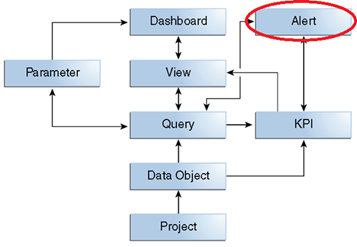
This post (next in the BAM series) is about BAM Alerts. Alerts were not part of the POC, but in the blog series I also wanted to pay attention to it, resulting in this post. I have made a very small example to get some feeling in there and will not get into all the details of alerts.

As usual, first a piece of theory from the Oracle documentation:

An alert performs one or more actions when launched by an event and filtered by one or more conditions. An event can be an amount of time, a specific time, a date and time, a repeating event between two dates, a change in a data object, output from a continuous query, or a manual event. A condition restricts the alert to an event occurring between two times or dates or to a specific day of the week. An action can send a notification, perform a data object operation, invoke a web service, call an external method, or launch other alerts. Read the complete article here

Part 1 – Oracle BPM 12c Process Invoke Database by Dan Atwood

image

Part 1 – Create a WebLogic JNDI Database Connection

This explains how the WebLogic JNDI connection to a database schema is created.  In the next two posts, you will see how the Database Adapter can use this connection once it has been created.  This simply describes the steps that are necessary to configure the JNDI connection initially. 

Components exposed in a SOA application can be exposed as a service, and a call to the database is no exception.  In order to invoke the database from a BPM process, it first has to be exposed as a service.

First, a datasource needs to be created.  You need the database schema’s datasource configured to create the JNDI connection information needed to access it. If all you want to do is to access the data from ADF, this is all you would need. 

Where the database adapter comes into play, however, is when your project’s composite needs to access it as a service (e.g., when a composite’s Mediator needs to connect to the database adapter). In the fourth part of this series, the Database Adapter SOA component will be dragged into the External References column of your composite diagram. For this to succeed at runtime, the datasource’s JNDI connection to the datasource has to first be added to the database adapter’s DBAdapter deployment.  This will be done in part 3 of this series.

This example uses the HR schema that comes that is preinstalled with the Oracle XE 11g or 12c SE database, but these same steps could be used to expose other database schemas. 

1. Open the WebLogic Console (e.g., http://localhost:7001/console), and log in.

2. In this step, the source of the data is configured as a datasource to the SOA infrastructure.  This datasource provides the connection to the actual underlying data provider.  Configure the JDBC Datasource in the WebLogic by selecting Services -> Data Sources. Read the complete article here.

PaaS Partner YouTube Update March 2018


The March edition of the PaaS & Middleware Partner Update contains four topics:

• Free on-demand trainings

• Oracle Developer Meetups

• Oracle OpenWorld Call for Papers

• PaaS Community Webcast Oracle JET

For regular updates please subscribe to our YouTube channel here. Thanks for your likes and sharing the video on YouTube and LinkedIn. For the latest SOA & BPM Partner Community information please visit our Community update wiki here (Community membership required).

PaaS Partner Community

For regular information on Oracle SOA Suite become a member in the SOA & BPM Partner Community for registration please visit www.oracle.com/goto/emea/soa (OPN account required) If you need support with your account please contact the Oracle Partner Business Center.

Blog Twitter LinkedIn image[7][2][2][2] Facebook clip_image002[8][4][2][2][2] Wiki

Technorati Tags: YouTube,SOA Community,Oracle SOA,Oracle BPM,Jürgen Kress,Middleware Update,Partner Update

Dealing with Dates and Times in Oracle Process Cloud Service by Sebastien Wiertz

image

Introduction

Oracle Process Cloud Service (PCS) is great! You can build process-based applications in two shakes of a lamb’s tail, much quicker than most Low Code platforms in the market. Of course, you can’t, or at least shouldn’t, develop any “normal” master-detail CRUD application with Oracle Process Cloud Service. If you need this kind of applications perhaps Oracle Application Builder Cloud Service will suit you better, but for process-centric applications, it’s a hard to beat tool.

As you may know, Oracle also has an on-premise product, called Oracle BPM, which features a similar codebase, but it features a more advanced and complex UI and it takes a bit more time to produce a similar application.

Oracle PCS really shines for its simplicity and ease of use, because the UI was streamlined and is much more focused. However, all this optimization and streamlining led to decisions to simplify the UI and some features present in Oracle BPM are not present in Oracle PCS. Most of them we won’t really need except for 1% of all our application needs, but a few are a more common necessity. The capacity to use functions to manage and operate dates and times fit this last set.

Oracle BPM allows you to manipulate dates using several options, with Data Associations and Script tasks perhaps being the most common. In Oracle PCS, the Data Associations don’t allow you manipulate dates nor retrieve the current Date / Time, and script tasks plain and simply are not available.

It’s possible to create services that do whatever we need to do with dates and then call them in Oracle PCS, but sometimes we want a more direct approach.

The Use Case

Let’s consider the following case:

We have a simple approval process with 3 steps. Every time there’s a response to a task, we want to record which response was and at which date and time it was made. We also want to show this information to the user, in the task web form, and we want that the whole process takes a calculated amount of time as the most, with it automatically finishing up after that amount.

Something a bit like this: Read the complete article here.

Web Forms in Oracle Process Cloud Service by Antonis Antoniou

image

The September 2016 release introduced an entirely new web forms functionality called “Web Forms”, an alternative to its existing Frevvo web forms with the latter being renamed to “Basic Forms”. The new “Web Forms” functionality is more business user-friendly, promoting important development principles like multiple views, re-use, branding, list of values and fetching data using REST connections.

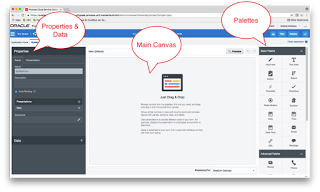
The new “Web Forms” group its functionality into three areas; the left area which includes the “Properties” section and the “Data” section, the right area that includes the palettes (basic, advanced, forms and business types) and the main area which is the drawing canvas.

Using drag and drop gestures you can design your form using any components from all four palettes. The “Basic Palette” includes basic components like the input text, button, checklist, radio button, date, etc. while the “Advanced Palette” includes components like image, video, section, tab, table, etc.

You can also use the “Forms Palette” to re-use previously created forms or you can use the “Business Type Palette” to create a user interface using a “data-first” approach (Oracle Process Cloud Service will automatically create a form using the data definitions of the business type). Read the complete article here.

Implementing Case Management Patterns using Oracle Process Cloud Service (PCS) by Jose Rodrigues

image

Hi everyone and welcome to the second part of our article on implementing Case Management (CM) patterns with Oracle Process Cloud Service (PCS).

On the first part, we learned a bit about the concepts around Case Management and we (barely) started a process on PCS. We’ll use this process now as a container to implement the ad-hoc nature patterns.

The First Rule of Fight Club

“We do NOT try to implement Case Management on PCS!” – That’s the first rule. What we will do is implement a small subset of behaviors, which will offer some of the advantages of Case Management.

The second rule is that we have two buddies that can help us in this quest: Database Cloud Service (DBCS) and Integration Cloud Service (ICS). Some of the behaviors will need a bit of persistence, which implies placing a lot of case metadata in some control tables, hence the DBCS, with the ICS being used to handle all integrations. ICS may not be necessary but makes integration easy as peach. Use them extensively!

As we’re trying to “hammer a screw”, things will not be pretty. This is a workaround. Please take it as a way to implement these behaviors.

Regarding the first rule, the set of behaviors which we’re going to implement is the following:

  • Ad-hoc Task and Process Invocation
  • Milestone and Stage Trigger/Set
  • Event Listeners

Let’s Start

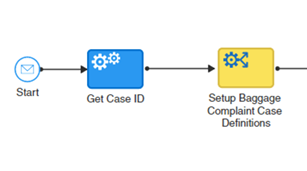
So, last time we created a message based process

Again, the process must be created with messages events, as these will allow it to be called by other cases in an asynchronous way.

The first thing we do is get a case ID. This ID should come from another system (for instance, a database) and will be used to guarantee correlation between all elements of the case. We’ll get into to that further ahead.

Then, what we typically do is set up a business rule (decision table) or a database table, in which we predefine some configurations, such as Overall Process SLA, Milestone SLA’s, etc… This will allow you to change the way a process/case behaves, without actually having to change the process model. Read the complete article here.

Forceview Takes Business Ideas to Automation in Minutes

image

Patrick ten Broeke, Forceview’s Creative Analysis Officer, shares how Oracle Process Cloud powers agile engagement with business experts to cut time to value from months to minutes. Watch the video here.

The Curious Case of Missing Port Type in Oracle PCS by Arun Pareek

image

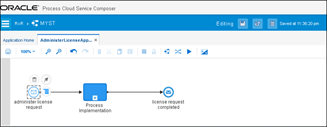
I was recently working on a simple process in PCS for a license approval flow. Given the purists that I am, I began by defining definitions for the various message based activities used in the process flow. The process was an asynchronous process with a few intermediate events. A simplified snippet is shown here for visualization.

In order to implement the above process, I created a service definition (WSDL) with the following schematic. As you can notice, there is a portType for accepting requests into the process (fc.myst.bp.TestDrive) and a callback portType for sending messages out of the process (fc.myst.bp.TestDrive.CallBack). Each of the portTypes have operations for catch and throw messages respectively.

Creating a service definition is considered a best practice as it will not lead to multiple definitions created by the process when generating interfaces from message based implementations. So instead of using “Define Interface” we tend to use “Use Interface“. Read the complete article here


Oracle OpenWorld 2018 Call for Papers – open until March 22nd 2018

image

Welcome to the Call for Speakers Submission Page for Oracle OpenWorld 2018

IMPORTANT NOTE ABOUT SUBMITTING: The submission tool will time out after 15 minutes of inactivity based on the oldest inactive tool window and you will lose the submission you were working on.

Please review the Speaker Guidelines and Instructions for submission information and key dates (subject to change) for Oracle OpenWorld before starting your proposal.

Make sure to take note of your session confirmation number after you enter the session.

By submitting a proposal for consideration, you authorize Oracle to promote, publish, display, and disseminate the content submitted to Oracle, including your name and likeness, for use associated with Oracle OpenWorld 2018. Press, analysts, bloggers and social media users may be in attendance at Oracle OpenWorld.

RainFocus supports Internet Explorer 11 and Edge, as well as the current versions of Firefox, Chrome and Safari.

Key Dates

OpenWorld Call for Speakers — Open February 27

OpenWorld Call for Speakers — Closed March 22, Midnight PST

Notifications for accepted and declined submissions sent Mid-May

Please submit your paper here and  see additional Call for Papers here

Oracle Process Cloud Service – Decision Model Notation part 2 by Lykle Thijssen

image

In my previous blog, I showed how to get started with Decision Model Notation (DMN) in Oracle Process Cloud Service and how to create a simple Decision Table. Picking up from there, we will now look into creating If-Then-Else rules, which should also be familiar to people who know Oracle’s old Business Rules. We will also create a service and call it from a process.

Creating an If Then Else Decision

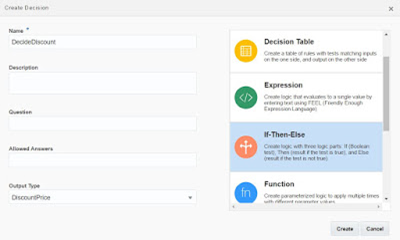
As Input, I have created a TotalAmount object, which is the total amount of a Sales Order. Based on this TotalAmount, we are going to calculate a Discount Price, for which I have created a DiscountPrice type to make the service interface a bit prettier than just ‘output’. To create an If-Then-Else rule, just click the + button next to Decisions, enter a name and set the output type to string, number or any other type, in this case DiscountPrice.

Now, Oracle will have created a rule for you, in which you only need to fill in the "if", "then" and "else". Since you’ve already decided your output object, we will not use that one in the expression, which is different from the old Oracle Business Rules. So just enter the value that you want for this object and you’ll be fine. You can also create nested expressions, as shown below: Read the complete article here.