PaaS Partner YouTube Update July 2017

The July edition of the PaaS & Middleware Partner Update contains three key topics:

  • PaaS Overview webcast and sales resources for Oracle Partners
  • PaaS Summer Camps 2017 and Integration & extend Bootcamps
  • Community Webcast about Wercker on July 21st 2017

For regular updates please subscribe to our YouTube channel here. Thanks for your likes and sharing the video on YouTube and LinkedIn. For the latest SOA & BPM Partner Community information please visit our Community update wiki here (Community membership required).

SOA & BPM Partner Community

For regular information on Oracle SOA Suite become a member in the SOA & BPM Partner Community for registration please visit www.oracle.com/goto/emea/soa (OPN account required) If you need support with your account please contact the Oracle Partner Business Center.

Blog Twitter LinkedIn image[7][2][2][2] Facebook clip_image002[8][4][2][2][2] Wiki

Technorati Tags: YouTube,SOA Community,Oracle SOA,Oracle BPM,Jürgen Kress,Middleware Update,Partner Update

Using Process Cloud Service REST API Part 1 by John Featherly

image

The Process Cloud Service (PCS) REST API provides an avenue to build UI components for workflow applications based on PCS. The versatility that comes with REST enables modern web application frameworks and just as easily, mobile applications. The API documentation is available here. Notice the endpoints are organized into eight categories. We’ll be focusing on the process and task categories.

Exploring the API

The API documentation contains samples using cURL which is useful for ad hoc command line calls. More comprehensive and easier to use tools like Postman and SoapUI are recommended. The PCS REST API WADL (Web Application Description Language) is available and can be imported into a Postman collection or SoapUI project. Most modern browsers such as Chrome, Firefox, Microsoft Internet Explorer and Edge have developer tools that can be useful when debugging web applications with REST calls.

A Simple PCS Application

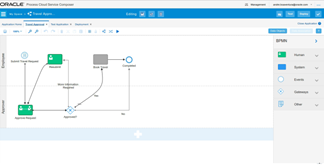
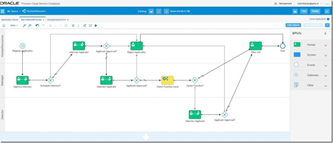
In order to explore the API we will need a simple PCS application with a basic workflow and task form. We’ll build a workflow with a message start which means it will have a SOAP Web Service binding. We’ll create a string parameter on the binding and pass that incoming string to a submit task, then to an approve task and end the flow.

PCS Composer

Login to PCS and select Develop Processes from the row of buttons on the welcome page. Read the complete article here.

SOA & BPM Partner Community

For regular information on Oracle SOA Suite become a member in the SOA & BPM Partner Community for registration please visit www.oracle.com/goto/emea/soa (OPN account required) If you need support with your account please contact the Oracle Partner Business Center.

Blog Twitter LinkedIn image[7][2][2][2] Facebook clip_image002[8][4][2][2][2] Wiki

Technorati Tags: SOA Community,Oracle SOA,Oracle BPM,OPN,Jürgen Kress

Process Cloud Service: new features and improvements by Lykle Thijssen

image

During Oracle Open World 2016, the latest release of Oracle Process Cloud Service got presented. The product has been making huge progress in all aspects, so here’s an overview of all the new and improved features.

Oracle Process Cloud Service

For those of you unfamiliar with the product: Oracle Process Cloud Service (PCS) is Oracle’s BPM solution for the cloud. While development on Oracle BPM Suite has pretty much come to an end, Oracle Process Cloud Service is the way forward and the platform for all new features related to Business Process Management. This meant that the product that was originally positioned as BPM for the citizen developer had to improve and mature to a full-blown BPM solution. It needs to support long running processes, improve its integration strategy and support case management, to mention some important subjects. While case management is not there yet, it will certainly come to Oracle Process Cloud Service and many other features are already there with the latest release.

Modelling Processes

As it used to be, modelling processes is done in the browser. This makes it easy for business and IT to collaborate on processes, because you only need an internet connection to get access. No need for development tools, code repositories and a powerful work station to get started. The main improvement in the process modelling is that Oracle has abandoned the usage of Flash. This makes the process modeller faster and easier to use, creating a far more pleasant and performant development experience.

Selecting integrations

When creating a Service Call, whether it’s synchronous or asynchronous, you can now select an Integration from Oracle Integration Cloud Service. Obviously, this is much more practical than dealing with WSDL imports and all the technical stuff related to that, but it also has a bigger meaning. It’s clearly showing that Integration Cloud Service has been strategically positioned as the way to go for process integrations. It’s putting the technical know-how of integration where it belongs, so you will no longer feel tempted to take that kind of complexity into a business process. Therefore, I strongly recommend following this approach as suggested by Oracle, instead of trying to work out your own integrations in PCS. Use these products for their purpose.

Document workflows

Oracle Process Cloud Service is still closely connected to Oracle Documents Cloud Service. It was already possible to deal with documents in your processes very easily, but now processes can even be started by putting a document in a certain folder in Documents Cloud Service. It requires minimal configuration on the Documents side, while in PCS you can now use a “Document Start” event for your process. Read the complete article here.

SOA & BPM Partner Community

For regular information on Oracle SOA Suite become a member in the SOA & BPM Partner Community for registration please visit www.oracle.com/goto/emea/soa (OPN account required) If you need support with your account please contact the Oracle Partner Business Center.

Blog Twitter LinkedIn image[7][2][2][2] Facebook clip_image002[8][4][2][2][2] Wiki

Technorati Tags: SOA Community,Oracle SOA,Oracle BPM,OPN,Jürgen Kress

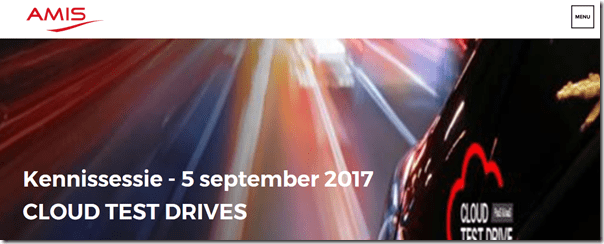
Try the Oracle Cloud hands-on September 5th Utrecht Netherlands


Voor de tweede keer organiseert AMIS de Oracle Cloud Test Drives. AMIS laat een groep Oraclegebruikers kennismaken met een aantal van deze Cloud Services. Zij kunnen deze dag hands-on ervaring opdoen.

Oracle, vooral bekend van zijn on-premises aanbod, brengt zijn gehele software portfolio naar de Cloud. Niet alleen de kant-en-klare applicaties, maar ook op het gebied van Platform (PaaS) en Infrastructure (IaaS). Met deze Cloud Services kun je snel en Agile maatwerk applicaties ontwikkelen, iets extra’s toevoegen aan SaaS implementaties of cloud en/of hybride omgevingen integreren.

Cloud Test Drives

Op 5 september kun je kennismaken met een aantal Cloud Services. We laten niet alleen zien hoe ze werken en wat je er mee kunt, maar je kunt ook hands-on ervaring opdoen. Spelen met de tools, door de verschillende schermen bladeren, integraties configureren en een aanzet maken met het ontwikkelen van processen of applicaties.

For details please visit the registration page here.

image

SOA & BPM Partner Community

For regular information on Oracle SOA Suite become a member in the SOA & BPM Partner Community for registration please visit www.oracle.com/goto/emea/soa (OPN account required) If you need support with your account please contact the Oracle Partner Business Center.

Blog Twitter LinkedIn image[7][2][2][2] Facebook clip_image002[8][4][2][2][2] Wiki

Technorati Tags: SOA Community,Oracle SOA,Oracle BPM,OPN,Jürgen Kress, AMIS

Migrating your Oracle BPM assets into Oracle Process Cloud Service (PCS) by Andre Boaventura

image

If you are already an Oracle BPM user, it is likely that you might have heard or even ventured in its respective cloud version called Oracle Process Cloud Service (aka PCS). Essentially, Oracle PCS is a solution that enables you to rapidly design, automate, and manage business processes, as well as it is done with Oracle BPM, however the major advantage is that you can do everything in the cloud, without any concerns with infrastructure installation, setup and provisioning while keeping IT teams focused on high-value projects rather than endless tuning, monitoring, troubleshooting and workarounds, as regularly it is required to be done for on-premise projects, which in turn, allows you to focus on the business value of your solution, that is what really matters whenever we  talk about Business Process Management.

Oracle PCS has two environments:

Composer: for developing, testing, and deploying process applications. Read the complete article here.

SOA & BPM Partner Community

For regular information on Oracle SOA Suite become a member in the SOA & BPM Partner Community for registration please visit www.oracle.com/goto/emea/soa (OPN account required) If you need support with your account please contact the Oracle Partner Business Center.

Blog Twitter LinkedIn image[7][2][2][2] Facebook clip_image002[8][4][2][2][2] Wiki

Technorati Tags: SOA Community,Oracle SOA,Oracle BPM,OPN,Jürgen Kress
Cloud based Human Workflow and Business Process automation – PCS, BPM Suite on the Cloud, BPM Suite on Premises by Lucas Jellema

image

On premises BPM Suite has been Oracle’s flagship product for business process automation for many years. Based on the industry standard of BPMN and tightly integrated with SOA Suite for integrations, it has been widely used to implement complex and typically long running business processes. The recent addition of Adaptive Case Management to BPM Suite has extended its functionality with support for less structured workflows, loosely based on the CMMN standard. Oracle has not offered – and will not offer – a BPM Suite CS; the only supported way to run BPM Suite in the Oracle Cloud is by installing it into a JCS instance.

For the business user, Oracle introduced the Process Cloud Service (PCS). PCS was originally introduced for fairly simple human workflows that may integrate documents (using Document CS) and collaboration (leveraging Oracle Social Network).

Workflows designed in PCS can exported to BPM Suite; however, BPM projects created in BPM Studio (JDeveloper) cannot be lifted and shifted to PCS, and long running instances are of course not lift and shiftable at all.

Over the last year, a similar development has taken place as with ICS: PCS is rapidly becoming the premier offering from Oracle for automating business processes, far beyond the reach of the business user. Instead of a citizen developer’s tool for simple human workflows, PCS is growing into what could have been the next generation of BPM Suite, while BPM Suite will not evolve any further. See this image from the documentation for BPM Suite 12.2.1.2.0 – October 2016: Read the complete article here.

SOA & BPM Partner Community

For regular information on Oracle SOA Suite become a member in the SOA & BPM Partner Community for registration please visit www.oracle.com/goto/emea/soa (OPN account required) If you need support with your account please contact the Oracle Partner Business Center.

Blog Twitter LinkedIn image[7][2][2][2] Facebook clip_image002[8][4][2][2][2] Wiki

Technorati Tags: SOA Community,Oracle SOA,Oracle BPM,OPN,Jürgen Kress
Creating a Platform Blueprint from an Existing SOA / BPM Domain by Matt Wright

image

Overview

Rubicon Red MyST uses a declarative approach to automation, meaning users simply define the target state of the Oracle Middleware infrastructure to be deployed; which, at the push of a button, is automatically provisioned by MyST.

Within MyST, the target state is captured in the platform definition, which is divided into two layers. First, the Platform Blueprint defines an environment agnostic specification used to define the platform topology and configuration of your Oracle Middleware. Second, the Platform Model, overlays the environment specific configurations.

Splitting the platform definition into two layers, provides infrastructure independence; enabling you to provision consistent middleware platforms across all environments regardless of infrastructure type, on premise and on cloud.

One way to create a Platform Blueprint is to use the Platform Wizard, this guides the user through a simple process to capture the key design decisions for the Oracle Middleware topology and configuration and creates a corresponding Platform Blueprint.

Alternatively MyST allows you to introspect and capture the configuration of an existing WebLogic domain and use that to generate an equivalent Platform Blueprint. This is the topic of this blog.

Discover and Introspect Existing WebLogic Domains

To create a Platform Blueprint based on an existing WebLogic domain, we simply point MyST at the servers hosting the WebLogic domain; MyST will introspect the domain and create a corresponding Platform Blueprint. This supports a number of use cases, including: Read the complete article here.

SOA & BPM Partner Community

For regular information on Oracle SOA Suite become a member in the SOA & BPM Partner Community for registration please visit www.oracle.com/goto/emea/soa (OPN account required) If you need support with your account please contact the Oracle Partner Business Center.

Blog Twitter LinkedIn image[7][2][2][2] Facebook clip_image002[8][4][2][2][2] Wiki

Technorati Tags: SOA Community,Oracle SOA,Oracle BPM,OPN,Jürgen Kress
Workshop: Oracle FMW Administration Foundation – SOA & OSB by Michel Schildmeijer

image

Learn the latest about Oracle Fusion Middleware Administration Foundation, SOA Suite, and Oracle Service Bus infrastructure management. Oracle Ace Michel Schildmeijer tells all during a two-day workshop in January. Enrich your knowledge and learn all about the various layers and engines that together make up the SOA and OSB Engine (and more). In-company, or at the Qualogy offices in Rijswijk.

The workshop is a two-day event, and is suitable for Senior Administrators with at least one year’s experience with SOA/OSB, developers with an ops focus, as well as other interested parties.

Admin Interfaces: consoles, command line, JMX

The workshop will cover admin interfaces in greater detail, such as consoles, command line and JMX:

  • SOA Suite and OSB Configuration
  • Security & OWSM Policy Configuration
  • Oracle Platform Security Services
  • Store Framework Credentials
  • Oracle FMW user, group and role management

SOA Suite and OSB: Life-cycle management

The workshop will also cover life-cycle management of SOA Suite and OSB applications: Learn more about the workshop here.

SOA & BPM Partner Community

For regular information on Oracle SOA Suite become a member in the SOA & BPM Partner Community for registration please visit www.oracle.com/goto/emea/soa (OPN account required) If you need support with your account please contact the Oracle Partner Business Center.

Blog Twitter LinkedIn image[7][2][2][2] Facebook clip_image002[8][4][2][2][2] Wiki

Technorati Tags: SOA Community,Oracle SOA,Oracle BPM,OPN,Jürgen Kress

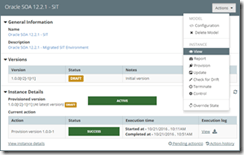
SOA 12c Migration by Matt Wright

image

Most organizations when migrating to Oracle SOA 12c or Oracle BPM 12s choose to perform a side-by-side upgrade, as it:

  • requires zero downtime,
  • supports all SOA and BPM components,
  • allows for a phased migration,
  • involves significantly less risk.

This involves provisioning a new instance of SOA 12c, replicating the configurations from your 11g platform and migrating and deploying your code. Once ready, you then switch over from 11g to 12c.

Most organizations fail to maintain accurate documentation of their current 11g configurations, so have to manually reverse engineer their existing 11g production configurations, so they can be re-applied to their new 12c environments. This is both a time consuming and error prone approach.

Rubicon Red MyST provides a simple and automated process for side-by-side upgrades. MyST allows you to introspect an existing 11g environment, extract the key configuration information and then use this to automatically provision an equivalent 12c environment in minutes.

Side-By-Side Upgrades made Simple

When performing a side-by-side upgrade, you simply point MyST at an existing 11g environment, MyST will introspect the platform instance and create a corresponding 11g Platform Blueprint.

Next, just specify the Oracle Middleware 12c version required. MyST will automatically convert the blueprint to one that is compliant with the Oracle Enterprise Deployment Guide for SOA 12c, whilst preserving your 11g configurations.

Finally, specify the target environment(s), for the new SOA 12c domain. Then at the click of a button, MyST will automatically provision an equivalent 12c Oracle Middleware platform.

The end-to-end process consists of three simple steps and can be performed in minutes.

Step 1 – Introspect SOA / BPM 11gR1 Domain

For the purpose of this blog, we are going to introspect an existing Oracle SOA 11.1.1.7 environment running on two VMs, that consists of a 2 node SOA Cluster and 2 node OSB Cluster. Read the complete article here.

SOA & BPM Partner Community

For regular information on Oracle SOA Suite become a member in the SOA & BPM Partner Community for registration please visit www.oracle.com/goto/emea/soa (OPN account required) If you need support with your account please contact the Oracle Partner Business Center.

Blog Twitter LinkedIn image[7][2][2][2] Facebook clip_image002[8][4][2][2][2] Wiki

Technorati Tags: SOA Community,Oracle SOA,Oracle BPM,OPN,Jürgen Kress

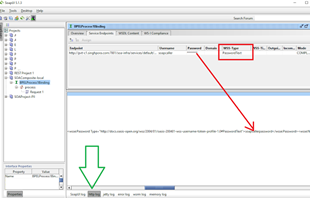
WS Security – enabling passwordDigest authentication in an Oracle FMW environment by Jang Vijay Singh

image

Objective:

To have a basic level of authentication on web services (especially where there’s no transport layer security) without having to pass clear text passwords in the WS Security headers.

Background:

The concepts are fairly generic but this post is highly Oracle Fusion middleware/SOA Suite specific. There can be complex decision tree (see [1]) involved when selecting the ‘appropriate’ level of security for any system. As security involves trade-offs between cost, performance, usability and other variables, the ‘appropriate’ level of security could be highly specific to the environment, usecase, system and people. But as developers, we can still perform some due diligence based on the tools and knowledge available to us. 

My rule of thumb when developing a traditional web service or microservice is: If it’s reading from a secure database or some system that is accessible only via authentication, it must only expose a secure endpoint.

Now sites can differ considerably and so does the definition of what "secure" is.

When exposing ah http endpoint (SOAP or REST) hosted on cloud or accessible over the Internet, one would as a minimum ensure that it’s over TLS and has authentication enabled.

In an on-premise hosted solution, traditionally https has not been widespread within organisations and web service endpoints meant for internal consumption have most commonly only been exposed over http – hopefully accompanied by infrastructure level setup (firewalls, DMZs etc.) that ensures that the data or service is only accessible inside a ‘trusted’ network. Read the complete article here.

SOA & BPM Partner Community

For regular information on Oracle SOA Suite become a member in the SOA & BPM Partner Community for registration please visit www.oracle.com/goto/emea/soa (OPN account required) If you need support with your account please contact the Oracle Partner Business Center.

Blog Twitter LinkedIn image[7][2][2][2] Facebook clip_image002[8][4][2][2][2] Wiki

Technorati Tags: SOA Community,Oracle SOA,Oracle BPM,OPN,Jürgen Kress