PaaS free trial accounts ICS and PCS, IoT and PaaS for SaaS

image

As part of our communities we do offer free PaaS accounts (only for partners in Europe, Middle East and Africa. In case you are not part of EMEA please contact your local partner manager):

· Integration Cloud Service & Process Cloud Service & SOA Cloud & IoT & PaaS for SaaS Service PaaS Demo Accounts  (Community membership required)

· Java Cloud Service & Application Cloud Container Service & Mobile Cloud Service PaaS Demo Accounts (Community membership required)

Watch the GSE Overview Video! Get an overview of what GSE is and how you can use GSE to help you sell. You can also get long running dedicated PaaS instances, therefore please send us details about your use cases. For instant access please request a sandbox demo

SOA & BPM Partner Community

For regular information on Oracle SOA Suite become a member in the SOA & BPM Partner Community for registration please visit www.oracle.com/goto/emea/soa (OPN account required) If you need support with your account please contact the Oracle Partner Business Center.

Blog Twitter LinkedIn image[7][2][2][2] Facebook clip_image002[8][4][2][2][2] Wiki

Technorati Tags: PaaS,Cloud,ICS,PCS,PaaS4SaaS,SOA Community,Oracle SOA,Oracle BPM,OPN,Jürgen Kress

Additional new content SOA & BPM Partner Community

image

· Call for Papers: Session proposals are being accepted for future OTN Virtual Technology Summit events. Submit your proposal for Middleware track sessions in the OTN Virtual Technology Summit Middleware Ideas Space, part of the OTN Community Platform.

· VTS Replay Library: Registration for the next OTN Virtual Technology Summit will open soon. But in the meantime you can watch replays of all the sessions from the July 2015 and September 2015 events in the VTS Replay Library. In addition, you can post questions and comments for the session presenters. You’ll find all of the middleware track sessions here.

· Video: Monitoring Oracle SOA Suite Matt Brasier, head of consulting at C2B2 and the co-author of the Oracle SOA Suite 11g Performance Tuning Cookbook (Packt Publishing) discusses monitoring in Oracle SOA Suite in this 2 Minute Tech Tip recorded at the UKOUG Tech 15 Conference. Watch the video.

SOA & BPM Partner Community

For regular information on Oracle SOA Suite become a member in the SOA & BPM Partner Community for registration please visit www.oracle.com/goto/emea/soa (OPN account required) If you need support with your account please contact the Oracle Partner Business Center.

Blog Twitter LinkedIn image[7][2][2][2] Facebook clip_image002[8][4][2][2][2] Wiki

Technorati Tags: SOA Community,Oracle SOA,Oracle BPM,OPN,Jürgen Kress

PaaS 4 SaaS webcast on-demand

clip_image002[4]

Maximize the Value of Your CX Investments with Oracle Cloud Platform

With Oracle CX Cloud, companies not only get the most comprehensive CX offering, but also an innovative and powerful cloud platform to extend, analyze and integrate these applications with the rest of the enterprise resources, as well as to optimize them for every user.  This session outlines the Cloud Platform (PaaS & IaaS) solutions that Oracle provides to streamline cloud development and empowers you to deliver enterprise-grade solutions rapidly and cost effectively. Join this event if you are interested in the most advanced way to extend, analyze and integrate the Oracle CX solutions. In subsequent webinars, we will drive you through further Integration Solutions’ details. Watch the webcast on-demand here.

SOA & BPM Partner Community

For regular information on Oracle SOA Suite become a member in the SOA & BPM Partner Community for registration please visit www.oracle.com/goto/emea/soa (OPN account required) If you need support with your account please contact the Oracle Partner Business Center.

Blog Twitter LinkedIn image[7][2][2][2] Facebook clip_image002[8][4][2][2][2] Wiki

How to Recover BPM Process Instances from a MDS 00054 Error in Oracle BPM 12.1.3 (Part 1) by Siming Mu

clip_image001


Introduction

There is an issue in Oracle SOA Suite Fabric layer in version 11.1.x. and 12.1.3. The issue is documented in Bug# 20517579: “Composites Lost Completely after redeployment and server restart”. This bug is fixed in version 12.2.1. A few customers have run into this bug. Once this bug is encountered, BPM server usually shows “MDS 00054: The file to be loaded oramds:/deployed-composites/CompositeName_rev1.0/composite.xml does not exist” error during server startup. The composite is no longer visible in EM and all User Tasks from this composite are not visible in BPM Workspace either. The composite appears to be lost.

One work-around for this issue is deploying the same composite as a higher version. Or customers can manually un-deploy their problematic version of the composite using WLST script and then deploy the same composite again. In either case, customers will lose all running instances of this composite. If this outcome is not desirable, we need to find a way to recover all running instances.

This multi-part blog will present one way to manually recover those instances. To make this process more understandable to readers, a very simple BPM composite is used to take you through the processes of deployment/undeployment, reproduction of the bug# 20517579 and MDS 00054 errors, and finally steps to recover instances. Along the way, we will look at changes in MDS and SOAINFRA tables due to normal life cycles of the sample composite and bug# 20517579.

Even though this bug is fixed in 12.2.1, I think the information documented in this blog will provide a valuable resource for understanding MDS and SOAINFRA schema.

What happens in MDS when a composite is deployed?

First, let’s take a look what happens in MDS when a BPM composite is deployed. To do that, we need a tool like MDS Explorer. Before any BPM composite is deployed, your MDS should look empty similar to the following image.

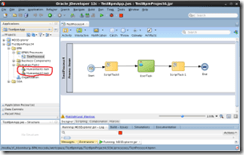
Now we will deploy a very simple BPM composite to check for changes in MDS. We can use a BPM composite similar to the following for our testing purposes.

Notice that I created two human tasks but only have one interactive activity in my BPM process. We will only use human task 1 for now and the other one will be used to generate the MDS 00054 error later.

After deploy this composite, the MDS  should look like this: Read the complete article here.

SOA & BPM Partner Community

For regular information on Oracle SOA Suite become a member in the SOA & BPM Partner Community for registration please visit www.oracle.com/goto/emea/soa (OPN account required) If you need support with your account please contact the Oracle Partner Business Center.

Blog Twitter LinkedIn image[7][2][2][2] Facebook clip_image002[8][4][2][2][2] Wiki

The BPM 12c Process Monitor Dashboard in 5 Minutes by Jaideep

clip_image002

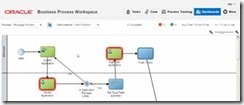
The Oracle BPM 12c Workspace offers two dashboards right out of the box. The Process Monitor and the Standard Dashboard. In this video we’ll go over how to use the process monitor.

Process monitor dashboards enable you to monitor and optimize business process execution. It can be a very helpful tool to be able to see process statistics like how many instances are currently running, how many have completed, how many have faulted etc over a time interval. It displays alerts that can help to identify process issues that are affecting performance. It also displays two performance graphs, the Workload per Activity and Performance per Activity.

Watch this video to get a quick overview of what the process monitor looks like and how to use it. Watch the video here.

SOA & BPM Partner Community

For regular information on Oracle SOA Suite become a member in the SOA & BPM Partner Community for registration please visit www.oracle.com/goto/emea/soa (OPN account required) If you need support with your account please contact the Oracle Partner Business Center.

Blog Twitter LinkedIn image[7][2][2][2] Facebook clip_image002[8][4][2][2][2] Wiki

PCS: Form rules in human tasks by Rubén Rodríguez Santiago

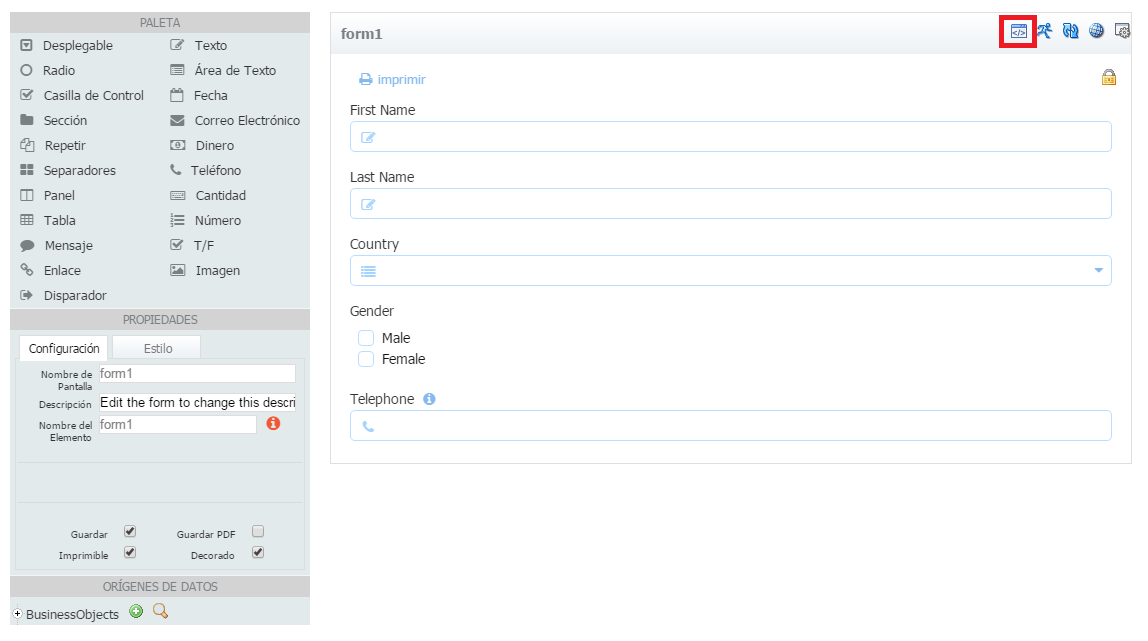
clip_image001In Oracle BPM it is possible to use Oracle ADF to implement Human Tasks, but in Oracle Process Cloud Service you can only create a form using web forms. Creating a form is an easy task and it offers us to define rules that it gives us a lot of flexibility to achieve complex requirements.
Having this simple form. We can navigate to rules clicking on the marked button.

For each of the elements we have a number of properties or events that we can manage,
For example we can manage form load event, or get if a field value is valid…

To build the rules we have to use JavaScript and we can get code snippets if we click on the button next to each of the properties.

Let’s build a couple of rules so you can see how easy it is.
Having this combo with this value.

We can build a rules that populates that combo and also add some kind of value change listener so if its value is "Spain" we can set the country code in Telephone field.
If we have any syntax errors, will be displayed in the bottom of the editor. Read the complete article here.

SOA & BPM Partner Community

For regular information on Oracle SOA Suite become a member in the SOA & BPM Partner Community for registration please visit www.oracle.com/goto/emea/soa (OPN account required) If you need support with your account please contact the Oracle Partner Business Center.

Blog Twitter LinkedIn image[7][2][2][2] Facebook clip_image002[8][4][2][2][2] Wiki

PCS: Starting a process instance remotely by Rubén Rodríguez Santiago


clip_image001

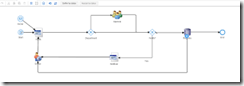
While implementing an Oracle Process Cloud Service PoC we had the requirement to allow users to start an instance using a form in their custom mobile application and also using the workspace.

We have a ‘Form Start Event’ so users can start the instance thought the workspace. We also added a ‘Message Start Event’ in order to publish it as a web service.

Having that process deployed, if we head to ‘Deployed Applications’ in workspace main page.

And click on the button in ‘Actions’ column.

We can see the web services exposed.

If we use that wsdl url in soapui we see that we have 2 operations, one for each of the start events.

Executing both, we can see that even using ‘Form Start Event’ we can start a process instance remotely as an operation is automatically created in the web service, so we can remove the ‘Message Start Event’ as we can meet both requirements just using the ‘Form Start Event’. Read the complete article here.

SOA & BPM Partner Community

For regular information on Oracle SOA Suite become a member in the SOA & BPM Partner Community for registration please visit www.oracle.com/goto/emea/soa (OPN account required) If you need support with your account please contact the Oracle Partner Business Center.

Blog Twitter LinkedIn image[7][2][2][2] Facebook clip_image002[8][4][2][2][2] Wiki

Video – How to build a Process Cloud Service Application (Business Travel Requests) in 40 minutes – Final Part – Wrapping it Up! by Jose Rodrigues

clip_image002


Welcome to Red Maverick’s sixth video, the third of the Business Travel Request Management Series. In this series we’ll guide you on how to build a complete, working BPM application using  Oracle’s Process Cloud Service. For this part, the focus is on doing the final configurations and connecting all the dots, making the application fully functional. This scenario and video was first prepared by me for Link Consulting‘s Process Cloud event, that was held in July 2015. Watch the video here.

SOA & BPM Partner Community

For regular information on Oracle SOA Suite become a member in the SOA & BPM Partner Community for registration please visit www.oracle.com/goto/emea/soa (OPN account required) If you need support with your account please contact the Oracle Partner Business Center.

Blog Twitter LinkedIn image[7][2][2][2] Facebook clip_image002[8][4][2][2][2] Wiki

PaaS free trial accounts ICS and PCS, IoT and PaaS for SaaS

image

As part of our communities we do offer free PaaS accounts (only for partners in Europe, Middle East and Africa. In case you are not part of EMEA please contact your local partner manager):

· Integration Cloud Service & Process Cloud Service & SOA Cloud & IoT & PaaS for SaaS Service PaaS Demo Accounts  (Community membership required)

· Java Cloud Service & Application Cloud Container Service & Mobile Cloud Service PaaS Demo Accounts (Community membership required)

Watch the GSE Overview Video! Get an overview of what GSE is and how you can use GSE to help you sell. You can also get long running dedicated PaaS instances, therefore please send us details about your use cases. For instant access please request a sandbox demo

SOA & BPM Partner Community

For regular information on Oracle SOA Suite become a member in the SOA & BPM Partner Community for registration please visit www.oracle.com/goto/emea/soa (OPN account required) If you need support with your account please contact the Oracle Partner Business Center.

Blog Twitter LinkedIn image[7][2][2][2] Facebook clip_image002[8][4][2][2][2] Wiki

Technorati Tags: PaaS,Cloud,ICS,PCS,PaaS4SaaS,SOA Community,Oracle SOA,Oracle BPM,OPN,Jürgen Kress

Patching SOA Composite Instances in Oracle 12.2.1 by Dennis

clip_image002


Introduction

Composite Instance Patching is a new feature introduced in 12.2.1 that allows compatible changes to be made to a SOA composite definition and be applied to long-running active instances. The feature enables you to patch running instances of a composite and recover faulted instances after patching the runtime. You can deliver urgent composite fixes and make compatible/allowed changes that are picked up with long-running instances without aborting them. If a patched running instance comes across a business process that has been fixed by the patch, say a BPEL transformation, then it picks up the fixes applied to the business process.

Prior to 12.2.1, there was no way to make small changes to a composite and have in-flight instances, which could be long running for days/months, or error hospital instances see those changes. The alternatives were to either redeploy an existing composite revision but that causes long running instances to stop processing, or, to create a new composite revision which does preserve existing running instances but those instances do not see the changes introduced in the new revision. Now, with the new Composite Instance Patching feature in 12.2.1, critical fixes can be applied in a timely fashion and have them take effect immediately which is a unique differentiator for Oracle SOA Suite.

In this article I will (1) highlight some of the compatible changes that can be made to a composite, (2) discuss the enhancements to JDeveloper that allow you to quickly and easily design the patch without worrying about making invalid modifications in the composite patch, and (3) outline the steps used to build, validate, and deploy the composite instance patch to the SOA runtime.

Compatible Composite Changes

As mentioned above, there are only a limited set of modifications that can be made to a composite and deemed compatible with running instances.  Some of the compatible changes that you can make include:

  • Non-schema related XSLT changes
  • Changes to fault policy, sensor data, and analytics data
  • Compatible BPEL changes such as sync/async invoke, transformation activity, assign operations, etc.
  • JCA Adapter configuration properties
  • Modifications of token values in composite references

while some of the incompatible changes that you cannot make include:

  • Deleting or renaming composite artifacts
  • Updating binding properties
  • Changes to a WSDL and Schema definition
  • Changes to XQuery mappings
  • Changes to BPEL receive inputs, structured activities, assign mapper source/target/skip conditions

Do not worry about knowing exactly what constitutes a compatible or incompatible change since, as we shall see, all those rules are accounted for in a new SOA Patch Developer mode within JDeveloper which automatically disables changes that cannot be made when constructing the patch.

Composite Instance Patch Development in JDeveloper

To simplify the creation of a composite instance patch a number of enhancements have been made to the JDeveloper tooling.  The first change is the introduction of a new new SOA Patch Developer role.  When launching JDeveloper you must first select the role that matches your requirements. Read the complete article here.

SOA & BPM Partner Community

For regular information on Oracle SOA Suite become a member in the SOA & BPM Partner Community for registration please visit www.oracle.com/goto/emea/soa (OPN account required) If you need support with your account please contact the Oracle Partner Business Center.

Blog Twitter LinkedIn image[7][2][2][2] Facebook clip_image002[8][4][2][2][2] Wiki