First impressions of Process Cloud Service

clip_image002

Watch the short videos to get a first impression of Oracle Process Cloud Service (PCS):

  • eProseed Digitizes with Oracle Process Cloud Service – YouTube
  • AVIO Empowers Business with Oracle Process Cloud Service – YouTube
  • Flextronics Speeds Up BPM with Oracle Process Cloud Service – YouTube
  • Land O’ Lakes Extends SaaS with Oracle Process Cloud Service – YouTube
  • Sofbang Extends SOA with Oracle Process Cloud Service – YouTube
  • Hitachi Manages Contracts with Oracle Process Cloud Service – YouTube

To learn more about PCS please visit the PCS tag at the SOA Community Workspace (SOA Community membership required)

SOA & BPM Partner Community

For regular information on Oracle SOA Suite become a member in the SOA & BPM Partner Community for registration please visit www.oracle.com/goto/emea/soa (OPN account required) If you need support with your account please contact the Oracle Partner Business Center.

Blog Twitter LinkedIn image[7][2][2][2] Facebook clip_image002[8][4][2][2][2] Wiki

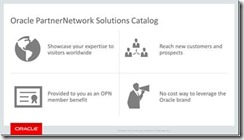
Free advertisement for Oracle partners – all details about Solutions Catalog & Cloud Marketplace

clip_image002

Takane Aizeki, Worldwide Alliances and Channels at Oracle Corporation, will presents all details about Oracle Solutions Catalog. Watch the on-demand training here.

Community Webcasts on-demand: Solutions Catalog & Cloud Marketplace & GSE demo systems & Hybrid sales plays & Integration Success Workshop. For the latest information please visit our Community Workspace here.

SOA & BPM Partner Community

For regular information on Oracle SOA Suite become a member in the SOA & BPM Partner Community for registration please visit www.oracle.com/goto/emea/soa (OPN account required) If you need support with your account please contact the Oracle Partner Business Center.

Blog Twitter LinkedIn image[7][2][2][2] Facebook clip_image002[8][4][2][2][2] Wiki

Technorati Tags: Webcast,Community,SOA Community,Oracle SOA,Oracle BPM,OPN,Jürgen Kress

Unleash the power of Java API’s on your WLST scripts! By Maarten Smeets


clip_image001Oracle SOA Suite and many other Oracle products have extensive Java API’s to expose their functionality. WLST can often be used for relatively course grained actions. WLST (the version supplied in Weblogic 12.1.3) uses Jython 2.2.1. Jython is the Python scripting language implemented on the Java Virtual Machine. Jython allows easy integration with Java. In this article I describe how you can unleash the power of these Java API’s on your WLST scripts!
Considerations

Why WLST and not Java?

For system operators, WLST is easier to work with than Java code. For Java code you need to supply all dependencies in the classpath and updating code requires recompilation. Also Java code can be a bit verbose compared to WLST code and requires (for most developers) more time to write. With a WLST script you do not need to provide dependencies since they are already present in the classpath set by the wlst.sh (of wlst.cmd) command used to start WLST scripts and you can more easily update the scripts without need for recompilation.

Why use Java classes in WLST?

In this example I wanted to create a script which undeployed composites which where not the default revision (are not called by default). Also I wanted to look at the instances. I did not want to undeploy composites which had running instances (long running instances like BPM and ACM). WLST provides some nifty features to undeploy composites; https://docs.oracle.com/middleware/1213/soasuite/wlst-reference-soa/custom_soa.htm#SOACR2689 for example the sca_undeployComposite command. I did however not see WLST commands I could use to query instances.

Undeploying composites using Java

I started out with a piece of Java code shown below. In order to make the required classes available in your project, you need to import Weblogic Remote Client, JRF API and SOA Runtime (see here for a more elaborate example of using the Java API). With the Locator class you can find your composites and instances. By calling the MBean oracle.soa.config:Application=soa-infra,j2eeType=CompositeLifecycleConfig,name=soa-infra method removeCompositeForLabel you can undeploy composites from Java. This is based on what I found at Read the complete article here.

SOA & BPM Partner Community

For regular information on Oracle SOA Suite become a member in the SOA & BPM Partner Community for registration please visit www.oracle.com/goto/emea/soa (OPN account required) If you need support with your account please contact the Oracle Partner Business Center.

Blog Twitter LinkedIn image[7][2][2][2] Facebook clip_image002[8][4][2][2][2] Wiki

SOA Cloud Service update September 29th 2015 16:00 CET

image This month we invite Yogesh Sontakke, Oracle Integration Product Manager to share with us two of Oracle’s exciting upcoming Cloud Services in the Oracle Integration portfolio.

Oracle SOA Cloud Service, a comprehensive service in the cloud with the core SOA Suite including Service Bus, BPEL and more, with flexible deployment options and lift-and-shift capabilities with existing SOA Suite environments. Together with the recently released and already popular Integration Cloud Service, this new Cloud offering enriches Oracle’s Hybrid Integration capabilities to a new level providing business speed, agility and flexibility leveraging Cloud and on-premise like never before.

Oracle API Manager Cloud Service, the API platform for innovation and speed in the Digital business. With this new Cloud Service, businesses can get API visibility in the Cloud, protection for their backend services and the ability to expose and manage their on-prem as well as Cloud APIs. Running on a robust, well-proven platform with low maintenance and all benefits of the Cloud, the API Manager Cloud Service brings API Management to the Cloud for businesses, developers and IT operations.

Make sure you are signed up and tuned in to hear the latest and to be prepared ahead of the rest for these two very important Oracle Cloud Integration Services!

Yogesh Sontakke is a Principal Product Manager at Oracle Corporation in the PaaS and Fusion Middleware group, leading Oracle’s Integration portfolio –  Integration Cloud Service, SOA Suite, API Management, Stream Explorer and MFT – in the Europe, Middle East & Africa (EMEA) region. Prior to joining the Integration Product Management team, Yogesh worked in various roles in Development, Post-Sales and Pre-Sales where he gained his experience architecting, developing, integrating and enabling technology as a key driver to businesses. Yogesh is based in the UK, and tweets at @yogesh_sontakke.

Attend our September edition of the SOA & BPM Partner Community Webcast live on September 29th 2015 16:00 CET.

Visit the registration page here.

Call ID: 5566478 Call Passcode: 333111

Austria: +43 (0) 192 865 12
Belgium: +32 (0) 240 105 28
Denmark: +45 327 292 22
Finland: +358 (0) 923 193 923
France: +33 (0) 15760 2222
Germany: +49 (0) 692 222 161 06
Ireland: +353 (0) 124 756 50
Italy: +39 (0) 236 008 198
Netherlands: +31 (0) 207 143 543
Spain: +34 914 143 755
Sweden: +46 (0) 856 619 465
Switzerland: +41 (0) 445 804 003
UK: +44 (0) 208 118 1001
United States: 140 877 440 73
More Local Numbers

If you have difficulty logging in using the above link please go to: http://ouweb.webex.com/meetingcenter and join with session id: 597994333

Missed our SOA & BPM Partner Community Webcast? – watch the August edition here, July edition here, June edition here and May edition here . For the latest information please visit Community Updates Wiki page (SOA Community membership required).

SOA & BPM Partner Community

For regular information on Oracle SOA Suite become a member in the SOA & BPM Partner Community for registration please visit www.oracle.com/goto/emea/soa (OPN account required) If you need support with your account please contact the Oracle Partner Business Center.

Blog Twitter LinkedIn image[7][2][2][2] Facebook clip_image002[8][4][2][2][2] Wiki

SOA Suite 12c: solving a bug by Michel Schildmeijer


clip_image002For a customer in the Netherlands, in the healthcare division, Qualogy is implementing Oracle SOA Suite 12c(12.1.3) and Oracle Service Bus 12c(12.1.3). For connection with a WebService to a backoffice system, we enabled SSL and the OWSM Policy oracle/wss_username_token_over_ssl_service_policy:

We enabled SSL on domain level, created the necessary keystores regarding trust and Identity. After restarting the domain, all alerts in the Fusion Middleware Console seems to have dissappeared.

Oracle raised an official bug for this, Bug 20599654 – OSB Pipeline alerts are not displayed in EM console when SSL is enabled which is under investigation at Oracle Product Development since begin of march, upto now.

What we saw appearing in the logs was that, when we enabled SSL at domainlevel, the OSB aggregator, which aggregates all OSB alert data, was not able to connect over the t3s protocol WebLogic uses for internal applications to connect with eachother over RMI. We saw these messages: Read the complete article here.

SOA & BPM Partner Community

For regular information on Oracle SOA Suite become a member in the SOA & BPM Partner Community for registration please visit www.oracle.com/goto/emea/soa (OPN account required) If you need support with your account please contact the Oracle Partner Business Center.

Blog Twitter LinkedIn image[7][2][2][2] Facebook clip_image002[8][4][2][2][2] Wiki

Enable SOA Composer in SOA Suite 11g by Waslley Souza


clip_image001When you are developing your SOA Composites in SOA Suite 11g, probably you will use DVM or Business Rules components. You can change the values of these components at runtime, and to do it, you need to use an application called SOA Composer. By default the SOA Composer is disabled. As it is an application, all you have to do is go to Console from WebLogic Server and start it.

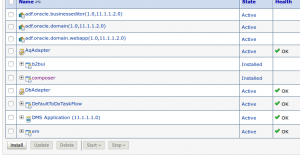
Go to WebLogic Server Console > > Deployments.
Click the composer application.

Click Targets tab, select all components and click the Change Targets button.

Read the complete article here.

SOA & BPM Partner Community

For regular information on Oracle SOA Suite become a member in the SOA & BPM Partner Community for registration please visit www.oracle.com/goto/emea/soa (OPN account required) If you need support with your account please contact the Oracle Partner Business Center.

Blog Twitter LinkedIn image[7][2][2][2] Facebook clip_image002[8][4][2][2][2] Wiki

SOA & BPM Partner Community Webcast – September 29th 2015

clip_image001Attend our September edition of the SOA & BPM Partner Community Webcast live on September 29th 2015 16:00 CET.

Visit the registration page here.

Call ID: 5566478 Call Passcode: 333111

Austria: +43 (0) 192 865 12
Belgium: +32 (0) 240 105 28
Denmark: +45 327 292 22
Finland: +358 (0) 923 193 923
France: +33 (0) 15760 2222
Germany: +49 (0) 692 222 161 06
Ireland: +353 (0) 124 756 50
Italy: +39 (0) 236 008 198

Netherlands: +31 (0) 207 143 543
Spain: +34 914 143 755
Sweden: +46 (0) 856 619 465
Switzerland: +41 (0) 445 804 003
UK: +44 (0) 208 118 1001
United States: 140 877 440 73
More Local Numbers

If you have difficulty logging in using the above link please go to: http://ouweb.webex.com/meetingcenter and join with session id: 597994333

Missed our SOA & BPM Partner Community Webcast? – watch the August edition here, July edition here, June edition here and May edition here . For the latest information please visit Community Updates Wiki page (SOA Community membership required).

SOA & BPM Partner Community

For regular information on Oracle SOA Suite become a member in the SOA & BPM Partner Community for registration please visit www.oracle.com/goto/emea/soa (OPN account required) If you need support with your account please contact the Oracle Partner Business Center.

Blog Twitter LinkedIn image[7][2][2][2] Facebook clip_image002[8][4][2][2][2] Wiki

Technorati Tags: Webcast,Community,SOA Community,Oracle SOA,Oracle BPM,OPN,Jürgen Kress

BPEL-> Mediator -> BPEL: Passing Business Errors back thru Mediator by Niall Commiskey


clip_image002Scenario:

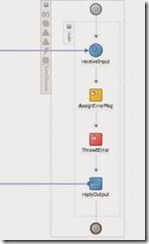
Sync BPEL1 calls Mediator that calls Sync BPEL2.

SyncBPEL2 throws a Business Error, Mediator needs to pass this back to SyncBPEL1.

In the following example I have the following components –

Sync BPEL 1 = BPELProcess3

Mediator = Route2BPEL1

Sync BPEL 2 = ErrorThrower

Here they are, in all their grandeur –

ErrorThrower

Note the explicit definition of the fault in the wsdl –

Read the complete article here.

SOA & BPM Partner Community

For regular information on Oracle SOA Suite become a member in the SOA & BPM Partner Community for registration please visit www.oracle.com/goto/emea/soa (OPN account required) If you need support with your account please contact the Oracle Partner Business Center.

Blog Twitter LinkedIn image[7][2][2][2] Facebook clip_image002[8][4][2][2][2] Wiki

OSB Release Management Utility by Joao Moura


clip_image002Agile methodologies have increased radically the numbers of release events in organisations where it has been adopted.  Both development and operations teams need to collaborate more closely during production release events requiring more than ever the right supporting tools.

How many times have you been asked what has been deployed in environment X?

If you are using CI tools and doing release management properly it should be a straightforward answer. However, software deployment comprises a set of steps involving multiple parties. As a result, the process isn’t entirely automated requiring human intervention which is susceptible to errors.

Imagine you have just delivered an OSB Production bundle to the operations guys (DBAs, Weblogic Admins…).

How can you prove that the expected jar has been deployed without looking at the source code or running any tests ?

We are using a custom Release Management Utility that saves us a lot of time and headaches ☺

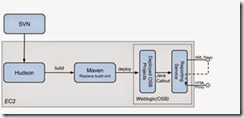
· No third-party software required; It uses Hudson, SVN, Maven and OSB

· Allows users without technical knowledge to view what’s deployed

· Identifies project changes between sprints

· Track back to source code based on SVN revision

· Displays build date and version for each individual project

Read the complete article here.

SOA & BPM Partner Community

For regular information on Oracle SOA Suite become a member in the SOA & BPM Partner Community for registration please visit www.oracle.com/goto/emea/soa (OPN account required) If you need support with your account please contact the Oracle Partner Business Center.

Blog Twitter LinkedIn image[7][2][2][2] Facebook clip_image002[8][4][2][2][2] Wiki

espresseo & integration – Opitz events 01.10 Frankfurt, 29.10 München & 25.11 Hamburg

Beginnen Sie den Tag mit einem tollen Frühstück sowie leckeren Kaffeespezialitäten und erfahren Sie bei unserem IT|espresso mehr zum Thema "Systemintegration". Unter der Fragestellung "Wie wird meine Integrationslandschaft modern, nutzbringend, wartbar und preiswert", möchten wir mit Ihnen und anderen Experten in lockerer Atmosphäre über Erfolgsfaktoren sowie Trends und deren Implikationen z.B. wie man eine Cloud Application integriert, diskutieren. Nutzen Sie die Chance zum Gedanken- und Erfahrungsaustausch mit unseren Experten Torsten Winterberg und Dr. Hendrik Voigt sowie den anderen Teilnehmern und gestalten Sie die Agenda mit Ihren aktuellen Themen.

Seien Sie dabei:  01.10. Frankfurt, 29.10. München, 25.11. Hamburg

Weitere Details zur Veranstaltungsreihe

SOA & BPM Partner Community

For regular information on Oracle SOA Suite become a member in the SOA & BPM Partner Community for registration please visit www.oracle.com/goto/emea/soa (OPN account required) If you need support with your account please contact the Oracle Partner Business Center.

Blog Twitter LinkedIn image[7][2][2][2] Facebook clip_image002[8][4][2][2][2] Wiki