Process Timers – Controlling the time in which your process executes by Jose Rodrigues

clip_image002


Following up a series of questions around setting timers in the Oracle Community forums, I decided to write this article to try and guide their use and how these can be used to control process execution.

Let’s start!

The Use Case

We’ll begin by setting up the scenario in which we’ll have to control our process flow.

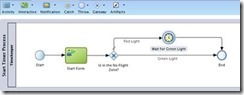
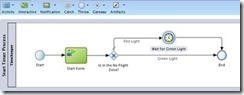
Imagine that you want to have a part of your process that executes immediately if the current time is between 08:00am and 04:00pm (16:00 hours for us Europeans), or wait until 08:00am if it’s outside that interval.

It’s frequent to have some kind of control in parts of the processes, for instance when you want to send SMS to your customers. You certainly don’t want to do it at 03:00am.

How will we make this?

We should use a Catch Timer event, of course, and XPATH’s DateTime functions to check the current time and to set the timer to way for next morning’s 08:00.

The Catch Timer event has several ways to be configured (triggered at specific dates and times, on a specific schedule – every day at 10:28:00 (repeatable), or in a time cycle – every 2 minutes), but we’ll focus on the one where we configure the timer to wait for a specific time and date. More on the others perhaps in another article.

We’ll illustrate the use of timers with an example process. You can, of course, adapt it to your needs.

Defining the execution conditions

So you start by defining a gateway that will split the execution between:

  • Immediate
  • Wait for 08:00am
    • This will have to be split into prior to midnight and after midnight. but for now, we’ll consider the scenario of only two options.

So, you set the expression on the conditional flow that will do the immediate execution, leaving the condition that must wait for 08:00 as the unconditional (default) branch.

The expression should be something like this: Read the complete article here.

SOA & BPM Partner Community

For regular information on Oracle SOA Suite become a member in the SOA & BPM Partner Community for registration please visit www.oracle.com/goto/emea/soa (OPN account required) If you need support with your account please contact the Oracle Partner Business Center.

Blog Twitter LinkedIn image[7][2][2][2] Facebook clip_image002[8][4][2][2][2] Wiki

Getting started with Process Cloud Service by Waslley Souza

clip_image002


If you know and use Oracle BPM Suite, you will like to try the new cloud solution called Oracle Process Cloud Service or PCS. With PCS you can modeling your processes through the cloud without the need to install Oracle BPM Suite. Go to PCS section within the Oracle Cloud website to learn more about or try it: http://cloud.oracle.com/process.

In this post we will create a basic process to create and approve employees.
Download the sample application: CreateEmployeeApplication.zip.

Log in to Oracle Process Cloud Service.
Click Create button, and then select New Application.

Name the application as Create Employee Application.
Select New Space option, and then name it as HR.

In this step, we will create the process and we have many options to create it.
Select the Form Approval Pattern option.

Name the process as Create Employee Process.

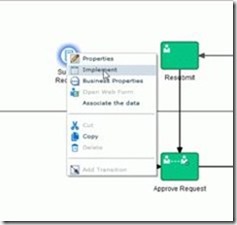
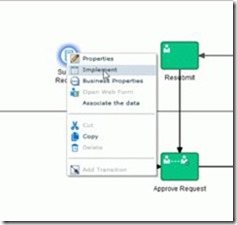
In the Create Employee Process, right-click Submit Request, and then select Implement. Read the complete article here.

SOA & BPM Partner Community

For regular information on Oracle SOA Suite become a member in the SOA & BPM Partner Community for registration please visit www.oracle.com/goto/emea/soa (OPN account required) If you need support with your account please contact the Oracle Partner Business Center.

Blog Twitter LinkedIn image[7][2][2][2] Facebook clip_image002[8][4][2][2][2] Wiki

PCS Travel Request Management – Process Form Creation by Red Mavericks

clip_image001


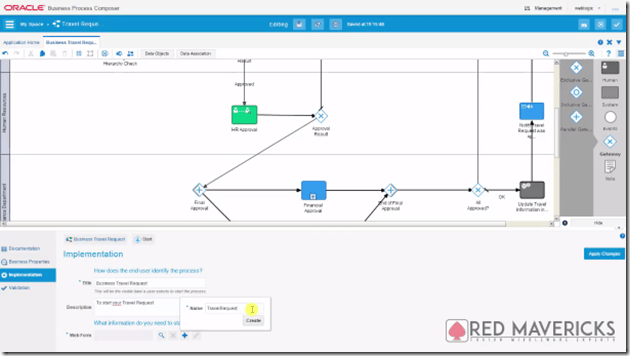
The fourth video by Red Mavericks (http://www.redmavericks.com) addresses the use of Oracle’s Process Cloud Service to build and deploy a full working Business Travel Request application in 40 minutes.
This is the first of a series of 4 videos that will guide you through the application creation process of a BPM application, using near zero code, which makes it particularly suitable for Business Analysts to also be engaged.

For this part, the focus is on Process Form Design using Oracle’s PCS Web Form builder, i.e. the process diagram that will guide the application’s general behavior. The use case was made for Link Consulting’s (http://www.linkconsulting.com/oracle) Process Cloud Event, held on July 2015. Watch the video here.

SOA & BPM Partner Community

For regular information on Oracle SOA Suite become a member in the SOA & BPM Partner Community for registration please visit www.oracle.com/goto/emea/soa (OPN account required) If you need support with your account please contact the Oracle Partner Business Center.

Blog Twitter LinkedIn image[7][2][2][2] Facebook clip_image002[8][4][2][2][2] Wiki

What’s new in Oracle BPM and Process Cloud Service? SOA & BPM Partner Community Webcast – July 26th 2016

imageAttend our July edition of the SOA & BPM Partner Community Webcast live on July 26th 2016 at 16:00 CET.

What’s new in Oracle BPM and Process Cloud Service? Digital Process Apps made Simple

During this session, we will be joined by Sujan Balachandran, Product Manager for Oracle BPM and Process Cloud Service (PCS). The session will cover

· Empower Business User using BPM Composer

· What is Business Architecture? How can it help Enterprises organize Business Process with Organization’s Goals and Objectives?

· What is Process Cloud Service? When and how to position On-Prem BPM vs PCS?

· Oracle BPM and PCS Roadmap

For those who are new to Process Cloud Service, PCS is the next-gen Process Management tool built and optimized for the Cloud. It is a Business User friendly Low Code Environment to build Process Automation applications.

imageSujan Balachandran

Senior Principal Product Manager

LinkedIn & Twitter

Visit the registration page here.

Call ID: 5566478 Call Passcode: 333111

Austria: +43 (0) 192 865 12
Belgium: +32 (0) 240 105 28
Denmark: +45 327 292 22
Finland: +358 (0) 923 193 923
France: +33 (0) 15760 2222
Germany: +49 (0) 692 222 161 06
Ireland: +353 (0) 124 756 50
Italy: +39 (0) 236 008 198

Netherlands: +31 (0) 207 143 543
Spain: +34 914 143 755
Sweden: +46 (0) 856 619 465
Switzerland: +41 (0) 445 804 003
UK: +44 (0) 208 118 1001
United States: 140 877 440 73
More Local Numbers

Schedule:

July 26th 2016 at 16:00-17:00 CET

Visit the registration page here.

Missed our SOA & BPM Partner Community Webcast? – watch the on-demand versions:

· Sales Plays Webcast June 9th 2016

· Real-Time Integration Business Insight May 31st 2016

· Integration Strategy sales and marketing campaign update

· Microservices

· Stream Explorer

· Process Cloud Service V2

· SOA Suite 12.2.1

· Oracle OpenWorld 2015 update

· SOA & API Cloud Service

· Solutions Catalog & Cloud Marketplace

· GSE demo systems

· Hybrid sales plays

For the latest information please visit Community Updates Wiki page (SOA Community membership required).

SOA & BPM Partner Community

For regular information on Oracle SOA Suite become a member in the SOA & BPM Partner Community for registration please visit www.oracle.com/goto/emea/soa (OPN account required) If you need support with your account please contact the Oracle Partner Business Center.

Blog Twitter LinkedIn image[7][2][2][2] Facebook clip_image002[8][4][2][2][2] Wiki

PaaS free trial accounts ICS and PCS, IoT and PaaS for SaaS

image

As part of our communities we do offer free PaaS accounts (only for partners in Europe, Middle East and Africa. In case you are not part of EMEA please contact your local partner manager):

· Integration Cloud Service & Process Cloud Service & SOA Cloud & IoT & PaaS for SaaS Service PaaS Demo Accounts  (Community membership required)

· Java Cloud Service & Application Cloud Container Service & Mobile Cloud Service PaaS Demo Accounts (Community membership required)

Watch the GSE Overview Video! Get an overview of what GSE is and how you can use GSE to help you sell. You can also get long running dedicated PaaS instances, therefore please send us details about your use cases. For instant access please request a sandbox demo

SOA & BPM Partner Community

For regular information on Oracle SOA Suite become a member in the SOA & BPM Partner Community for registration please visit www.oracle.com/goto/emea/soa (OPN account required) If you need support with your account please contact the Oracle Partner Business Center.

Blog Twitter LinkedIn image[7][2][2][2] Facebook clip_image002[8][4][2][2][2] Wiki

Technorati Tags: PaaS,Cloud,ICS,PCS,PaaS4SaaS,SOA Community,Oracle SOA,Oracle BPM,OPN,Jürgen Kress

Process Timers – Controlling the time in which your process executes by Jose Rodrigues

clip_image002


Following up a series of questions around setting timers in the Oracle Community forums, I decided to write this article to try and guide their use and how these can be used to control process execution.

Let’s start!

The Use Case

We’ll begin by setting up the scenario in which we’ll have to control our process flow.

Imagine that you want to have a part of your process that executes immediately if the current time is between 08:00am and 04:00pm (16:00 hours for us Europeans), or wait until 08:00am if it’s outside that interval.

It’s frequent to have some kind of control in parts of the processes, for instance when you want to send SMS to your customers. You certainly don’t want to do it at 03:00am.

How will we make this?

We should use a Catch Timer event, of course, and XPATH’s DateTime functions to check the current time and to set the timer to way for next morning’s 08:00.

The Catch Timer event has several ways to be configured (triggered at specific dates and times, on a specific schedule – every day at 10:28:00 (repeatable), or in a time cycle – every 2 minutes), but we’ll focus on the one where we configure the timer to wait for a specific time and date. More on the others perhaps in another article.

We’ll illustrate the use of timers with an example process. You can, of course, adapt it to your needs.

Defining the execution conditions

So you start by defining a gateway that will split the execution between:

  • Immediate
  • Wait for 08:00am
    • This will have to be split into prior to midnight and after midnight. but for now, we’ll consider the scenario of only two options.

So, you set the expression on the conditional flow that will do the immediate execution, leaving the condition that must wait for 08:00 as the unconditional (default) branch.

The expression should be something like this: Read the complete article here.

SOA & BPM Partner Community

For regular information on Oracle SOA Suite become a member in the SOA & BPM Partner Community for registration please visit www.oracle.com/goto/emea/soa (OPN account required) If you need support with your account please contact the Oracle Partner Business Center.

Blog Twitter LinkedIn image[7][2][2][2] Facebook clip_image002[8][4][2][2][2] Wiki

Getting started with Process Cloud Service by Waslley Souza


clip_image002If you know and use Oracle BPM Suite, you will like to try the new cloud solution called Oracle Process Cloud Service or PCS. With PCS you can modeling your processes through the cloud without the need to install Oracle BPM Suite. Go to PCS section within the Oracle Cloud website to learn more about or try it: http://cloud.oracle.com/process.

In this post we will create a basic process to create and approve employees.
Download the sample application: CreateEmployeeApplication.zip.

Log in to Oracle Process Cloud Service.
Click Create button, and then select New Application.

Name the application as Create Employee Application.
Select New Space option, and then name it as HR.

In this step, we will create the process and we have many options to create it.
Select the Form Approval Pattern option.

Name the process as Create Employee Process.

In the Create Employee Process, right-click Submit Request, and then select Implement. Read the complete article here.

SOA & BPM Partner Community

For regular information on Oracle SOA Suite become a member in the SOA & BPM Partner Community for registration please visit www.oracle.com/goto/emea/soa (OPN account required) If you need support with your account please contact the Oracle Partner Business Center.

Blog Twitter LinkedIn image[7][2][2][2] Facebook clip_image002[8][4][2][2][2] Wiki

PCS Travel Request Management – Process Form Creation by Red Mavericks


The fourth video by Red Mavericks (http://www.redmavericks.com) addresses the use of Oracle’s Process Cloud Service to build and deploy a full working Business Travel Request application in 40 minutes.
This is the first of a series of 4 videos that will guide you through the application creation process of a BPM application, using near zero code, which makes it particularly suitable for Business Analysts to also be engaged.

clip_image001

For this part, the focus is on Process Form Design using Oracle’s PCS Web Form builder, i.e. the process diagram that will guide the application’s general behavior. The use case was made for Link Consulting’s (http://www.linkconsulting.com/oracle) Process Cloud Event, held on July 2015. Watch the video here.

SOA & BPM Partner Community

For regular information on Oracle SOA Suite become a member in the SOA & BPM Partner Community for registration please visit www.oracle.com/goto/emea/soa (OPN account required) If you need support with your account please contact the Oracle Partner Business Center.

Blog Twitter LinkedIn image[7][2][2][2] Facebook clip_image002[8][4][2][2][2] Wiki

PaaS free trial accounts ICS and PCS, IoT and PaaS for SaaS

clip_image002


As part of our communities we do offer free PaaS accounts (only for partners in Europe, Middle East and Africa. In case you are not part of EMEA please contact your local partner manager):

· Integration Cloud Service & Process Cloud Service & SOA Cloud & IoT & PaaS for SaaS Service PaaS Demo Accounts  (Community membership required)

· Java Cloud Service & Application Cloud Container Service & Mobile Cloud Service PaaS Demo Accounts (Community membership required)

Watch the GSE Overview Video! Get an overview of what GSE is and how you can use GSE to help you sell. You can also get long running dedicated PaaS instances, therefore please send us details about your use cases. For instant access please request a sandbox demo

SOA & BPM Partner Community

For regular information on Oracle SOA Suite become a member in the SOA & BPM Partner Community for registration please visit www.oracle.com/goto/emea/soa (OPN account required) If you need support with your account please contact the Oracle Partner Business Center.

Blog Twitter LinkedIn image[7][2][2][2] Facebook clip_image002[8][4][2][2][2] Wiki

Technorati Tags: PaaS,Cloud,ICS,PCS,PaaS4SaaS,SOA Community,Oracle SOA,Oracle BPM,OPN,Jürgen Kress

Running Business Processes in the Cloud by Antonis Antoniou


clip_image002My article on Oracle Process Cloud Service has just been published by OTech Magazine in its Fall 2015 "OpenWorld Special" edition. Oracle has been releasing a number of different cloud products, including Oracle Process Cloud Service (PCS) as an addition to its on-premise Oracle BPM Suite offering. This article briefly explains what PCS is about.
Read the complete article here

SOA & BPM Partner Community

For regular information on Oracle SOA Suite become a member in the SOA & BPM Partner Community for registration please visit www.oracle.com/goto/emea/soa (OPN account required) If you need support with your account please contact the Oracle Partner Business Center.

Blog Twitter LinkedIn image[7][2][2][2] Facebook clip_image002[8][4][2][2][2] Wiki