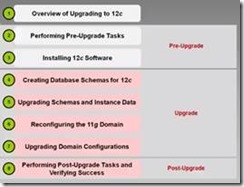
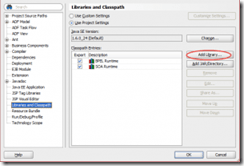
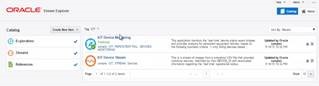
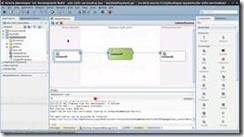
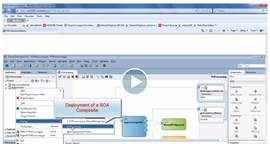
Upgrading Oracle SOA Suite to 12c Videos

clip_image002

SOA & BPM Partner Community

For regular information on Oracle SOA Suite become a member in the SOA & BPM Partner Community for registration please visit www.oracle.com/goto/emea/soa (OPN account required) If you need support with your account please contact the Oracle Partner Business Center.

Blog Twitter LinkedIn image[7][2][2][2] Facebook clip_image002[8][4][2][2][2] Wiki

Technorati Tags: SOA Community,Oracle SOA,Oracle BPM,OPN,Jürgen Kress

SOA Suite 12c – Composite Lazy Loading by Adam Desjardin


clip_image002A new feature in SOA Suite 12c is composite lazy loading.  This feature allows the components, WSDLs, and XSDs for a composite to be loaded as needed instead of at startup.  This can help reduce start up time of the SOA servers from possibly as high as 30 minutes for domains with a large number of composites deployed, down to just a few minutes.  We have worked with several customers who run SOA Suite 11g with hundreds of deployed composites. Many of the composites may be retired or previous versions simply for maintaining compatibility.  Once utilizing SOA 12c, those customers will no longer have slow server start up times and can accomplish restarts much more quickly with less downtime for each node.

Enabling and Disabling Lazy Loading at the SOA-INFRA Level

Composite lazy loading and lazy deployment are both enabled at the soa-infra level by default in 12c.

You can find these settings by opening EM and right clicking on your domain and selecting System MBean Browser Read the complete article here.

SOA & BPM Partner Community

For regular information on Oracle SOA Suite become a member in the SOA & BPM Partner Community for registration please visit www.oracle.com/goto/emea/soa (OPN account required) If you need support with your account please contact the Oracle Partner Business Center.

Blog Twitter LinkedIn image[7][2][2][2] Facebook clip_image002[8][4][2][2][2] Wiki

Simplifying Error Handling with Custom XPath Function by Dan Reynebeau


clip_image001How many times have you developed error handling logic in a BPEL process and want to collect error information to pass to an error handler service?  There are many xpath functions that are currently available and can be utilized individually to collect all the necessary data, however this can become a time consuming task when you have several catch blocks and many processes.  This is a case where re-use is a must.  Simplifying the collection of the error data will ensure that the error handling is completed and performed in a consistent manner across processes.

Re-using the logic doesn’t imply copying the logic to another process, this leads to maintenance problems since we will inherently forget every place it was copied.  You could create small utility BPEL processes that manage the logic but that can be a bit heavy weight and probably overkill.

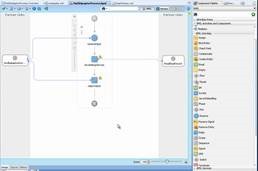
Custom XPath functions come to the rescue and solve this problem by providing a framework to generate a custom java class that can perform the collection of all the error data and return a XML document in the structure of the specific error handler.

Now we know we want to create a custom XPath function to populate the following CommonErrorHandler.xsd, so here are the steps required. Read the complete article here.

SOA & BPM Partner Community

For regular information on Oracle SOA Suite become a member in the SOA & BPM Partner Community for registration please visit www.oracle.com/goto/emea/soa (OPN account required) If you need support with your account please contact the Oracle Partner Business Center.

Blog Twitter LinkedIn image[7][2][2][2] Facebook clip_image002[8][4][2][2][2] Wiki

Stream Explorer Patch Update 2


clip_image002Today we posted the latest Stream Explorer Patch Update 2 on our Oracle Technology Network (OTN) Downloads page.

The attached document highlights the software updates and in addition, new samples are now available that you can have automatically included in your user experience.

Watch out! Oracle Stream Explorer Version 2 is in the pipe, scheduled to be showcased at Oracle Openworld San Francisco 2015, so feature rich I would take all day to describe, but in our opinion, it will take this technology to a whole new level, challenging competitors to even keep up.

SOA & BPM Partner Community

For regular information on Oracle SOA Suite become a member in the SOA & BPM Partner Community for registration please visit www.oracle.com/goto/emea/soa (OPN account required) If you need support with your account please contact the Oracle Partner Business Center.

Blog Twitter LinkedIn image[7][2][2][2] Facebook clip_image002[8][4][2][2][2] Wiki

SOA Suite 12c High Level Overview – free online training


clip_image002See the features included in the Oracle SOA Suite 12c release. Some highlights of the features include automated conversions REST/SOAP, cloud adapters to simplify on-premise to cloud integration, new SAP, JDE Adapters, and Managed File Transfer (MFT) for file-based integration (new SKU), memory footprint reduction, startup acceleration, pre-tuned database profiles, one-click install, improved integration with JDeveloper, debugger & tester, templates, support for mobile-friendly standards (REST, JSON, …). See oracle.com/oll/soa for more information.
Attend the free online training here.

SOA & BPM Partner Community

For regular information on Oracle SOA Suite become a member in the SOA & BPM Partner Community for registration please visit www.oracle.com/goto/emea/soa (OPN account required) If you need support with your account please contact the Oracle Partner Business Center.

Blog Twitter LinkedIn image[7][2][2][2] Facebook clip_image002[8][4][2][2][2] Wiki

SOA Suite 12.1.3 free online demo systems at GSE

clip_image002

Request access to our middleware demo systems here.

For support with GSE demo systems please visit our wiki here. (SOA Community membership required)

Global Sales Engineering (GSE), in collaboration with EMEA Pre-Sales Center (EPC), is pleased to announce the availability of the Oracle SOA (Service-Oriented Architecture) Suite 12c (12.1.3) Solutions demo. This demo showcases the fundamental concepts, approach to development and integration, and the functionality of the core components of the SOA Suite 12c. The demo highlights the benefits of SOA components in a realistic use-case scenario to build, change, or extend a business.

Highlights

  • Design and execution of Purchase Order Process flow using Oracle JDeveloper and SOA application consoles
  • Service Virtualization using Oracle Service Bus (OSB)
  • Managed File Transfer

Call to Action

  • Go to the GSE Demo Store to see this 2 minute video, demo scripts, and other collateral material.
    • Note: The video streaming works best in Firefox, while Chrome users will need to click the download button to download then play the video directly from their PC.
  • Register a new demo or environment from the GSE website by searching for Demo Title “SOA Suite 12c (12.1.3) Solutions”.
    • SOA Suite 12c (12.1.3) Solutions is available as an Instant Canned demo (short-term use) and as a Deal Server demo (customizable for days or weeks of use).
  • See this site for comprehensive Oracle product and sales information about SOA

Support

If you need assistance or encounter any issues please submit a GSE support ticket or call the GSE Support Hotline. The hotline is available 24 hours a day, Monday through Friday, at:

  • Americas: +1-650-506-8763
  • EMEA: +44-118-9240808
  • APAC: +65-6436-2150
  • Japan: +81-3-6834-6097

SOA & BPM Partner Community

For regular information on Oracle SOA Suite become a member in the SOA & BPM Partner Community for registration please visit www.oracle.com/goto/emea/soa (OPN account required) If you need support with your account please contact the Oracle Partner Business Center.

Blog Twitter LinkedIn image[7][2][2][2] Facebook clip_image002[8][4][2][2][2] Wiki

SOA & BPM Partner Community Webcast – January 26th get a Stream explorer update


clip_image001Attend our January edition of the SOA & BPM Partner Community Webcast live on January 26th 2016 16:00 CET.

Robin Smith

Product Management Stream Explorer

clip_image003

Stream Explorer

The Oracle Stream Explorer platform provides a compelling combination of an easy-to-use visual façade to rapidly create and dynamically change Real Time Event Stream Processing (Fast Data) applications, together with a comprehensive run-time platform to manage and execute these solutions.

Visit the registration page here.

Call ID: 9139664 Call Passcode: 333111

Austria: +43 (0) 192 865 12
Belgium: +32 (0) 240 105 28
Denmark: +45 327 292 22
Finland: +358 (0) 923 193 923
France: +33 (0) 15760 2222
Germany: +49 (0) 692 222 161 06
Ireland: +353 (0) 124 756 50
Italy: +39 (0) 236 008 198

Netherlands: +31 (0) 207 143 543
Spain: +34 914 143 755
Sweden: +46 (0) 856 619 465
Switzerland: +41 (0) 445 804 003
UK: +44 (0) 208 118 1001
United States: 140 877 440 73
More Local Numbers

Schedule:

January 26th 2016 16:00-17:00 CET

Visit the registration page here.

If you have difficulty logging in using the above link please go to: http://ouweb.webex.com/meetingcenter and join with session id: 597192008

Missed our SOA & BPM Partner Community Webcast? – watch the on-demand versions:

Process Cloud Service V2

SOA Suite 12.2.1

Oracle OpenWorld 2015 update

SOA & API Cloud Service

Solutions Catalog & Cloud Marketplace

GSE demo systems

Hybrid sales plays

For the latest information please visit Community Updates Wiki page (SOA Community membership required).

SOA & BPM Partner Community

For regular information on Oracle SOA Suite become a member in the SOA & BPM Partner Community for registration please visit www.oracle.com/goto/emea/soa (OPN account required) If you need support with your account please contact the Oracle Partner Business Center.

Blog Twitter LinkedIn image[7][2][2][2] Facebook clip_image002[8][4][2][2][2] Wiki

SOA Suite 12c monitoring with EM 12c Cloud Control by Michel Schildmeijer


clip_image002Good monitoring is knowing how your systems and application are doing at past, present and future time. There are many  monitoring tools & solutions at the market, all with pro’s and cons. Building monitoring takes time and effort but in the end gives you the benefit of less disturbance and more guarantee of business continuity.

At the customers I work for, I often implemented Oracle’s Enterprise manager 12c Cloud Control to build a monitoring framework. In this blog I will tell about what needs to be done to build such a framework.

Pre Requirements

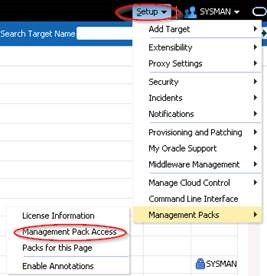
Before start building a solution, make sure you have:

  • The proper monitoring pack licenses; for SOA Suite that will be:
    • The WebLogic Diagnostics & Monitoring Pack
    • The SOA Suite Diagnostics & Montitoring Pack
  • Agents installed on every physical (or virtual ) host where WebLogic / SOA is running

Building Steps

Deploying Agents to Targets

If not already done so, agents need to be deployed to the hostst were middleware is running. I will not discuss this any further because this is more Enterprise Manager generic.

Discover Middleware Targets

Discovering Middleware Targets is just as it is as with other Targets. Read the complete article here.

SOA & BPM Partner Community

For regular information on Oracle SOA Suite become a member in the SOA & BPM Partner Community for registration please visit www.oracle.com/goto/emea/soa (OPN account required) If you need support with your account please contact the Oracle Partner Business Center.

Blog Twitter LinkedIn image[7][2][2][2] Facebook clip_image002[8][4][2][2][2] Wiki

Why does DB-adapter return duplicate rows? by Jon Petter Hjulstad


clip_image002Here are some DB adapter tips regarding duplicate rows.

The DB Adapter has some nice features, but sometimes you can get fooled. One of my colleagues experiences this one day. The query returned the same row – just repeated many times.

The reason for this is because the primary key was not defined correctly.

The good thing is that the documentation describes this – and more: Oracle documentation

For tables where primary key is defined – this should not be a problem, but in cases where it is not defined or you are querying a view – you would need to specify a primary key yourself. A couple of relevant notes here:

  • If you do not provide a valid primary key, then the unique constraint is not guaranteed, and this could result in possible loss of messages at runtime. That is, rows with duplicate primary key values are likely to be lost.
  • You should ensure that you primary key is less than 100 bytes.
  • Oracle recommends that you use varchar instead of char for primary key columns

Read the complete article here.

SOA & BPM Partner Community

For regular information on Oracle SOA Suite become a member in the SOA & BPM Partner Community for registration please visit www.oracle.com/goto/emea/soa (OPN account required) If you need support with your account please contact the Oracle Partner Business Center.

Blog Twitter LinkedIn image[7][2][2][2] Facebook clip_image002[8][4][2][2][2] Wiki

5 Best practices for SoapUI Pro and Oracle SOA Suite by Martijn van der Kamp

clip_image001

Over the last year I had the opportunity to be involved in an Oracle SOA Suite 10g to 11g upgrade. At the starting point, the 10g situation, automated tests were not yet part of the landscape. As part of our approach to upgrade the SOA Suite from 10g to 11g, we created SoapUI tests to check that the 11g code would behave functionally the same as the 10g code. This ensured the quality of the code and it also enabled us to run a full regression test within 30 minutes. During the project we created around 300 test cases in SoapUI. Next to that we continuously leveraged our experiences while working in an upgrade environment, and improved our test approach during the project. In this blog I will elaborate on five best practices while using SoapUI in combination with Oracle SOA Suite.

1. Minimize groovy scripting.

As we made the SoapUI tests based on functional flows we realized that a large part of the SOA Suite projects are reused in various functional flows. To make the maintainability easier, we created some groovy scripts that handle the messaging for these steps. It shortens the number of steps in the test case by letting the groovy script handle multiple steps in the background. Also we would be able to store the groovy script in a scripts folder, and call it from any test cases we would create. See figure 1.

Figure 1 Using Groovy script to shorten the number of steps

It started out simple, with a few generic post and get message steps. But not long after that, the first if-then-else statements started to introduce themselves inside the scripts. After that started, the scripts gained in complexity. Read the complete article here.

SOA & BPM Partner Community

For regular information on Oracle SOA Suite become a member in the SOA & BPM Partner Community for registration please visit www.oracle.com/goto/emea/soa (OPN account required) If you need support with your account please contact the Oracle Partner Business Center.

Blog Twitter LinkedIn image[7][2][2][2] Facebook clip_image002[8][4][2][2][2] Wiki