Using DB Adapter in SOA Suite 12c by Waslley Souza

clip_image001When you have a BPEL Process, and it needs to perform an operation on a Database Table, for example, insert an employee, you have to use the Database Adapter. The Database Adapter exposes to SOA, tables and SQL transparently and non-intrusively.

In this post, I will create a BPEL Process to insert employees into Employees table from HR Schema. Best practises, like the use of MDS and Mediator, are not the purpose of this post. Download the sample application: SOADBAdapterApp.zip.

Create a SOA Application.

In Step 1, set the Application Name and Application Package Prefix.

In Step 2, set the Project Name. Read the complete article here.

SOA & BPM Partner Community

For regular information on Oracle SOA Suite become a member in the SOA & BPM Partner Community for registration please visit www.oracle.com/goto/emea/soa (OPN account required) If you need support with your account please contact the Oracle Partner Business Center.

Blog Twitter LinkedIn image[7][2][2][2] Facebook clip_image002[8][4][2][2][2] Wiki

Integration Adaptors including SAP R/3

Acelerate Integration with your Cloud, On-Premise and Legacy Applications with Oracle Integration Adapters. clip_image002
Oracle Integration Adapters provides a critical foundation for the Product, providing a Unified Connectivity Architecture, facilitating integration of information from several on-premise, legacy and cloud based applications and systems into a Service Oriented Architecture.They enables creation of Reusable service assets that publish to and extract information from disparate Cloud and On-Premise Applications such as Oracle E-Business Suite, SAP or Salesforce.com to simple but key technology assets such as FTP Servers or Databases. Oracle Integration Adapters facilitate an Integration and Extension Platform for your Applications.
Whats New!
The 12c release of SOA Suite positions the product as the only integration product in the market today that can support all major ongoing technology trends: mobile enablement via major REST & JSON improvements throughout the suite, cloud integration via the new line of cloud adapters and Internet-of-Things with Oracle Event Processing providing the impedance matching layer between devices and enterprise systems. While many vendors may boast similar claims in high-level positioning documents, Oracle goes beyond the hype by delivering tangible features to back up these assertions in SOA Suite 12c.
Please goto the SOA Suite Product Overview page for more information on this new release.
The 12c release also delivers exciting new connectivity capabilities including all new Adapters for Cloud and On-premise Integration. These include the all new Enterprise Application Adapters for SAP R/3 and JD Edwards World, and brand new Technology Adapters for integrating with Coherence, MSMQ and LDAP. Note that the new SAP R/3 and JD Edwards World Adapter have a rich and intuitive JDeveloper based design-time and advanced Runtime capabilities. The 12c release will also be the platform for several upcoming Cloud Adapters.  For more details, refer to the following document.

Accelerate your SAP Integration with the new  Oracle Integration Adapter for SAP R/3

clip_image004The Oracle Adapter for SAP R/3 provides comprehensive, bi-directional, standards-based, real-time connectivity to SAP R/3 systems. The Adapter supports both JCA and Web Service standards for creation of open and reusable service-oriented applications (SOA). High-speed, low-impact, non-intrusive access to and from SAP exposes the critical business logic and data contained with SAP for reuse: the key to building a successful e-business application or integrated enterprise. This Adapter, newly introduced in 12.1.3 is natively integrated with JDeveloper providing enhanced developer productivity and accelerated time-to-market. Refer to the following documents for more information.

Read the complete article here.

SOA & BPM Partner Community

For regular information on Oracle SOA Suite become a member in the SOA & BPM Partner Community for registration please visit www.oracle.com/goto/emea/soa (OPN account required) If you need support with your account please contact the Oracle Partner Business Center.

Blog Twitter LinkedIn image[7][2][2][2] Facebook clip_image002[8][4][2][2][2] Wiki

SOA 12c Encryption and Decryption of Sensitive Data By Vivek Garg

clip_image002Oracle SOA Suite is used for reliable transfer of information, it stores whole the message in SOA_INFRA schema. We can see incoming and outgoing messages in audit trail from EM console. That means user which has access to EM console can see all the messages coming and going through middleware, sometimes some of the information which is flowing through Oracle SOA Suite is very critical and SOA Suite user should not have access to see that critical piece of information. In this post we will discuss how to fulfill this requirement using Oracle SOA Suite.

In previous version of Oracle SOA Suite (11g) there were no out of box provision to encrypt and decrypt sensitive data so that user can’t see the data which is flowing through fusion but in current version of Oracle SOA Suite which is 12c, Oracle provided out of box functionality to encrypt specific fields in the message which is flowing through middleware. Below is sample encrypted message field.

In Oracle SOA 12c, encryption policy is used to encrypt and decrypt the message, message encryption happens at component binding that means message get encrypted before it come to component (BPEL or Mediator) and we see only encrypted message in audit trail. Message decryption happens at reference binding level that means message fields get decrypted before it is sent to target service/system. Read the complete article here.

SOA & BPM Partner Community

For regular information on Oracle SOA Suite become a member in the SOA & BPM Partner Community for registration please visit www.oracle.com/goto/emea/soa (OPN account required) If you need support with your account please contact the Oracle Partner Business Center.

Blog Twitter LinkedIn image[7][2][2][2] Facebook clip_image002[8][4][2][2][2] Wiki

Patching the Oracle Service Bus 12.1.3 unknown protocol deployment error by Jan van Zoggel

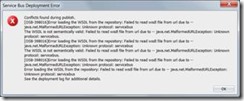
If you (already) created your first Oracle Service Bus 12c application/project with SOAP webservices and tried to deploy it to your IntegratedWeblogic server you might be familiar with this error.

clip_image002

Lucky for us Oracle quickly released a solution on their support website and also various blogs picked it up and posted a solution. The earliest reference I found was posted by Link. The solution to your problem was either:

  • Add felix.service.urlhandlers=false to the Init properties of OSGi frameworks bac-svnserver-osgi-framework factory implementation class
  • Remove the default server as a target for the framework

This worked like a charm and I was able to play around with my 12c Service Bus. However since it was stated that the solution could result into problems with BPM on your domain I reminded myself that I wanted to dive deeper into this when I had the time.

Google helped me out, and I discovered this information on the Apache Felix framework website.

Felix installs the URL Handlers service by default. If you do not want this service you can disable it, by setting the felix.service.urlhandlers property to false in the config.properties file. It is not recommended to disable this, but the main reason for doing so it because the URL Handlers implementation invokes methods to set the singleton factories for URL stream and content handler factories. Assuming that you want to use URL Handlers service, you must configure it if you aren’t running on the standard Sun JRE. Read the complete article here.

SOA & BPM Partner Community

For regular information on Oracle SOA Suite become a member in the SOA & BPM Partner Community for registration please visit www.oracle.com/goto/emea/soa (OPN account required) If you need support with your account please contact the Oracle Partner Business Center.

Blog Twitter LinkedIn image[7][2][2][2] Facebook clip_image002[8][4][2][2][2] Wiki

Enterprise Manager Cloud Control 12c: Best Practices for Middleware Management free on-demand training

clip_image002This self-paced course teaches you best practices when using Oracle Enterprise Manager Cloud Control 12c for managing your WebLogic and SOA applications and infrastructure. It consists of interactive lectures, videos, review sessions, and optional demonstrations.
This course covers Enterprise Manager Cloud Control 12c licensed with the WebLogic Server Management Pack Enterprise Edition and the SOA Management Pack Enterprise Edition. Watch the training here.

SOA & BPM Partner Community

For regular information on Oracle SOA Suite become a member in the SOA & BPM Partner Community for registration please visit www.oracle.com/goto/emea/soa (OPN account required) If you need support with your account please contact the Oracle Partner Business Center.

Blog Twitter LinkedIn image[7][2][2][2] Facebook clip_image002[8][4][2][2][2] Wiki

Closer look at the SOA 12c Feature: Oracle Managed File Transfer By Tshepo Madigage

clip_image002

The rapid growth of cloud-based applications in the enterprise, combined with organizations’ desire to integrate applications with mobile technologies, is dramatically increasing application integration complexity. To meet this challenge, Oracle introduced Oracle SOA Suite 12c, the latest version of the industry’s most complete and unified application integration and SOA solution. With simplified cloud, mobile, on-premises, and Internet of Things (IoT) integration capabilities, all within a single platform, Oracle SOA Suite 12c helps organizations speed time to integration, improve productivity, and lower TCO.

To extend its B2B solution capabilities with Oracle SOA Suite 12c, Oracle unveiled Oracle Managed File Transfer, an integrated solution that enables organizations to virtually eliminate file transfer complexities. This allows customers to load data securely into Oracle Cloud applications as well as third-party cloud or partner applications.

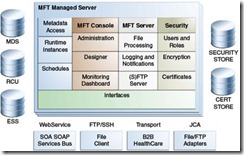
Oracle Managed File Transfer (Oracle MFT) enables secure file exchange and management with internal departments and external partners. It protects against inadvertent access to unsecured files at every step in the end-to-end transfer of files. It is easy to use especially for non technical staff so you can leverage more resources to manage the transfer of files. The extensive reporting capabilities allow you to get quick status of a file transfer and resubmit it as required. You can protect data in your DMZ by using the SSH/FTP reverse proxy. Read the complete article here

SOA & BPM Partner Community

For regular information on Oracle SOA Suite become a member in the SOA & BPM Partner Community for registration please visit www.oracle.com/goto/emea/soa (OPN account required) If you need support with your account please contact the Oracle Partner Business Center.

Blog Twitter LinkedIn image[7][2][2][2] Facebook clip_image002[8][4][2][2][2] Wiki

Multichannel enablement for Applications – hands-on workshop at OFM Forum 2015

image Agenda Highlights

74% consumers use at least 3 channels when interacting with an enterprise about customer service issues.

– Gartner

Multichannel Strategy Overview

Business scenario and demo walkthrough

  • Lab: Service Virtualization with Service Bus
  • Lab: Composite Portal with WebCenter Suite
  • Lab: Mobile App Integration with Mobile Suite
  • Securing multi-channel experience with Oracle Identity & Access Mgmt Suite

For details please visit our registration page here.

SOA & BPM Partner Community

For regular information on Oracle SOA Suite become a member in the SOA & BPM Partner Community for registration please visit www.oracle.com/goto/emea/soa (OPN account required) If you need support with your account please contact the Oracle Partner Business Center.

Blog Twitter LinkedIn image[7][2][2][2] Facebook clip_image002[8][4][2][2][2] Wiki

SOA Suite 12c: The LDAP Adapter, a quick and easy tutorial by Maarten Smeets

clip_image001In enterprises, LDAP servers are often used to store user credentials and groups and share them among applications. Oracle SOA Suite 12c introduces a new technology adapter; the LDAPAdapter which allows easy integration with LDAP servers. In this blog post I will provide a quick and easy howto on installation of an LDAP server and browser (ApacheDS and Apache Directory Studio). I will also describe the configuration required to use the LDAPAdapter and provide an example BPEL process which allows creation of new users in the ApacheDS LDAP server by means of webservice calls.

Setting up the LDAP server

Installing an LDAP server

For this example I’ll use ApacheDS as LDAP server and Apache Directory Studio as LDAP browser. First download and install Apache Directory Studio from http://directory.apache.org/studio/. Next create an LDAP server. Click the LDAP server tab in the bottom left corner and click New Server. Read the complete article here.

SOA & BPM Partner Community

For regular information on Oracle SOA Suite become a member in the SOA & BPM Partner Community for registration please visit www.oracle.com/goto/emea/soa (OPN account required) If you need support with your account please contact the Oracle Partner Business Center.

Blog Twitter LinkedIn image[7][2][2][2] Facebook clip_image002[8][4][2][2][2] Wiki

Create Service Bus Customization File using WLST by Ronald van Luttikhuizen

clip_image002For one of our Oracle Fusion Middleware projects we had the requirement that the IT Ops activities should be scripted as much as possible. These activities included things like packaging, deploying, and automated testing of Service Bus projects, SOA Composites, and BPM processes. One of the more challenging tasks to script was to create and extract the runtime configuration of services deployed on Oracle Service Bus 11g using customization files. There seems to be no WLST feature readily available for this purpose. Based on some resources that all contained part of the solution, we were able to construct a WLST script for this purpose which you can find in this blog.
This blog briefly explains the use of customization files, how to create a customization file using the Service Bus Console, includes the WLST script to execute this task, and provides a brief conclusion.

Customization Files

Customization files are XML files that contain the configuration of Service Bus resources and projects. Examples of such configurations are Service URIs, JCA settings, Retry Settings, and so on. Customization files provide a convenient way to apply environment-specific configuration during deployment. You can both apply, as well as create and extract the runtime configuration of Service Bus resources and projects into customization files using the Service Bus Console. Read the complete article here.

SOA & BPM Partner Community

For regular information on Oracle SOA Suite become a member in the SOA & BPM Partner Community for registration please visit www.oracle.com/goto/emea/soa (OPN account required) If you need support with your account please contact the Oracle Partner Business Center.

Blog Twitter LinkedIn image[7][2][2][2] Facebook clip_image002[8][4][2][2][2] Wiki

SOA12c -Service Bus Resequencer by Vivek Garg

clip_image002We often come under such situation when we receive message from source system which are not in proper sequence but target system need to receive that in proper sequence. To resolve this we need to re-sequence the messages and process them in proper sequence.   Re-sequencing is term used when we need to process incoming messages in sequence which are not coming in proper sequence. Design and developer need to think on this re-sequencing when they encounter such requirement as e described above. E.g. suppose we are receiving sales orders from source system, sales order contain one field with the name sales order number, suppose source system sends sales order in this sequence ( 1, 4,3,2,5,6,7 ) but target system need sales order in this sequence (1,2,3,4,5,6,7) , in this case we need to do re-sequencing of message.

In 11g version of Oracle SOA Suite, re-sequencing was there in Mediator component but this feature was not available for BPEL and Service Bus. In 12c release, this feature is provided for service bus. We can set this feature either at pipeline level or at operation level. In this post, we will discuss on that. We will only discuss about pipeline level re-sequencer. 

We have three types of re-sequencing in Service Bus.

Standard:  This sequencer is used when incoming message contain numeric identifier.  This numeric identifier is termed as Sequence Id. We may specify message Group also, that means incoming order can be Sales Order or purchase order, in this case we will have separate group for both Sales Order and purchase order. When source system send out of order messages then it store out-of-order message until complete order is received this is based on sequence Id.

FIFO: This sequencer works based on message arrival time. Whichever message received first, will be processed first. Here you need to specify only Group. So all the messages which are there in one group processed based on message receive time.

Best Effort: It is used when we receive large number of messages in a short period of time and cannot provide information to the re-sequencer about the identifier to use for sequencing. Typically, the identifier used for sequencing in such scenarios is of a dateTime type or numeric type.

– See more at: http://www.soawork.com/2014/09/soa12c-service-bus-resequencer.html#sthash.CJJjVYly.dpuf

Read the complete article here.

SOA & BPM Partner Community

For regular information on Oracle SOA Suite become a member in the SOA & BPM Partner Community for registration please visit www.oracle.com/goto/emea/soa (OPN account required) If you need support with your account please contact the Oracle Partner Business Center.

Blog Twitter LinkedIn image[7][2][2][2] Facebook clip_image002[8][4][2][2][2] Wiki