How to build a Process Cloud Service Application (Business Travel Expense) in 40 minutes – Part I – Designing your process by Jose Rodrigues


clip_image001

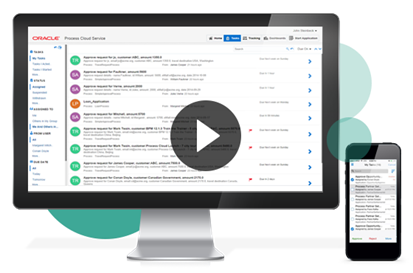
Welcome to Red Maverick’s third video. In this one, we’ll guide you on how to build a complete, working BPM application using  Oracle’s Process Cloud Service. The first part is about designing your process from a functional/business point of view.

In the next parts, you’ll see how to setup a process start form, build advanced rules, conduct escalations and going up management chains. This scenario and video was first prepared by me for Link Consulting‘s Process Cloud event, that was held in July 2015. Watch the video here.

SOA & BPM Partner Community

For regular information on Oracle SOA Suite become a member in the SOA & BPM Partner Community for registration please visit www.oracle.com/goto/emea/soa (OPN account required) If you need support with your account please contact the Oracle Partner Business Center.

Blog Twitter LinkedIn image[7][2][2][2] Facebook clip_image002[8][4][2][2][2] Wiki

Process Success Workshops generate additional consulting business!


The Process Success Workshops are technical workshops you can run with your customers. You can generate additional consulting business with existing customers e.g. SOA Suite customers with BPM Suite. Or You can use the excellent content to win new customers. We highly encourage you to make use of the BPM Success Workshop 2015 at our SOA Community Workspace (SOA Community membership required).

clip_image002

SOA & BPM Partner Community

For regular information on Oracle SOA Suite become a member in the SOA & BPM Partner Community for registration please visit www.oracle.com/goto/emea/soa (OPN account required) If you need support with your account please contact the Oracle Partner Business Center.

Blog Twitter LinkedIn image[7][2][2][2] Facebook clip_image002[8][4][2][2][2] Wiki

PaaS & IaaS hands-on Bootcamp part of PaaS & Middleware Summer Camps 2016


August 29th – September 2nd 2016 Lisbon Portugal

Please visit our registration page here www.tinyurl.com/ofmSummerCamps2016

Trainer: Niall Commiskey & Chris Peytier


Questions

Please post them in the discussion forum here! All details are posted at our registration page here.


Agenda Highlights:

  • ICS & PCS integration and other goodies (1.5 days to 2 days)
  • IaaS & JCS (1.5 days to 2 days)
  • Developer Cloud Service & Application Container Cloud Service (1day)

Skill Requirements:
Attendees must have the following skills to make sure they get the most out of the training:

Technical Requirements:
Every participant works on his/her own laptop. The minimal hardware requirements are:

  • Laptop 12 GB RAM better 16 GB RAM
  • Pentium 4 with dual-core CPU
  • Minimum 60 GB free disk space
  • Please install the most recent Oracle Virtual box
  • Make sure you have administrator rights on your machine (including bios)

Cloud Requirements:

Niall Commiskey

clip_image002Is a member of the worldwide Oracle PTS team. PTS focuses on partner technical enablement – this runs the gamut from technical evangelisation to project support. Niall’s areas of expertise include SOA, BPM, ICS, PCS, IaaS, JCS. He is also the author of the iconoclastic fictional trilogy – The Hare of the Dog Volumes I to III, available on Amazon.

Chris Peytier

clip_image004BPM Specialist – EMEA Technology Specialist Group.
Providing help and support to the BPM presales team accross EMEA
Topics include
– How PCS is altering the BPM selection procedures with our customers
– Going through some of the use cases that we see now with PCS
PaaS4SaaS integration: How PCS can be an instrument to extend functionalities of Oracle applications.

For details please visit our registration page here www.tinyurl.com/ofmSummerCamps2016

SOA & BPM Partner Community

For regular information on Oracle SOA Suite become a member in the SOA & BPM Partner Community for registration please visit www.oracle.com/goto/emea/soa (OPN account required) If you need support with your account please contact the Oracle Partner Business Center.

Blog Twitter LinkedIn image[7][2][2][2] Facebook clip_image002[8][4][2][2][2] Wiki

Technorati Tags: OFM Summer Camps,Training,enablement,Summer Camps,PaaS,Cloud,SOA Community,Oracle SOA,Oracle BPM,OPN,Jürgen Kress

PaaS free trial accounts ICS and PCS, IoT and PaaS for SaaS

clip_image002


As part of our communities we do offer free PaaS accounts (only for partners in Europe, Middle East and Africa. In case you are not part of EMEA please contact your local partner manager):

· Integration Cloud Service & Process Cloud Service & SOA Cloud & IoT & PaaS for SaaS Service PaaS Demo Accounts  (Community membership required)

· Java Cloud Service & Application Cloud Container Service & Mobile Cloud Service PaaS Demo Accounts (Community membership required)

Watch the GSE Overview Video! Get an overview of what GSE is and how you can use GSE to help you sell. You can also get long running dedicated PaaS instances, therefore please send us details about your use cases. For instant access please request a sandbox demo

SOA & BPM Partner Community

For regular information on Oracle SOA Suite become a member in the SOA & BPM Partner Community for registration please visit www.oracle.com/goto/emea/soa (OPN account required) If you need support with your account please contact the Oracle Partner Business Center.

Blog Twitter LinkedIn image[7][2][2][2] Facebook clip_image002[8][4][2][2][2] Wiki

Technorati Tags: PaaS,Cloud,ICS,PCS,PaaS4SaaS,SOA Community,Oracle SOA,Oracle BPM,OPN,Jürgen Kress

In drei Schritten zur Onlinehypothek – Hypothekar-Antrags-Prozess auf der Cloud Prozessplattform von Oracle (Oracle PCS) by Richard Schaller

imageIn drei Schritten erstellen wir einen einfachen Hypothekar-Antrags-Prozess auf der Cloud Prozessplattform von Oracle (Oracle PCS). Der Prozess kann direkt nach Erstellung auf dem Handy, Tablet oder Laptop genutzt werden.

Im letzten Teil der Blog-Serie wie die Prozessautomatisierung den Digitalisierungs-Initiativen zum Erfolg verhilft, setzen wir beispielhaft einen einfachen Hypothekar-Antrags-Prozess in drei Schritten um. Wir verwenden dazu die Cloud-Prozessplattform von Oracle.

Schritt 1: Formular erstellen

Das zentrale Element ist ein Formular, das die geschäftlichen Daten beinhaltet. Der Workflow (Prozess) verwendet das Formular vom Anfang bis zum Ende. Der Nutzer startet den Prozess indem er das Formular ausfüllt, Dokumente hinzufügt und versendet. Im Verlauf des Workflows wird das Formular vom Kunden und von Sachbearbeitern fortlaufend ergänzt. Der Arbeitsfluss wird von der Cloud-Plattform gesteuert.

Die Erstellung von Formularen ist intuitiv. Die einzelnen Elemente können bequem mittels «Drag und Drop» angeordnet werden. Die nachfolgende Abbildung zeigt die verfügbaren Formular-Elemente der Oracle Process Cloud (PCS).

Die Formular-Elemente werden ohne Programmierung individuell angepasst. Im Vordergrund steht die Konfiguration von Name, Tipp und Eingabeformat (Text, Datum, E-Mail, Zahl, Auswahl, etc.). Dank der Unterstützung für Mehrsprachigkeit wird das Formular dem Benutzer in seiner Sprache dargestellt. Die nachfolgende Abbildung zeigt ein mögliches Formular.

Schritt 2: Hypothekar-Antrags-Prozess konfigurieren

Der Prozess ist ein sogenannter Antragsprozess. Wir wählen deshalb die dafür vorbereitete Vorlage aus. Oracle PCS stellt eine Reihe von Prozess-/Workflow-Vorlagen zur Verfügung.

Oracle PCS erstellt einen einfachen Antragsprozess. Dieser sieht zu Beginn wie folgt aus:

Nun geht es darum, den einfachen Prozess an die eigenen Bedürfnisse anzupassen. In unserem Fall sind folgende Anpassungen erforderlich:

  • Das Formular aus Schritt 1 den einzelnen Prozessschritten (grüne Boxen) zuweisen
  • Dem Antragsprozess konkrete Benutzergruppen (Antragsteller, Sachbearbeiter, Manager) zuweisen.
  • Read the complete Article here.

SOA & BPM Partner Community

For regular information on Oracle SOA Suite become a member in the SOA & BPM Partner Community for registration please visit www.oracle.com/goto/emea/soa (OPN account required) If you need support with your account please contact the Oracle Partner Business Center.

Blog Twitter LinkedIn image[7][2][2][2] Facebook clip_image002[8][4][2][2][2] Wiki

Process Cloud Services 16.2.1 available


clip_image002ANNOUNCING…Oracle Process Cloud Service

16.2.1 Release

We are pleased to announce the availability of the 16.2.1 release of Process Cloud Service (PCS)

What’s New!

  • Document Workflow Process Apps
  • Business Indicators and Analytics Dashboard
  • REST Service Connectors
  • New Process Composer
  • New Data Association and Transformation Editor
  • Federated SSO
  • OAuth Authentication for REST API

Document Workflow Process Apps

Oracle Process Cloud Service introduces a new Document Start activity to create Document Workflow Process Applications specifically designed to process documents and document folders from Documents Cloud Service. Documents and folders used to initiate a Document Workflow Process Application are automatically associated to the process, providing participants easy access to the content within the context of their assigned tasks. The introduction of first class Document Workflow capabilities makes it easy to create processes to manage document review and approval, transactional document management and light weight case management use cases. 

Business Indicators and Analytics Dashboard

Business indicators enable you to capture and display business metrics specific to your applications. Use the Business Analytics Dashboard to plot and view charts, graphs and reports for business metrics captured as business indicators. Create charts that display business indicator values. In Composer, developers create business indicators for data objects whose metrics they want to capture and display as X axis, Y axis, and filter values. In Workspace, you select business or system indicators to plot them in charts, graphs and reports.

REST Service Connectors

Use the new REST Service Connector to invoke RESTful services directly from within a process flow. The Service Activity has been enhanced to support both SOAP and REST Service Connectors, providing a familiar approach to interacting with external data sources and systems. Using the REST Service Connector you can easily define the resources, operations and payloads needed to connect to a REST service, regardless of the description language used to define the service.

New Process Composer

The new Process Composer has a more flexible and intuitive user Interface that can now be accessed through mobile tablets. The BPMN palette is easier to navigate. The process Activities are easier to access. And improved process flow layout makes it easier to create professional and organized looking process maps. Select an Activity to choose from a contextual set of actions and properties to configure the Activity behavior. Changing process sequence is more intuitive and provides contextual instructions on sequence flow alternatives.

New Data Association and Transformation Editor

The new Data Association editor greatly simplifies the task of mapping data between process Data Objects and Activities. Separate Input and Output associations allow for a more natural experience that makes it easy to map and review associations. Simply drag-and-drop Data Objects and Activity Payloads or use the intelligent auto-complete data entry. Even create new Data Objects right in the editor. Define reusable Transformations to associate different data types or reduce complex mappings. Define them once and apply wherever they’re needed in the application.

Federated SSO

Oracle Process Cloud Service now supports federated single sign-on (SSO) and authentication. Users who enter their valid credentials are authenticated through the their identity provider such as Oracle Identity Federation (OIF) or Active Directory Federation Services (ADFS) using the Security Assertion Markup Language (SAML) protocol, and redirected to the Oracle Process Cloud Service Workspace or Composer home page.

OAuth Authentication for REST API

Oracle Process Cloud Service now accepts OAuth tokens as an alternative to basic authentication for our REST APIs

Want to try Process Cloud Service? Please visit our Community wiki PaaS Demo Accounts (Community membership required). For more information please visit the PCS tag here. (Community membership required)

SOA & BPM Partner Community

For regular information on Oracle SOA Suite become a member in the SOA & BPM Partner Community for registration please visit www.oracle.com/goto/emea/soa (OPN account required) If you need support with your account please contact the Oracle Partner Business Center.

Blog Twitter LinkedIn image[7][2][2][2] Facebook clip_image002[8][4][2][2][2] Wiki

Flex Fields : Lesson 6: Promoting Flex Fields Mappings and Labels Across Environments by Jaideep


clip_image002When you promote your application from one environment to another, from example from ‘Development’ to ‘Test’ or from ‘Test’ to ‘Production’, it can be a lot of work to have to recreate all the flex field mappings and labels manually in each target environment. To make this easier, Oracle provides a Data Migrator ant script to promote Flex Field mappings and labels from one environment to another. This video is an excerpt from one of our Oracle BPM Training courses. It walks you through how to use the Data Migrator ant script. Watch the video here.

SOA & BPM Partner Community

For regular information on Oracle SOA Suite become a member in the SOA & BPM Partner Community for registration please visit www.oracle.com/goto/emea/soa (OPN account required) If you need support with your account please contact the Oracle Partner Business Center.

Blog Twitter LinkedIn image[7][2][2][2] Facebook clip_image002[8][4][2][2][2] Wiki

JDeveloper 12c becomes slow while editing BPM Process by Tiago Teixeira


There is a known issue with JDeveloper 12c while working on a BPM Process where JDeveloper becomes very slow while editing the process.
A simple drag and drop of an activity or a data association becomes a real pain and it seems as if JDeveloper is constantly working on the background.
To improve this I have two suggestions. The first one will not solve the issue but will help. The second will take away all your frustration!

  1. Remove the auto-build on save action
    1. Go to Tools → Preferences
    2. Search for save actions
    3. Remove the Build Project after Save from the list
  2. Apply patch # 18964763 to your JDeveloper 
    1. Download patch # 18964763 from My Oracle Support
    2. Follow the installation instructions to install the patch with OPatch
  3. Read the complete article here.

SOA & BPM Partner Community

For regular information on Oracle SOA Suite become a member in the SOA & BPM Partner Community for registration please visit www.oracle.com/goto/emea/soa (OPN account required) If you need support with your account please contact the Oracle Partner Business Center.

Blog Twitter LinkedIn image[7][2][2][2] Facebook clip_image002[8][4][2][2][2] Wiki

Escalate task after expiration time in BPM by Waslley Souza

clip_image001In Oracle BPM 12c, when you have a priority activity that you need to be resolved at a specified time to fulfill your SLA (Service Level Agreement), you can escalate it. Let’s learn how to do it!

As a starting point, I will use the BPM application created here: Creating BPM Process with BPM Composer.

I created three users: peter, bruce and clark. Clark is the manager of Bruce, and Bruce is the manager of peter.

In the process, add a new swimlane and change the role to Process Reviewer.
Add an User Task between Initiator and End Events.

Double-click on User Task and click on Add button near Human Task field.
Name it as EmployeeApprovalHT. Read the complete article here.

SOA & BPM Partner Community

For regular information on Oracle SOA Suite become a member in the SOA & BPM Partner Community for registration please visit www.oracle.com/goto/emea/soa (OPN account required) If you need support with your account please contact the Oracle Partner Business Center.

Blog Twitter LinkedIn image[7][2][2][2] Facebook clip_image002[8][4][2][2][2] Wiki

Suppress Approval Controls from BPM Workspace 12c – Hidden Feature by Antonis Antoniou


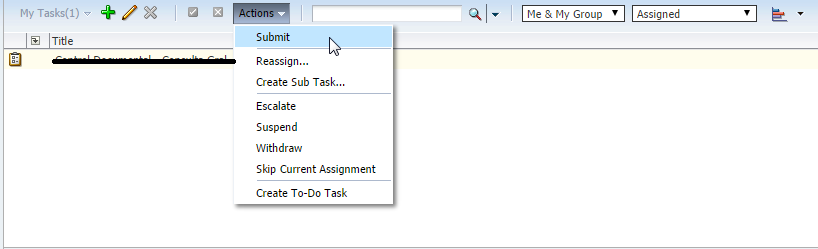
clip_image002I recently came across a very interesting discussion on the Oracle BPM forum which stimulated my interest for investigation; how to suppress the human task custom outcomes from the action bar in the BPM Workspace application in 12c!
When you deploy a BPM process or a BPEL service that includes a human task component, the BPM Workspace will automatically include in its action bar the custom outcomes that you have defined on your human task.

In the image above it’s assumed that a composite has been deployed that includes a human task component that defines a custom outcome "Submit".
There are cases though that you might want to suppress this default behavior and not have your custom actions appearing in the actions list but just have them displayed in the task details.
In 11g this was "officially" supported with a checkbox option ("Show approval controls in task details only") in the advanced human task properties. Read the complete article here.

SOA & BPM Partner Community

For regular information on Oracle SOA Suite become a member in the SOA & BPM Partner Community for registration please visit www.oracle.com/goto/emea/soa (OPN account required) If you need support with your account please contact the Oracle Partner Business Center.

Blog Twitter LinkedIn image[7][2][2][2] Facebook clip_image002[8][4][2][2][2] Wiki