Top 10 Things You Should Know About BPM 11g/12c by Mark Foster


clip_image001With the help of my A-Team colleagues (Sushil Shukla, Siming Mu, John Featherly, Pete Farkas), and based on collective experiences visiting numerous BPM customers worldwide, I have put together my “Top 10″ list of things everyone should know when embarking on a BPM project.

You might agree, you might disagree, most of all, feel free to comment.

1. Auditing

BPM provides the business with extremely detailed visibility of runtime instances through its powerful auditing capabilities.

HOWEVER

This comes at a cost: detailed auditing requires frequent inserts into the SOAINFRA database increasing the likelihood of contention and causing significant database growth. As volume increases it is almost always the case that the consequences of Auditing produce the first bottleneck.

BUT…

Auditing can be tuned down where appropriate and purge scripts can remediate database growth

SEE…

Auditing Demystified

2. Payload Size

It can often be simpler at the time of BPM process design to have one large payload schema that includes all elements for every possible interaction within the lifetime of an instance, and pass this everywhere within the instance, including to human tasks and their UIs.

HOWEVER

The cost of this, both at runtime and in terms of the number and size of database rows, can be large. The whole payload must be written to SOAINFRA database at dehydration points within the lifetime of a process instance & in-between these dehydration points, data objects associated with this payload are held in memory.

BUT…

Appropriate design of the payload schema (flatter & simpler) can reduce the size considerably. The optimal solution would be to pass only key-values in the payload and retrieve detail values as-and-when needed inside the process, however this can lead to over-complicating the process design with technical services. A sensible balance is always the best approach.

SEE…

XML_DOCUMENT Table Growth

3. Partitioning / Purging

BPM audits heavily, this can be extremely useful for business insight

HOWEVER

The SOAINFRA database growth can be larger than expected

BUT…

Partitioning & purging are critical to limiting database growth. Test purging thoroughly as part of a normal stress/load test cycle. Determine whether “loop purge” outside of the online window is sufficient, if not consider also using “parallel purge” during quiet periods during the online day. Partitioning is a good option in most cases, in 11g SOAINFRA must be partitioned post-installation but in 12c it is an installation option.

SEE…

SOA 11g Database Growth Management Strategy Paper

SOA Partitioning

4. Negative Testing

SOA Suite provides a comprehensive fault policy framework & BPM has inbuilt fault-handling constructs, allowing the vast majority of technical and business exceptions to be handled gracefully.

HOWEVER

Failure to properly negative test potential exceptions, individually & in bulk, can lead to inadequate operational guidelines & faults occurring in production which can be hard to recover.

BUT… Read the complete article here

SOA & BPM Partner Community

For regular information on Oracle SOA Suite become a member in the SOA & BPM Partner Community for registration please visit www.oracle.com/goto/emea/soa (OPN account required) If you need support with your account please contact the Oracle Partner Business Center.

Blog Twitter LinkedIn image[7][2][2][2] Facebook clip_image002[8][4][2][2][2] Wiki

The first BPMN process by Maverick


clip_image002

I know I’m a bit late on this article, but my presence in the Middle East had more (positive) impact than I anticipated, so I got tied up at work.

Anyway, let’s finally start to use Oracle’s BPM Composer to model our “Request a parking space” process.

As the Akino Fishing Co is a series focused on the Business User, we’ll try to keep our articles as Zero-Code as possible.

Finally… Hands-on!

We’ll start by logging on to BPM Composer

Oracle BPM Composer Login Screen

After logging in we are taken into the Process Spaces screen. Here, we’ll create a Space for our BPM Initiative. A Space is an container were you group and keep your Business Architecture (BA) and BPMN projects.

You can create as much spaces as you want, to organize your Business Architecture and BPMN projects the way you think it’s best. However, a project that belongs to a given space can’t be “seen” in other spaces, so take that into account. For the purpose of our article, we’ll be using just one space for all processes.

Hello there!

I know I’m a bit late on this article, but my presence in the Middle East had more (positive) impact than I anticipated, so I got tied up at work.

Anyway, let’s finally start to use Oracle’s BPM Composer to model our “Request a parking space” process.

As the Akino Fishing Co is a series focused on the Business User, we’ll try to keep our articles as Zero-Code as possible.

Finally… Hands-on!

We’ll start by logging on to BPM Composer

Oracle BPM Composer Login Screen

After logging in we are taken into the Process Spaces screen. Here, we’ll create a Space for our BPM Initiative. A Space is an container were you group and keep your Business Architecture (BA) and BPMN projects.

You can create as much spaces as you want, to organize your Business Architecture and BPMN projects the way you think it’s best. However, a project that belongs to a given space can’t be “seen” in other spaces, so take that into account. For the purpose of our article, we’ll be using just one space for all processes. Read the complete article here.

SOA & BPM Partner Community

For regular information on Oracle SOA Suite become a member in the SOA & BPM Partner Community for registration please visit www.oracle.com/goto/emea/soa (OPN account required) If you need support with your account please contact the Oracle Partner Business Center.

Blog Twitter LinkedIn image[7][2][2][2] Facebook clip_image002[8][4][2][2][2] Wiki

BPM 12c Gateways (Part 3 of 5): Parallel Gateway by Antonis Antoniou


clip_image002The parallel gateway enables you to perform multiple tasks simultaneously, allowing your process to follow several unconditional paths in parallel. When your process token reaches a parallel gateway activity, the parallel gateway will create a token for each outgoing parallel sequence flow. Your process will wait until all tokens have arrived at the parallel gateway merge activity before resuming with the rest of the activities.
You should be very careful with the parallel gateway activity because if one of the tokens that have been created by the parallel gateway doesn’t arrive at the parallel gateway merge activity, then your process will freeze.
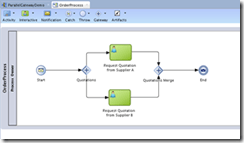
So let’s see how you can use the parallel gateway in a process. Let’s assume that you are implementing an order process and that at some point in your process you want to request for quotations from two different suppliers. Once you have received both quotations your process should resume (ideally pick the lowest quotation but I will not be implementing this part).
I created a BPM application with a default BPM project (named both application and project "ParallelGatewayDemo") having an empty composite. Read the complete article here.

SOA & BPM Partner Community

For regular information on Oracle SOA Suite become a member in the SOA & BPM Partner Community for registration please visit www.oracle.com/goto/emea/soa (OPN account required) If you need support with your account please contact the Oracle Partner Business Center.

Blog Twitter LinkedIn image[7][2][2][2] Facebook clip_image002[8][4][2][2][2] Wiki

BPM Suite 12c what is New


Make sure you read our White Paper: What’s New in Oracle BPM 12c – PDF. 12.1.3 Bundled Patch 1 (BP1), is planned for BPM Suite 12c in Q1 2015. In the case you are working on a BPM 12c project please make sure that you reach out to myself to get Oracle support.

clip_image002

SOA & BPM Partner Community

For regular information on Oracle SOA Suite become a member in the SOA & BPM Partner Community for registration please visit www.oracle.com/goto/emea/soa (OPN account required) If you need support with your account please contact the Oracle Partner Business Center.

Blog Twitter LinkedIn image[7][2][2][2] Facebook clip_image002[8][4][2][2][2] Wiki

BPM Suite on the Oracle Cloud! Learn more about Java Cloud Service – join our Webcast April 24th 2015

image

Join our Webcast on April 24th 2015!

Oracle Java Cloud Service is a part of the platform service offerings in Oracle Public Cloud Services. Powered by Oracle WebLogic Server, it provides a platform on top of Oracle’s enterprise-grade cloud infrastructure for developing and deploying new or existing Java EE applications.

Schedule: April 24th 2015 15:00-16:00 CET (Berlin time)

Presenters: Cosmin Tudor & Jürgen Kress

Registration: please visit our registration page here

In this eSeminar we will provide both an overview presentation and a short demo that will cover the new Oracle Java Cloud Services – Platform as a Service offerings and the integration with other Oracle Cloud offerings like: Developer Cloud Services, Database Cloud Services, Documents Cloud Services …

Do you want to learn more about innovative features, capabilities and roadmap of Oracle Java Cloud Services? Then this technical overview is for you.

Presentation Outline – 1 hour

  • Java Cloud Services:
    • Java Cloud Services PaaS and PaaS – Virtual Image
    • Java Cloud Services SaaS Extensions
    • Management and Administration:
      • Provisioning
      • Backup & Recovery
      • Patching
      • Scaling
      • REST API
    • Coherence Cloud Services
    • Storage Cloud Services
    • Compute Cloud Services
  • Developer Cloud Services
  • Database Cloud Services

Audience

  • Java/JavaEE/WebLogic Consultants & Architects

For details please visit our registration page here.

SOA & BPM Partner Community

For regular information on Oracle SOA Suite become a member in the SOA & BPM Partner Community for registration please visit www.oracle.com/goto/emea/soa (OPN account required) If you need support with your account please contact the Oracle Partner Business Center.

Blog Twitter LinkedIn image[7][2][2][2] Facebook clip_image002[8][4][2][2][2] Wiki

Set-up a 12c SOA/BPM Infrastructure by Rene van Wijk


In this post, we will show how to create automation scripts in order to set-up middleware environments.

Preparation

In the example, we will use the following software

· Oracle JDK

· Fusion Middleware Infrastructure (fmw_12.1.3.0.0_infrastructure.jar) which can be obtained from the Oracle Software Delivery Cloud

· Oracle SOA Suite (fmw_12.1.3.0.0_soa.jar) which can be obtained from the Oracle Software Delivery Cloud

First, we have to decide which directory structure we are going to use. Below an example is given in which the binaries (that create the run-time) are separated from the configuration.

1.  ${BASE_DIRECTORY}
2.      /soa12.1.3
3.          /configuration
4.              /applications
5.                  /base_domain
6.              /domains
7.                  /base_domain
8.              /nodemanagers
9.                  /base_domain
10.                                     /installation (directory that contains all the software)
11.                                         /coherence
12.                                         /em
13.                                         /oracle_common
14.                                         /osb
15.                                         /soa
16.                                         /wlserver
17.                                     /jdk1.7.0_55

Installation

To install an Oracle SOA Suite Infrastructure (that uses Oracle JDK as the Java Virtual Machine) we can use the following script

Read the complete article here.

SOA & BPM Partner Community

For regular information on Oracle SOA Suite become a member in the SOA & BPM Partner Community for registration please visit www.oracle.com/goto/emea/soa (OPN account required) If you need support with your account please contact the Oracle Partner Business Center.

Blog Twitter LinkedIn image[7][2][2][2] Facebook clip_image002[8][4][2][2][2] Wiki

SOA Magazine IV published

SOAMagazineCover4The SOA Magazine IV edition focuses on Industrial SOA articles which showcase that SOA is much more than a web service. Rolando Carrasco and Arturo Viveros showcase in their SOA Myth Busters article the evolution of the SOA Suite towards a complete platform over the last 10 years. An industrial SOA platform contains also API management to secure web services, as well b2b as a trading hub between external partners.

What is the use case for Business Process Management versus Services Oriented Architecture. SOA is mainly used for data mediation and process orchestration between different IT systems. BPM is focused on automation on human based processes like an employee holiday request. Key is to re-use the SOA web services for your BPM deployment. In our holiday request example we can re-use a web service from the HR system which informs the employee of the available holidays. In this magazine edition you learn on the BPM Side more about Gateways and how Link Consulting is using a generator to create Human tasks. Thanks to Mark Foster who highlights in his article 10 best practices for SOA Suite and BPM Suite a must read!

This quarterly newsletter is for both customers and partners who are active in the SOA space. The content includes articles for IT decision makers, architects and developers. The goal of the newsletter is to update you on the latest SOA technologies, market studies, trainings & certifications and conferences. We publish the newsletter in English and some articles will be in Portuguese specially for the Brazilian marketing, thanks to Ricardo Puttini and his team. Contribution is open for everybody! We want to publish your content! Like case studies, best practice, technical examples and solutions and conferences. Feel free to submit your content to Marcello Marinho (Portuguese articles) & Jürgen Kress (for English articles).

Enjoy reading the SOA Magazine IV we are looking forward to get your feedback! Ricardo Puttini & Jürgen Kress


SOA & BPM Partner Community

For regular information on Oracle SOA Suite become a member in the SOA & BPM Partner Community for registration please visit www.oracle.com/goto/emea/soa (OPN account required) If you need support with your account please contact the Oracle Partner Business Center.

Blog Twitter LinkedIn image[7][2][2][2] Facebook clip_image002[8][4][2][2][2] Wiki

Technorati Tags: SOA Magazine,SOA Community,Oracle SOA,Oracle BPM,OPN,Jürgen Kress

Patch SOA/BPM VM to WebCenter 11.1.1.8 by The Cattle Crew


clip_image002At OTN you can find the latest 11g SOA/BPM Virtual Machine (VM) which also contains Webcenter. Unfortunately, Webcenter has been added in version 11.1.1.7 to that VM; as there are major enhancements in Webcenter 11.1.1.8 it generally makes sense to upgrade the VM to that version.

At the Oracle website a documentation for upgrading from 11.1.1.7 to 11.1.1.8 can be found. In this post I want to describe which steps of the update guide I actually executed in order to upgrade my VM and which ones I skipped as they seem to be optional.

The particular steps are also described in full detail here.

Pre-Patching Tasks

I skipped all pre-patching tasks, as we’re starting with a VM that does not contain any data so far and which already contains an up to date Weblogic installation. Read the complete article here.

SOA & BPM Partner Community

For regular information on Oracle SOA Suite become a member in the SOA & BPM Partner Community for registration please visit www.oracle.com/goto/emea/soa (OPN account required) If you need support with your account please contact the Oracle Partner Business Center.

Blog Twitter LinkedIn image[7][2][2][2] Facebook clip_image002[8][4][2][2][2] Wiki

Creating Custom BPM Work List for Human Tasks based in ADF by Mark Peterson


clip_image002

If you ever need a custom work list and need to open the human task from this list, then this blog can help you. All you really need to do is find the list of tasks and create the URL that opens the task from the custom work list. This is not as straightforward as it seems since the URL contains some dynamic fields that you will need to derive from information about the tasks.

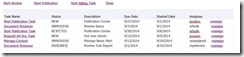
The need for a custom work list usually involves some sort of relationship between instances in a process, or between tasks in different processes such that the OOTB functionality of the BPM workspace is not sufficient. The user wants to see a logical grouping of tasks or between parent and child tasks. These tasks should be shown grouped together. These tasks can be shown in a table or tree format and each task should have a link to click on to open the task directly from the form. This is an example of such a list and grouping. Read the complete article here.

SOA & BPM Partner Community

For regular information on Oracle SOA Suite become a member in the SOA & BPM Partner Community for registration please visit www.oracle.com/goto/emea/soa (OPN account required) If you need support with your account please contact the Oracle Partner Business Center.

Blog Twitter LinkedIn image[7][2][2][2] Facebook clip_image002[8][4][2][2][2] Wiki


Screenflows with BPM and ADF 12c by Marcel Maas


clip_image002BPM 12c came with a slew of features that were scrapped when Oracle truly integrated the acquired BEA’s BPM implementation. One of those features is “screenflows”. I guess some of you, if not all of you have ever come across the situation where you needed to retrieve some information from a user using a human task, then do some logic and immediately provide the same user with a new screen for processing this data without having to go back to the tasklist.

In 11g there was no (out-of-the-box) way to do so, other than using the human workflow api or simply doing a service call from the existing task flow and not really going back to the process. Well now you can! And we are going to demonstrate it in this post. Now this feature is easily configured. We first need to make sure the server is configured correctly. Because this feature uses JMS messaging to function we need to a new topic as well as a new connection factory.

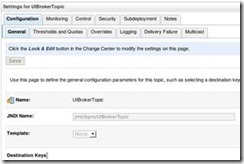
In WLS console in BpmModule create a new topic:

Name: UIBrokerTopic
JNDI Name: jms/bpm/UIBrokerTopic
Type: Topic (or Distributed unified Topic if clustered)

Read the complete article here.

SOA & BPM Partner Community

For regular information on Oracle SOA Suite become a member in the SOA & BPM Partner Community for registration please visit www.oracle.com/goto/emea/soa (OPN account required) If you need support with your account please contact the Oracle Partner Business Center.

Blog Twitter LinkedIn image[7][2][2][2] Facebook clip_image002[8][4][2][2][2] Wiki