API CS is available for free trails at Demo.Oracle.com

image

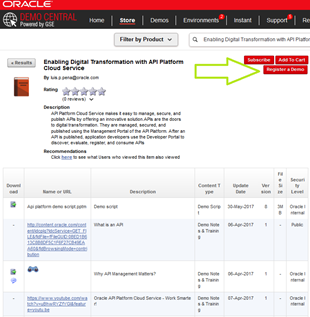
Please login to https://demo.oracle.com, choose store and search for “Enabling Digital Transformation with API Platform Cloud” and register a Demo!

For Oracle Partners we offer an API Platform Cloud Service resource kit (community membership required):

· Sales kit

· Online training and certification: API Platform Cloud Service Partner Sales Rep GLP and API Platform Cloud Service Partner Sales Consultant GLP

· API trial service

· API CS Whitepaper & API Platform Cloud Service Data Sheet & Apiary Data Sheet

· API Platform Cloud Service Documentation

· Upcoming API hands-on trainings

· API CS website & OTN page

· API free trials via Demo.Oracle.com choose store and search for “Enabling Digital Transformation with API Platform Cloud” and register a Demo!

SOA & BPM Partner Community

For regular information on Oracle SOA Suite become a member in the SOA & BPM Partner Community for registration please visit www.oracle.com/goto/emea/soa (OPN account required) If you need support with your account please contact the Oracle Partner Business Center.

Blog Twitter LinkedIn image[7][2][2][2] Facebook clip_image002[8][4][2][2][2] Wiki

Technorati Tags: SOA Community,Oracle SOA,Oracle BPM,OPN,Jürgen Kress
API Platform Cloud Service – PaaS Partner Community Webcast – April 17th 2018

image

Attend our April edition of the PaaS Partner Community Webcast live on April 17th 2018 at 16:00 CET. In the webcast Luis Weir and Robert Wunderlich will update you on Oracle API Platform Cloud Service.

Luis Weir LinkedIn profileimage

Robert Wunderlich LinkedIn profile

Visit the registration page here.

Call ID: 5566478 Call Passcode: 250410

UK: +44 (0) 208 118 1001 & United States: 140 877 440 73

More Local Numbers image

Oracle API Platform Cloud Service:

A great API Management solution supports agile API development, and also makes it easy to keep an eye on KPIs covering every aspect of the API lifecycle. True hybrid API deployment – in the Cloud or on-premises – means that your API solution is modern and adaptable, all while employing the most up-to-date security protocols.

Schedule:

Tuesday April 17th 2018 16:00 – 17:00 CET

Visit the registration page here.

Missed our PaaS Partner Community Webcast? – watch the on-demand versions:

· Oracle JET February March 27th 2018

· Oracle Visual Builder Cloud Service February 28th 2018

· Container Native Application Development Platform January 23rd 2018

· Oracle free Cloud Demo Services December 15th 2017

· Oracle Integration Cloud (OIC) November 21st 2017

· Adaptive Case Management in PCS October 31st 2017

· Oracle OpenWorld 2017 September 25th 2017

· Cloud Compliance & Certification August 2017

· Wercker July 21st 2017

· Sales Play webcast June 28th 2017

· Process Cloud Service update – DMN capabilities May 23rd 2017

· Drive DevOps Agility and Operational Efficiency with Oracle Management Cloud April 25th 2017

· Implementing DevOps and Agile Methodologies in Oracle Projects March 21st 2017

· Mobile Cloud Service & Chat Bots February 28th 2017

· b2b January 31st 2017

· Community Resources & free Cloud trails December 20th 2016

· SOA 12 & BPM Suite 12c Roadmap update November 29th 2016

· Microservices October 25th 2016

· Oracle OpenWorld 2016 update September 27th 2016

· API Cloud Platform Service August 30th 2016

· BPM Suite & PCS Update July 26th 2016

· Integration Cloud Service June 28th 2016

· Sales Plays Webcast June 9th 2016

· Real-Time Integration Business Insight May 31st 2016

For the latest information please visit Community Updates Wiki page (SOA Community membership required).

SOA & BPM Partner Community

For regular information on Oracle SOA Suite become a member in the SOA & BPM Partner Community for registration please visit www.oracle.com/goto/emea/soa (OPN account required) If you need support with your account please contact the Oracle Partner Business Center.

Blog Twitter LinkedIn image[7][2][2][2] Facebook clip_image002[8][4][2][2][2] Wiki

Technorati Tags: SOA Community,Oracle SOA,Oracle BPM,OPN,Jürgen Kress
Additional new content SOA & BPM Partner Community

image

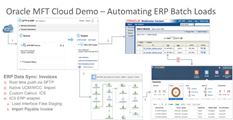
· Automate ERP Cloud Batch Uploads using Oracle MFT and Integration Cloud Service This article from Oracle Cloud Solutions architect Serene Tan illustrates a typical use-case for organisations that work with numerous vendors and want those vendors to bulk invoice them through an SFTP file drop. Read the article.

· Oracle API Platform Cloud Enables Customers to Drive Business Transformation and API-First Thinking Helps developers monetize new opportunities and deliver better customer experiences Learn more.

· Oracle Code Oracle Code is an event for developers building modern Web, mobile, enterprise, and cloud-native applications. The focus is on the latest software developer technologies, practices, and trends, including: Containers, Microservices/APIs, and DevOps; Databases; Open Source Technologies; Development Tools and Low Code Platforms; Machine Learning, Chatbots and AI. Click the link below for the complete schedule. Learn more.

SOA & BPM Partner Community

For regular information on Oracle SOA Suite become a member in the SOA & BPM Partner Community for registration please visit www.oracle.com/goto/emea/soa (OPN account required) If you need support with your account please contact the Oracle Partner Business Center.

Blog Twitter LinkedIn image[7][2][2][2] Facebook clip_image002[8][4][2][2][2] Wiki

Technorati Tags: SOA Community,Oracle SOA,Oracle BPM,OPN,Jürgen Kress

The Art of Intelligence – A Practical Introduction Machine Learning by Lucas Jellema

image

Watch the video here.

SOA & BPM Partner Community

For regular information on Oracle SOA Suite become a member in the SOA & BPM Partner Community for registration please visit www.oracle.com/goto/emea/soa (OPN account required) If you need support with your account please contact the Oracle Partner Business Center.

Blog Twitter LinkedIn image[7][2][2][2] Facebook clip_image002[8][4][2][2][2] Wiki

Technorati Tags: SOA Community,Oracle SOA,Oracle BPM,OPN,Jürgen Kress

Migrating Oracle BPM customers to PCS – never say never by Andre Boaventura

image

Some of you might recall this blog post at Migrating your Oracle BPM assets into Oracle Process Cloud Service (PCS) that I published last year for some customers that wanted to move their assets to Oracle Cloud. However, as you likely can recall too, this was only targeted for customers that were only using BPM Composer for modeling and documentation purposes only.
Early this year, a new BPM customer in Brazil, that automated their business processes on top of Oracle BPM, came up with the same request, that was essentially to take all their assets to Oracle PaaS. However, this time, the challenge was much bigger than before, since more than just translate Oracle BPMN process to their respective notations in Oracle PCS, I had to deal with many other concerns like integration with legacy systems (EBS, Oracle DB) running on their datacenter, OSB services being called by their Oracle BPM processes on-premises, business KPIs used by Oracle BPM for integration with Oracle BAM, security issues around being needed to expose their OSB services to the internet to be able to be consumed by PCS, etc.
Initially, I thought that this could be an impossible task given all the very known restrictions and caveats for this kind of job, but even so, I decided to embark on this journey, since I knew it that I could go further, given everything I had done so far for other customers around this topic, and also due to a life lesson that I learned from my parents: “never say never”.

That said, now I am coming to you to share the outcome of that POC that I successfully finished for that customer. Happy to share the great news that I managed to figure out how to migrate Oracle BPM for process automation in a smoothly way to our Oracle PaaS services, since I managed to improve my BPM conversion framework(more details in my blog post) to be able to deal also with scenarios used by process automation in Oracle BPM(that weren’t covered in my original blog post), that turned the BPM migration process to OIC into an even more ease and streamlined task, even for more complex scenarios where automation and integration with backend systems are needed as well.

As such, I have decided to share all steps used to take that BPM application integrated with OSB, BAM and documents to our respective blueprint on Oracle PaaS.  I have recorded a series of 6 videos describing in details on how one can perform that migration to Oracle OIC and take advantage to leverage other key solutions to make a more comprehensive PaaS architecture by using other PaaS services like ICS, CEC, and Integration Analytics.
These are the videos I have recorded for this migration task:

Design Time

  • Part 1 – BPM to PCS/OIC Migration: This is the first step towards generate the first BPM project to be imported into PCS/OIC. It walks you through the original Oracle BPM application(BPM Composer and Studio) and shows how to create the first migratable project on Oracle PCS by leveraging the migration framework available at my blog.
  • Part 2 – ICS: This step demonstrates how to install and setup ICS connectivity agent to be used by integrations that require access to customer’s Oracle database tables. Also, it shows how to build an integration from scratch in ICS to access customer database tables and then expose them as REST services to be consumed by Oracle PCS.
  • Part 3 – PCS & ICS Integration: This video demonstrates how to leverage services created in ICS to replace those from the original process created with Oracle DB adapter within a SOA composite. Also, it showcases how to link those ICS services to PCS service call activities and how to map inbound and outbound data. Also, it shows the first deployable version to be tested and run on PCS.
  • Part 4 – Integration Analytics: This video guides you on how to create a Business Insight model with milestones, business metrics(measures and dimensions), assign them to their respective milestones and finally expose those milestones APIs to be consumed by Oracle PCS.
  • Part 5 – PCS-Business Insight Integration: This video shows how to enable and link Business Insight within PCS and also deploy the final version to be used and tested in run-time.

Run Time

This video walks you through all products described earlier like PCS, ICS, Business Insight and CEC, but now looking from the run-time perspective. It starts showing a process instance kicked-off through a PCS web forms, then an approval by a Mobile app, integration with Content experience cloud. Also, it guides you through all default and custom dashboards created on Business Insight as well as how to monitor integrations and track process integration instances in ICS. This is a comprehensive and seamlessly integrated demo that highlights how these 4 PaaS(PCS, ICS, CEC, and Business Insight) services can work together and bring more value and benefits for customers that have the same or a similar use case.


SOA & BPM Partner Community

For regular information on Oracle SOA Suite become a member in the SOA & BPM Partner Community for registration please visit www.oracle.com/goto/emea/soa (OPN account required) If you need support with your account please contact the Oracle Partner Business Center.

Blog Twitter LinkedIn image[7][2][2][2] Facebook clip_image002[8][4][2][2][2] Wiki

Technorati Tags: SOA Community,Oracle SOA,Oracle BPM,OPN,Jürgen Kress
Adding a Link using the New PCS Web Form Tool by Dan Atwood

image

There is an issue you need to be aware of when adding link fields to Oracle’s Process Cloud Service (PCS) web forms using the new web form design tool.  This blog provides a fairly simple workaround to the problem.

At runtime, the problem is that the value stored in the link’s data element is lost once the form is submitted.  This means that the process data object cannot then map or use the element in the process downstream.

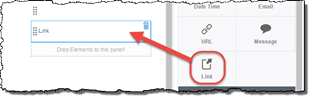
Follow these steps to workaround this issue.  In this example, the data element that actually contains the desired URL is called uRL.  First open the form in the web form design tool, and create a new element named uRLCalculated by dragging Link from the Basic Palette tab onto the form.

Instead of using the original uRL element for the field’s data binding, use uRLCalculated as the Value Binding for the field on the form.

So that the correct link will displayed to the end user at runtime on the form, set the Label property to Dynamic and set the binding to use the original uRL data element for the field’s Label Binding property.

Under the Value Binding property, click the Computed Value checkbox -> click the Edit button beside it. Read the complete article here.

SOA & BPM Partner Community

For regular information on Oracle SOA Suite become a member in the SOA & BPM Partner Community for registration please visit www.oracle.com/goto/emea/soa (OPN account required) If you need support with your account please contact the Oracle Partner Business Center.

Blog Twitter LinkedIn image[7][2][2][2] Facebook clip_image002[8][4][2][2][2] Wiki

Technorati Tags: SOA Community,Oracle SOA,Oracle BPM,OPN,Jürgen Kress

An Introduction to Oracle Internet of Things by Kashif Manzoor

image 

Internet of Things (IOT) is the internetworking of physical devices, vehicles (also referred to as “connected devices” and “smart devices“), buildings, and other items-embedded with electronics, software, sensors, actuators, and network connectivity that enable these objects to collect and exchange data.(source Wikipedia).

If you have not watched movie I.T, must watch it today and you will get to the feelings of Smart-Home concept and how heavily used IOT is showing in the movie.

Oracle is also offering namely Oracle Internet of Things (IoT) Cloud Service product as a part of Platform as a Service (PaaS) category that enables customers to connect devices to the IOT cloud, analyze data and alert messages from devices in real time to make critical business decisions and this can be integrated back to any other application through web services, or with other Oracle Cloud Services, such as Oracle Business Intelligence Cloud Service, etc.

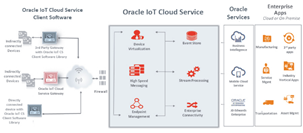
Started exploring IOT so this is 1st post on voyage to connect “things” with “Internet”, started from official documentation of Oracle Internet of Things and flow of the overall IOT is as below:

Typical Workflow for Using Oracle IoT Cloud Service

  1. Register the device models that are implemented by your devices.
  2. Create an IoT application.
  3. Register device
  4. Configure device to connect to Oracle IoT Cloud Service server.
  5. Activate previously registered gateway device
  6. Develop device software using Oracle IoT Cloud Service Client Software
  7. Develop enterprise applications that use the Oracle IoT Cloud Service REST API

Overall representation or architecture of IOT is as per below image. Read the complete article here.

SOA & BPM Partner Community

For regular information on Oracle SOA Suite become a member in the SOA & BPM Partner Community for registration please visit www.oracle.com/goto/emea/soa (OPN account required) If you need support with your account please contact the Oracle Partner Business Center.

Blog Twitter LinkedIn image[7][2][2][2] Facebook clip_image002[8][4][2][2][2] Wiki

Technorati Tags: SOA Community,Oracle SOA,Oracle BPM,OPN,Jürgen Kress
Happy Easter from the PaaS Community

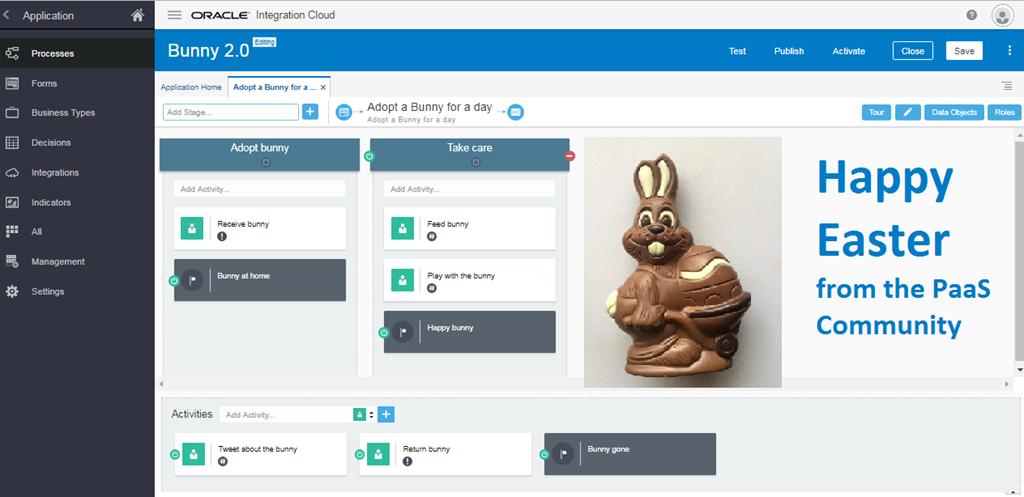
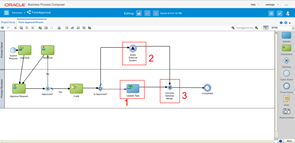
As part of the #PaaSForum community presentation we created on stage an application to handle a dynamic process to adopt a Bunny for a day. The case has two stages to adopt a bunny and take care of the bunny. The milestone “happy bunny” is achieved when to you feed and play with the bunny. Want to try it yourself? Get a feed Oracle Process Cloud Services trial here (for OPN members please see here).

Happy Easter from the PaaS Community – Jürgen Kress

image

SOA & BPM Partner Community

For regular information on Oracle SOA Suite become a member in the SOA & BPM Partner Community for registration please visit www.oracle.com/goto/emea/soa (OPN account required) If you need support with your account please contact the Oracle Partner Business Center.

Blog Twitter LinkedIn image[7][2][2][2] Facebook clip_image002[8][4][2][2][2] Wiki

Technorati Tags: SOA Community,Oracle SOA,Oracle BPM,OPN,Jürgen Kress
Using Business Events in E-Business Suite to send messages to other applications via ICS by Naveen Nahata

image

Introduction

In this article, I will discuss and demonstrate the use of Business Events in E-Business Suite (EBS) to integrate it with other applications using Integration Cloud Service (ICS). The Oracle Workflow Business Event System is an application service that leverages the Oracle Advanced Queuing (AQ) infrastructure to communicate business events between systems. This functionality is leverage by ICS to register a subscription with EBS for an event which is invoked when the event is triggered. In this article I’ll explain this in detail. ICS provides Oracle SaaS customers with pre-defined to connections to most SaaS subscriptions and zero-code integration features to quickly connect SaaS applications.

Prerequisites

E-Business Suite can be installed in a customer’s data center or on OMCS or on IaaS (Infrastructure-as-a-service). It may be installed allowing access from Public Internet, or behind the firewall where access is restricted to only within the corporate network. In case where EBS is publically accessible, ICS can integrate with EBS directly.

However, when EBS is only available within the corporate network, ICS has no connectivity to EBS. In such cases, connectivity can still be established by the use of on-premises connectivity agent. Whenever ICS needs to connect to EBS, it write the message to a queue. The connectivity agent is installed on-premises and it polls ICS periodically and passes the messages to EBS. This is a prerequisite to use ICS with EBS for any kind of integration use case. For instructions on how to install connectivity agent, please read this article

In case of Business Events, connectivity agent helps automate the process of registration of ICS integration which needs to be invoked when the even fires. When an integration in ICS which uses EBS Business Event as a trigger is activated, ICS registers the integration as a subscriber to that particular Business Event. Since ICS cannot directly communicate with EBS, if it is behind the firewall, it writes the message to a queue which is read by the connectivity agent which in turns registers the integration as a subscriber. Once the subscription is created, EBS can directly invoke the integration with the event payload since the firewall blocks incoming connections to EBS and not outgoing HTTP(s) connections from the EBS to ICS.

There are other tasks that you need to perform on EBS before it can be used with ICS for integration using Business Events. These steps include setting up Integrated SOA Gateway REST Services, deploying the required REST services, setting up ICS credentials etc. To perform the required setup, please follow the instructions in page Setting Up and Creating an Oracle E-Business Suite Adapter Connection of Oracle E-Business Suite Adapter documentation.

Main Article

For this article, I’ll take an example where there is a requirement to keep Trading Community Architecture (TCA) data in sync between EBS and Oracle Sales Cloud (OSC). EBS is on-premises and behind the firewall so it cannot be accessed from internet. I will demonstrate how to use ICS to achieve this real-time integration.

The high level series of steps will be:

1. Create an Agent group in ICS

2. Download the connectivity agent installer from ICS and install it on a separate server. This agent will help receive messages from ICS and pass them to EBS. Read the complete article here.

SOA & BPM Partner Community

For regular information on Oracle SOA Suite become a member in the SOA & BPM Partner Community for registration please visit www.oracle.com/goto/emea/soa (OPN account required) If you need support with your account please contact the Oracle Partner Business Center.

Blog Twitter LinkedIn image[7][2][2][2] Facebook clip_image002[8][4][2][2][2] Wiki

Technorati Tags: SOA Community,Oracle SOA,Oracle BPM,OPN,Jürgen Kress
Integrating the Chatbot by Léon Smiers

image

In this blog we look at the specific aspects of Chatbots and elaborate on its four integration parts. Read our previous blogs in this series: Why Chatbots, Maturity levels and Intelligence.

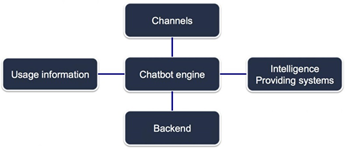
Chatbots are like any other application; they have a need for integration. In basic form the Chatbot integrates with the Channels, the Intelligence Providing systems, Backend systems  and it offloads Usage information for later improvements and intelligence determination.

All four integration parts have their usage patterns and (non functional) requirements for usage in the Chatbot solution.

Here we go through the details of each integration parts and considerations that need to be made during the design of a Chatbot solution.

Channel integration
Integration with channels firstly is about the job of acting as a funnel for many devices all communicating with the bot engine. As human interaction is a fraction of the speed of the ability for the engine to process the dialogue we need a more contemporary integration model that doesn’t tie up resources such as threads for each stream of interaction such as the models that Kafka and Node.js support. Read the complete article here.

SOA & BPM Partner Community

For regular information on Oracle SOA Suite become a member in the SOA & BPM Partner Community for registration please visit www.oracle.com/goto/emea/soa (OPN account required) If you need support with your account please contact the Oracle Partner Business Center.

Blog Twitter LinkedIn image[7][2][2][2] Facebook clip_image002[8][4][2][2][2] Wiki

Technorati Tags: SOA Community,Oracle SOA,Oracle BPM,OPN,Jürgen Kress