Estafet Opinion on the new Integration Cloud Service from Oracle


clip_image001Integration Expert Phil McLaughlin takes a look at the new cloud solution from Oracle.

Last week Oracle announced its long awaited iPaaS Integration Cloud Service (ICS) and Process Cloud Service (PCS). As integration experts, Estafet looked at these exciting new products and assessed how they will affect the integration market.

If you are interested in finding out more, come along to our event on the 24th July at the Royal Exchange London. We will delve deeper into the technology, including a live demo of ICS

The iPaaS market has been dominated by providers such as Dell Boomi, Snaplogic and Mulesoft all taking slightly different approaches towards integrating SaaS applications in the cloud. Oracle has now entered this market providing a comprehensive set of solutions of its own.  In this blog we examine Integration Cloud service (ICS), in later blogs we will look at some of the others.

So how does Oracle ICS fare against the competition?

Oracle ICS makes most sense if you already have Oracle SaaS applications that need point-to-point integrations in the cloud, or integrations to on-premise solutions (ideally using OSB) to form a hybrid cloud solution.

Many companies have one or two SaaS applications that require linking either to each other, or to existing service bus-based backend systems, and ICS is ideal for this. The Oracle SaaS endpoints that belong to the company are made available in the development environment, meaning the development of the integrations are quick and simple. Read the complete article here.

SOA & BPM Partner Community

For regular information on Oracle SOA Suite become a member in the SOA & BPM Partner Community for registration please visit www.oracle.com/goto/emea/soa (OPN account required) If you need support with your account please contact the Oracle Partner Business Center.

Blog Twitter LinkedIn image[7][2][2][2] Facebook clip_image002[8][4][2][2][2] Wiki

Integration Cloud Service Campaign by IPT

clip_image002

Thanks to our Swiss partner IPT for the excellent Cloud Integration Campaign. Great blog articles in German:

Cloud Integration CH

Oracle sagt dem Silo-as-a-Service den Kampf an – Teil 1

Oracle sagt dem Silo-as-a-Service den Kampf an – Teil 2

SOA & BPM Partner Community

For regular information on Oracle SOA Suite become a member in the SOA & BPM Partner Community for registration please visit www.oracle.com/goto/emea/soa (OPN account required) If you need support with your account please contact the Oracle Partner Business Center.

Blog Twitter LinkedIn image[7][2][2][2] Facebook clip_image002[8][4][2][2][2] Wiki

Integration Success Workshop updated Cloud material – generate additional consulting business!


clip_image002The Integration Success Workshops are technical workshops you can run with your customers. You can generate additional consulting business with existing customers e.g. SOA Suite customers with MFT, API Catalog & Manager or Stream explorer. Or You can use the excellent content to win new customers. We highly encourage you to make use of the ISW content at our SOA Community Workspace (SOA Community membership required).

We just updated the ISW content with industry specific value propositions with focus on B2B and Stream Explorer:

New Cloud: all content here

Module  Business Benefits  Presentation  Viewlets  Labs/Demos 
Integration with Salesforce
  • FASTER TIME TO MARKET for enterprise business processes (e.g. Lead to Order) via rich design time features – intuitive object/service discovery wizards, credential management, and SOQL support for integration developers
  • IMPROVE SALES PRODUCTIVITY — by enabling integration between standard/custom Salesforce objects and other cloud/enterprise systems
  • IMPROVE TCO with Intelligent Salesforce session management, support for multiple SFDC versions, and certification with multiple SOA components
Prospecting and Positioning Sales Deck
Integration with Salesforce
EBS SFDC Integration
Runtime – Click-through Demo (Play the HTML)
Design-time Click-through Demo (EXE)
SAP – Salesforce Integration (Videos)
Account Sync Opp to Order
SFDC JDeveloper Design-time Demo Script
EBix SFDC Runtime Demo script
Integration with RightNow
  • STREAMLINE DEVELOPMENT with rich design time features – intuitive object/service discovery wizards, Bulk/Batch/Chain operation support , and credential management for integration developers
  • FASTER TIME TO MARKET for enterprise business processes (e.g. Agent to Field Service ), and thus improved Customer Service productivity by enabling integration with standard/custom RightNow objects with other cloud/on-premise systems
  • IMPROVE TCO with Intelligent RightNow session management, support for multiple RightNow versions, and certification with multiple SOA components
Integration with RightNow RightNow Adapter DesignTime Viewlet
Win Mac
Integration with Oracle Sales Cloud
  • FASTER TIME TO MARKET for enterprise business processes (e.g. Lead to Order) via rich design time features – intuitive object/service discovery wizards, credential management, and extensive mapping support for integration developers
  • IMPROVE SALES PRODUCTIVITY — by enabling integration between standard/custom Oracle Sales Cloud objects and other cloud/enterprise systems
  • IMPROVE TCO with rich bi-directional integration for Sales Cloud and certification with multiple SOA components
Integration with Oracle Sales Cloud Sales Cloud Adapter DesignTime Viewlet (coming soon)
Integration with Eloqua
  • FASTER TIME TO MARKET for “Integrated Marketing Lead Flow” via rich design time features – intuitive object/service discovery wizards, credential management, and bulk API support for integration developers
  • IMPROVE Marketing Reach — by enabling integration between standard/custom Eloqua objects and other cloud/enterprise systems
  • IMPROVE TCO by syncing large data sets with Eloqua, and certification with multiple SOA components
Integration with Eloqua Eloqua Adapter DesignTime Viewlet
Win Mac
Integration in the Cloud (iPaas)
  • Simplified and AcceleratedSaaS to SaaS and SaaS to On-Premise Integration in the Cloud
  • Highly Intuitive Browser based designer for modeling your Integrations
  • Pre-built integration flows to kick-start your SaaS Integrations
  • Intelligent Mapping Recommendations to accelerate and bring down costs of building transformation maps
Integration Cloud Service(OOW Presentation)
Cloud Adapter Roadmap
Click-though Demo for RN to EBS Field Service Integratiom via ICS
Order Management System for Li-Ning – based on Cloud Integration
  • Effectively integrate resources and enhance competitiveness
  • Reduce decline in revenues and increase in deficits
  • Satisfy customer specific requirements
Presentation Viewlet Demo Assets

SOA & BPM Partner Community

For regular information on Oracle SOA Suite become a member in the SOA & BPM Partner Community for registration please visit www.oracle.com/goto/emea/soa (OPN account required) If you need support with your account please contact the Oracle Partner Business Center.

Blog Twitter LinkedIn image[7][2][2][2] Facebook clip_image002[8][4][2][2][2] Wiki

The Top Five Roadblocks to Cloud Integration by Carol Hildebrand


clip_image002In the digital economy, integration is no longer a technology term—it’s a business imperative. After all, when your business strategy depends on how quickly you can analyze and act upon data, building a clear and consistent flow of information is more than just a lifestyle choice.

But it’s not simple. Information must move across myriad applications from mobile and cloud-based apps to on-premises systems. Add in factors like the explosive growth of the Internet of Things (Gartner predicts 30 billion devices by 2020), and it’s pretty safe to assume that integration requirements are only going to get more complex.

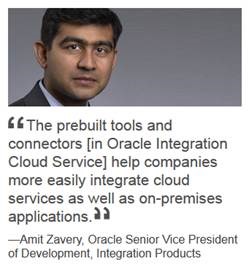
“As companies respond to demanding customer expectations and unprecedented changes in the competitive landscape, integration has become a priority on the business side as well as IT,” says Amit Zavery, Oracle’s senior vice president of development, integration products. “In fact, nearly 80 percent of respondents to a recent Computerworld survey rated ease of integration with external data and apps as a top priority.” Read the complete article here

SOA & BPM Partner Community

For regular information on Oracle SOA Suite become a member in the SOA & BPM Partner Community for registration please visit www.oracle.com/goto/emea/soa (OPN account required) If you need support with your account please contact the Oracle Partner Business Center.

Blog Twitter LinkedIn image[7][2][2][2] Facebook clip_image002[8][4][2][2][2] Wiki

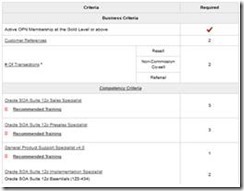
SOA Suite 12c Specialization available


clip_image002Who passed the SOA Suite 12c PreSales Specialist Assessment and SOA Suite 12c Implementation Specialist? Let us know via twitter @soaCommunity. Who will be the first partner that achieved SOA Suite 12c Specialization? Let us know if you apply for SOA 12c Specialization! To apply for SOA Suite 12c Specialization, please visit the knowledge zone here. To support you with your SOA Suite 12c Specialization effort here are the top community resources:

SOA Suite 12c resource (Community membership required)

Resources

Sales

Pre-Sales

Implementation

Online-training

SOA Suite 12c Sales Specialist – free

SOA Suite 12c PreSales Specialist – free

SOA Suite 11c free on-demand Bootcamp – free
SOA Suite 12c & free training material

Certification

SOA Suite 12c Sales Specialist Assessment – free

SOA Suite 12c PreSales Specialist Assessment – free

SOA Suite 12c Implementation Specialist – $245

Tips

Sales kits for SOA Suite 12c (including ppt & cheat sheets)

Demo Systems hosted at Oracle – free

SOA Blackbelt cheat sheets

SOA & BPM Partner Community

For regular information on Oracle SOA Suite become a member in the SOA & BPM Partner Community for registration please visit www.oracle.com/goto/emea/soa (OPN account required) If you need support with your account please contact the Oracle Partner Business Center.

Blog Twitter LinkedIn image[7][2][2][2] Facebook clip_image002[8][4][2][2][2] Wiki

Hybrid Integration and Hybrid Process Sales Kits – Discover new consulting service opportunities in the cloud


With cloud computing and PaaS in specific, partners become even more important. To discover new consulting opportunities we made our sales kits available for you as a partner!

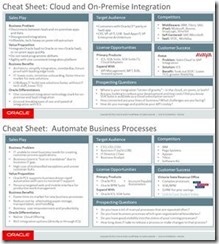
clip_image002Sales kits include:

  • Sales play presentation
  • Ppt customer presentation
  • Cheat sheet
  • Solution video
  • Demo accounts
  • Marketing kits

To get the sales kits please SOA Sales page and the BPM Sales page.

Call to action

  • Get the sales kits and forward them to your sales team
  • Develop a consulting service offerings for Oracle PaaS
  • Print the 1 page sales cheat sheets (from the sales play presentation) and put them in the valet of your sales people (add your consulting service offering)
  • Get a free demo instance of our PaaS Services

To access the above links SOA Community membership is required.

SOA & BPM Partner Community

For regular information on Oracle SOA Suite become a member in the SOA & BPM Partner Community for registration please visit www.oracle.com/goto/emea/soa (OPN account required) If you need support with your account please contact the Oracle Partner Business Center.

Blog Twitter LinkedIn image[7][2][2][2] Facebook clip_image002[8][4][2][2][2] Wiki

SOA & BPM Community Newsletter November 2015

This month the top news is the availability of Fusion Middleware 12.2.1. Make sure you get the latest presentations at our community workspace and you try out the new release. The new release was also a key topic in many Oracle Open World presentations. The second major OpenWorld topic was Cloud computing. With the availability of many PaaS services and more to come, European partners are leading the cloud adoption. Thanks for the nice OpenWorld summaries by Danilo OpenWorld 2015 Highlights and Robbrecht OpenWorld 2015: Finally a real Vision and Mission. A pleasant surprise. One of my personal OpenWorld highlights was the HCL Samsung PaaS showcase for predictive maintenance. In case you missed OpenWorld the product management team will run multiple webcasts to update you in November.

SOA Suite 12.2.1 is available for download thanks for the excellent partner quotes. The community published already the first blog posts Quick overview of SOA Suite 12.2.1 new features & SOA Suite 12.2.1: A first look at end-to-end JSON and JavaScript support in SOA Composites from Maarten, SOA Suite 12.2.1: Resiliency updates on the operations side of life from Robert, SOA Suite 12.2.1: Failure resiliency from Marcel New Oracle Fusion Middleware 12c (12.2.1.0.0) Released from Bruno, SOA 12.2.1 – Awesome features! from Rama and SOA 12.2.1 New Feature – End to End JSON and Javascript Example from Krishna – super thanks!

The joint cloud computing journey continues as Digital Innovation Demands Hybrid Integration. More adapters to SaaS applications like NetSure become available, or HCM Atom Feed Subscriber using SOA Cloud Service. And the deployment to SOA Cloud Service becomes easy with Flexagon.

Thanks to the community for sharing all the SOA articles: Automated Unittesting of XQueries in Oracle OSB & Apply SOA/BPM Bundle Patch 3 to JDeveloper 12c & OSB 12c – Database Polling using DB adapter & The SOAMythBusters discuss SOA Cloud Service & Monitoring Performance Issues with Integrated Workload Statistics & Integrate Oracle SOA Healthcare and Oracle SOA Suite back-end composites & API Management Implementation Case Study & FlexDeploy 3.0 to be Unveiled at Oracle OpenWorld

Also BPM Suite Version 12.2.1 became available. BPM Suite is now a solid release and Cesare Rotundo gives some insights into same new features including Alta UI. To upsell your SOA Suite customers we published a Process Success Workshop with the goal to generate new consulting business for you. With Process Cloud Service you want build a complete Business Travel Application in 40 minutes which runs no both the Cloud and on-premises. Thanks to the community for sharing all the BPM articles: Running Business Processes in the Cloud & Case for case management & BPM 12c Subprocesses (Part 2 of 3): Embedded Subprocess

In our last section Architecture & AppAdvantage updates from OpenWorld include new PaaS4SaaS tools like the Rapid Development Kit or Mobile UX or the eBook on Simplified User Experience Design Patterns for Oracle Applications Cloud Service and Visualizations are far more than a pretty face on the cloud – highlights from Oracle OpenWorld 2015.

Yes this newsletter is again long – make sure you read it! For a short summery of our key monthly information watch the Fusion Middleware Partner Updates on YouTube. The November edition of the Middleware Partner Update includes tips for free PaaS trail accounts and an OpenWorld wrap-up. For details about SOA Suite 12.2.1 join our Community Webcast November 24th 2015.

Jürgen Kress

Fusion Middleware Partner Adoption
Oracle EMEA

To read the newsletter please visit http://tinyurl.com/SOAnewsNovember2015  (OPN Account required)

To become a member of the SOA Partner Community please register at http://www.oracle.com/goto/emea/soa (OPN account required) If you need support with your account please contact the Oracle Partner Business Center.

image

Blog Twitter LinkedIn image[7][2][2][2] Facebook

Technorati Tags: newsletter,SOA Community newsletter,SOA Community,Oracle,OPN,Jürgen Kress

SOA Suite 12.2.1 Community Webcast with Yogesh Sontakke – November 24th 16:00 CET

clip_image001

Join our Community Webcast November 24th 16:00 CET here.

This month we invite Yogesh Sontakke, Oracle Senior Principal Product Manager to share with us the latest updates on SOA Suite 12.2.1. Attend the community webcast to learn all about the latest new features including:

· JavaScript in SOA Composites

· JavaScript in Service Bus

· Supporting Representational State Transfer (REST

· SOA Suite: Cloud & other Adapters Roadmap

· Integration Debugger& XSLT Debugger

· Integration Workload Statistics (IWS)

· Resiliency: Circuit Breaker

· Composite Instance Patching

· and more!

Make sure you are signed up and tuned in to hear the latest and to be prepared for SOA Suite 12.2.1.!

Yogesh Sontakke is a Principal Product Manager at Oracle Corporation in the PaaS and Fusion Middleware group, leading Oracle’s Integration portfolio –  Integration Cloud Service, SOA Suite, API Management, Stream Explorer and MFT – in the Europe, Middle East & Africa (EMEA) region. Prior to joining the Integration Product Management team, Yogesh worked in various roles in Development, Post-Sales and Pre-Sales where he gained his experience architecting, developing, integrating and enabling technology as a key driver to businesses. Yogesh is based in the UK, and tweets at @yogesh_sontakke .


clip_image001Attend our November edition of the SOA & BPM Partner Community Webcast live on November 24th 2015 16:00 CET. Yogesh Sontakke will give an update on the brand new SOA Suite 12.2.1 version.

Visit the registration page here.

Call ID: 6965489 Call Passcode: 333111

Austria: +43 (0) 192 865 12
Belgium: +32 (0) 240 105 28
Denmark: +45 327 292 22
Finland: +358 (0) 923 193 923
France: +33 (0) 15760 2222
Germany: +49 (0) 692 222 161 06
Ireland: +353 (0) 124 756 50
Italy: +39 (0) 236 008 198
Netherlands: +31 (0) 207 143 543
Spain: +34 914 143 755
Sweden: +46 (0) 856 619 465
Switzerland: +41 (0) 445 804 003
UK: +44 (0) 208 118 1001
United States: 140 877 440 73
More Local Numbers

If you have difficulty logging in using the above link please go to: http://ouweb.webex.com/meetingcenter and join with session id: 591335749

Missed our SOA & BPM Partner Community Webcast? – watch the on-demand versions:

• Oracle Open World 2015 update

SOA & API Cloud Service

Solutions Catalog & Cloud Marketplace

GSE demo systems

Hybrid sales plays

For the latest information please visit Community Updates Wiki page (SOA Community membership required).

SOA & BPM Partner Community

For regular information on Oracle SOA Suite become a member in the SOA & BPM Partner Community for registration please visit www.oracle.com/goto/emea/soa (OPN account required) If you need support with your account please contact the Oracle Partner Business Center.

Blog Twitter LinkedIn image[7][2][2][2] Facebook clip_image002[8][4][2][2][2] Wiki

Business Process Modelling and Business Activity Monitoring by Stefan Wörmcke


Objective

The objective of this exercise is make participants familiar how to prepare a BPM project for monitoring using BAM

Use Case Description

In this exercise participants will add measurements to a given BPM process:

Prepare BAM data structure

Open given BPM process

Enable BAM for the project

Create measurement indicators

Set measurement marks

Deploy process

Run process

Check BAM data objects

Prepare BAM data structure

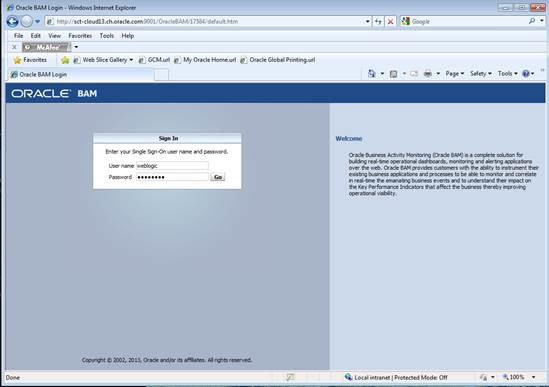
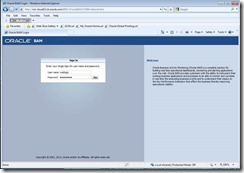
First step when using BAM is to organize the data you are gathering. For this you’ll have to log into BAM (http://hostname:9001/OracleBAM):
clip_image002

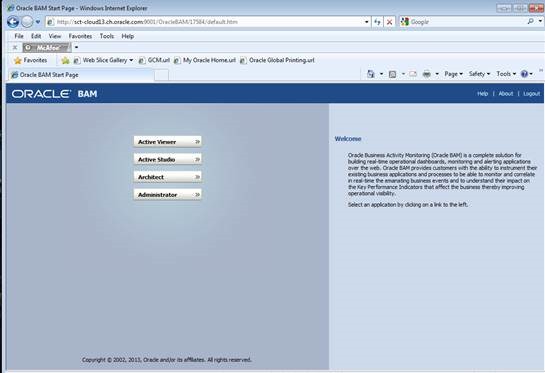
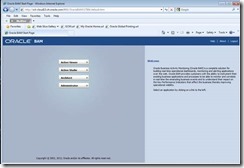
and from the menu choose the BAM architect:
clip_image004

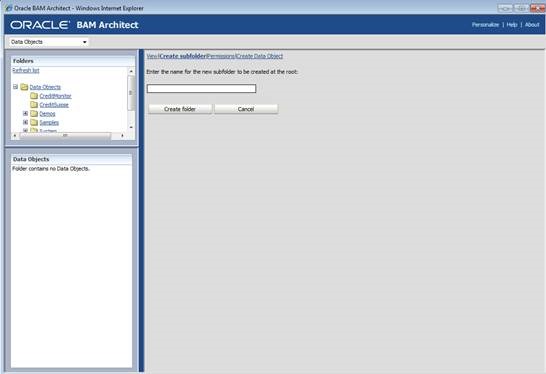
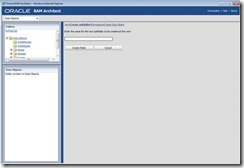
within the folder structure for data objects, create a new subfolder for storing your new data objects:
clip_image006

Open given BPM process

Your instructor should provide you with a file named “BAMTutorial.zip” Unzip the file and open the project using JDeveloper.

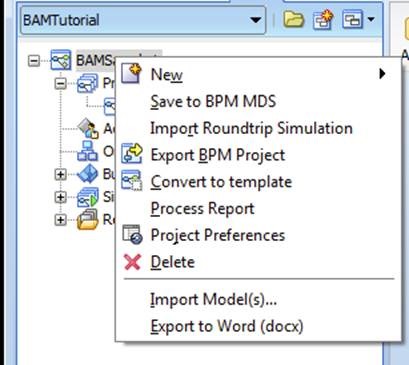
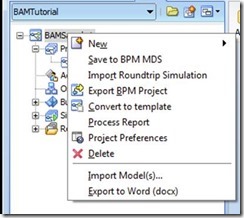
Select the project in the BPM navigation tree, and right click on the project to open project preferences:
clip_image008

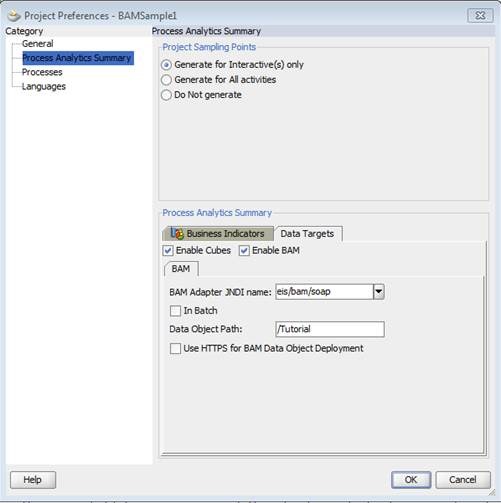
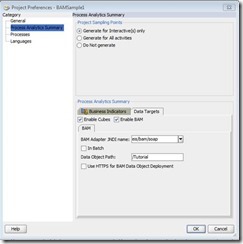
Select “Process Analytics Summary” on the left hand side and select the tab “Data Targets” below:
clip_image010

Here you have to check “Enable BAM” and enter the folder path you created in step 1.3

Click ok and your ready to deploy your project using BAM for monitoring!

Create Measurements Indicators

First step when using BAM in a process is to define what kind of data will be measured: you have to define business indicators. The basic indicators we use in this exercise are:

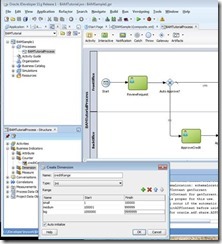
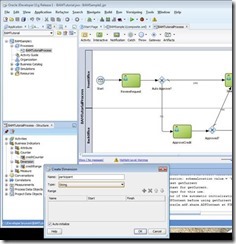
Dimensions: you use dimension to group data accordingly, e.g. grouping sales by region: North, East, South, West. If you base the dimension on numbers, you have to define ranges for grouping your data, like 0 – 1000, 1001 – 10000, etc.

Measurement: here you actually define the data you are interested in: quantity of ordered items, order total in USD, etc.

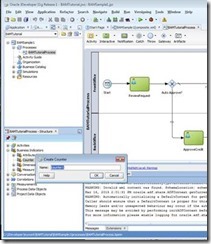
Counter: counter are somehow special in BPM: for each process instance their value will be 1 when set. Counters can be used for example to check which path of a process an instance was taken

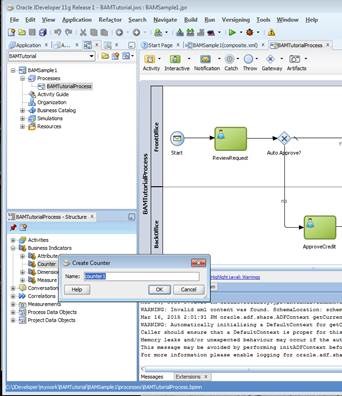
So for our demo process you will first create a counter: within the structure window of your process, expand “Business Indicators”, and right-click “counter” to create a new counter:
clip_image012

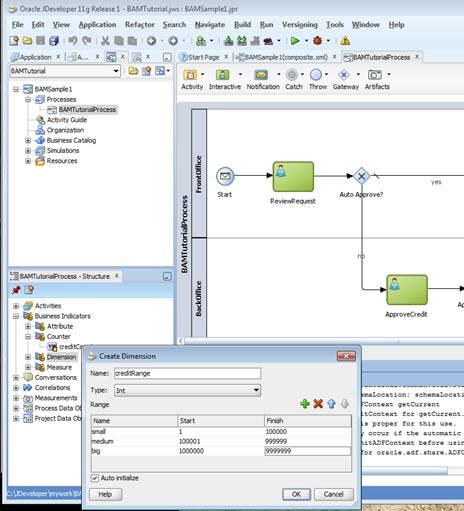
In the next step you’ll create two dimension:

a dimension range (“credit range”):
clip_image014

as you can see here, for a numeric dimension you have to define ranges for the numbers you’re interested in

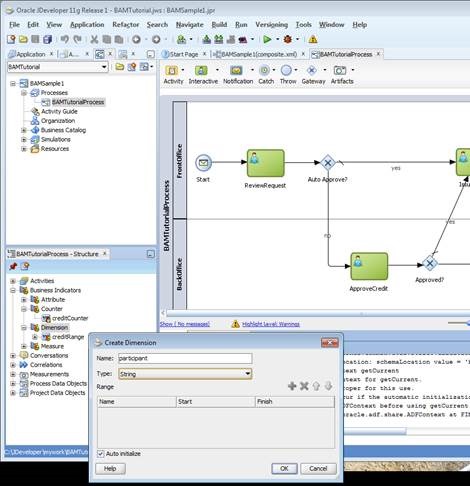
a dimension “Participant”:
clip_image016

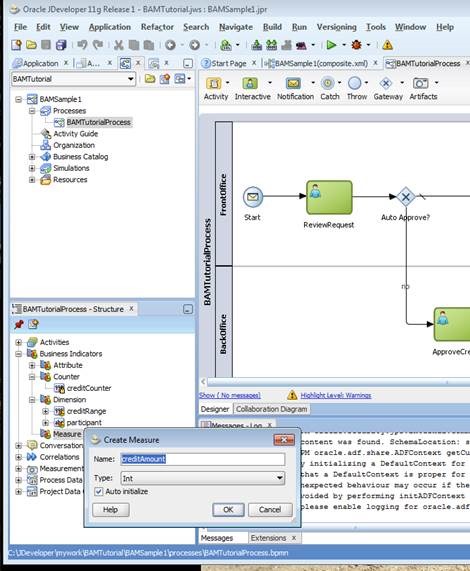
and finally you’ll create for measuring the amount within your process:
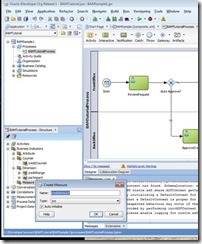
clip_image018

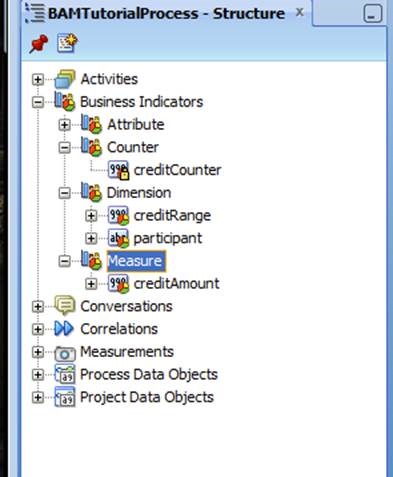
After completing each of the above steps, your list of business indicators should like this by now:
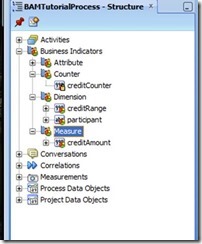
clip_image020

set measurement marks

As you have defined your indicators in the previous exercise, it’s now time set values when the process is executed.

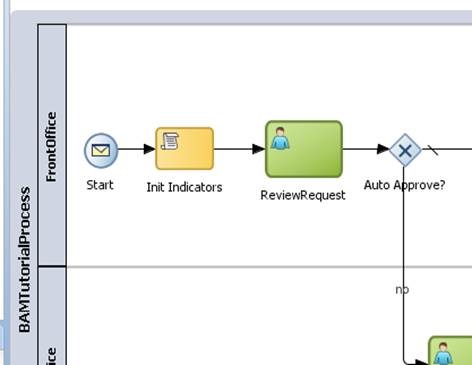
To set dimension, you will use a script task: from the pallet, drop a script task between the start node and “review request”, and call it “Init Indicators”:
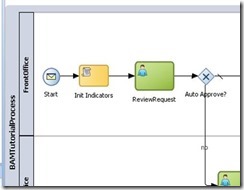
clip_image022

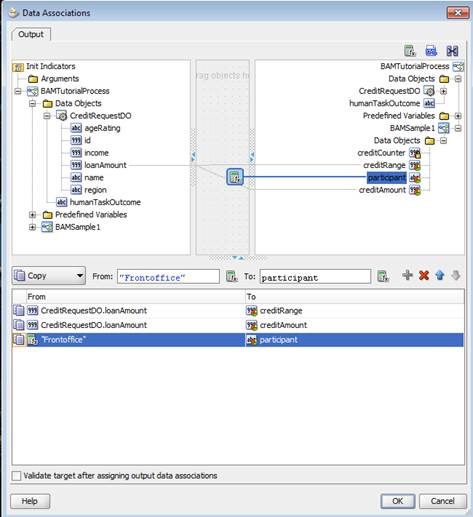
Double click the script task, got to implementation and set data associations:
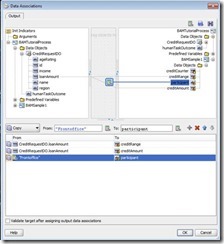
clip_image024

drag lines from left to right to do the associations:

drag a line from “loan amount” to “credit range” to set the dimension for the credit range

drag a line from “loan amount” to “credit amount” for setting the measurement for the credit amount

drop an expression on top of “participant” and assign the value “Frontoffice” to it. Although creating reports by human tasks is a standard measurement you’ll get when using BAM in a BPM process, this step is to demonstrate how to set various dimension you may want to use in future reports

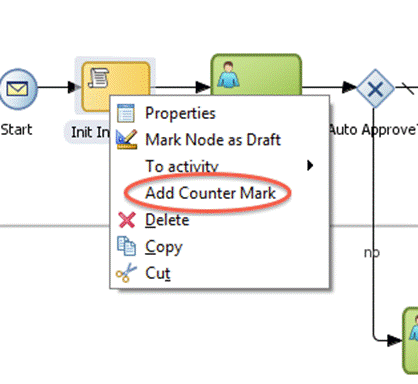
For setting counters, you will have to right click a flow object where you want to set the counter:
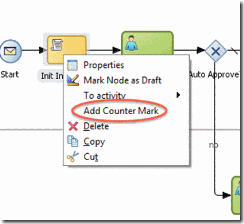
clip_image026

In the following dialog you will define which counter mark you want to set in this step.

Deploy the process

Deploying the process with BAM enabled is the same as deploying any other BPM process. The only difference is that you have to enable BAM in the project preferences before deployment.

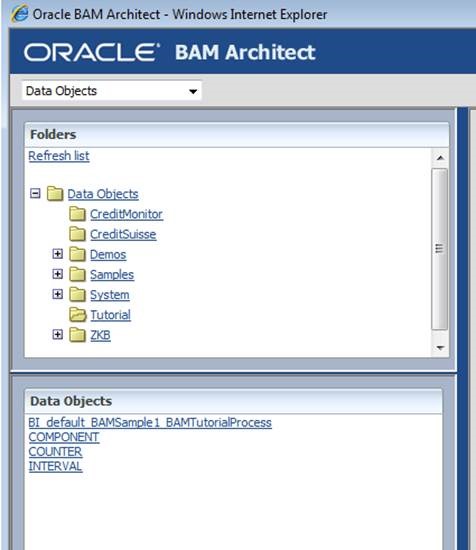
After successful deployment, log into BAM and start BAM Architect to verify that data objects for your process have been created:
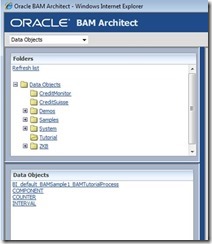
clip_image028

Run the process

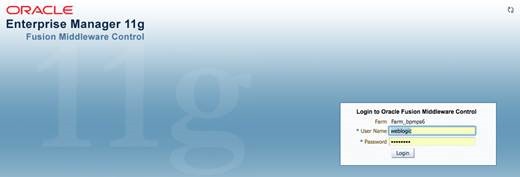
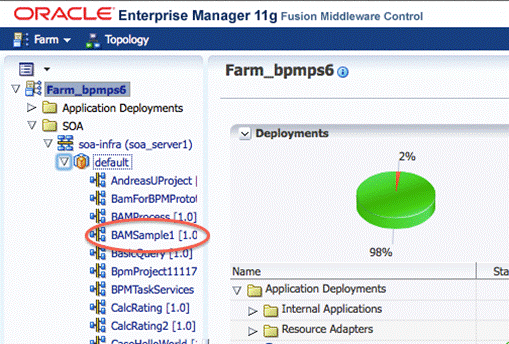
To check if data objects of BAM will be populated, you will have to run the process. You will use Enterprise Manager Fusion Control to test the process. Log into Enterprise Manager (EM), e.g. http://hostname:port/em:
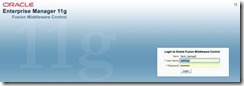
clip_image030

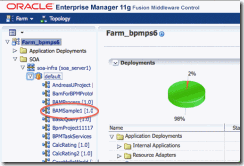
Select the BAMSample1 process in EM:

clip_image032

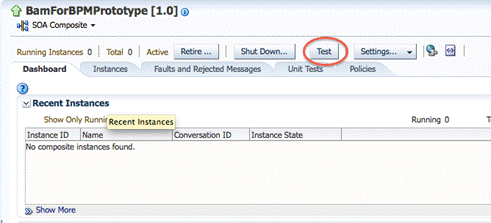
Cick on the TEST button for displaying the request form:
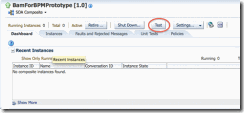
clip_image034

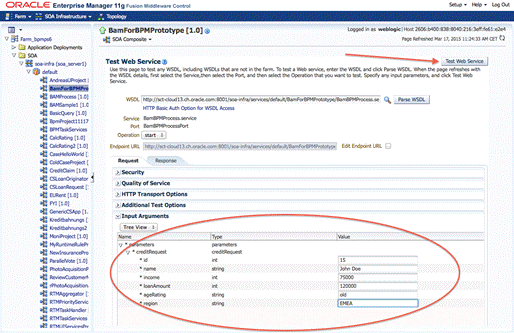
Enter some data for a credit request and start the process using “Test Web Service”:
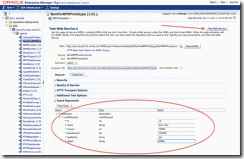
clip_image036

This process consists of two human tasks which have to be fulfilled to finish the process. To ease testing, both activities should be assigned to the same user. This way you won’t have to login and out several times to finish the process.

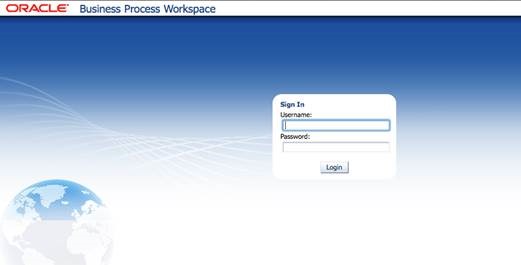
So log into BPM workspace (e.g. http://hostname:port/bpm/workspace) using the credentials of the user, to whom you assigned the human tasks:
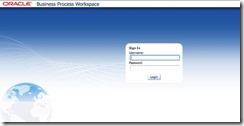
clip_image038

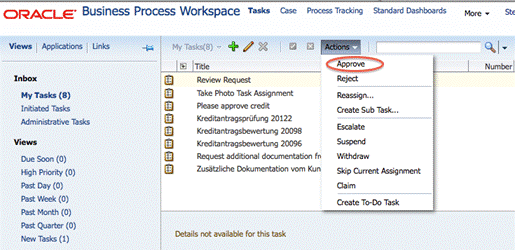
In your inbox, you’ll find the first assigned task “review request”:
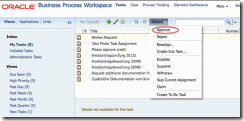
clip_image040

Select the task in the list, click on “Actions” and approve it.

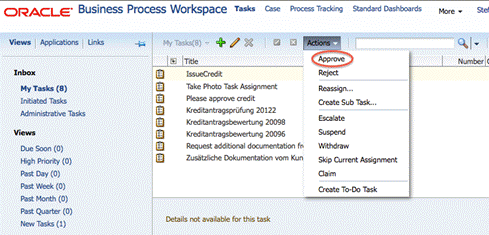
After approving the first task, you’ll find a second task in your inbox “Issue Credit”:
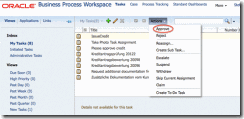
clip_image042

Like in the first part, do approve this task as well.

Now its time to check your data gathered by BAM. Start the BAM architect, and select the newly created Data Objects. Navigate around all data objects and observe the data.

Optional Exercise

Start the process several times with different data and different human tasks actions (approve or reject)

Add more business indicators to your project

Use the newly created business indicators in the project

Redeploy the project

Run the new version of the project and check the data objects

Objective

The objective of this exercise is make participants familiar how to create custom reports and dashboards

Use Case Description

In this exercise participants create a custom dashboard:

Create a dashboard

Add views to the dashboard

Format / change views

Doing a drill down into views

Learn about data objects

Create a dashboard

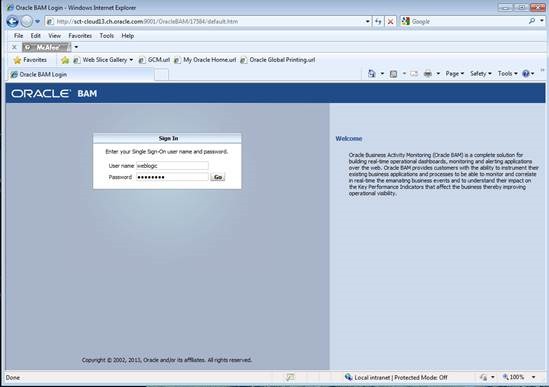
To create your first dashboard, you’ll have to log into BAM (http://hostname:9001/OracleBAM):
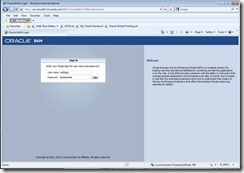
clip_image043

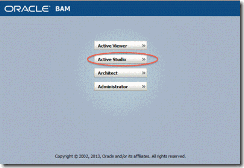
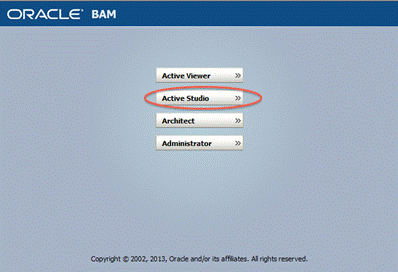
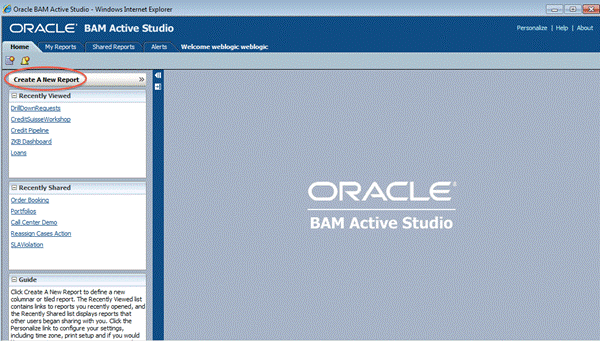
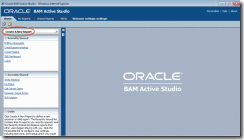
Then start active studio:

clip_image045

To create a new report, hit the button shown below:
clip_image047

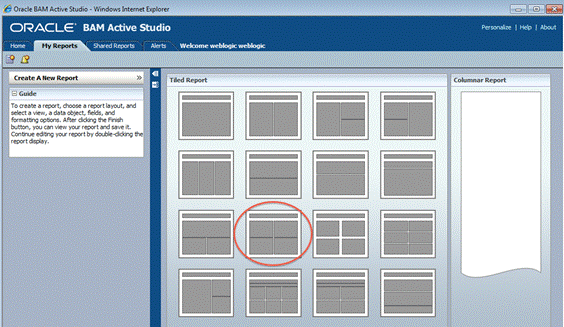
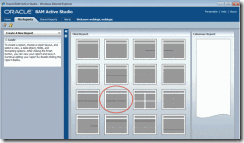
First you’ll have to choose the layout for your report, in our exercise we’ll choose a format with a title bar and 4 frames for the views we will insert later:
clip_image049

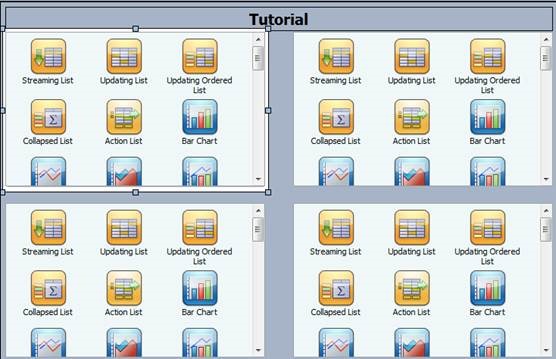
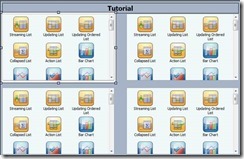
Click on the title bar to change the name of the title, for example: Tutorial

Within the 4 frames you’ll see icons for the various views for your report. “Streaming List, Bar Chart, Range Gauge,..” are all different kind of views you can create. You can also resize the frame of each view to fit your needs.

Start creating your first view by clicking on “Bar Chart” in the upper left frame:
clip_image051

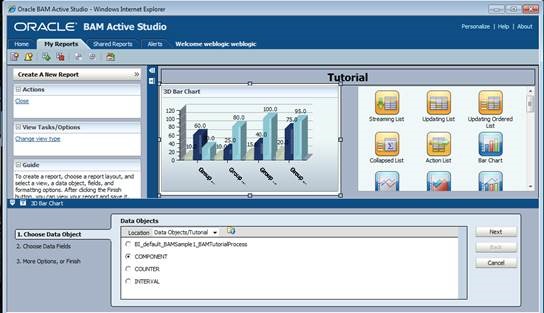
A wizard will start in the bottom guiding you through the definition of your view: data objects, data fields, formats, filters etc.

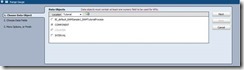
The first step is to define the data object for the report: navigate to the “Tutorial” folder and choose the “Component” data object, then click “Next”:
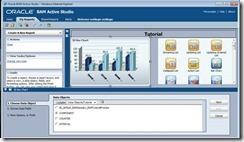
clip_image053

Next step is to define data fields and how we would like to group them: Choose “Component_Instance_Status” for grouping, and count the number of instances “Component_Instance_ID”:
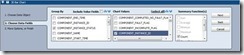
clip_image055

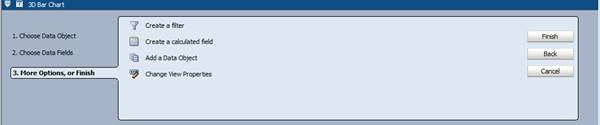
For this report, we don’t need e.g. a filter; finish your report by clicking the corresponding button:
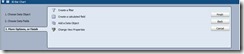
clip_image057

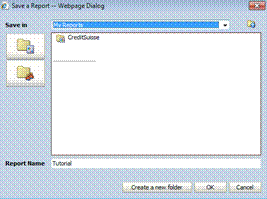
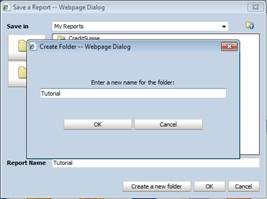
Before proceeding with the exercise, you should save your report. Hit “Save Report AS”, and create a new subfolder:
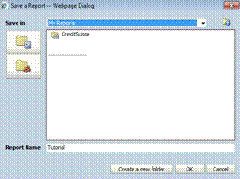
clip_image059

Enter e.g. “Tutorial” as the name for the subfolder:
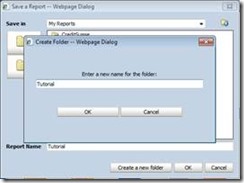
clip_image061

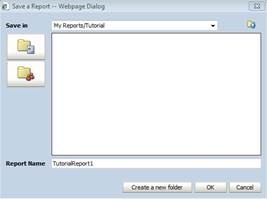
and finally give a name for your report and hit “Ok”:
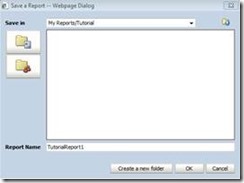
clip_image063

Let’s recap what we have done so far:

We created a new report by clicking on the corresponding icon. Then we defined where the data is located we want to use for reporting. At this point it is beneficial to make yourself familiar with the underlying data object(s) for your report. Therefor you can start the “Architect” from the Oracle BAM Start menu. For further details refer to your training material from the first BAM workshop.

For the data we want to show in the report, we’ve chosen to count the number of process instances, and group them by “Component_Instance_Status” – but why? Every instance we see in Oracle BAM can only have two conditions:

active: the process instances was started, but did not finish yet

completed: the process has finished

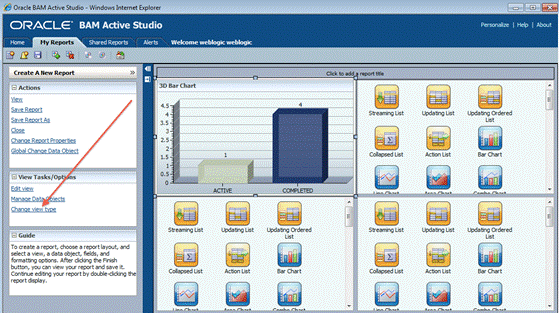
Now if we group the number of instances by status, BAM will count all instances with status “active”, and all instances with status “completed”. The result can be seen in our first view of our report:
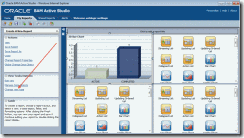
clip_image065

Next step is to change the view type: you will change the Bar Chart into a 3D Pie Chart. Therefor you will first click on “Change View Type” as illustrated in the screenshot above

And then choose the “3D Pie Chart” diagram:
clip_image067

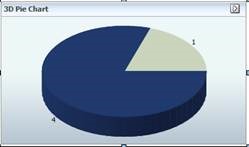
This will change the diagram into a 3D Pie Chart:
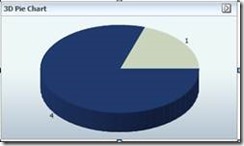
clip_image069

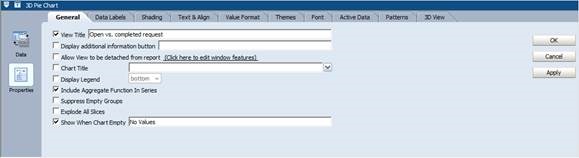
Double-click on the pie chart, and then choose “Properties” on the left hand side to change the title into “Open vs. completed request”:
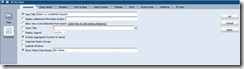
clip_image071

Finally hit “OK” to apply your changes.

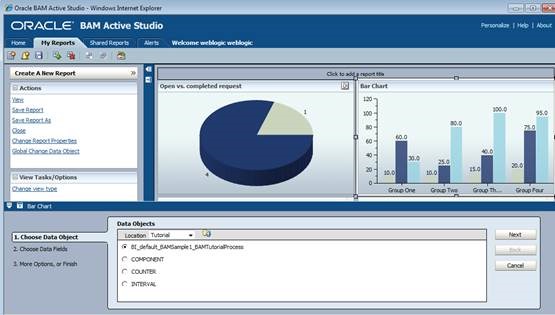
Now we will add another view. Therefor we will choose a “Bar Chart” in the upper right frame. The wizard will start, where you first define the underlying data object for the view, in our case “BI_default_BAMSample1_BAMTutorialProcess” (the actual name of the data object may vary, depending on the setup by your instructor):
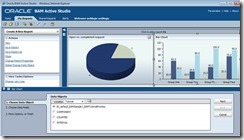
clip_image073

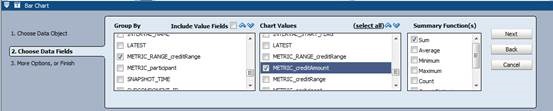
This time we will group our data by credit range, so we will display the sum of credit requests for each range:
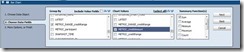
clip_image075

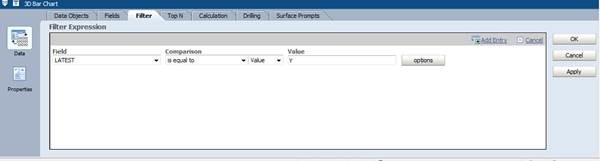
ATTENTION: at this point you have to add a filter – why? Because each time a process instance will send payload data to BAM, a new entry will be generated. So if a process contains more than one measurement marks or invocation of BAM, one process instances will have multiple entries in the data object with the same payload.

Now in order to make sure you won’t sum up the same amount multiple times for one process instance, we have to make sure we summarize over the latest entry for an instance, therefor checking the “LATEST” flag.

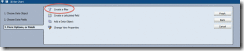
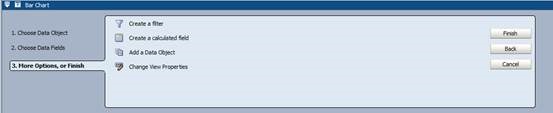
Click on “Create a filter”:
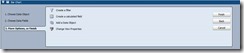
clip_image077

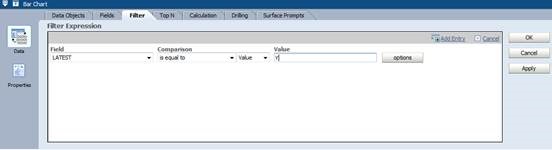
and then “Add Entry”. For the field, choose “LATEST”, set comparison to “is equal to” and enter “Y” as the value. When finished, hit “add entry” again:
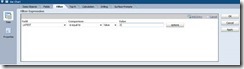
clip_image079

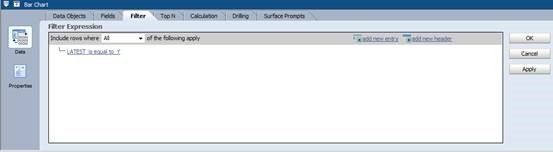
your resulting filter should look like this by now
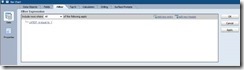
clip_image081

Click ok to finish your 2nd view.

The third view (lower left corner) will be a range gauge. Select the range gauge icon:

clip_image083

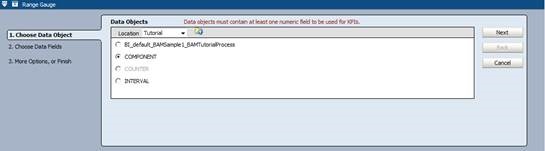
set the data object to “COMPONENT”:

clip_image085

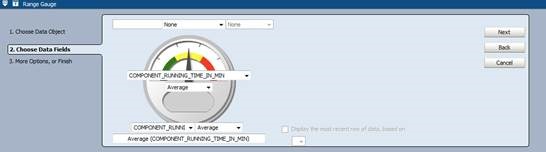
select “Component_Running_Time_In_Min” in the middle of the gauge and in the bottom, and select “Average”:
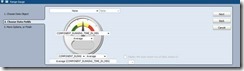
clip_image087

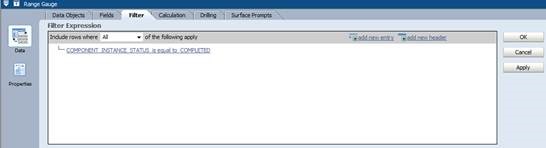
and filter for all instances, which are completed:
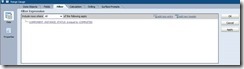
clip_image089

Click “Ok” to finish your settings.

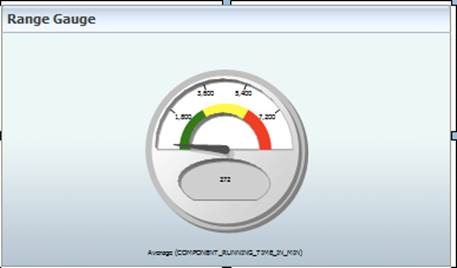
The resulting gauge may look like this (depending on the underlying data):
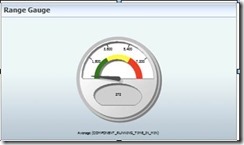
clip_image091

As you can see the scale doesn’t fit for our test data – the red area is around 7200 minutes, far too much for our purpose.

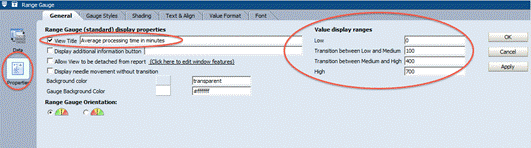
So we have to customize our green, yellow and read areas by customizing the low, medium and high ranges.

Double-click on the range gauge, select “Properties and set the values according to the screenshot below:
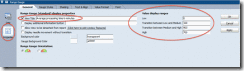
clip_image093

Depending on your test data, adapt values for the ranges accordingly, until you’re satisfied with the result.

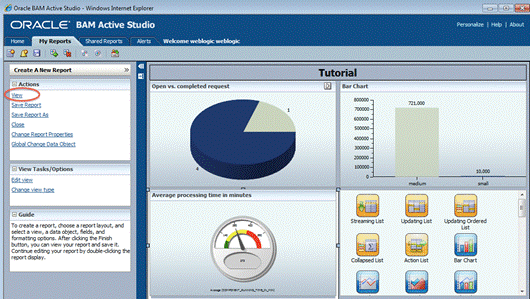
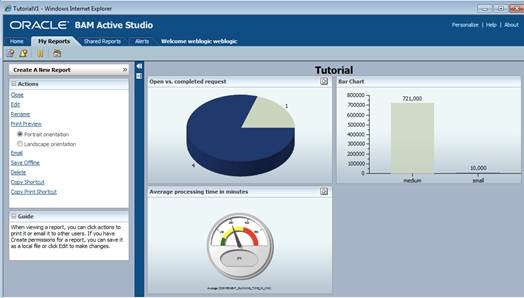
By now your report should look like the screenshot below. To exit the development mode and get a preview, click on “View”:
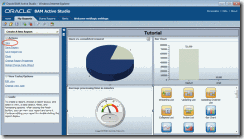
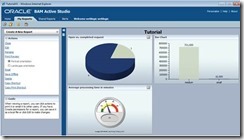
clip_image095

clip_image097

Optional Exercise – drill down

In order to do a drill down, we will first have to define a new report with exactly one view in it. Later this report will be exchange with the current view, from which you start your drill down.

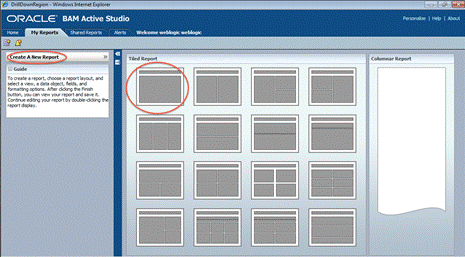
So let’s first start with creating a new report, selecting a template with one view:
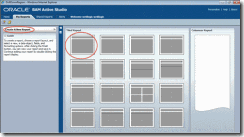
clip_image099

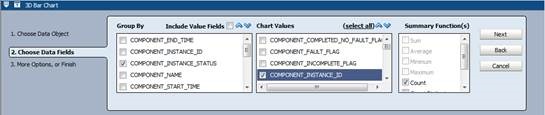
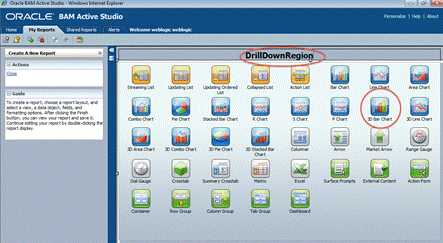
Change the name to “Drill Down”, and choose a “3D Bar Chart:
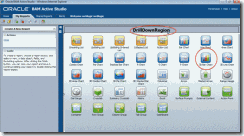
clip_image101

As data object, choose “BI_default_xx” (name depending on your data objects):
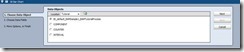
clip_image103

choose to group the sum of credit amounts by range:
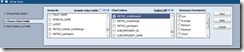
clip_image105

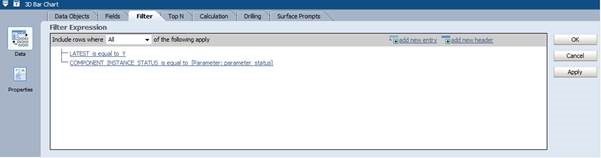
and create a filter:

clip_image107

to only select the latest entry:

clip_image109

We will start the drilldown from our previously created report, from the “active vs. completed requests” view in the upper left corner.

Depending from which part of the view (active or completed) the user will start the drill down, we will have to pass this information to the report being called.

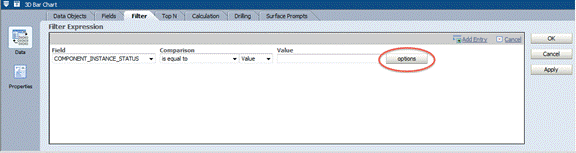
Therefor we will add another filter, the field we need here is “Component_Instances_Status”. To define the parameter, click on “Options”:
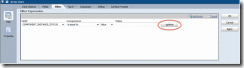
clip_image111

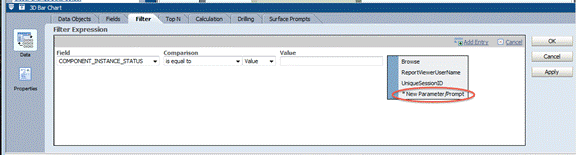
Choose “New Parameter Prompt”:

clip_image113

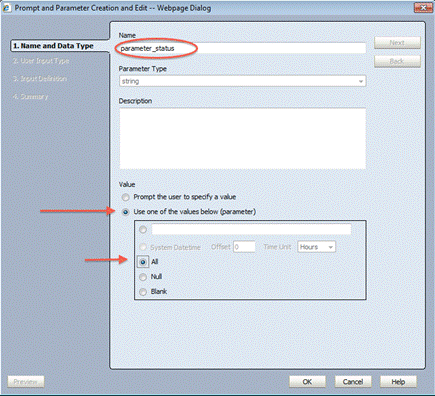
Give your parameter a meaningful name (e.g. “parameter_status”) , select “Use one of the values below (parameter) and then choose “All”:
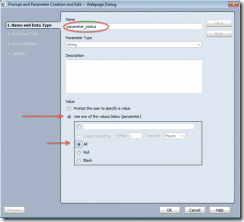
clip_image115

Now your filter should look like this:
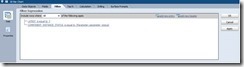
clip_image117

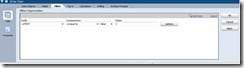
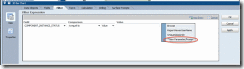
Now we can save the new report, and switch back to our first report. Edit the report, and double click the 3D Pie Chart in the upper left frame. Click on “Properties” and choose the tab “Drilling”.

To define your Drilling Target (the new report), click on “New Target”:
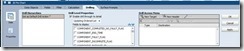
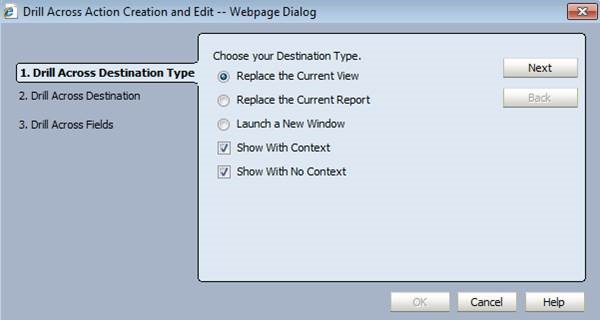
clip_image119

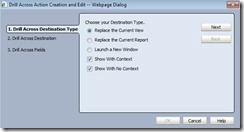
select “replace the current view”:

clip_image121

click on next

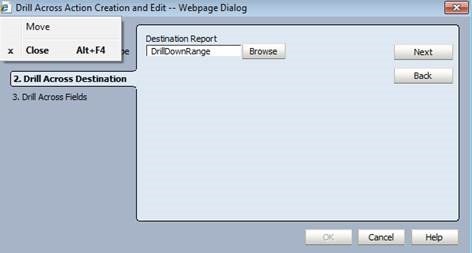
Clicke on “Browse” to select your new report”:
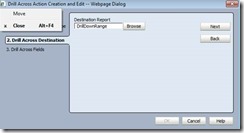
clip_image123

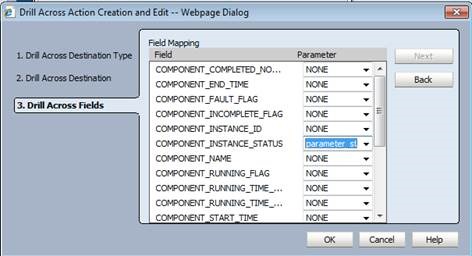
click next, and in the final page set the “Component_Instance_Status” to the newly created parameter (e.g. “parameter status”):
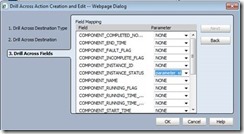
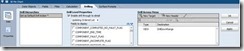
clip_image125

clip_image127

Stefan Wörmcke
Stefan Wörmcke is a Principal Sales Consultant at Oracle Switzerland focusing on SOA and BPM themes. Stefan started 15 years ago at Oracle Germany as a technical consultant for SQL and Java development, Oracle iStore (internet shop application), and application development using frameworks like Struts, Oracle ADF. As one of the first Middleware Sales Consultant for Oracle in Switzerland, he was covering the whole Oracle Middleware stack for some years, and is now focusing on BPM themes, helping customer enabling BPM initiatives throughout their organization. Architecture reviews, BPM best practices and hands-on workshops for customer and partner are just a few examples of Stefans’ activities to grow BPM adoption in Switzerland.

SOA & BPM Partner Community

For regular information on Oracle SOA Suite become a member in the SOA & BPM Partner Community for registration please visit www.oracle.com/goto/emea/soa (OPN account required) If you need support with your account please contact the Oracle Partner Business Center.

Blog Twitter LinkedIn image[7][2][2][2] Facebook clip_image002[8][4][2][2][2] Wiki

SOA & BPM Partner Community Webcast – November 24th 2015 get a SOA Suite 12.2.1 update


clip_image001Attend our November edition of the SOA & BPM Partner Community Webcast live on November 24th 2015 16:00 CET. Yogesh Sontakke will give an update on the brand new SOA Suite 12.2.1 version.

Visit the registration page here.
Call ID: 6965489 Call Passcode: 333111

Austria: +43 (0) 192 865 12
Belgium: +32 (0) 240 105 28
Denmark: +45 327 292 22
Finland: +358 (0) 923 193 923
France: +33 (0) 15760 2222
Germany: +49 (0) 692 222 161 06
Ireland: +353 (0) 124 756 50
Italy: +39 (0) 236 008 198
Netherlands: +31 (0) 207 143 543
Spain: +34 914 143 755
Sweden: +46 (0) 856 619 465
Switzerland: +41 (0) 445 804 003
UK: +44 (0) 208 118 1001
United States: 140 877 440 73
More Local Numbers

If you have difficulty logging in using the above link please go to: http://ouweb.webex.com/meetingcenter and join with session id: 591335749

Missed our SOA & BPM Partner Community Webcast? – watch the on-demand versions:

• Oracle Open World 2015 update

SOA & API Cloud Service

Solutions Catalog & Cloud Marketplace

GSE demo systems

Hybrid sales plays

For the latest information please visit Community Updates Wiki page (SOA Community membership required).
SOA & BPM Partner Community

For regular information on Oracle SOA Suite become a member in the SOA & BPM Partner Community for registration please visit www.oracle.com/goto/emea/soa (OPN account required) If you need support with your account please contact the Oracle Partner Business Center.

Blog Twitter LinkedIn image[7][2][2][2] Facebook clip_image002[8][4][2][2][2] Wiki