MTOM using SoapUI and OSB by Martien van den Akker


clip_image001MTOM (Message Transmission Optimization Mechanism) is incredibly hard… to find practical information about, on SoapUI and OSB. There are loads of articles. Like:

But I need to process documents that are send using MTOM to my service. And to be able to test it, I need to create a working example of a SoapUI project to do exactly that. Also about SoapUI and MTOM there are loads of examples, and it is quite simple really. But I had a more complex wsdl that I was able to use for Soap with Attachments (SwA) wich is also simple really. But how to connect those two in a simple working example? Well, actually, it turns out not so hard either… So bottom-line, MTOM with SoapUI and OSB is not so hard. If you know how, that is.
So let’s work this out on a step-by-step basis.

XSD/WSDL

I’ll start with a simple XSD: Read the complete article here.

SOA & BPM Partner Community

For regular information on Oracle SOA Suite become a member in the SOA & BPM Partner Community for registration please visit www.oracle.com/goto/emea/soa (OPN account required) If you need support with your account please contact the Oracle Partner Business Center.

Blog Twitter LinkedIn image[7][2][2][2] Facebook clip_image002[8][4][2][2][2] Wiki

Why does DB-adapter return duplicate rows? by Jon Petter Hjulstad


clip_image002Here are some DB adapter tips regarding duplicate rows.

The DB Adapter has some nice features, but sometimes you can get fooled. One of my colleagues experiences this one day. The query returned the same row – just repeated many times.

The reason for this is because the primary key was not defined correctly.

The good thing is that the documentation describes this – and more: Oracle documentation

For tables where primary key is defined – this should not be a problem, but in cases where it is not defined or you are querying a view – you would need to specify a primary key yourself. A couple of relevant notes here:

  • If you do not provide a valid primary key, then the unique constraint is not guaranteed, and this could result in possible loss of messages at runtime. That is, rows with duplicate primary key values are likely to be lost.
  • You should ensure that you primary key is less than 100 bytes.
  • Oracle recommends that you use varchar instead of char for primary key columns

Read the complete article here.

SOA & BPM Partner Community

For regular information on Oracle SOA Suite become a member in the SOA & BPM Partner Community for registration please visit www.oracle.com/goto/emea/soa (OPN account required) If you need support with your account please contact the Oracle Partner Business Center.

Blog Twitter LinkedIn image[7][2][2][2] Facebook clip_image002[8][4][2][2][2] Wiki

Connect and consume data with Oracle RightNowCX using the new SOA12c RightNow adapter by Fabio Persico

 
clip_image002Connect and consume data with Oracle RightNowCX using the new SOA12c RightNow adapter

The  Oracle RightNow adapter has been released for the SOA 12.1.3 just couple of months ago, and I tested as soon as I’ve heard of it!

What it is needed for this tip
  • JDeveloper 12.1.3
  • An account with read right on the WebServices exposed by an Oracle Rightnow instance
Before starting!

Make sure the following patch bundle has been applied to your SOA/jdev Home.
Bundle Patch for Bug: 20423408
The patch can be downloaded from Oracle support of course, and installed using opatch apply.
The patch must be applied to both, the SOA Server home (if not in the jdev home) and Jdev home, since the new plugin which will shows the RightNow adapter wizard, must be configured into JDeveloper.
Remember to perform the post-installation steps (patch READ-ME for details):

1. Log in to Fusion Middleware Control Enterprise Manager.
2. Expand "Weblogic Domain" in the left panel
3. Right click on the domain you want to modify and select Security > System Policies to display the page System Policies. Read the complete article here

SOA & BPM Partner Community

For regular information on Oracle SOA Suite become a member in the SOA & BPM Partner Community for registration please visit www.oracle.com/goto/emea/soa (OPN account required) If you need support with your account please contact the Oracle Partner Business Center.

Blog Twitter LinkedIn image[7][2][2][2] Facebook clip_image002[8][4][2][2][2] Wiki

How to customize your Service Bus 12c pipeline templates by Jan van Zoggel


clip_image001One of the new features in Service Bus 12c is the ability to use pipeline templates. Usually the Oracle Service Bus pipelines in an environment have many common steps. Think of the re-use of logging, error handling, alerts and pattern + naming convention for your stages. In practice with OSB 11g we often used a “template” or existing OSB project which we then copied and modified. With the “clone” option of 12c this task is already easier, but the use of pipeline templates is even better. Since templates and concrete pipelines (generated pipelines from a template) remain linked we can update our services easier with new insights. For example, when you want to change your default logging or fault handling behavior.

Index:

To use pipeline templates to their fullest potential we can customize them to our own needs. For this we have multiple options.

Generic configuration

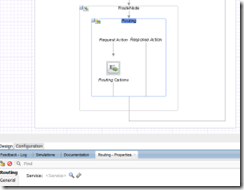
The essential configuration of most actions can be left empty in the template without any problem. As soon as they are implemented in concrete pipelines the actions there will come into an ERROR state. The example below shows the Routing which is empty in the pipeline template. When developing the concrete pipelines we can then easily set the correct business service. Read the complete article here.

SOA & BPM Partner Community

For regular information on Oracle SOA Suite become a member in the SOA & BPM Partner Community for registration please visit www.oracle.com/goto/emea/soa (OPN account required) If you need support with your account please contact the Oracle Partner Business Center.

Blog Twitter LinkedIn image[7][2][2][2] Facebook clip_image002[8][4][2][2][2] Wiki

SOA & BPM Community Newsletter December 2015

Registration for our Oracle Fusion Middleware & PaaS EMEA Partner Community Forum 2016 is open. Don’t miss our annual conference to get the latest updates on middleware products, hybrid PaaS, network and get hands-on trained. Since the first conference in Copenhagen 2007 we have been always booked out! Don’t miss this opportunity to attend March 2016 in Valencia!

With Internet of Things (Io) Cloud Service the next PaaS Service is available. Make sure you become familiar with it and build an industry showcase like HCL has done with predictive maintenance. To get started with PaaS we do offer free trial services.

In case you missed Oracle Open World read Lucas Jellema’s reflections. We offer the OpenWorld presentations and demos for you to run events & workshops for your customer base. Also our Community workspace (membership required) we published the latest Hybrid and SOA Cloud Service material.

Thanks to the community for sharing all the SOA articles: SOA_BPM_12 2 1_Install_and_Config_Workshop & Processing large XML files & SOA 12.2.1 New Feature – End to End JSON and Javascript Example & Error Resilient Adapters – SOA 12.2.1 & Handling inbound Attachments by Service Bus & Custom Transports in Service Bus 12.2.1 & Increase speed to deployment of SOA.

Also for BPM Suite and PCS we want to encourage you to build industry solutions. A great example are the Pharma and Automotive applications from OpRisk. Or the PCS travel requset template for PCS build by Red Mavericks. To start with PCS read Waslley’s blog or Dan’s blog. Thanks to the community for sharing all the BPM articles: Business Activity Monitoring videos & Process Timers & BPM 12c Event Subprocesses.

In our last section Architecture & AppAdvantage we published excellent SaaS integration articles for HCM Cloud & ServiceCloud Rightnow. You can learn more about SaaS Cloud integration by joining our Webcast December 17th 2015.

Yes this newsletter is again long – make sure you read it! For a short summery of our key monthly information watch the Fusion Middleware Partner Updates on YouTube. The December edition of the Middleware Partner Update includes tips for PaaS Industry Showcases and reminds you to register for our Partner Community Forum 2016. For details about Process Cloud Service V2 join our Community Webcast December 15th 2015.

Jürgen Kress

Fusion Middleware Partner Adoption
Oracle EMEA

To read the newsletter please visit http://tinyurl.com/SOAnewsDecember2015  (OPN Account required)

To become a member of the SOA Partner Community please register at http://www.oracle.com/goto/emea/soa (OPN account required) If you need support with your account please contact the Oracle Partner Business Center.

image

Blog Twitter LinkedIn image[7][2][2][2] Facebook

Technorati Tags: newsletter,SOA Community newsletter,SOA Community,Oracle,OPN,Jürgen Kress

5 Best practices for SoapUI Pro and Oracle SOA Suite by Martijn van der Kamp

clip_image001

Over the last year I had the opportunity to be involved in an Oracle SOA Suite 10g to 11g upgrade. At the starting point, the 10g situation, automated tests were not yet part of the landscape. As part of our approach to upgrade the SOA Suite from 10g to 11g, we created SoapUI tests to check that the 11g code would behave functionally the same as the 10g code. This ensured the quality of the code and it also enabled us to run a full regression test within 30 minutes. During the project we created around 300 test cases in SoapUI. Next to that we continuously leveraged our experiences while working in an upgrade environment, and improved our test approach during the project. In this blog I will elaborate on five best practices while using SoapUI in combination with Oracle SOA Suite.

1. Minimize groovy scripting.

As we made the SoapUI tests based on functional flows we realized that a large part of the SOA Suite projects are reused in various functional flows. To make the maintainability easier, we created some groovy scripts that handle the messaging for these steps. It shortens the number of steps in the test case by letting the groovy script handle multiple steps in the background. Also we would be able to store the groovy script in a scripts folder, and call it from any test cases we would create. See figure 1.

Figure 1 Using Groovy script to shorten the number of steps

It started out simple, with a few generic post and get message steps. But not long after that, the first if-then-else statements started to introduce themselves inside the scripts. After that started, the scripts gained in complexity. Read the complete article here.

SOA & BPM Partner Community

For regular information on Oracle SOA Suite become a member in the SOA & BPM Partner Community for registration please visit www.oracle.com/goto/emea/soa (OPN account required) If you need support with your account please contact the Oracle Partner Business Center.

Blog Twitter LinkedIn image[7][2][2][2] Facebook clip_image002[8][4][2][2][2] Wiki

Inline Subprocesses in SOA Suite 12c by Herman Brunnekreef


clip_image001In a project I work in I had to create a process that does calculations based on the input. This calculations must be done from different parts in the input. So the only difference where the input variables. For this I used the option Inline Subprocesses in BPEL. An Inline Subprocess is embedded in the main BPEL-proces and can be called from different scope’s in the main process.
In this blogpost I will give a brief introduction of the use of Inline Subprocesses in BPEL.

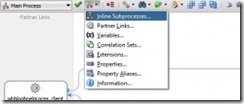
The Inline Subprocess can be created from the main BPEL-window in the menu-bar.
When selecting this you see the next window. Here you type a name for your subprocess.

When you created the subprocess you can here select the subprocess store_output. When it’s opened it’s look like a brand new BPEL-process. Read the complete article here

SOA & BPM Partner Community

For regular information on Oracle SOA Suite become a member in the SOA & BPM Partner Community for registration please visit www.oracle.com/goto/emea/soa (OPN account required) If you need support with your account please contact the Oracle Partner Business Center.

Blog Twitter LinkedIn image[7][2][2][2] Facebook clip_image002[8][4][2][2][2] Wiki

Patching your JDeveloper 12.1.3 with SOA Bundle Patch 12.1.3.0.2 by Jan van Zoggel


clip_image001

The SOA(/BPM) Bundle Patch 12.1.3.0.2 is available for download from Oracle Support (http://support.oracle.com)
Just use the search on patch number ‘20423408’ and it will bring you the patch details page with the download (approx. 662MB).
You can deploy the patch on top of your basic 12.1.3.0.0 or the earlier released SOA Bundle Patch 12.1.3.0.1

So I patched my own JDeveloper 12.1.3 environment with the OPATCH tool.
Extract the downloaded patch, I’ll use C:\temp\p20423408_121300_Generic\20423408
This folder is called ‘patch_TOP’ in opatch terminology.

Since I use Windows as local OS you will need to First open a command prompt with Administrator rights (right-click, run as Administrator).
If we don’t use the right permissions we will get the error: Unable to lock Central Inventory. OPatch will attempt to re-lock

First we set our ORACLE_HOME to the Jdeveloper 12.1.3 folder:
SET ORACLE_HOME=C:\ORACLE\middleware\12.1.3
And make sure opatch is in our path:
SET PATH=%PATH%;C:\ORACLE\middleware\12.1.3\OPatch
We browse to the patch_top folder:
cd C:\temp\p20423408_121300_Generic\20423408
And run opatch:
opatch apply

Read the complete article here.

SOA & BPM Partner Community

For regular information on Oracle SOA Suite become a member in the SOA & BPM Partner Community for registration please visit www.oracle.com/goto/emea/soa (OPN account required) If you need support with your account please contact the Oracle Partner Business Center.

Blog Twitter LinkedIn image[7][2][2][2] Facebook clip_image002[8][4][2][2][2] Wiki

Continuous Delivery for Oracle SOA and BPM by Matt Wright


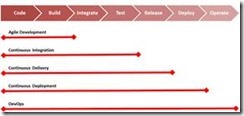
clip_image002The goal of continuous delivery is to help software development teams drive waste out of their process by simultaneously automating the process of software delivery and reducing the batch size of their work. This allows organizations to rapidly, reliably, and repeatedly deliver software enhancements faster, with less risk and less cost.

Continuous Integration (CI) is the practice of automatically building and testing a piece of software; either each time code is committed by a developer or in environments with a large number of small commits, or a long-running build on a regular scheduled basis.

Continuous Delivery (CD) goes a step further to automate the build, packaging, deployment, and regression testing, so that it can be released at any time into production.

Continuous deployment takes this another step further, in that code is automatically deployed into production, rather than when the business decides to release the code. Read the complete article here.

SOA & BPM Partner Community

For regular information on Oracle SOA Suite become a member in the SOA & BPM Partner Community for registration please visit www.oracle.com/goto/emea/soa (OPN account required) If you need support with your account please contact the Oracle Partner Business Center.

Blog Twitter LinkedIn image[7][2][2][2] Facebook clip_image002[8][4][2][2][2] Wiki

An Introduction to Oracle’s Integration Cloud Service (ICS) by Jennie DeRosa

clip_image002Overview

Last month, Oracle made available their latest tool within their integration cloud strategy, Integration Cloud Service (ICS).  With the number of SaaS applications growing, the need to integrate is becoming more important, making ICS even more relevant.

The intended usage of ICS are implementations of simple, light weight integrations between SaaS applications.  It resides within the cloud, is built off the Oracle Service Bus, and is available on a monthly subscription basis.

Pre-built solutions will be available in the marketplace (think app store), allowing for reusable integrations to be purchased, implemented in an accelerated manner. This will provide the option to reuse existing integrations as-is, or build on top of the existing, customizing for your business integration needs. If the pre-built solutions don’t meet your integration needs, the capability to develop your own from scratch is always on option. Either way, the development of an integration within ICS can be done using the capabilities detailed in this article.

Within ICS, there are 4 aspects: Integrations, Connections, Lookups, and Packages. Each of these will be discussed in further detail.

Integrations

Developing integrations between SaaS applications is done in ICS via a web based tool. Using drag and drop capabilities, an integration can easily be defined. Since the tool is built on top of OSB, the functions defined within the VETO (validate, enrich, transform, and operation) integration design pattern are available for implementation: Read the complete article here.

SOA & BPM Partner Community

For regular information on Oracle SOA Suite become a member in the SOA & BPM Partner Community for registration please visit www.oracle.com/goto/emea/soa (OPN account required) If you need support with your account please contact the Oracle Partner Business Center.

Blog Twitter LinkedIn image[7][2][2][2] Facebook clip_image002[8][4][2][2][2] Wiki