SOA Suite 12c Essentials Exam available

clip_image002
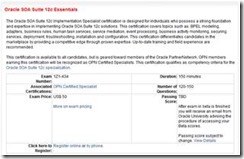
SOA Suite 12c Exam (1Z1-434) is now closed for registrations as the beta testing finished, it is now available. This certification covers topics such as: BPEL modeling, adapters, business rules, human task services, service mediation, event processing, business activity monitoring, securing services, deployment, troubleshooting, installation and configuration. It qualifies as competency criteria for the Oracle SOA Suite 12c specialization.
Check-out the Oracle SOA Suite 12c Essentials Exam Study Guide, which can help you prepare for the exam!


SOA & BPM Partner Community

For regular information on Oracle SOA Suite become a member in the SOA & BPM Partner Community for registration please visit www.oracle.com/goto/emea/soa (OPN account required) If you need support with your account please contact the Oracle Partner Business Center.

Blog Twitter LinkedIn image[7][2][2][2] Facebook clip_image002[8][4][2][2][2] Wiki

PaaS Cloud Services: Integration Cloud Service and Process Cloud Services


At the SOA Community Workspace (SOA Community membership required) we posted the latest Platform as a Service (PaaS) documents for Process Cloud Service and Integration Cloud Service. Including click trough demos from GSE Demo Systems PaaS .

clip_image002Integration Cloud Service

Introducing Oracle Integration Cloud Service_v7(1).pptx

Oracle Integration Cloud Service DS-2015-03-04.pdf

ICS GSE

Process Cloud Service

PCS Datasheet.pdf

PCS GSE

For more information visit the cloud tag here.

SOA & BPM Partner Community

For regular information on Oracle SOA Suite become a member in the SOA & BPM Partner Community for registration please visit www.oracle.com/goto/emea/soa (OPN account required) If you need support with your account please contact the Oracle Partner Business Center.

Blog Twitter LinkedIn image[7][2][2][2] Facebook clip_image002[8][4][2][2][2] Wiki

Implementing Oauth2.0 with Oracle Api Gateway 11.1.2.3.0 with 2 nodes by Marcelo França

clip_image011Introduction

Recently I participated of a project with Oracle API Gateway it uses Oauth2.0 for authenticate and authorize partners to call some APIs. The flow is simple, the partner calls the OAG through method POST with client ID and secret ID and then return the access token with scopes. This works well while it was in Development environment with single node Gateway, but when it runs in UAT environment with two nodes Gateway not in the same machine, the client reaches node 1, everything goes well and OAG/OAuth can authenticate the user. In node 2, however, OAG can’t find the OAuth client_id and the authorization is denied.

Oracle Api Gateway by default installs and uses Cassandra database for store token, access code and client for authorization. When it need to distribute through two nodes is required a shared structure to store this information. This article describes how to create the new shared structure using the Oracle Database.

Tested Environment Requiriments

OAG-11.1.2.3.0

· oagpolicystudio

· apigateway server

Plugin Firefox

· Http Requester

Oracle Database Express Edition 11g Release 2

Setup environment

1 – Run scripts of path:

OAG_HOME/apigateway/system/conf/sql/Oracle

· kps.sql

· oauth-client.sql

· oauth-server.sql

2 – Change parameter policystudio for show hidden files

Edit the file OAG_HOME/oagpolicystudio/policystudio.ini and include the line in the end of file:

-Dshow.internal.kps.collection=true

3 – Create database connection

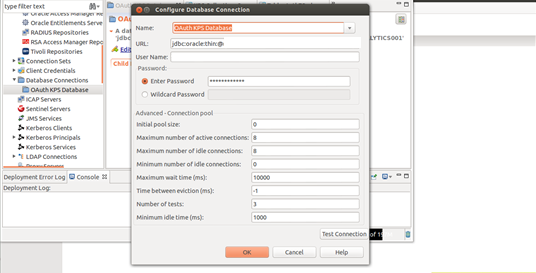
Initiate the Policy Studio tool connect in the gateway 1, go to the tab “Database connections” and create the new database connection with the name “OAuth KPS Database”
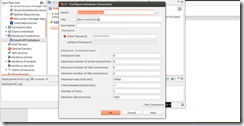
clip_image001

URL : jdbc:oracle:thin:@myenvironment:1521:xe and after click Test Connection, you should to see Test Connection OK.

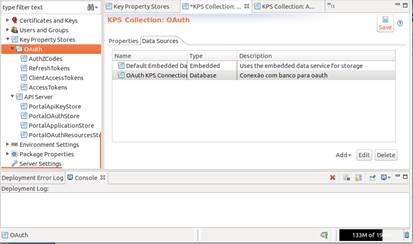
4 – Change Data Sources OAuth

4.1 – Go at Key Property Stores > OAuth tab Data Sources click add
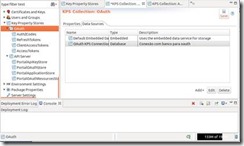
clip_image003

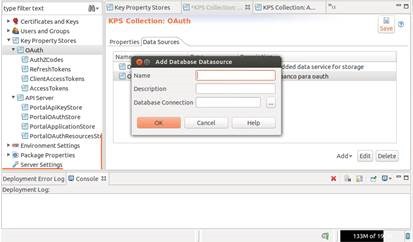
4.2 – Select the option Database, write the name “OAuth KPS Connection” and Database connection choose the value created at step 3 “OAuth KPS Database” and OK.
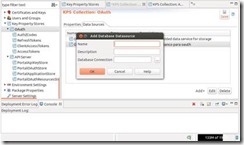
clip_image005

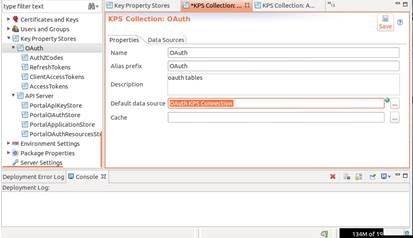
4.3 – Back to tab properties option “Default Data Source” select item created at step earlier “OAuth KPS Connection” after click Save.
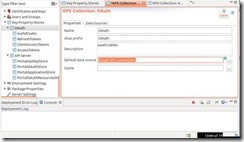
clip_image007

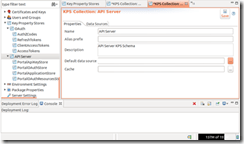
5 – Change Data Sources API Server

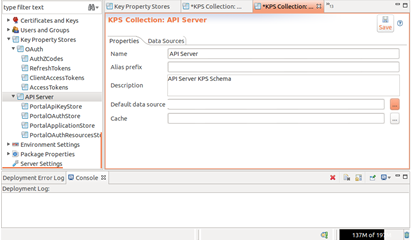
Repeat the steps 4.1, 4.2 and 4.3 for item “API Server”
clip_image008

6 – Alter OAuth Stores

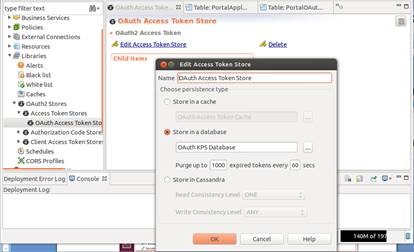
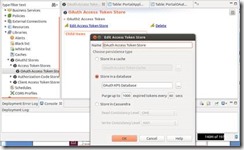
Go to option Libraries > OAuth2 Stores > Access Token Stores > OAuth Access Token Store, click Edit “Access Token Store“ and select “Store in a database“ choosing the item “OAuth KPS Database”.
clip_image010

7 – Repeat the step 6 for items below:

· Libraries > OAuth2 Stores > Authorization Code Stores > Authz Code Store

· Libraries > OAuth2 Stores > Client Access Token Stores > OAuth Client Access Token Store

8 – Test Configurations, Open Firefox and go to http requester plugin.

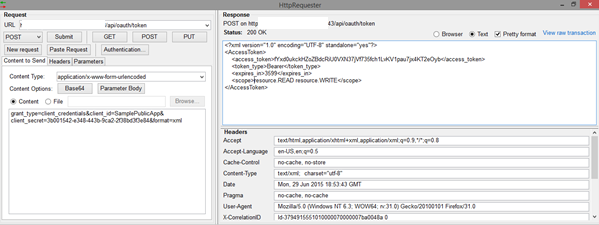
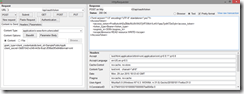
8.1 – Server 1 get token.

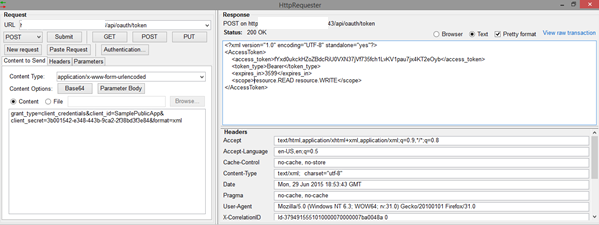
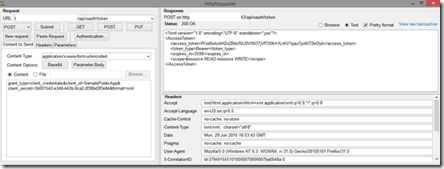
Call service https://server1:port/api/oauth/token

grant_type=client_credentials&client_id=SamplePublicApp&client_secret=3b001542-e348-443b-9ca2-2f38bd3f3e84&format=xml

clip_image011

clip_image012

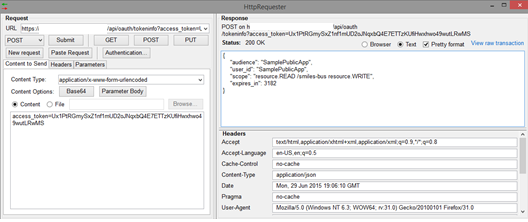
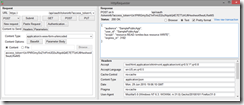
8.2 – Server 2 with token info.

Call service https://server2:port/api/oauth/tokeninfo with token recovered at item 8.1.

access_token=Ux1PtRGmySxZ1nf1mUD2oJNqxbQ4E7ETTzKUfiHwxhwo49wutLRwMS
clip_image013

clip_image014

Conclusion

Now we be able to use Oracle API Gateway with two or more nodes, sharing the same Database repository.

References

http://docs.oracle.com/cd/E39820_01/doc.11121/gateway_docs/content/oauth_flows.html

https://docs.oracle.com/cd/E50612_01/doc.11122/oauth_guide/content/oauth_intro.html

https://docs.oracle.com/cd/E50612_01/doc.11122/oauth_guide/content/oauth_setup.html


Marcelo FrançaMarcelo Gimenes França

Senior Consultant

Oracle LAD Consulting

SOA & BPM Partner Community

For regular information on Oracle SOA Suite become a member in the SOA & BPM Partner Community for registration please visit www.oracle.com/goto/emea/soa (OPN account required) If you need support with your account please contact the Oracle Partner Business Center.

Blog Twitter LinkedIn image[7][2][2][2] Facebook clip_image002[8][4][2][2][2] Wiki

Java and the Internet of Things: Automating the Industrial Economy


clip_image002

Industrial automation involves the integration of physical machinery and processes with sensors, computers, and software. The result is an intelligent manufacturing infrastructure for increased safety and efficiency, and lowered costs. However, industrial automation comes with its own set of challenges. These include the need to connect multiple proprietary control systems, maintain end – to-end system uptime, reduce energy consumption and total costs, adhere to regulatory requirements, and increase safety and security at every phase. At its core, industrial automation aims to bring together the advances of two transformative revolutions: the machines, facilities, fleets and networks that arose from the Industrial Revolution, and the powerful advances in computing, information and communication systems established via the Internet Revolution. The intersection of these two diverse and disparate sets of technologies often results in a mixture of individual solutions. Businesses need their distributed manufacturing and business processes and control systems to behave like a single , flexible computing platform combined securely with a modern development platform to build, deploy and update applications. Oracle Java Embedded delivers this. Get the whitepaper here.

SOA & BPM Partner Community

For regular information on Oracle SOA Suite become a member in the SOA & BPM Partner Community for registration please visit www.oracle.com/goto/emea/soa (OPN account required) If you need support with your account please contact the Oracle Partner Business Center.

Blog Twitter LinkedIn image[7][2][2][2] Facebook clip_image002[8][4][2][2][2] Wiki

SOA 12c – Using Maven for SOA Projects deployment by Silva


clip_image002In this post, we will see creation of SOA application/projects using the maven archetypes. And we will use local Maven Repository for the demonstration.

Navigate to %MW_HOME%\oracle_common\plugins\maven\com\oracle\maven\oracle-maven-sync\12.1.3 and use following commands to sync your local repository:

mvn install:install-file -Dfile=oracle-maven-sync-12.1.3.jar -DpomFile=oracle-maven-sync-12.1.3.pom

mvn com.oracle.maven:oracle-maven-sync:push -Doracle-maven-sync.oracleHome=%MW_HOME%

Update your archetype catalog using:

mvn archetype:crawl -Dcatalog=C:\Users\<<uname>>\.m2\archetype-catalog.xml

Generate SOA Application and project as shown below. This generates SOA application test-soa-application with  project test-soa-project.

mvn archetype:generate -DarchetypeGroupId=com.oracle.soa.archetype -DarchetypeArtifactId=oracle-soa-application -DarchetypeVersion=12.1.3-0-0 -DgroupId=org.my.test -DartifactId=test-soa-application -DprojectName=test-soa-project -Dversion=1.0-SNAPSHOT

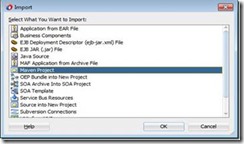
Import this maven project in JDeveloper using File –> Import and select the Maven Project option as shown below. Click OK.

Give your application directory as Root Directory which brings up all POMs and select other options as shown below. Click OK. Read the complete article here.

SOA & BPM Partner Community

For regular information on Oracle SOA Suite become a member in the SOA & BPM Partner Community for registration please visit www.oracle.com/goto/emea/soa (OPN account required) If you need support with your account please contact the Oracle Partner Business Center.

Blog Twitter LinkedIn image[7][2][2][2] Facebook clip_image002[8][4][2][2][2] Wiki

Performance Study – REST vs SOAP for Mobile Applications by Steven Davelaar


clip_image002Introduction

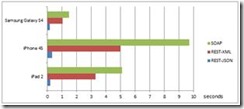
To build functional and performant mobile apps, the back-end data services need to be optimized for mobile consumption. RESTful web services using JSON as payload format are widely considered as the best architectural choice for integration between mobile apps and back-end systems. Nevertheless, we have seen many customers of Oracle’s Mobile Application Framework (MAF) consuming SOAP web services in their mobile apps. One reason this is happening might be the nice declarative support in MAF/JDeveloper where you can easily create a SOAP-based data control through a wizard and build your pages using drag and drop. However, this wizard is only intended for really simple SOAP services. It cannot handle all XSD types, nor can it handle more complex, nested payloads. One way to work around these limitations is to process the SOAP payload programmatically in Java, but this is not a trivial task to do. While most of the issues around consuming more complex web services can ultimately be solved, this article explains why you should really abandon SOAP and go for REST-JSON services for one simple reason: performance. The differences in performance are staggering and get worse as the mobile device gets older.

Main Article

This articles discusses the results of a test conducted by Oracle’s A-Team to compare the performance of REST-JSON, REST-XML and SOAP service calls in MAF. We will first discuss the test set-up, then discuss the test results and we will end with a discussion of the options you have if you are currently consuming SOAP web services in your MAF application.

Test Set-Up

We have created an ADF Business Components (ADF BC) application that uses the HR schema to return a list of departments, including a nested list of employees for each department. So, the payload returned consists of 27 departments with 107 nested employee records.Each department row has 4 attributes, each employee row has 11 attributes.
In JSON format this payload is 26.2 KB, in XML format the payload is 77.3 KB in size (whitespace and carriage returns have been removed). Read the complete article here.

SOA & BPM Partner Community

For regular information on Oracle SOA Suite become a member in the SOA & BPM Partner Community for registration please visit www.oracle.com/goto/emea/soa (OPN account required) If you need support with your account please contact the Oracle Partner Business Center.

Blog Twitter LinkedIn image[7][2][2][2] Facebook clip_image002[8][4][2][2][2] Wiki

Purging and partitioned schemas by Christian

SOA Suite 11g and 12c both require regular database maintenance for optimal performance. A key task in managing your SOA Suite database is a regular purging strategy. You should be doing this, so read the Oracle SOA Suite database growth management strategy if you haven’t already: http://www.oracle.com/technetwork/middleware/bpm/learnmore/soa11gstrategy-1508335.pdf

One of the best practices for managing large SOA Suite applications is to use Oracle Database partitioning. In 11g this is usually a fairly ad-hoc setup, though the whitepaper has everything you need to know about setting it up; in 12c, the “LARGE” RCU profile is partitioned (with monthly partitions).

Purging a partitioned schema usually involves running the check and move scripts, to ensure your partitions don’t contain “LIVE” data (based on your retention policy), followed by dropping the “OLD” partitions and rebuilding the indexes.

However, there are times where you may want to run a purge to clean up data that doesn’t neatly align with the partitions, for example in a load testing environment. The purge scripts, by default, won’t touch any table that is partitioned. If your favourite table isn’t mentioned in the purge debug log output (example below), then it is probably because it is partitioned.

To force the purge scripts to consider partitioned tables, you need to enable the “purge_partitioned_component” flag to the “delete instances” purge function (see below). The purge script will then purge partitioned tables.

Obviously, this is not intended for regular production use and it should never be used there.

An example invocation with the flag set:
soa.delete_instances(max_runtime => 300, min_creation_date => to_timestamp('2000-01-01','YYYY-MM-DD'), max_creation_date => to_timestamp('2000-12-31','YYYY-MM-DD'), purge_partitioned_component=TRUE);

The example output below is from a soa.delete_instances run that has a partition on composite_instance. Note that there is no mention of composite_instance in the output. Read the complete article here.

SOA & BPM Partner Community

For regular information on Oracle SOA Suite become a member in the SOA & BPM Partner Community for registration please visit www.oracle.com/goto/emea/soa (OPN account required) If you need support with your account please contact the Oracle Partner Business Center.

Blog Twitter LinkedIn image[7][2][2][2] Facebook clip_image002[8][4][2][2][2] Wiki

CI using Oracle Fusion Middleware 12C: Part 2. Building a SB and SOA project using maven and the MDS by Hugo Hendriks


clip_image001In the part 1 I have shown how to setup a simple CI environment and how to build a Service Bus project using Maven. In this part I will try to make a release pipeline which builds, deploys, tests, packages and release a whole service using Jenkins and if all successful and finally install the artifact in Nexus.

Lets start where we left of. Startup Tomcat and log into Jenkins. We need some sort of plugin to be able to run multiple actions in a sequence. Jenkins has alot of plugins but the one which I am going to use is the MultiJob one. Go to Manage Jenkins->Manage plugins, choose the available tab, check the Multijob plugin and click Install without restart.

The multi-job plugin can chain jobs together and share variables and artifact between jobs. You can make very intricate jobs but for now I will keep it simple. I will make 1 job that will:

  1. Build the service bus component which also refers to a SharedObjects project and deploy it to my server
  2. Build the soa component which also refers to the MDS and deploy it to my server
  3. Run the matching soap ui test
  4. If succesfull, install the artifact to nexus

I have created a simple HelloService which first goes to the SB and then routes to a SOA component. The SB component makes use of a SharedObjects SB project which holds the WSDL and XSD. This project is setup so you don’t have to sync between this project and the MDS. This because the SB isn’t able yet to access the MDS. The SOA component does nothing else the return a string response. So the setup will look like this: Read the complete article here.

SOA & BPM Partner Community

For regular information on Oracle SOA Suite become a member in the SOA & BPM Partner Community for registration please visit www.oracle.com/goto/emea/soa (OPN account required) If you need support with your account please contact the Oracle Partner Business Center.

Blog Twitter LinkedIn image[7][2][2][2] Facebook clip_image002[8][4][2][2][2] Wiki

REST-enable existing SOAP services with Oracle SOA Suite 12c – free online training


REST-Enabling SOA with Oracle Service Bus 12c clip_image001clip_image002

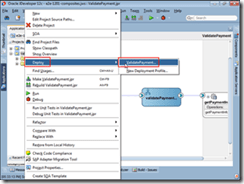
clip_image004In this tutorial, you REST-enable a service by using an application that validates credit cards. The application validates the requested authorization amount for the credit card number, and it returns the response in XML or JavaScript Object Notation (JSON) format, the common data formats for mobile devices.

REST-Enabling SOA with Oracle SOA Suite 12c clip_image001[1]clip_image002[1]

In this tutorial you integrate REST operations as service-binding components and reference-binding components in SOA composite applications. You REST-enable a service by using Oracle SOA Suite 12c and an application that validates credit cards. The application validates the requested authorization amount for the credit card number, and it returns the response in XML or JavaScript Object Notation (JSON) format, the common data formats for mobile devices.

SOA & BPM Partner Community

For regular information on Oracle SOA Suite become a member in the SOA & BPM Partner Community for registration please visit www.oracle.com/goto/emea/soa (OPN account required) If you need support with your account please contact the Oracle Partner Business Center.

Blog Twitter LinkedIn image[7][2][2][2] Facebook clip_image002[8][4][2][2][2] Wiki

How to use the Domain Value Map (DVM) in Oracle Service Bus 12c by Jan van Zoggel


Introduction

clip_image002Due to the tighter integration of Oracle Service Bus 12c in the whole Oracle SOA Suite product it’s now much easier for developers to use general SOA Suite components like the Domain Value Map (DVM).

Getting Started

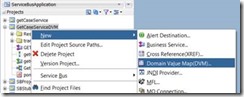
First I use the OSB 12c clone project ability to copy th earlier created/blogged OSB 12c Database adapter project and create a project named GetCaseServiceDVM. In the new project we add a Domain Value Map (DVM):

The file name and description speak for themself. The Initial DVM Entries forces us to define the minimum amount of 2 domain names (source and target of our value) and if we want we can inmediately configure the 1st record here.

The result is a DVM file in our project which we can easily edit within JDeveloper 12c.
For this blogpost we will add 2 records which will allow us to translate the value “1” and “2” which we receive from the database to a basic description of that value. Read the complete article here.

SOA & BPM Partner Community

For regular information on Oracle SOA Suite become a member in the SOA & BPM Partner Community for registration please visit www.oracle.com/goto/emea/soa (OPN account required) If you need support with your account please contact the Oracle Partner Business Center.

Blog Twitter LinkedIn image[7][2][2][2] Facebook clip_image002[8][4][2][2][2] Wiki