Oracle Process Cloud Service – Decision Model Notation part 2 by Lykle Thijssen

image

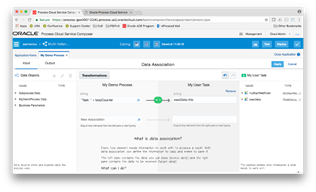
In my previous blog, I showed how to get started with Decision Model Notation (DMN) in Oracle Process Cloud Service and how to create a simple Decision Table. Picking up from there, we will now look into creating If-Then-Else rules, which should also be familiar to people who know Oracle’s old Business Rules. We will also create a service and call it from a process.

Creating an If Then Else Decision

As Input, I have created a TotalAmount object, which is the total amount of a Sales Order. Based on this TotalAmount, we are going to calculate a Discount Price, for which I have created a DiscountPrice type to make the service interface a bit prettier than just ‘output’. To create an If-Then-Else rule, just click the + button next to Decisions, enter a name and set the output type to string, number or any other type, in this case DiscountPrice.

Now, Oracle will have created a rule for you, in which you only need to fill in the "if", "then" and "else". Since you’ve already decided your output object, we will not use that one in the expression, which is different from the old Oracle Business Rules. So just enter the value that you want for this object and you’ll be fine. You can also create nested expressions, as shown below: Read the complete article here.


Process Cloud Service and how to loop and select elements from a list by Martien van den Akker

image

For more than half a year I’ve been ‘dying’ to write posts about some of the constructs I’ve developed in my last Process Cloud Service project. At last I have the opportunity. And I hope I’ll be able to write some more. But for starters, one of the problems I encountered is that I needed to process a list of something(s) and select elements from it. Or even better, how to build up a new list based on an input-list and some rules. Oh and do looping, or actually determine how to finish a loop based on a list of elements. Without a count() function in the PCS Expressions…

Questions

If you have met these kinds of problems and the tool at hand is PCS, then you probably ran in (some of) the following questions:

  • Why don’t we try to solve this in SOA CS or possibly ICS?
  • Where are the script tasks we have in BPM Suite? (Sorry, this is an obvious one, but still)
  • How to count the elements of a list? Or, where are the functions in PCS?
  • How to add elements to a list?
  • Etc.

To address a few of those…
Many of these things we ran into are actually orchestration issues. And as with the all-time discussions on when to use SOA and when BPM, we advise doing complex service orchestration  (with message processing) in SOA CS, or if possible in ICS. But when we started with this project, the tools we were given were PCS and ICS. And where ICS lacked the more advanced logic processing in the orchestration integrations, at the time (it’s improved over time). And sometimes it really is fun to try to accomplish things that were mentioned not being possible. Go where no man has gone before, that sort of stuff.
Script tasks? I guess PCS Product Management gets tired of answering this question. But the real thing is: we do need to do determinations based on the outcome of services. But also doing logic before doing an activity. In the input data association of an activity, you can only assign into the input-arguments of the activity. You can’t update process variables. You can do that in the output data-association. But not all activities have a output-data-associations. And there are cases where you don’t have an applicable previous activity. For instance in loops. Read the complete article here.


Multi-Instance Subprocess in Oracle Process Cloud Service by Antonis Antoniou

image 

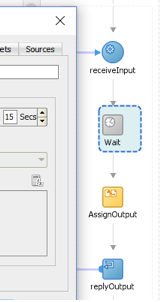
The May 2017 Oracle Process Cloud Service release on-boarded a very useful and powerful on-prem feature, that of multi-instance subprocesses.
In a nutshell, multi-instance subprocesses allow you to execute a specific set of actions a specified number of times either in sequence or in parallel.
What shouldn’t be confused is the difference between repetitions and multi-instances. Multi-instances will create a snapshot of a specific set of actions and data, and run it a specified number of times, with each instance living in it’s own private memory space.
Repetitions on the other hand is executing the same actions and data a specified number of times, with both actions and data sharing the same context, therefore being capable of being executed in a sequence manner.
So let’s see all this in practise. In the following steps, I will be creating a sample form-initiated based process where the user will define the number of loops (executions) a subprocess, that will include of a simple "Submit Task" should execute. Read the complete article here.


Oracle Named a Leader in Analyst Evaluation for Digital Process Automation Software


Oracle positimageioned as a leader and selected for evaluation based on proven customer adoption, strong go-to-market strategy, and breadth of capabilities

REDWOOD SHORES, Calif., July 18, 2017 /PRNewswire/ — Oracle today announced it has been named a leader in the Forrester Wave™ Digital Process Automation (DPA) Software report. This placement confirms leadership for Oracle Process Cloud, which is part of Oracle Cloud Platform.

"By delivering comprehensive process automation capabilities such as no- and low-code process design, case management and simplified connections to SaaS, Social, Cloud and on-premise systems, Oracle provides customers with a powerful option to continuously deliver engaging customer, employee, and partner experiences at every stage in their business transformation journey," said Vikas Anand, vice president, product management, Oracle. "Today business process automation augmented with intelligent machine learning is helping organizations drive best next actions and provide them with better, timely decision making capabilities."

In Forrester’s 30-criteria evaluation of DPA vendors, they evaluated 12 significant software providers. Oracle was cited as a leader with the highest possible scores in the low-code/no-code, smart forms and user experience, process flow and design, mobile engagement, API support, data virtualization, deployment options, and ease of implementation criteria.

Download Forrester’s Wave report for "Digital Process Automation Software, Q3 2017" here.

Oracle Process Cloud Service was built from the ground up for the cloud to provide enterprises of all sizes with the low-code app dev platform that they need to build business agility and control their digital destiny. With full lifecycle support for end-to-end process automation spanning departments, SaaS apps, and on-premises systems of record, Oracle Process Cloud Service empowers business analysts and process designers with the tools they need to rapidly deliver differentiating experiences in a collaborative manner. Oracle Process Cloud Service comes with Quick Start App templates and pre-built integrations to companion platform services including, Content Management, Integration, Mobile, Intelligent Bots, and IoT Apps, to enable rapid delivery of engaging experiences across channels and devices.

Customer Momentum
"Process automation is central to our integration strategy," said Ravi Gade, senior director of apps IT and digital transformation, Calix. "Calix leverages Oracle Process Cloud to reduce IT backlog, ensure compliance, and simplify connections across our rapidly evolving SaaS and on-premises business systems."

"Using a combination of Oracle Process Cloud Service and Oracle Application Builder Cloud Service along with the cloud-native best practices introduced by our partner, Rubicon Red, we have a comprehensive, integrated cloud platform that enables us to deliver innovative, modern solutions," said Ryan Klose, general manager, corporate, National Pharmacies. "The Oracle Cloud Platform gives us flexibility to connect to all our core systems, and easily deliver to a range of user interfaces, whether they be online, mobile/tablet, devices/IoT, or emerging chatbot technology."

"Oracle Process Cloud Service has allowed us to dramatically shorten our time-to-market by up to 40 percent," said Matt Wright, chief technology officer, Rubicon Red. "Oracle provides developers with immediate access to a full lifecycle process management environment—including development, test, and production—and enterprise-quality tooling, without needing to build and maintain an IT infrastructure."

Additional information:

Oracle Internet of Things Fleet Monitoring Cloud

image

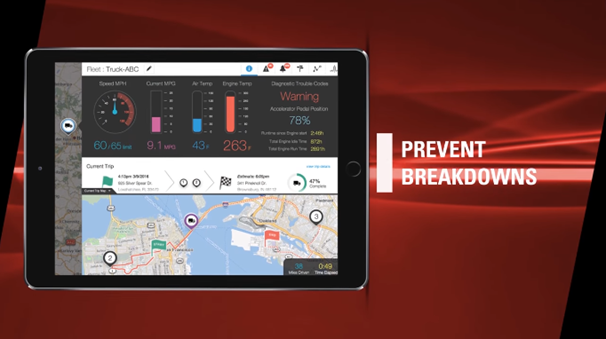
Your fleet is on the road daily — collecting miles, carrying cargo, fulfilling orders. Wouldn’t you like to capture that useful data and align it with your business? So start collecting data today. Put your company on a fast track with Oracle Internet of Things Fleet Monitoring Cloud. Accelerate your fleet management operations, streamline your supply chain, and improve customer satisfaction. Watch the video here.

PaaS Partner Community

For regular information on business process management and integration become a member in the SOA & BPM Partner Community for registration please visit www.oracle.com/goto/emea/soa (OPN account required) If you need support with your account please contact the Oracle Partner Business Center.

Blog Twitter LinkedIn image[7][2][2][2] Facebook clip_image002[8][4][2][2][2] Wiki

Technorati Tags: SOA Community,Oracle SOA,Oracle BPM,OPN,Jürgen Kress

How We Added a Spoon of Agility to a Large Oracle Service Bus Project by Pavel Samolysov

image

Several months ago I already shared how to ensure guaranteed delivery for 5.000.000 messages handled per day by Oracle Service Bus (OSB). In the case, OSB is heavy used to integrate a customer relationship management application (the CRM) in a solid environment with many regional billing systems, provisioning, ERP and ordering management system (OMS), etc. Also, the integration solution is deployed across four ex-standalone corporations, each of which has its own IT infrastructure, and this circumstance makes the project more and more interesting.
The common problem from a manager’s point of view is to provide consistency among services deployed on the bus, the main client application (the CRM), and numerous 3rd party applications. Also, there is a time lag in development and end up to production these parts of the infrastructure. And the development team forever must have guaranteed stable and ready to deploy code of the service bus.
The situation is usual for almost all integration projects in the World. The releases of an enterprise service bus must be delivered in a reliable way, no one integration flow (neither the client -> service bus nor the service bus -> 3rd party application communication) must fail after the release is deployed to the production environment.
Let me explain the features of our project.

  1. A one pizza size development team, not more than 5 developers are there.
  2. Hovewer, the team has developed and delivered 13 services and 46 adapters to a wide range of enterprise applications. The services provide very different business logic – from just wrapping a stored procedure into a SOAP-based web service till a complex orchestration employing the Splig-Join component of Oracle Service Bus.
  3. SVN is utilized as a source code management tool.
  4. Oracle Service Bus out of the box provides no capability for service versioning, so it’s impossible to expose numerous versions of the same service simultaneously. Although the main service client, CRM application, is developed by a team working for the same company, we are able to deliver releases of the service bus regardless of this capability. Read the complete article here.

Check Composite State of Oracle SOA Suite by Command Line by Dirk Nachbar

image 

I was currently fighting a bit with the monitoring of Oracle SOA Suite 12c Composites.
The goal was to check the state of deployed Composites on an Oracle SOA Suite 12c with following requirements/dependencies:

  • No Oracle Cloud Control
  • Capture only Active Composites and not Retired Composites

After some discussions with colleagues and a lot of Google and serveral tests with Python Scripts in wlst, I came to following solution:

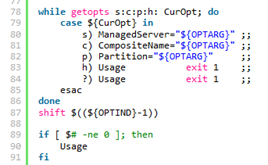
  • one main Pythin Script, called check_composite_state.py which is checking the State of a non retired given Composite Name for a given Partition|Folder and a given Managed Server
  • one property file called domain.properties which will be used by the Python Script in order to build the required connect string to the Admin Server of the SOA Suite
  • one wrapper Shell Script, which takes the required 3 Arguments (Name of Managed Server, Composite Name and Partition|Folder Name). Read the complete article here.

Jump-Start your Oracle SOA Projects in FlexDeploy by Dan Reynebeau

image

In an effort to simplify the population of existing composites on a server into FlexDeploy projects, we have provided a utility to extract composites from a SOA server into a comma delimited file. This file can then be the basis for a spreadsheet that can be loaded directly into FlexDeploy, through the use of templates, and all of the composite projects can be created in seconds. I will talk about templates in another blog post.

The composite extraction from a SOA server can be done with the attached zip file (extractComposites).  There are three components in the zip file:

  • Property file that contains the userName, password, hostName and hostPort for the targeted SOA server
  1. #Weblogic server username and password
  2. server.user=weblogic
  3. server.password=welcome1
  4. #server.host=
  5. server.host=soalt06.flexagon
  6. #server.port=
  7. server.port=8001
  • CompositeMgmt.jar that contains the code that interrogates the targeted server
  • ExtractComposites.sh that contains the script that manages the jvm and classpath

Read the complete article here.

Avoiding Service Call Failures in Oracle Service Bus and Oracle SOA Suite by Rolando Carrasco

image

Introduction

This article is targeted at Oracle Service Bus (OSB) developers and architects who want to learn/validate their strategies for avoiding service call failures within their integration pipelines.

Having dual roles as architects and developers the authors have seen many projects in which the developer or the architect didn’t design or implement a good exception/failure management strategy.

This article will streamline a series of strategies to avoid such failures.

Some of the ideas in this article are were originally presented by our colleague David Hernández in a December 2015 session at a Microservices and API Management Symposium in Lima, Peru. That session focused on various strategies for mitigating failures in the development of Services:

  1. Circuit breakers
  2. Bulkheads
  3. Timeouts
  4. Redundancy

In this article we will apply these strategies to Oracle Service Bus.

These strategies can be implemented using OSB and Oracle SOA Suite (composites). Some features of the current latest release (12.2.1) will help you to facilitate the implementation; other strategies are very basic configurations in OSB that many people skip and therefore struggle to maintain stability in their Service Bus implementation.

Let’s always keep in mind that the Service Bus is a core element in any infrastructure that implements it. CIOs and managers sometimes do not give that specific weight to this platform and wonder why, if the OSB/SOA Suite is not available, the infrastructure crashes. Or sometimes they wonder why the OSB struggles when a platform is not available or is under heavy load. The answer is simple: OSB is the integration pipeline within your infrastructure and architecture. Imagine if a water pipeline in your house breaks: you don’t see it, but a real mess is happening behind your walls or beneath the floor. The same idea applies here.

Let’s also bear in mind that 60% of the development of a service is related to exception management and the ability to avoid failures. If we don’t take care of this, or expect that someone else will take care of it, we are wrong. You need to be able to identify the following scenarios: Read the complete article here.

Purging Strategies in Oracle SOA Suite 12c – Part II by Arturo Viveros

image

In my earlier post about purging the Oracle SOA product database, I mentioned that this is one of the most critical tasks when it comes to ensuring the stability and performance of SOA/BPM Suite production environments.

Read the 1st part here

This means that you should never neglect this or expect it to magically take care of itself.

So let’s take a look at a couple of extra tips to get a better grip on this:

In 12c we have auto-purge, which can be configured and scheduled from the EM console. Unfortunately, EM still lacks a reporting / alerting feature to provide purging statistics or at least make sure the jobs are actually running successfully. So, if you’re blindly trusting this feature, it could very well be that instances are piling up by the millions without you noticing until it becomes a problem.

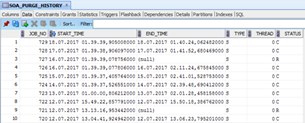
Luckily, there’s a very simple way to find out and keep track, just by looking into the SOA_PURGE_HISTORY table inside the SOAINFRA schema:

This table is pretty straightforward, as it will tell us the start & end time, if it was the single or the parallel script and the final status: C (Completed) or R (Rollbacked).

The out-of-the-box scripts are quite sensitive and enforce a lot of validations, which means that if anything goes wrong they will rollback everything and no instances will be purged whatsoever. So in case there’s a malfunction it’s good to be able to know and take the necessary steps to correct it before everything blows up. Read the complete article here.