Cloud Adapter SDK – Part 2: Functionality by Jeroen Ninck

clip_image002


Introduction

So this is part 2 of a series of blog post describing building a Cloud Adapter for MongoDB. In this part I want to discuss the functionality I want to achieve.

I will use Windows 10 and PowerShell (my favourite Windows shell!) for these blogs. All sources can be found on GitHub.

Parts:

Just a small warning: Always keep track of Oracle license information and the Oracle certification matrix!

What should it do?

MongoDB has a lot of features we might want to expose in the Cloud Adapter. However I want to start relative simple and I might expend the functionality in the feature. So I want to start with inserting data. A second step will be to find the data by querying it.

MongoDB

MongoDB is a NoSQL database and stores documents. These documents are basically JSON documents (actually BSON):

{
                    "_id" : ObjectId("56fa75781f1378215c215709"),
                    "field1" : "value1"
}

Basically there are no foreign keys. Of course you refer to other documents, however these is no foreign key like in a relational database. Each document does have a primary key called _id (which is of type ObjectId). A document is stored in a collection and a MongoDB database can have multiple collections. A single instance of MongoDB can host multiple databases. Read the complete article here.

SOA & BPM Partner Community

For regular information on Oracle SOA Suite become a member in the SOA & BPM Partner Community for registration please visit www.oracle.com/goto/emea/soa (OPN account required) If you need support with your account please contact the Oracle Partner Business Center.

Blog Twitter LinkedIn image[7][2][2][2] Facebook clip_image002[8][4][2][2][2] Wiki

Uploading files to Oracle Document Cloud Service using SOA by Shreenidhi Raghuram

clip_image002

This blog provides a quick tip for implementing file upload into Oracle Document Cloud Service (DOCS) using java in Oracle SOA and Oracle SOA Cloud Service(SOACS)

The DOCS upload REST service requires POSTing of multipart form, a feature that is currently unavailable in the REST cloud adapter. This POST request to upload a file contains 2 body parts. The first being a json payload and the second containing the actual file content.

The request format looks as shown here in the Oracle Documents Cloud Service REST API Reference.

The section below shows a java embedded block of code that can be used within a BPEL process to achieve the file upload. This can be used in Oracle SOA and SOACS – BPEL composites. A valid DOCS endpoint, credentials for authorization, and a GUID of the folder location for the file upload are required to execute this REST call.
In this sample, a pdf document file is being uploaded into DOCS. The media type should be appropriately changed for other content formats.
Also, It is recommended to access the authorization credentials from a credential store when developing for production deployments. This section is only intended as a demo. Read the complete article here.

SOA & BPM Partner Community

For regular information on Oracle SOA Suite become a member in the SOA & BPM Partner Community for registration please visit www.oracle.com/goto/emea/soa (OPN account required) If you need support with your account please contact the Oracle Partner Business Center.

Blog Twitter LinkedIn image[7][2][2][2] Facebook clip_image002[8][4][2][2][2] Wiki

Dynamic Hybrid Bundles Expand Your Cloud Footprint


clip_image002As customers seek cloud solutions, partners must pivot their business to the cloud to meet these transformational market needs. Oracle Dynamic Hybrid Bundles are designed to help partners address those customer requirements while driving higher profitability and growth through the solution sale of on-premise and cloud offerings.

Make More Margin

Oracle Dynamic Hybrid Bundles offer partners substantial upfront discount (Cloud Credits) off metered Platform-as-a-Service (PaaS) and Infrastructure-as-a-Service (IaaS). Cloud Credits apply when bundles are sold with Oracle Engineered Systems, including Oracle FS1 Flash Storage System, to the same end customer.

Get the details here.

SOA & BPM Partner Community

For regular information on Oracle SOA Suite become a member in the SOA & BPM Partner Community for registration please visit www.oracle.com/goto/emea/soa (OPN account required) If you need support with your account please contact the Oracle Partner Business Center.

Blog Twitter LinkedIn image[7][2][2][2] Facebook clip_image002[8][4][2][2][2] Wiki

Integration Cloud Service (ICS): A developer’s first impression by Maarten Smeets

clip_image001


Oracle provides ICS (Integration Cloud Service) as a simple means for citizen developers to do integrations in the cloud and between cloud and on-premises. On the Oracle Fusion Middleware Partner Community Forum I got a chance to get some hand-on experience with this product in one of the workshops. In this blog post I will describe some of my experiences. I’m not the target audience for this product since I am a technical developer and have different requirements compared to a citizen developer. I’ve not been prejudiced by reading the documentation

I experimented with ICS on two use-cases. I wanted to proxy SOAP and REST requests. For the SOAP request I used a SOA-CS Helloworld web-service and for the REST request I used an Apiary mockservice. I will not go into basics too much such as creating a new Connection and using the Connection in an Integration since you can easily learn about those in other places.

ICS: Calling a SOAP service on SOA-CS

When you want to call a SOAP service which you have exposed on ICS, you require two sets of headers. The WS-Timestamp headers and the WSS-UserName token headers (with the password in plain text).

This is required even when you have not specified a security policy (currently username/password token and basic authentication are supported). When you don’t provide them, you get Service Bus errors (as shown in the screenshot below) which indicates ICS is running on the Service Bus (in case you didn’t know this yet, it is no secret). This was not required when directly calling the SOA-CS service. Read the complete article here.

SOA & BPM Partner Community

For regular information on Oracle SOA Suite become a member in the SOA & BPM Partner Community for registration please visit www.oracle.com/goto/emea/soa (OPN account required) If you need support with your account please contact the Oracle Partner Business Center.

Blog Twitter LinkedIn image[7][2][2][2] Facebook clip_image002[8][4][2][2][2] Wiki

Are you doing SaaS, or EBS, integrations and using Oracle Integration Cloud Service (ICS)? By Angelo Santagata

clip_image002


Are you doing SaaS, or EBS,  integrations and using Oracle Integration Cloud Service (ICS)?

Do you need some inspiration? Well this is your lucky day!

Below you’ll find a collection of ICS Integration videos , produced by our product managers and our UA development team which go though, step by step, how to integrate  two SaaS applications

There are plenty more videos available at the Oracle Help Centre here and read the complete article here.

SOA & BPM Partner Community

For regular information on Oracle SOA Suite become a member in the SOA & BPM Partner Community for registration please visit www.oracle.com/goto/emea/soa (OPN account required) If you need support with your account please contact the Oracle Partner Business Center.

Blog Twitter LinkedIn image[7][2][2][2] Facebook clip_image002[8][4][2][2][2] Wiki

Oracle Service Bus Internals: Delivered by A-team from SOA Blackbelt Training–Webcast December 15th 2016

Resultado de imagem


Presented by Oracle A-team, Integration Cloud team and Middleworks
Thurs, December 15, 2016
9:00 am  |  Pacific Standard Time (San Francisco, GMT-08:00)  |  1 hr

REGISTER NOW

This session will be delivered by Mike Muller of the Oracle A-team, with many years of deep expertise in the Oracle Service Bus. The content comes from the “SOA Blackbelt Training” which was previously used within Oracle to provide deep internal and architectural understanding of components within the SOA Suite, and applies to OSB versions 11g and 12c as well as both cloud and on-premise installations.
Attendees will receive a highly advanced and deeply technical presentation on some of the nitty-gritty internal details of the Oracle Service Bus and is intended for developers and architects who already have a good understanding of OSB. Trust us, if you are looking for an intro or overview of OSB, this session will not be a good use of your time. But if you want to go from being an experienced OSB developer to the next level, we think this content will be perfect and is only available here. The session is presented by Mike Muller from the  Oracle A-team, with many years of deep expertise with OSB, troubleshooting, putting out customer’s fires and answering technical and architectural questions. Key topics on the agenda include:

  • the service bus threading model
  • weblogic thread management
  • work managers
  • throttling
  • transactions

Planned participants in this session include:

  • Mike Muller from the Oracle A-team, with some of the deepest working knowledge of Oracle Service Bus in the world, delivering OSB internals information from the Oracle internal "SOA Blackbelt Training"
  • David Shaffer of Middleworks, moderating and providing additional resources
  • Kathryn Lustenberger of the Oracle Cloud Integration prod mgmt team
  • We hope to also have OSB engineering representation on the line to help with Q&A

This session will be especially fast, focused and highly technical, when compared against others in this series. All who register will receive invitations to future related events and the ability to access a recording of the webinar and the slides. To access this information for previous webinars, and see the schedule for future webinars, go to http://www.middleworks.com/soa-expert/

REGISTER NOW

SOA & BPM Partner Community

For regular information on Oracle SOA Suite become a member in the SOA & BPM Partner Community for registration please visit www.oracle.com/goto/emea/soa (OPN account required) If you need support with your account please contact the Oracle Partner Business Center.

Blog Twitter LinkedIn image[7][2][2][2] Facebook clip_image002[8][4][2][2][2] Wiki

Round Trip On-Premise Integration (Part 1) – ICS to EBS by Greg Mally

clip_image002


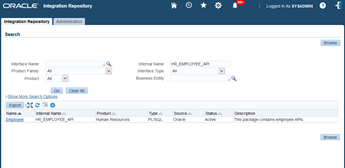
One of the big challenges with adopting Cloud Services Architecture is how to integrate the on-premise applications when the applications are behind the firewall. A very common scenario that falls within this pattern is cloud integration with Oracle E-Business Suite (EBS). To address this cloud-to-ground pattern without complex firewall configurations, DMZs, etc., Oracle offers a feature with the Integration Cloud Service (ICS) called Connectivity Agent (additional details about the Agent can be found under New Agent Simplifies Cloud to On-premises Integration). Couple this feature with the EBS Cloud Adapter in ICS and now we have a viable option for doing ICS on-premise integration with EBS. The purpose of this A-Team blog is to detail the prerequisites for using the EBS Cloud Adapter and walk through a working ICS integration to EBS via the Connectivity Agent where ICS is calling EBS (EBS is the target application). The blog is also meant to be an additional resource for the Oracle documentation for Using Oracle E-Business Suite Adapter.

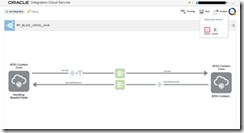
The technologies at work for this integration include ICS (Inbound REST Adapter, Outbound EBS Cloud Adapter), Oracle Messaging Cloud Service (OMCS), ICS Connectivity Agent (on-premise), and Oracle EBS R12.  The integration is a synchronous (request/response) to EBS where a new employee will be created via the EBS HR_EMPLOYEE_API. The flow consists of a REST call to ICS with a JSON payload containing the employee details.  These details are then transformed in ICS from JSON to XML for the EBS Cloud Adapter. The EBS adapter then sends the request to the on-premise connectivity agent via OMCS. The agent then makes the call to EBS where the results will then be passed back to ICS via OMCS. The EBS response is transformed to JSON and returned to the invoking client. The following is a high-level view of the integration: Prerequisites read the complete article here.

SOA & BPM Partner Community

For regular information on Oracle SOA Suite become a member in the SOA & BPM Partner Community for registration please visit www.oracle.com/goto/emea/soa (OPN account required) If you need support with your account please contact the Oracle Partner Business Center.

Blog Twitter LinkedIn image[7][2][2][2] Facebook clip_image002[8][4][2][2][2] Wiki

Using the ICS Connectivity Agent with an On-Premises Database by Robert van Mölken

clip_image002

In this third article about the Connectivity Agent we deep-dive into the details. We learn how to use the ICS Connectivity Agent in combination with an on-premises database. For more information about the architecture and installation of the agent I recommend to read these two articles first. This article continuous where the previous article about the installation ended.

Taking the Agent for a test drive

Now that the Connectivity Agent is installed, registered and running we can use the Agent to create connections to our on-premises applications and create integration on top of these applications.

Preparing the connection to the on-premises database

Now that we know the Agent is running we can make a connection to the on-premises database. For this example I use the HR sample schema that is part of my database installation. Navigate to the connections page of ICS and click on the “Create new Connection” button. My instance is running the latest 16.1.3 version. The “Create Connection” dialog now at lot nicer and user friendlier.

Select the Database adapter to create a connection your database instance. the connection is named OnPremisesHRDB which creates the associated identifier ONPREMISESHRDB. Read the complete article here.

SOA & BPM Partner Community

For regular information on Oracle SOA Suite become a member in the SOA & BPM Partner Community for registration please visit www.oracle.com/goto/emea/soa (OPN account required) If you need support with your account please contact the Oracle Partner Business Center.

Blog Twitter LinkedIn image[7][2][2][2] Facebook clip_image002[8][4][2][2][2] Wiki

PaaS & Middleware Partner YouTube Update December 2016

The December edition of the PaaS & Middleware Partner Update contains three key topics:

  • Cloud Partner Opportunities
  • Enrich SaaS with PaaS
  • SOA & BPM Partner Community Webcasts December20th 2016

For regular updates please subscribe to our YouTube channel here. Thanks for your likes and sharing the video on YouTube and LinkedIn. For the latest SOA & BPM Partner Community information please visit our Community update wiki here (Community membership required)

SOA & BPM Partner Community

For regular information on Oracle SOA Suite become a member in the SOA & BPM Partner Community for registration please visit www.oracle.com/goto/emea/soa (OPN account required) If you need support with your account please contact the Oracle Partner Business Center.

Blog Twitter LinkedIn image[7][2][2][2] Facebook clip_image002[8][4][2][2][2] Wiki

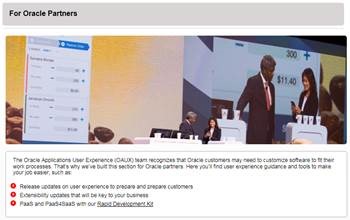
Applications User Experience OpenWorld 2016 results

image


See what the Oracle Applications User Experience (#OAUX) team did during Oracle OpenWorld 2016 in San Francisco in September on the Voice of User Experience blog, or VoX, where we’ve reposted our most recent Storify collection. Here’s a short summary of the big stuff:

 The OAUX Cloud Exchange, where the OAUX team demos near-future and future concepts, was extended to three days this year. Participants included Oracle partners, industry analysts, private customer tours, global media, legislators learning about technology, and a robot, which was part of an emerging technologies demo on virtual reality.

 Several Cloud UX demos and messages popped up in general sessions, like the Oracle ERP Cloud. The simplified UI designs central to the Cloud user experience were a new and exciting story to share with ERP customers, so we saw it in several sessions. For more user experience excitement, this time in the Oracle HCM Cloud general session, check out this tweet showing a voice demo from the OAUX team. (The audience actually applauded.)

 About 250 people came through lab tours at Oracle Headquarters in Redwood Shores, Calif., and nearly 100 customers and partners participated in customer feedback sessions, focus groups and a design jam at the onsite lab.

 A new UX Rapid Development Kit (RDK) was also announced in time for OpenWorld. Read about what’s available now in this post on the Usable Apps blog.

 The OAUX IoT workshops, a joint project with the Oracle Technology Network (OTN), pulled in about 200 people who attended workshops during three days at both JavaOne and OpenWorld conferences. More tweets are on Twitter, including a short video by ACE Director Tim Hall, who is using the chip that the AppsLab, the OAUX emerging technologies team, provided post-show. He also wrote about it in this post. The AppsLab team wrote about their experiences on their blog as well.

ORACLE HCM CLOUD: In September Aylin Uysal, Senior Director, HCM User Experience, was part of an Oracle Partner Network Partner Cast. She discussed Oracle’s HCM UX strategy with host Jonathan Vinoskey, Director of Global Partner Enablement, HCM Cloud, Oracle Sales and Partner Academy.

Aylin also points to a recent video from industry analyst Holger Mueller from the Constellation Group, where he talks about what makes a great user experience.

STRATEGY DAY WITH ACE DIRECTORS: During OpenWorld, the OAUX team held a special Strategy Day for several hand-picked ACE Directors who are interested in the Oracle cloud user experience. For a look at what they took away from that daylong meeting, read these posts:

SOA & BPM Partner Community

For regular information on Oracle SOA Suite become a member in the SOA & BPM Partner Community for registration please visit www.oracle.com/goto/emea/soa (OPN account required) If you need support with your account please contact the Oracle Partner Business Center.

Blog Twitter LinkedIn image[7][2][2][2] Facebook clip_image002[8][4][2][2][2] Wiki