Create a SOA Application in JDeveloper 12c Using Maven SOA Plug-In by Daniel Rodriguez


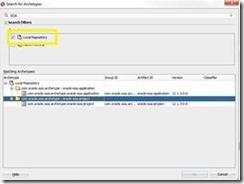
clip_image002Maven is a commonly used build system for java projects. It provide benefits ranging from standardizing project layouts, to automated dependency fetching, to automated builds and Maven.  Oracle provides a pretty comprehensive document outlining how to build and create Oracle SOA and BPM projects using Maven. See this article that documents some simple steps to get up and running using Maven. However, when running my first Maven project I encountered some unexpected errors. Maven could not find any SOA archetypes and was also unable to load every dependency. As I found, being able to create, build, and deploy SOA and BPM projects using Maven requires some initial pre-work. Once the set-up is done, the Oracle doc mentioned above will make more sense and will execute successfully.

Why Maven in SOA Applications?

Unlike Ant, Maven does not require developers to specify every command to achieve a goal. Moreover, Maven’s structure in the form of a POM file allows dependencies to be managed easily. However, the biggest benefit is that Maven in JDeveloper provides complete a life-cycle process. Each goal incorporates the previous one and adds functionality. For example, if we run the mvn test command, it will execute the compile, package and deploy commands before running each test on the composite. The idea is to provide a foundation for continuous development and integration. A single command can compile, package, deploy and run all test cases: saving you time.

Gradle provides much of the same functionality of Maven but on a different format. It is implemented using Groovy and, as a result, some of its scripts are much shorter than Maven’s. Unfortunately, Gradle is not native to JDeveloper at this moment.

Maven Goals

Documentation lists five goals for the SOA Maven Plug-in. However, The plug-in itself lists six goals.

  1. compile: Compiles the Application
  2. package: Creates a SAR file of the composite
  3. deploy: Deploys the SOA composite
  4. test: Runs all test created for the SOA composite
  5. undeploy: Removes the composite
  6. help: Provides a list of goals and their corresponding commands.

The help goal is the only goal not listed in the actual Oracle document but displayed on the plug-in itself. While the “help” command may not be a “Goal”, It provides useful information regarding goals, commands, and what each command tries to achieve. Read the complete article here.

SOA & BPM Partner Community

For regular information on Oracle SOA Suite become a member in the SOA & BPM Partner Community for registration please visit www.oracle.com/goto/emea/soa (OPN account required) If you need support with your account please contact the Oracle Partner Business Center.

Blog Twitter LinkedIn image[7][2][2][2] Facebook clip_image002[8][4][2][2][2] Wiki

SOA Suite 12c monitoring with EM 12c Cloud Control by Michel Schildmeijer


clip_image002Good monitoring is knowing how your systems and application are doing at past, present and future time. There are many  monitoring tools & solutions at the market, all with pro’s and cons. Building monitoring takes time and effort but in the end gives you the benefit of less disturbance and more guarantee of business continuity.

At the customers I work for, I often implemented Oracle’s Enterprise manager 12c Cloud Control to build a monitoring framework. In this blog I will tell about what needs to be done to build such a framework.

Pre Requirements

Before start building a solution, make sure you have:

  • The proper monitoring pack licenses; for SOA Suite that will be:
    • The WebLogic Diagnostics & Monitoring Pack
    • The SOA Suite Diagnostics & Montitoring Pack
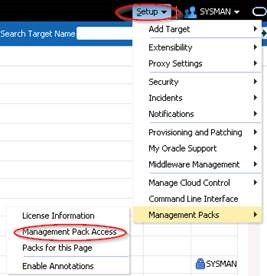
  • Agents installed on every physical (or virtual ) host where WebLogic / SOA is running

Building Steps

Deploying Agents to Targets

If not already done so, agents need to be deployed to the hostst were middleware is running. I will not discuss this any further because this is more Enterprise Manager generic.

Discover Middleware Targets

Discovering Middleware Targets is just as it is as with other Targets. Read the complete article here.

SOA & BPM Partner Community

For regular information on Oracle SOA Suite become a member in the SOA & BPM Partner Community for registration please visit www.oracle.com/goto/emea/soa (OPN account required) If you need support with your account please contact the Oracle Partner Business Center.

Blog Twitter LinkedIn image[7][2][2][2] Facebook clip_image002[8][4][2][2][2] Wiki

MTOM using SoapUI and OSB by Martien van den Akker


clip_image001MTOM (Message Transmission Optimization Mechanism) is incredibly hard… to find practical information about, on SoapUI and OSB. There are loads of articles. Like:

But I need to process documents that are send using MTOM to my service. And to be able to test it, I need to create a working example of a SoapUI project to do exactly that. Also about SoapUI and MTOM there are loads of examples, and it is quite simple really. But I had a more complex wsdl that I was able to use for Soap with Attachments (SwA) wich is also simple really. But how to connect those two in a simple working example? Well, actually, it turns out not so hard either… So bottom-line, MTOM with SoapUI and OSB is not so hard. If you know how, that is.
So let’s work this out on a step-by-step basis.

XSD/WSDL

I’ll start with a simple XSD: Read the complete article here.

SOA & BPM Partner Community

For regular information on Oracle SOA Suite become a member in the SOA & BPM Partner Community for registration please visit www.oracle.com/goto/emea/soa (OPN account required) If you need support with your account please contact the Oracle Partner Business Center.

Blog Twitter LinkedIn image[7][2][2][2] Facebook clip_image002[8][4][2][2][2] Wiki

Why does DB-adapter return duplicate rows? by Jon Petter Hjulstad


clip_image002Here are some DB adapter tips regarding duplicate rows.

The DB Adapter has some nice features, but sometimes you can get fooled. One of my colleagues experiences this one day. The query returned the same row – just repeated many times.

The reason for this is because the primary key was not defined correctly.

The good thing is that the documentation describes this – and more: Oracle documentation

For tables where primary key is defined – this should not be a problem, but in cases where it is not defined or you are querying a view – you would need to specify a primary key yourself. A couple of relevant notes here:

  • If you do not provide a valid primary key, then the unique constraint is not guaranteed, and this could result in possible loss of messages at runtime. That is, rows with duplicate primary key values are likely to be lost.
  • You should ensure that you primary key is less than 100 bytes.
  • Oracle recommends that you use varchar instead of char for primary key columns

Read the complete article here.

SOA & BPM Partner Community

For regular information on Oracle SOA Suite become a member in the SOA & BPM Partner Community for registration please visit www.oracle.com/goto/emea/soa (OPN account required) If you need support with your account please contact the Oracle Partner Business Center.

Blog Twitter LinkedIn image[7][2][2][2] Facebook clip_image002[8][4][2][2][2] Wiki

My private Corner – Merry Christmas

clip_image002

Our little family wish’s you all a Merry Christmas. Get some time to rest with your family. Enjoy your traditional Christmas meal with a good bottle of wine.

Whish you a great start in 2016 and see you all in Valencia!

Bandit & Jürgen

SOA & BPM Partner Community

For regular information on Oracle SOA Suite become a member in the SOA & BPM Partner Community for registration please visit www.oracle.com/goto/emea/soa (OPN account required) If you need support with your account please contact the Oracle Partner Business Center.

Blog Twitter LinkedIn image[7][2][2][2] Facebook clip_image002[8][4][2][2][2] Wiki

Connect and consume data with Oracle RightNowCX using the new SOA12c RightNow adapter by Fabio Persico

 
clip_image002Connect and consume data with Oracle RightNowCX using the new SOA12c RightNow adapter

The  Oracle RightNow adapter has been released for the SOA 12.1.3 just couple of months ago, and I tested as soon as I’ve heard of it!

What it is needed for this tip
  • JDeveloper 12.1.3
  • An account with read right on the WebServices exposed by an Oracle Rightnow instance
Before starting!

Make sure the following patch bundle has been applied to your SOA/jdev Home.
Bundle Patch for Bug: 20423408
The patch can be downloaded from Oracle support of course, and installed using opatch apply.
The patch must be applied to both, the SOA Server home (if not in the jdev home) and Jdev home, since the new plugin which will shows the RightNow adapter wizard, must be configured into JDeveloper.
Remember to perform the post-installation steps (patch READ-ME for details):

1. Log in to Fusion Middleware Control Enterprise Manager.
2. Expand "Weblogic Domain" in the left panel
3. Right click on the domain you want to modify and select Security > System Policies to display the page System Policies. Read the complete article here

SOA & BPM Partner Community

For regular information on Oracle SOA Suite become a member in the SOA & BPM Partner Community for registration please visit www.oracle.com/goto/emea/soa (OPN account required) If you need support with your account please contact the Oracle Partner Business Center.

Blog Twitter LinkedIn image[7][2][2][2] Facebook clip_image002[8][4][2][2][2] Wiki

Packt Skill up


Back in June, we asked you what tech skills you were using most and what you were hoping to learn in the coming months. Over 20,000 of you replied and helped us to produce the most informative salary and skills reports of 2015.

clip_image002Almost 6 months later, we want to find out what has changed, to get your thoughts on the most important emerging tech for 2016 and to, ultimately, help you to Skill Up into a new year.

Take our quick 5 minute survey and you will receive a code for buying any eBook or video for just $5! Find more here. For the latest books please visit our wikis SOA Books and BPM Books.

SOA & BPM Partner Community

For regular information on Oracle SOA Suite become a member in the SOA & BPM Partner Community for registration please visit www.oracle.com/goto/emea/soa (OPN account required) If you need support with your account please contact the Oracle Partner Business Center.

Blog Twitter LinkedIn image[7][2][2][2] Facebook clip_image002[8][4][2][2][2] Wiki

How to customize your Service Bus 12c pipeline templates by Jan van Zoggel


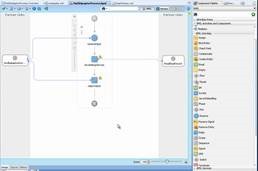
clip_image001One of the new features in Service Bus 12c is the ability to use pipeline templates. Usually the Oracle Service Bus pipelines in an environment have many common steps. Think of the re-use of logging, error handling, alerts and pattern + naming convention for your stages. In practice with OSB 11g we often used a “template” or existing OSB project which we then copied and modified. With the “clone” option of 12c this task is already easier, but the use of pipeline templates is even better. Since templates and concrete pipelines (generated pipelines from a template) remain linked we can update our services easier with new insights. For example, when you want to change your default logging or fault handling behavior.

Index:

To use pipeline templates to their fullest potential we can customize them to our own needs. For this we have multiple options.

Generic configuration

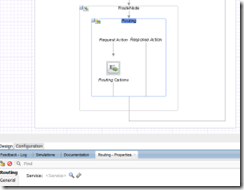
The essential configuration of most actions can be left empty in the template without any problem. As soon as they are implemented in concrete pipelines the actions there will come into an ERROR state. The example below shows the Routing which is empty in the pipeline template. When developing the concrete pipelines we can then easily set the correct business service. Read the complete article here.

SOA & BPM Partner Community

For regular information on Oracle SOA Suite become a member in the SOA & BPM Partner Community for registration please visit www.oracle.com/goto/emea/soa (OPN account required) If you need support with your account please contact the Oracle Partner Business Center.

Blog Twitter LinkedIn image[7][2][2][2] Facebook clip_image002[8][4][2][2][2] Wiki

SOA & BPM Community Newsletter December 2015

Registration for our Oracle Fusion Middleware & PaaS EMEA Partner Community Forum 2016 is open. Don’t miss our annual conference to get the latest updates on middleware products, hybrid PaaS, network and get hands-on trained. Since the first conference in Copenhagen 2007 we have been always booked out! Don’t miss this opportunity to attend March 2016 in Valencia!

With Internet of Things (Io) Cloud Service the next PaaS Service is available. Make sure you become familiar with it and build an industry showcase like HCL has done with predictive maintenance. To get started with PaaS we do offer free trial services.

In case you missed Oracle Open World read Lucas Jellema’s reflections. We offer the OpenWorld presentations and demos for you to run events & workshops for your customer base. Also our Community workspace (membership required) we published the latest Hybrid and SOA Cloud Service material.

Thanks to the community for sharing all the SOA articles: SOA_BPM_12 2 1_Install_and_Config_Workshop & Processing large XML files & SOA 12.2.1 New Feature – End to End JSON and Javascript Example & Error Resilient Adapters – SOA 12.2.1 & Handling inbound Attachments by Service Bus & Custom Transports in Service Bus 12.2.1 & Increase speed to deployment of SOA.

Also for BPM Suite and PCS we want to encourage you to build industry solutions. A great example are the Pharma and Automotive applications from OpRisk. Or the PCS travel requset template for PCS build by Red Mavericks. To start with PCS read Waslley’s blog or Dan’s blog. Thanks to the community for sharing all the BPM articles: Business Activity Monitoring videos & Process Timers & BPM 12c Event Subprocesses.

In our last section Architecture & AppAdvantage we published excellent SaaS integration articles for HCM Cloud & ServiceCloud Rightnow. You can learn more about SaaS Cloud integration by joining our Webcast December 17th 2015.

Yes this newsletter is again long – make sure you read it! For a short summery of our key monthly information watch the Fusion Middleware Partner Updates on YouTube. The December edition of the Middleware Partner Update includes tips for PaaS Industry Showcases and reminds you to register for our Partner Community Forum 2016. For details about Process Cloud Service V2 join our Community Webcast December 15th 2015.

Jürgen Kress

Fusion Middleware Partner Adoption
Oracle EMEA

To read the newsletter please visit http://tinyurl.com/SOAnewsDecember2015  (OPN Account required)

To become a member of the SOA Partner Community please register at http://www.oracle.com/goto/emea/soa (OPN account required) If you need support with your account please contact the Oracle Partner Business Center.

image

Blog Twitter LinkedIn image[7][2][2][2] Facebook

Technorati Tags: newsletter,SOA Community newsletter,SOA Community,Oracle,OPN,Jürgen Kress

5 Best practices for SoapUI Pro and Oracle SOA Suite by Martijn van der Kamp

clip_image001

Over the last year I had the opportunity to be involved in an Oracle SOA Suite 10g to 11g upgrade. At the starting point, the 10g situation, automated tests were not yet part of the landscape. As part of our approach to upgrade the SOA Suite from 10g to 11g, we created SoapUI tests to check that the 11g code would behave functionally the same as the 10g code. This ensured the quality of the code and it also enabled us to run a full regression test within 30 minutes. During the project we created around 300 test cases in SoapUI. Next to that we continuously leveraged our experiences while working in an upgrade environment, and improved our test approach during the project. In this blog I will elaborate on five best practices while using SoapUI in combination with Oracle SOA Suite.

1. Minimize groovy scripting.

As we made the SoapUI tests based on functional flows we realized that a large part of the SOA Suite projects are reused in various functional flows. To make the maintainability easier, we created some groovy scripts that handle the messaging for these steps. It shortens the number of steps in the test case by letting the groovy script handle multiple steps in the background. Also we would be able to store the groovy script in a scripts folder, and call it from any test cases we would create. See figure 1.

Figure 1 Using Groovy script to shorten the number of steps

It started out simple, with a few generic post and get message steps. But not long after that, the first if-then-else statements started to introduce themselves inside the scripts. After that started, the scripts gained in complexity. Read the complete article here.

SOA & BPM Partner Community

For regular information on Oracle SOA Suite become a member in the SOA & BPM Partner Community for registration please visit www.oracle.com/goto/emea/soa (OPN account required) If you need support with your account please contact the Oracle Partner Business Center.

Blog Twitter LinkedIn image[7][2][2][2] Facebook clip_image002[8][4][2][2][2] Wiki