Putting BPM Change Management into the Hands of the Business by Mark Peterson

image

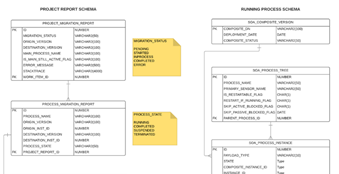
Business Process Management (BPM) is an important part of many organizations. Many experts agree that BPM is not only important for business operations, it is a necessary component for handling change. There can be changes in assignments, changes in back-end systems and changes in workflow are just some examples. However when changes occur, it has been up to IT to implement and up to the business managers to manage the fallout. We all know change is painful, and the more we can place change control in the hands of the business managers, the better the organization can manage change.

AVIO has developed a framework that gives managers control over changes to their business processes.  To see how this works, let’s first characterize the types of changes we typically see within an organization and their business processes.

Process Changes

  • A new assignment (for example, approving a work item) is added or removed to an existing task.
  • New decision points are added or removed that branch the process in different ways.
  • A new back-end service is added, removed or changed.
  • A new sequential or parallel activity is added or removed.
  • A new sub-process is added or removed.

Business Data Changes

  • A business parameter (such as the amount of the invoice) is added that changes the path in the process.
  • A new business parameter (such as region) or value for a given parameter (such as a new region) is added that changes the process flow.

Notice that not all changes involve process changes. Some changes are data-related.  Whether process-related or data-related, these changes can cause problems within your organization.  Typically, a one-size fits all solution, is applied to the problem. New process versions are developed and deployed, and the business is faced with the fallout. Read the complete article here.

SOA & BPM Partner Community

For regular information on Oracle SOA Suite become a member in the SOA & BPM Partner Community for registration please visit www.oracle.com/goto/emea/soa (OPN account required) If you need support with your account please contact the Oracle Partner Business Center.

Blog Twitter LinkedIn image[7][2][2][2] Facebook clip_image002[8][4][2][2][2] Wiki

Technorati Tags: SOA Community,Oracle SOA,Oracle BPM,OPN,Jürgen Kress
An Introduction to Oracle Internet of Things by Kashif Manzoor

image 

Internet of Things (IOT) is the internetworking of physical devices, vehicles (also referred to as “connected devices” and “smart devices“), buildings, and other items-embedded with electronics, software, sensors, actuators, and network connectivity that enable these objects to collect and exchange data.(source Wikipedia).

If you have not watched movie I.T, must watch it today and you will get to the feelings of Smart-Home concept and how heavily used IOT is showing in the movie.

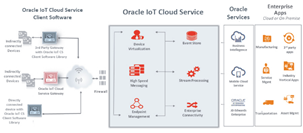
Oracle is also offering namely Oracle Internet of Things (IoT) Cloud Service product as a part of Platform as a Service (PaaS) category that enables customers to connect devices to the IOT cloud, analyze data and alert messages from devices in real time to make critical business decisions and this can be integrated back to any other application through web services, or with other Oracle Cloud Services, such as Oracle Business Intelligence Cloud Service, etc.

Started exploring IOT so this is 1st post on voyage to connect “things” with “Internet”, started from official documentation of Oracle Internet of Things and flow of the overall IOT is as below:

Typical Workflow for Using Oracle IoT Cloud Service

  1. Register the device models that are implemented by your devices.
  2. Create an IoT application.
  3. Register device
  4. Configure device to connect to Oracle IoT Cloud Service server.
  5. Activate previously registered gateway device
  6. Develop device software using Oracle IoT Cloud Service Client Software
  7. Develop enterprise applications that use the Oracle IoT Cloud Service REST API

Overall representation or architecture of IOT is as per below image. Read the complete article here.

SOA & BPM Partner Community

For regular information on Oracle SOA Suite become a member in the SOA & BPM Partner Community for registration please visit www.oracle.com/goto/emea/soa (OPN account required) If you need support with your account please contact the Oracle Partner Business Center.

Blog Twitter LinkedIn image[7][2][2][2] Facebook clip_image002[8][4][2][2][2] Wiki

Technorati Tags: SOA Community,Oracle SOA,Oracle BPM,OPN,Jürgen Kress
An Introduction to Oracle Stream Analytics and Stream Processing Kafka Data by Robin Moffatt

image

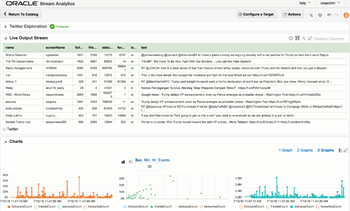
Oracle Stream Analytics (OSA) is a graphical tool that provides “Business Insight into Fast Data”. In layman terms, that translates into an intuitive web-based interface for exploring, analysing, and manipulating streaming data sources in realtime. These sources can include REST, JMS queues, as well as Kafka. The inclusion of Kafka opens OSA up to integration with many new-build data pipelines that use this as a backbone technology.

Previously known as Oracle Stream Explorer, it is part of the SOA component of Fusion Middleware (just as OBIEE and ODI are part of FMW too). In a recent blog it was positioned as “[…] part of Oracle Data Integration And Governance Platform.”. Its Big Data credentials include support for Kafka as source and target, as well as the option to execute across multiple nodes for scaling performance and capacity using Spark.

I’ve been exploring OSA from the comfort of my own Mac, courtesy of Docker and a Docker image for OSA created by Guido Schmutz. The benefits of Docker are many and covered elsewhere, but what I loved about it in this instance was that I didn’t have to download a VM that was 10s of GB. Nor did I have to spend time learning how to install OSA from scratch, which whilst interesting wasn’t a priority compared to just trying to tool out and seeing what it could do. [Update] it turns out that installation is a piece of cake, and the download is less than 1Gb … but in general the principle still stands – Docker is a great way to get up and running quickly with something

In this article we’ll take OSA for a spin, looking at some of the functionality and terminology, and then real examples of use with live Twitter data. Read the complete article here.

SOA & BPM Partner Community

For regular information on Oracle SOA Suite become a member in the SOA & BPM Partner Community for registration please visit www.oracle.com/goto/emea/soa (OPN account required) If you need support with your account please contact the Oracle Partner Business Center.

Blog Twitter LinkedIn image[7][2][2][2] Facebook clip_image002[8][4][2][2][2] Wiki

Technorati Tags: SOA Community,Oracle SOA,Oracle BPM,OPN,Jürgen Kress
Add client certificate for outgoing OSB call by Hugo Hendriks

image

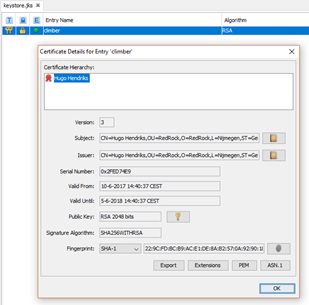
Simple use case……you want to connect to a customer system over the internet. The customers system has an API but requires 2-way SSL. This means we have to send a client certificate along to make sure the SSL handshake can be completed. If your server has already a server certificate installed, it will send this one along by default but the customers system won’t accept it as it is different then what it trusts. In the next section, I will explain how to add a client certificate to an outgoing OSB call.

Let’s say I want to connect to my favourite climbing shop http://www.mountaingear.com as they have a nice backend api to take orders. The guys from mountaingear.com created a certificate for me to send along with the call.

First I am going to generate a keystore with a private key in it, to simulate the certificate which the third party gave to me. Read the complete article here.

SOA & BPM Partner Community

For regular information on Oracle SOA Suite become a member in the SOA & BPM Partner Community for registration please visit www.oracle.com/goto/emea/soa (OPN account required) If you need support with your account please contact the Oracle Partner Business Center.

Blog Twitter LinkedIn image[7][2][2][2] Facebook clip_image002[8][4][2][2][2] Wiki

Technorati Tags: SOA Community,Oracle SOA,Oracle BPM,OPN,Jürgen Kress
When Oracle SOA Database Pollers Collide by Aaron Dolan

image 

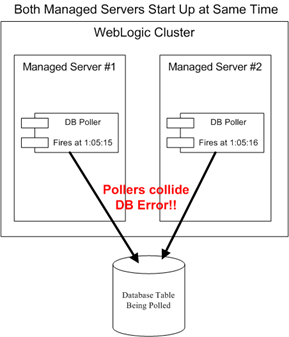
Oracle SOA Database Adapters provide a polling mechanism that will periodically query a table to see if a there is a new or changed record.  If so, it can trigger a BPEL process.  This is enormously useful.  However, on one client I ran into a series of issues with database pollers in a clustered environment when they … collided.  (queue dramatic music)

The issue began one quiet morning early in the project after I started my WebLogic Admin Server and 2 SOA 11g Managed Servers.  I then deployed my process with my shiny new database poller.  I was very excited to see it work in the Development Environment.  I had tested it the night before in my local VM and it worked great.

I won’t bore you with the details of what the overall process did, but suffice it to say, I was not excited with the database error I received when the pollers fired.  You heard me right … pollers.

I did NOT anticipate that SOA would have a separate database poller for each managed server for the same process.  However, after consulting with colleagues, I found that they too had seen this rather odd and seemingly illogical behavior.

Luckily after a bit of sleuthing, I found a nice solution – the Distributed Polling flag.  As usual, the A Team came to the rescue with an outstanding article that nicely explained the inner guts of how this works: DB Adapter – Distributed Polling (SKIP LOCKED) Demystified.

In short, this flag doesn’t allow more than 1 server to issue a lock on a table at a given time.  In effect, this ensures that you end up with 1 database poller for your process and not 1 per managed server (however, there is a twist to this that I’ll discuss in a moment). Read the complete article here.

SOA & BPM Partner Community

For regular information on Oracle SOA Suite become a member in the SOA & BPM Partner Community for registration please visit www.oracle.com/goto/emea/soa (OPN account required) If you need support with your account please contact the Oracle Partner Business Center.

Blog Twitter LinkedIn image[7][2][2][2] Facebook clip_image002[8][4][2][2][2] Wiki

Technorati Tags: SOA Community,Oracle SOA,Oracle BPM,OPN,Jürgen Kress
Oracle SOA Suite: Want performance? Don’t log so much and clean up your database! by Maarten Smeets

image


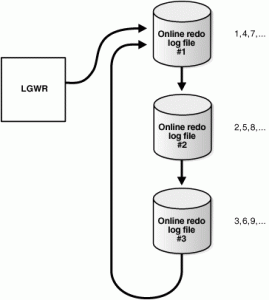
The Oracle SOA Suite infrastructure, especially composites, use the database intensively. Not only are the process definitions stored in the database, also a lot of audit information gets written there. The SOA infrastructure database, if not well managed, will grow and will eventually have detrimental effects on performance. In this blog post I will give some quick suggestions that will help you increase performance of your SOA Suite infrastructure on the database side by executing some simple scripts. These are some suggestions I have seen work at different customers. Not only do they help managing the SOA Suite data in the database, they will also lead to better SOA Suite performance.

Do not log too much!

Less data is faster. If you can limit database growth, management becomes easier.

  • Make sure the auditlevel of your processes is set to production level in production environments.
  • Think about the BPEL setting inMemoryOptimization. This can only be set for processes that do not contain any dehydration points such as receive, wait, onMessage and onAlarm activities. If set to true, the completionpersistpolicy can be used to tweak what to do after completion of the process. For example only save information about faulted instances in the dehydration store. In 12c this setting is part of the ‘Oracle Integration Continuous Availability’ feature and uses Coherence.

Start with a clean slate regularly

Especially for development environments it is healthy to regularly truncate all the major SOAINFRA tables. The script to do this is supplied by Oracle: MW_HOME/SOA_ORACLE_HOME/rcu/integration/soainfra/sql/truncate/truncate_soa_oracle.sql

The effect of executing this script is that all instance data is gone. This includes all tasks, long running BPM processes, long running BPEL processes, recoverable errors. For short everything except the definitions. The performance gain from executing the script can be significant. You should consider for example to run the script at the end of every sprint to start with a clean slate. Read the complete article here.

SOA & BPM Partner Community

For regular information on Oracle SOA Suite become a member in the SOA & BPM Partner Community for registration please visit www.oracle.com/goto/emea/soa (OPN account required) If you need support with your account please contact the Oracle Partner Business Center.

Blog Twitter LinkedIn image[7][2][2][2] Facebook clip_image002[8][4][2][2][2] Wiki

Technorati Tags: SOA Community,Oracle SOA,Oracle BPM,OPN,Jürgen Kress
Happy Easter from the PaaS Community

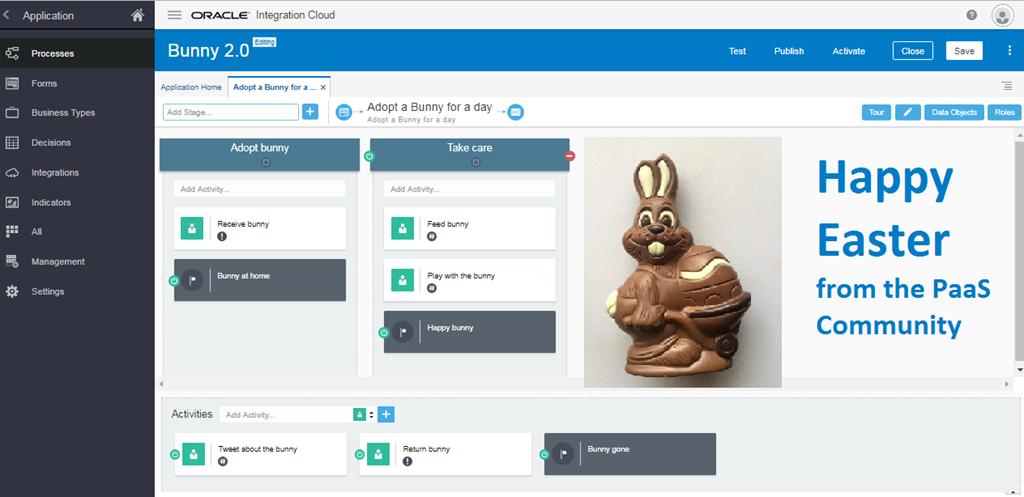
As part of the #PaaSForum community presentation we created on stage an application to handle a dynamic process to adopt a Bunny for a day. The case has two stages to adopt a bunny and take care of the bunny. The milestone “happy bunny” is achieved when to you feed and play with the bunny. Want to try it yourself? Get a feed Oracle Process Cloud Services trial here (for OPN members please see here).

Happy Easter from the PaaS Community – Jürgen Kress

image

SOA & BPM Partner Community

For regular information on Oracle SOA Suite become a member in the SOA & BPM Partner Community for registration please visit www.oracle.com/goto/emea/soa (OPN account required) If you need support with your account please contact the Oracle Partner Business Center.

Blog Twitter LinkedIn image[7][2][2][2] Facebook clip_image002[8][4][2][2][2] Wiki

Technorati Tags: SOA Community,Oracle SOA,Oracle BPM,OPN,Jürgen Kress
Using Business Events in E-Business Suite to send messages to other applications via ICS by Naveen Nahata

image

Introduction

In this article, I will discuss and demonstrate the use of Business Events in E-Business Suite (EBS) to integrate it with other applications using Integration Cloud Service (ICS). The Oracle Workflow Business Event System is an application service that leverages the Oracle Advanced Queuing (AQ) infrastructure to communicate business events between systems. This functionality is leverage by ICS to register a subscription with EBS for an event which is invoked when the event is triggered. In this article I’ll explain this in detail. ICS provides Oracle SaaS customers with pre-defined to connections to most SaaS subscriptions and zero-code integration features to quickly connect SaaS applications.

Prerequisites

E-Business Suite can be installed in a customer’s data center or on OMCS or on IaaS (Infrastructure-as-a-service). It may be installed allowing access from Public Internet, or behind the firewall where access is restricted to only within the corporate network. In case where EBS is publically accessible, ICS can integrate with EBS directly.

However, when EBS is only available within the corporate network, ICS has no connectivity to EBS. In such cases, connectivity can still be established by the use of on-premises connectivity agent. Whenever ICS needs to connect to EBS, it write the message to a queue. The connectivity agent is installed on-premises and it polls ICS periodically and passes the messages to EBS. This is a prerequisite to use ICS with EBS for any kind of integration use case. For instructions on how to install connectivity agent, please read this article

In case of Business Events, connectivity agent helps automate the process of registration of ICS integration which needs to be invoked when the even fires. When an integration in ICS which uses EBS Business Event as a trigger is activated, ICS registers the integration as a subscriber to that particular Business Event. Since ICS cannot directly communicate with EBS, if it is behind the firewall, it writes the message to a queue which is read by the connectivity agent which in turns registers the integration as a subscriber. Once the subscription is created, EBS can directly invoke the integration with the event payload since the firewall blocks incoming connections to EBS and not outgoing HTTP(s) connections from the EBS to ICS.

There are other tasks that you need to perform on EBS before it can be used with ICS for integration using Business Events. These steps include setting up Integrated SOA Gateway REST Services, deploying the required REST services, setting up ICS credentials etc. To perform the required setup, please follow the instructions in page Setting Up and Creating an Oracle E-Business Suite Adapter Connection of Oracle E-Business Suite Adapter documentation.

Main Article

For this article, I’ll take an example where there is a requirement to keep Trading Community Architecture (TCA) data in sync between EBS and Oracle Sales Cloud (OSC). EBS is on-premises and behind the firewall so it cannot be accessed from internet. I will demonstrate how to use ICS to achieve this real-time integration.

The high level series of steps will be:

1. Create an Agent group in ICS

2. Download the connectivity agent installer from ICS and install it on a separate server. This agent will help receive messages from ICS and pass them to EBS. Read the complete article here.

SOA & BPM Partner Community

For regular information on Oracle SOA Suite become a member in the SOA & BPM Partner Community for registration please visit www.oracle.com/goto/emea/soa (OPN account required) If you need support with your account please contact the Oracle Partner Business Center.

Blog Twitter LinkedIn image[7][2][2][2] Facebook clip_image002[8][4][2][2][2] Wiki

Technorati Tags: SOA Community,Oracle SOA,Oracle BPM,OPN,Jürgen Kress
Integrating the Chatbot by Léon Smiers

image

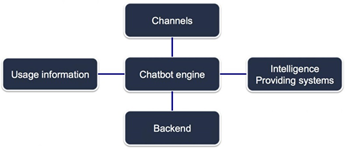
In this blog we look at the specific aspects of Chatbots and elaborate on its four integration parts. Read our previous blogs in this series: Why Chatbots, Maturity levels and Intelligence.

Chatbots are like any other application; they have a need for integration. In basic form the Chatbot integrates with the Channels, the Intelligence Providing systems, Backend systems  and it offloads Usage information for later improvements and intelligence determination.

All four integration parts have their usage patterns and (non functional) requirements for usage in the Chatbot solution.

Here we go through the details of each integration parts and considerations that need to be made during the design of a Chatbot solution.

Channel integration
Integration with channels firstly is about the job of acting as a funnel for many devices all communicating with the bot engine. As human interaction is a fraction of the speed of the ability for the engine to process the dialogue we need a more contemporary integration model that doesn’t tie up resources such as threads for each stream of interaction such as the models that Kafka and Node.js support. Read the complete article here.

SOA & BPM Partner Community

For regular information on Oracle SOA Suite become a member in the SOA & BPM Partner Community for registration please visit www.oracle.com/goto/emea/soa (OPN account required) If you need support with your account please contact the Oracle Partner Business Center.

Blog Twitter LinkedIn image[7][2][2][2] Facebook clip_image002[8][4][2][2][2] Wiki

Technorati Tags: SOA Community,Oracle SOA,Oracle BPM,OPN,Jürgen Kress

Interfacing with HCM (or other file source) via FTP – ICS Definitive Tip #8 By Phil Wilkins

image

The techniques for integrating Oracle Human Capital Management (HCM) and several other Oracle SaaS solutions can require the use of Oracle Transactional Business Analysis (OTBI). The need for OTBI comes down to the fact that to  access to the relevant data an API is not available. OTBI can be configured to generate a report and then transfer the report using FTP. When the report needs to be consumed by ICS then an obvious FTP location is needed. One such option to hold a file for ICS to retrieve is the FTP server provided with the SaaS services (details here).

However,  it has come to light that the original intent for this FTP service was for holding bulk data intended to be used for ‘priming’ your HCM instance. As a place for staging data for ICS is in the mid to long term it isn’t recommended. The roadmap for the SaaS product team may result in removing the FTP server.

FTP Data Staging

So the question begs, where should we put the data coming out of OTBI to be consumed elsewhere? Well the next option would be to use Oracle’s Managed File Transfer (MFT). Although historically listed with SOA Cloud Service (SOA CS), it is independently priced and has  become a 1st class citizen of the PaaS family more recently. For MFT to be an option it needs to include an FTP server which it does. But MFT also has the abilities for doing a number of orchestration processes, such as calling web services when files are ready. Read the complete article here.

SOA & BPM Partner Community

For regular information on Oracle SOA Suite become a member in the SOA & BPM Partner Community for registration please visit www.oracle.com/goto/emea/soa (OPN account required) If you need support with your account please contact the Oracle Partner Business Center.

Blog Twitter LinkedIn image[7][2][2][2] Facebook clip_image002[8][4][2][2][2] Wiki

Technorati Tags: SOA Community,Oracle SOA,Oracle BPM,OPN,Jürgen Kress