Implementing Coherence and OWSM out-of-process on OSB 12c by David Saes
April 27, 2015 Leave a comment
Introduction
Enterprise Deployment Guide for Oracle SOA Suite states that we should segregate Oracle Web Service Manager (OWSM) and if we plan to use Result Caching heavily with OSB we should segregate Coherence from OSB Managed Server too, but to perform these tasks at WebLogic 12c is quite different than old version 11g. This article describes how to create an OSB domain and segregate (or “out-of-process”) OWSM and Coherence Servers from OSB Managed Servers, our desired domain is covered by the following image:
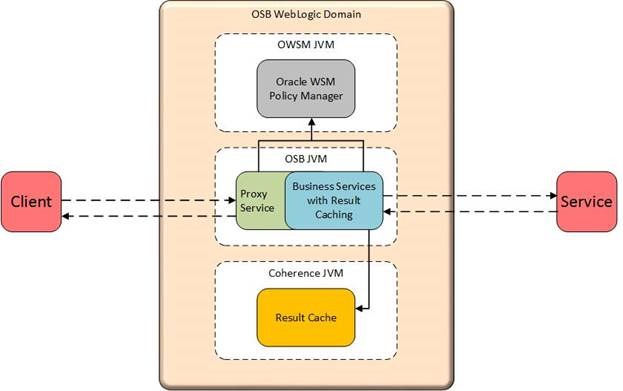
Tested Environment
- Oracle Fusion Middleware 12c (12.1.3.0.0) Infrastructure
- Oracle Fusion Middleware 12c (12.1.3.0.0) Service Bus
- Oracle JDK 7u75
- Linux
Installation Steps
I’m assuming that all Installation steps are already done before, and I’ll not cover them on this article to not be boring, the installation steps are:
(Note: always certify your system meets the Requirements and Supported Platform):
- Database Installation and Configuration
- JDK 7 Installation
- Oracle Fusion Middleware Infrastructure Installation
- Oracle Service Bus Installation
- RCU (Repository Creation Utility) Configuration
Domain Configuration
Now we already have installed the OSB binaries, we need to configure the domain using the Configuration Wizard, my Oracle Home is /u01/oracle/middleware/fmw1213 and to start the Configuration Wizard we need to go to $ORACLE_HOME/oracle_common/common/bin and execute:
|
$ ./config.sh |
Choose “Create a new domain” and choose the Domain Location as you prefer (in my case it will be /u01/oracle/domains/OSBDomain) and Click in Next button:

Select the Template “Oracle Service Bus”, and the templates: “WebLogic Advanced Web Services for JAX-RPC Extension”, “ODSI XQuery 2004 Components”, “Oracle Enterprise Manager”, “Oracle WSM Policy Manager”, “Oracle JRF” and “WebLogic Coherence Cluster Extension” will be selected too, then Click in Next button:

Choose the Application Location as you prefer (in my case it will be /u01/oracle/domains/applications/OSBDomain) and Click in Next button:

Define the Administrator Account User and password (in my case it will be weblogic for User and welcome1 for Password) and Click in Next button:
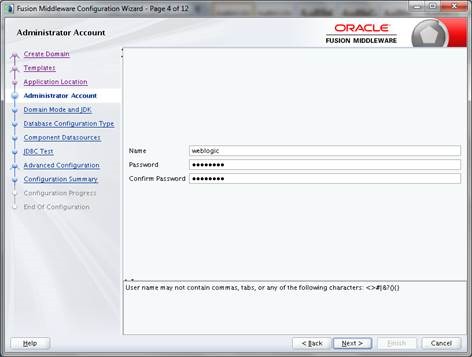
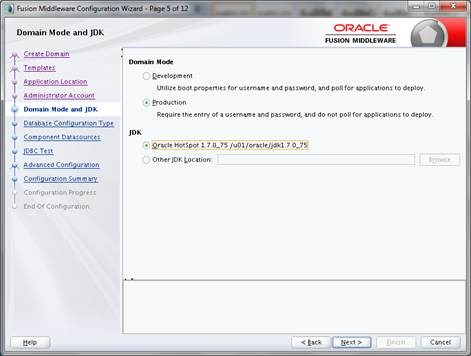
Select “Production” on Domain Mode and Choose the JDK appropriate and Click in Next button:
Enter your Database connection and RCU data then click in “Get RCU Configuration”, after we verify everything is OK click in Next button:

On Component Datasources click in Next button:
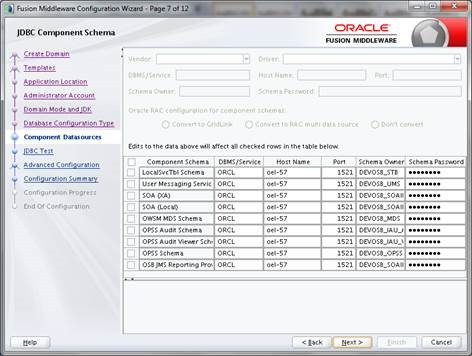
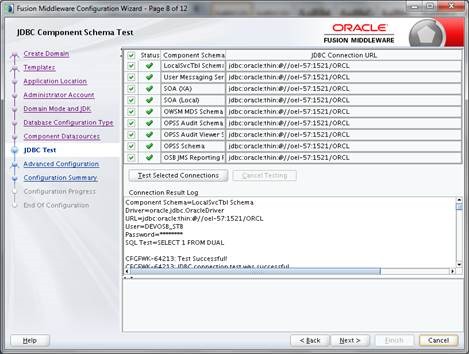
On JDBC Test verify if everything is OK and click in Next button:
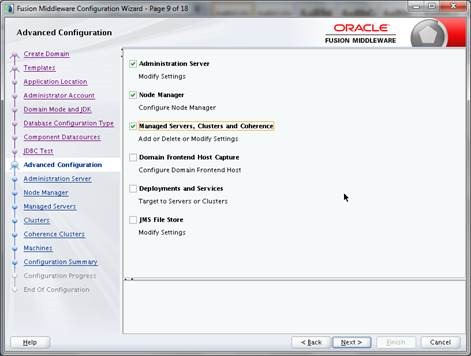
Select “Administration Server”, “Node Manager”, “Managed Servers, Clusters and Coherence” and Click in Next button:
On Administration Server enter the “Server Name” and “Listen Port” as you prefer, on “Listen Address” as EDG states use a virtual host (in my case it will be AdminServer for Server Name, admin-vip for Listen Address and 7001 for Listen Port), on “Server Groups” leave “Unspecified” and click in Next button:

Choose the “Node Manager Type” and “Node Manager Credentials” as you prefer (in my case it will be Per Domain Default Location for Node Manager Type, nmuser for Username and welcome1 for Password) and click in Next button:

On Managed Servers screen, we will change the Server Group for OSB Server from “OSB-MGD-SVRS-COMBINED” to “OSB-MGD-SVRS-ONLY”, and Click in  button to add our OWSM Managed Server then we will associate the Server Groups: “JFR-MAN-SVR” and “WSMPM-MAN-SVR” for it, then click in Next button:

Create two new cluster as following, you can adapt the names to your standards (Note: Always set Frontend Host to OSB)
|
Cluster Name |
Cluster Address |
Frontend Host |
Frontend HTTP Port |
Frontend HTTPS |
|
cluster_osb |
osb-node-01-vip:7010 |
osb-dev.internal |
80 |
443 |
|
cluster_owsm |
owsm-node-01-vip:7020 |
Click in Next button:

Associate each Server on your respective cluster then click in Next button:

Enter the name for Coherence Cluster and an Unicast Port Listen (in my case it will be CoherenceCluster for Cluster Name and 0 for Unicast Listen Port), if you leave port 0 it will create an offset for the Managed Servers, then click in Next button:

Enter the Machine information (in my case it will be machine1 for Name, machine1-vip for Node Manager Listen Address and 5556 for Node Manager Listen Port) then click in Next button:
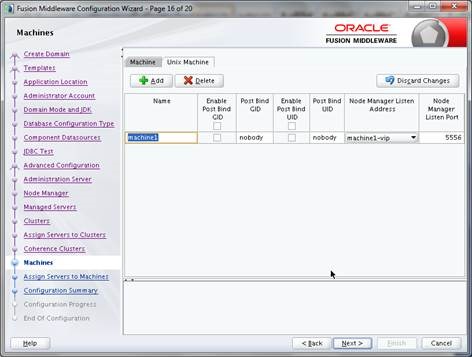
Associate the Managed Servers to Machine created then click in Next button:

Click in Create button on Configuration Summary:

After the Domain was created, click in Next button:

Click in Finish button:

Here we’ve already segregated the OSB and OWSM in two different Managed Servers.
Starting OSB domain
Now we start our OSB domain created in previous step, my Domain Location or $DOMAIN_HOME is /u01/oracle/domains/OSBDomain, and to start the Admin Server we need to go $DOMAIN_HOME, execute startWebLogic.sh shell script, when asked enter the admin user name and password and wait the process to be in RUNNING state:
|
$ ./startWebLogic.sh . . JAVA Memory arguments: -Xms1024m -Xmx2048m -XX:PermSize=512m -XX:MaxPermSize=1024m . CLASSPATH=/u01/oracle/middleware/fmw1213/oracle_common/modules/features/com.oracle.db.jdbc7-dms.jar:/u01/oracle/middleware/fmw1213/oracle_common/modules/odsi_xquery2004_12.1.3/odsi.xquery.modules_12.1.3.0.jar:/u01/oracle/jdk1.7.0_75/lib/tools.jar:/u01/oracle/middleware/fmw1213/wlserver/server/lib/weblogic_sp.jar:/u01/oracle/middleware/fmw1213/wlserver/server/lib/weblogic.jar:/u01/oracle/middleware/fmw1213/wlserver/../oracle_common/modules/net.sf.antcontrib_1.1.0.0_1-0b3/lib/ant-contrib.jar:/u01/oracle/middleware/fmw1213/wlserver/modules/features/oracle.wls.common.nodemanager_2.0.0.0.jar:/u01/oracle/middleware/fmw1213/soa/soa/modules/oracle.soa.common.adapters_11.1.1/oracle.soa.common.adapters.jar:/u01/oracle/middleware/fmw1213/soa/soa/modules/oracle.cloud.adapter_12.1.3/oracle.cloud.adapter.jar:/u01/oracle/middleware/fmw1213/osb/lib/servicebus-common.jar:/u01/oracle/middleware/fmw1213/oracle_common/communications/modules/config-12.1.3.jar:/u01/oracle/middleware/fmw1213/oracle_common/communications/modules/userprefs-config-12.1.3.jar:/u01/oracle/middleware/fmw1213/oracle_common/modules/internal/features/jrf_wlsFmw_oracle.jrf.wls.classpath_12.1.3.jar:/u01/oracle/middleware/fmw1213/osb/lib/version.jar:/u01/oracle/middleware/fmw1213/osb/lib/servicebus.jar:/u01/oracle/domains/OSBDomain/config/osb:/u01/oracle/middleware/fmw1213/wlserver/../oracle_common/modules/com.oracle.cie.config-wls-online_8.1.0.0.jar::/u01/oracle/middleware/fmw1213/wlserver/common/derby/lib/derbynet.jar:/u01/oracle/middleware/fmw1213/wlserver/common/derby/lib/derbyclient.jar:/u01/oracle/middleware/fmw1213/wlserver/common/derby/lib/derby.jar:/u01/oracle/middleware/fmw1213/wlserver/server/lib/xqrl.jar . PATH=/u01/oracle/middleware/fmw1213/wlserver/server/bin:/u01/oracle/middleware/fmw1213/wlserver/../oracle_common/modules/org.apache.ant_1.9.2/bin:/u01/oracle/jdk1.7.0_75/jre/bin:/u01/oracle/jdk1.7.0_75/bin:/usr/lib64/qt-3.3/bin:/usr/local/bin:/bin:/usr/bin:/usr/local/sbin:/usr/sbin:/sbin:/home/oracle/bin . *************************************************** * To start WebLogic Server, use a username and * * password assigned to an admin-level user. For * * server administration, use the WebLogic Server * * console at http://hostname:port/console * *************************************************** starting weblogic with Java version: java version "1.7.0_75" Java(TM) SE Runtime Environment (build 1.7.0_75-b13) Java HotSpot(TM) 64-Bit Server VM (build 24.75-b04, mixed mode) Starting WLS with line: /u01/oracle/jdk1.7.0_75/bin/java -server -Xms1024m -Xmx2048m -XX:PermSize=512m -XX:MaxPermSize=1024m -Dweblogic.Name=AdminServer -Djava.security.policy=/u01/oracle/middleware/fmw1213/wlserver/server/lib/weblogic.policy -Dweblogic.ProductionModeEnabled=true -Djava.endorsed.dirs=/u01/oracle/jdk1.7.0_75/jre/lib/endorsed:/u01/oracle/middleware/fmw1213/wlserver/../oracle_common/modules/endorsed -Djava.protocol.handler.pkgs=oracle.mds.net.protocol -Dopss.version=12.1.3 -Digf.arisidbeans.carmlloc=/u01/oracle/domains/OSBDomain/config/fmwconfig/carml -Digf.arisidstack.home=/u01/oracle/domains/OSBDomain/config/fmwconfig/arisidprovider -Doracle.security.jps.config=/u01/oracle/domains/OSBDomain/config/fmwconfig/jps-config.xml -Doracle.deployed.app.dir=/u01/oracle/domains/OSBDomain/servers/AdminServer/tmp/_WL_user -Doracle.deployed.app.ext=/- -Dweblogic.alternateTypesDirectory=/u01/oracle/middleware/fmw1213/oracle_common/modules/oracle.ossoiap_12.1.3,/u01/oracle/middleware/fmw1213/oracle_common/modules/oracle.oamprovider_12.1.3,/u01/oracle/middleware/fmw1213/oracle_common/modules/oracle.jps_12.1.3 -Dweblogic.jdbc.remoteEnabled=true -Dcommon.components.home=/u01/oracle/middleware/fmw1213/oracle_common -Djrf.version=12.1.3 -Dorg.apache.commons.logging.Log=org.apache.commons.logging.impl.Jdk14Logger -Ddomain.home=/u01/oracle/domains/OSBDomain -Doracle.server.config.dir=/u01/oracle/domains/OSBDomain/config/fmwconfig/servers/AdminServer -Doracle.domain.config.dir=/u01/oracle/domains/OSBDomain/config/fmwconfig -Doracle.mds.filestore.preferred= -Dadf.version=12.1.3 -Doracle.osb.home=/u01/oracle/middleware/fmw1213/osb -da -Dwls.home=/u01/oracle/middleware/fmw1213/wlserver/server -Dweblogic.home=/u01/oracle/middleware/fmw1213/wlserver/server -Djavax.management.builder.initial=weblogic.management.jmx.mbeanserver.WLSMBeanServerBuilder -Dem.oracle.home=/u01/oracle/middleware/fmw1213/em -DINSTANCE_HOME=/u01/oracle/domains/OSBDomain -Djava.awt.headless=true -Doracle.sysman.util.logging.mode=dual_mode -Dums.oracle.home=/u01/oracle/middleware/fmw1213/oracle_common -Djava.util.logging.manager=oracle.core.ojdl.logging.ODLLogManager -Dweblogic.utils.cmm.lowertier.ServiceDisabled=true weblogic.Server <Mar 28, 2015 12:59:36 AM BRT> <Info> <Security> <BEA-090905> <Disabling the CryptoJ JCE Provider self-integrity check for better startup performance. To enable this check, specify -Dweblogic.security.allowCryptoJDefaultJCEVerification=true.> <Mar 28, 2015 12:59:36 AM BRT> <Info> <Security> <BEA-090906> <Changing the default Random Number Generator in RSA CryptoJ from ECDRBG128 to FIPS186PRNG. To disable this change, specify -Dweblogic.security.allowCryptoJDefaultPRNG=true.> <Mar 28, 2015 12:59:37 AM BRT> <Info> <WebLogicServer> <BEA-000377> <Starting WebLogic Server with Java HotSpot(TM) 64-Bit Server VM Version 24.75-b04 from Oracle Corporation.> <Mar 28, 2015 12:59:38 AM BRT> <Info> <Management> <BEA-141107> <Version: WebLogic Server 12.1.3.0.0 Wed May 21 18:53:34 PDT 2014 1604337 >
Enter username to boot WebLogic server:weblogic Enter password to boot WebLogic server: <Mar 28, 2015 1:00:42 AM BRT> <Notice> <WebLogicServer> <BEA-000365> <Server state changed to STARTING.> <Mar 28, 2015 1:00:42 AM BRT> <Info> <WorkManager> <BEA-002900> <Initializing self-tuning thread pool.> <Mar 28, 2015 1:00:42 AM BRT> <Info> <WorkManager> <BEA-002942> <CMM memory level becomes 0. Setting standby thread pool size to 256.> <Mar 28, 2015 1:00:43 AM BRT> <Notice> <Log Management> <BEA-170019> <The server log file /u01/oracle/domains/OSBDomain/servers/AdminServer/logs/AdminServer.log is opened. All server side log events will be written to this file.> Mar 28, 2015 1:00:45 AM oracle.security.jps.JpsStartup start INFO: Jps initializing. Mar 28, 2015 1:00:52 AM org.hibernate.validator.util.Version <clinit> INFO: Hibernate Validator 12.1.3.0.0 Mar 28, 2015 1:00:52 AM org.hibernate.validator.engine.resolver.DefaultTraversableResolver detectJPA INFO: Instantiated an instance of org.hibernate.validator.engine.resolver.JPATraversableResolver. … <Mar 28, 2015 1:04:18 AM BRT> <Notice> <WebLogicServer> <BEA-000365> <Server state changed to ADMIN.> <Mar 28, 2015 1:04:18 AM BRT> <Notice> <WebLogicServer> <BEA-000365> <Server state changed to RESUMING.> <Mar 28, 2015 1:04:19 AM BRT> <Notice> <Server> <BEA-002613> <Channel "Default" is now listening on 192.168.56.102:7001 for protocols iiop, t3, ldap, snmp, http.>
<Mar 28, 2015 1:04:19 AM BRT> <Notice> <WebLogicServer> <BEA-000360> <The server started in RUNNING mode.> |


Note: If during the Admin startup you see the stack like below, it is because the Admin Server is trying to reach wsm-pm during startup. As wsm-pm is targeted only to Managed Servers which have not been started yet, this must fail.
The connection to wsm-pm will be retried, and will be established once wsm-pm is available in the domain. (more details see the MOS Note: 1948727.1)
|
<Mar 28, 2015 1:03:03 AM BRT> <Warning> <oracle.wsm.resources.policymanager> <WSM-02141> <Unable to connect to the policy access service. oracle.wsm.policymanager.PolicyManagerException: WSM-02141 : Unable to connect to the policy access service. at oracle.wsm.policymanager.BeanFactory.getInitialContext(BeanFactory.java:810) at oracle.wsm.policymanager.BeanFactory.getJndiObj(BeanFactory.java:844) at oracle.wsm.policymanager.BeanFactory.lookupJndiObj(BeanFactory.java:1175) at oracle.wsm.policymanager.BeanFactory.getUsageTrackerBeanEJB(BeanFactory.java:1019) at oracle.wsm.policymanager.BeanFactory.getBeanEJB(BeanFactory.java:544) at oracle.wsm.policymanager.BeanFactory.getBean(BeanFactory.java:451) at oracle.wsm.config.ConfigurationManager$2.run(ConfigurationManager.java:1589) at java.security.AccessController.doPrivileged(Native Method) at oracle.wsm.config.ConfigurationManager.getBean(ConfigurationManager.java:1585) at oracle.wsm.config.ConfigurationManager.access$1400(ConfigurationManager.java:169) at oracle.wsm.config.ConfigurationManager$ContextualAccessor.configureBean(ConfigurationManager.java:600) at oracle.wsm.config.ConfigurationManager$ContextualAccessor.configure(ConfigurationManager.java:541) at oracle.wsm.config.ConfigurationManager$ContextualAccessor.<init>(ConfigurationManager.java:487) at oracle.wsm.config.ConfigurationManager$ContextualAccessor.<init>(ConfigurationManager.java:375) at oracle.wsm.config.ConfigurationManager.initializeAccessors(ConfigurationManager.java:1902) at oracle.wsm.config.ConfigurationManager.reset(ConfigurationManager.java:2251) at oracle.wsm.config.ConfigurationManager.getRepositoryAccessor(ConfigurationManager.java:1803) at oracle.wsm.policyaccess.PolicyAccessPoint$1.run(PolicyAccessPoint.java:333) at oracle.wsm.policyaccess.PolicyAccessPoint$1.run(PolicyAccessPoint.java:330) at java.security.AccessController.doPrivileged(Native Method) … at org.jvnet.hk2.internal.ServiceHandleImpl.getService(ServiceHandleImpl.java:98) at org.jvnet.hk2.internal.ServiceHandleImpl.getService(ServiceHandleImpl.java:87) at org.glassfish.hk2.runlevel.internal.CurrentTaskFuture$QueueRunner.oneJob(CurrentTaskFuture.java:1162) at org.glassfish.hk2.runlevel.internal.CurrentTaskFuture$QueueRunner.run(CurrentTaskFuture.java:1147) at weblogic.work.SelfTuningWorkManagerImpl$WorkAdapterImpl.run(SelfTuningWorkManagerImpl.java:548) at weblogic.work.ExecuteThread.execute(ExecuteThread.java:311) at weblogic.work.ExecuteThread.run(ExecuteThread.java:263) Caused By: javax.naming.CommunicationException: t3://owsm-node-01-vip:7020: Destination 192.168.56.102, 7020 unreachable; nested exception is: java.net.ConnectException: Connection refused; No available router to destination] at weblogic.jndi.internal.ExceptionTranslator.toNamingException(ExceptionTranslator.java:40) at weblogic.jndi.WLInitialContextFactoryDelegate.toNamingException(WLInitialContextFactoryDelegate.java:808) at weblogic.jndi.WLInitialContextFactoryDelegate.getInitialContext(WLInitialContextFactoryDelegate.java:365) at weblogic.jndi.Environment.getContext(Environment.java:319) |
Creating Coherence Managed Server
Now we need to create our WebLogic Cluster and WebLogic Managed Server to keep our Coherence data from OSB Resulting Cache, this process is very different than the configuration on OSB 11g, in order you need to follow this steps:
- Create a file named createAndDeployCoherence.py and paste the following text:
|
## Variables username=’weblogic’ password=’welcome1′ domainURI=’t3://admin-vip:7001′ ClusterWLSCoherence_Name=’cluster_coherence’ ManagedWLSCoherence_Name=’coherence_server1′ ListenAddressCoherence=’coherence-node-01-vip’ PortCoherence=7030 ClusterCoherence=’CoherenceCluster’ MachineCoherence=’machine1′ OracleHome=’/u01/oracle/middleware/fmw1213/osb’ ## End Variables connect(username,password,domainURI); edit(); startEdit(); #Create Cluster cd(‘/’) cmo.createCluster(ClusterWLSCoherence_Name) cd(‘/Clusters/’+ClusterWLSCoherence_Name) cmo.setClusterMessagingMode(‘unicast’) #Create Server cd(‘/’) cmo.createServer(ManagedWLSCoherence_Name) cd(‘/Servers/’+ManagedWLSCoherence_Name) cmo.setListenAddress(ListenAddressCoherence) cmo.setListenPort(PortCoherence) cmo.setCluster(getMBean(‘/Clusters/’+ClusterWLSCoherence_Name)) cmo.setMachine(getMBean(‘/Machines/’+MachineCoherence)) #Disable SSL cd(‘/Servers/’+ManagedWLSCoherence_Name+’/SSL/’+ManagedWLSCoherence_Name) cmo.setEnabled(false) #Add to Coherence Cluster cd(‘/Servers/’+ManagedWLSCoherence_Name) cmo.setCoherenceClusterSystemResource(getMBean(‘/CoherenceClusterSystemResources/’+ClusterCoherence)) cd(‘/CoherenceClusterSystemResources/’+ClusterCoherence) cmo.addTarget(getMBean(‘/Servers/’+ManagedWLSCoherence_Name)) cd(‘/Clusters/’+ClusterWLSCoherence_Name) cmo.setCoherenceClusterSystemResource(getMBean(‘/CoherenceClusterSystemResources/’+ClusterCoherence)) cd(‘/CoherenceClusterSystemResources/’+ClusterCoherence) cmo.addTarget(getMBean(‘/Clusters/’+ClusterWLSCoherence_Name)) #Deploy resultcache progress=deploy(‘resultcache’,OracleHome+’/lib/apps/resultcache.gar’,ClusterWLSCoherence_Name,block=’true’,upload=’true’) progress.printStatus() print ‘Coherence Server has been configured’ save(); activate(); disconnect(); exit(); |
- Modify the script variables according to your installation settings. The variables are:
username – The Admin username created for the Domain
password – The Admin password created for the Domain
domainURI – The Url for your Admin Server
ClusterWLSCoherence_Name – The new name for WebLogic Cluster to create for the Coherence Managed Servers
ManagedWLSCoherence_Name – The new name for Coherence Managed Server
ListenAddressCoherence – The virtual host for the new Coherence Managed Server
PortCoherence – The port for the new Coherence Managed Server
ClusterCoherence – The Coherence created to the new Coherence Managed Servers
MachineCoherence – The Machine created to managed the new Coherence Managed Servers
OracleHome – Oracle Service Bus installation directory
- In another SSH session run wlst.sh shell script asking our createAndDeployCoherence.py script created previously, the wlst.sh in my case resides on /u01/oracle/middleware/fmw1213/oracle_common/common/bin/wlst.sh:
|
$ /u01/oracle/middleware/fmw1213/oracle_common/common/bin/wlst.sh createAndDeployCoherence.py Initializing WebLogic Scripting Tool (WLST) … Welcome to WebLogic Server Administration Scripting Shell Type help() for help on available commands Connecting to t3://admin-vip:7001 with userid weblogic … Successfully connected to Admin Server "AdminServer" that belongs to domain "OSBDomain". Warning: An insecure protocol was used to connect to the server. To ensure on-the-wire security, the SSL port or Admin port should be used instead. Location changed to edit tree. This is a writable tree with DomainMBean as the root. To make changes you will need to start an edit session via startEdit(). For more help, use help(‘edit’) Starting an edit session … Started edit session, please be sure to save and activate your changes once you are done. Deploying application from /u01/oracle/middleware/fmw1213/osb/lib/apps/resultcache.gar to targets cluster_coherence (upload=true) … <Mar 28, 2015 2:00:44 AM BRT> <Info> <J2EE Deployment SPI> <BEA-260121> <Initiating deploy operation for application, resultcache [archive: /u01/oracle/middleware/fmw1213/osb/lib/apps/resultcache.gar], to cluster_coherence .> You have an edit session in progress, hence WLST will not block for your deployment to complete. Started the Deployment of Application. Please refer to the returned WLSTProgress object or variable LAST to track the status. Current Status of your Deployment: Deployment command type: deploy Deployment State : failed Deployment Message : weblogic.deploy.beans.factory.InvalidTargetException: cluster_coherence Coherence Server has been configured Saving all your changes … Saved all your changes successfully. Activating all your changes, this may take a while … The edit lock associated with this edit session is released once the activation is completed. Activation completed Disconnected from weblogic server: AdminServer Exiting WebLogic Scripting Tool. <Mar 28, 2015 2:00:46 AM BRT> <Warning> <JNDI> <BEA-050001> <WLContext.close() was called in a different thread than the one in which it was created.> |
- Log into WebLogic console: http://admin-vip:7001/console
Expand Environment in the left menu and select Servers
i) Click on server osb_server1 and go to Server Start tab on Arguments, add the following parameters and Save your configuration:
|
-DOSB.coherence.cluster=CoherenceCluster -Dtangosol.coherence.distributed.localstorage=false |
ii) Click on server owsm_server1 and go to Server Start tab on Arguments, add the following parameters and Save your configuration:
|
-DOSB.coherence.cluster=CoherenceCluster -Dtangosol.coherence.distributed.localstorage=false |
iii) Click on server coherence_server1 and go to Server Start tab on Arguments, add the following parameters and Save your configuration:
|
-DOSB.coherence.cluster=CoherenceCluster |
- Start All Managed Servers
Conclusion
Now we have an OSB domain configured using the best practices that EDG says and also we can use the best that Oracle Fusion Middleware 12c can deliver.
References
https://docs.oracle.com/middleware/1213/soasuite/SOEDG/toc.htm
https://docs.oracle.com/middleware/1213/osb/develop/osb-business-services.htm#OSBDV2232
http://www.oracle.com/technetwork/articles/soa/bus-coherence-caching-421276.html
https://blogs.oracle.com/MarkSmith/entry/osb_and_coherence_integration_1
For regular information on Oracle SOA Suite become a member in the SOA & BPM Partner Community for registration please visit www.oracle.com/goto/emea/soa (OPN account required) If you need support with your account please contact the Oracle Partner Business Center.
 Blog
Blog  Twitter
  LinkedIn
 ![image[7][2][2][2]](https://paascommunity.com/wp-content/uploads/2013/04/image7222.png?w=20&h=20 "image[7][2][2][2]") Facebook
Facebook ![clip_image002[8][4][2][2][2]](https://paascommunity.com/wp-content/uploads/2013/04/clip_image00284222.jpg?w=26&h=23 "clip_image002[8][4][2][2][2]") Wiki
Wiki





 PaaS Community Blog