FMW 12.1.3 – Invoking Enterprise Scheduler Service Web Services from SoapUI by Lucas Jellema
December 10, 2014 Leave a comment
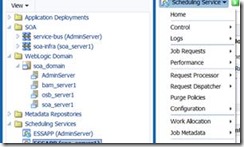
The Fusion Middleware 12.1.3 platform contains the ESS or Enterprise Scheduler Service. This service can be used as asynchronous, schedule based job orchestrator. It can execute jobs that are Operating System jobs, java calls (local Java or EJB), PL/SQL calls, and Web Service calls (synchronous, asynchronous and one-way) including SOA composite, Service Bus and ADF BC web services.
Jobs and schedules can be defined from client applications
through a Java API or through the Enterprise Manager FMW Control user interface. Additionally, ESS exposes a web service through which (pre defined) jobs can be scheduled. This web service can be invoked from BPEL processes in SOA composites – or from any component that knows how to invoke a SOAP Web Service.
In this article I will briefly demonstrate how to invoke the ESS Web Service from SoapUI. I will not describe how to create the Job Definition – I will assume two pre existing Job Definitions: HelloWorld (of type PL/SQL job) and SendFlightUpdateNotification of type SOA composite based one way Web Service. Both Job Definitions contain application properties – parameters that can be set for every job instance and that are used in the job execution. When invoking the ESS Web Service to schedule a job, values for these properties can be passed in.
There is one tricky aspect with ESS: jobs cannot be run as anonymous users. So if ESS does not know who makes the request for scheduling a job, it will not perform the request. It returns an error such as
oracle.as.scheduler.RuntimeServiceAccessControlException: ESS-02002 User anonymous does not have sufficient privilege to perform operation submitRequest JobDefinition://oracle/apps/ess/custom/saibot/SendFlightUpdateNotification.
To ensure we do not run into this problem, we have to attach a WSM security policy to the ESS Web Service and pass a WS Security Header with valid username and password in our request. Then the job request is made in the context of a validated user and this problem goes away.
The steps to go through: Read the complete article here.
For regular information on Oracle SOA Suite become a member in the SOA & BPM Partner Community for registration please visit www.oracle.com/goto/emea/soa (OPN account required) If you need support with your account please contact the Oracle Partner Business Center.
 Blog
Blog  Twitter
  LinkedIn
 ![image[7][2][2][2]](https://paascommunity.com/wp-content/uploads/2013/04/image7222.png?w=20&h=20 "image[7][2][2][2]") Facebook
Facebook ![clip_image002[8][4][2][2][2]](https://paascommunity.com/wp-content/uploads/2013/04/clip_image00284222.jpg?w=26&h=23 "clip_image002[8][4][2][2][2]") Wiki
Wiki

![clip_image001[4]](https://paascommunity.com/wp-content/uploads/2014/12/clip_image0014.jpg "clip_image001[4]")


 Simon Haslam
  jeqo @jeqo89
  Rami AL-Sahhar
  Bruno Neves Alves
  SOA Community
  André Evensen
  AVIO Consulting
  Andreas Koop
  A. Chatziantoniou
  Danilo Schmiedel
  Yogesh Sontakke
 Hendrik Gossens
  José Rodrigues
![clip_image015[1]](https://paascommunity.com/wp-content/uploads/2014/12/clip_image0151.png?w=52&h=52 "clip_image015[1]") José Rodrigues
José Rodrigues 
![clip_image010[1]](https://paascommunity.com/wp-content/uploads/2014/12/clip_image0101.jpg?w=52&h=52 "clip_image010[1]") Danilo Schmiedel
Danilo Schmiedel  Carsten Wiesbaum
 ![clip_image007[1]](https://paascommunity.com/wp-content/uploads/2014/12/clip_image0071.jpg?w=52&h=52 "clip_image007[1]") AVIO Consulting
AVIO Consulting  OTNArchBeat
  Red Mavericks
  Big Files
  Simone Geib
  Jon petter hjulstad
 ![clip_image022[1]](https://paascommunity.com/wp-content/uploads/2014/12/clip_image0221.png "clip_image022[1]")

![clip_image005[1]](https://paascommunity.com/wp-content/uploads/2014/12/clip_image0051.jpg?w=52&h=52 "clip_image005[1]") SOA Community
SOA Community ![clip_image008[1]](https://paascommunity.com/wp-content/uploads/2014/12/clip_image0081.png?w=52&h=52 "clip_image008[1]") Andreas Koop
Andreas Koop  Red Expert Alliance
  Robert van Mölken
 ![clip_image009[1]](https://paascommunity.com/wp-content/uploads/2014/12/clip_image0091.jpg?w=52&h=52 "clip_image009[1]") A. Chatziantoniou
A. Chatziantoniou ![clip_image009[2]](https://paascommunity.com/wp-content/uploads/2014/12/clip_image0092.jpg?w=52&h=52 "clip_image009[2]") A. Chatziantoniou
A. Chatziantoniou  Lonneke Dikmans

![clip_image005[2]](https://paascommunity.com/wp-content/uploads/2014/12/clip_image0052.jpg?w=52&h=52 "clip_image005[2]") SOA Community
SOA Community 
![clip_image007[2]](https://paascommunity.com/wp-content/uploads/2014/12/clip_image0072.jpg?w=52&h=52 "clip_image007[2]") AVIO Consulting
AVIO Consulting  leonsmiers
  Oracle.IMC
 JDeveloper & ADF
  Oracle Middleware
  Misha Vaughan
  gschmutz
![clip_image010[2]](https://paascommunity.com/wp-content/uploads/2014/12/clip_image0102.jpg "clip_image010[2]")

![clip_image009[3]](https://paascommunity.com/wp-content/uploads/2014/12/clip_image0093.jpg?w=52&h=52 "clip_image009[3]") A. Chatziantoniou
A. Chatziantoniou ![clip_image010[3]](https://paascommunity.com/wp-content/uploads/2014/12/clip_image0103.jpg?w=52&h=52 "clip_image010[3]") Danilo Schmiedel
Danilo Schmiedel  Rolando Carrasco
 ![clip_image015[2]](https://paascommunity.com/wp-content/uploads/2014/12/clip_image0152.png?w=52&h=52 "clip_image015[2]") José Rodrigues
José Rodrigues ![clip_image036[1]](https://paascommunity.com/wp-content/uploads/2014/12/clip_image0361.jpg?w=52&h=52 "clip_image036[1]") leonsmiers
leonsmiers ![clip_image011[1]](https://paascommunity.com/wp-content/uploads/2014/12/clip_image0111.jpg?w=52&h=52 "clip_image011[1]") Yogesh Sontakke
Yogesh Sontakke  Ken Dohan
![clip_image010[4]](https://paascommunity.com/wp-content/uploads/2014/12/clip_image0104.jpg?w=52&h=52 "clip_image010[4]") Danilo Schmiedel
Danilo Schmiedel  Debra Lilley
 ![clip_image051[1]](https://paascommunity.com/wp-content/uploads/2014/12/clip_image0511.jpg?w=52&h=52 "clip_image051[1]") Debra Lilley
Debra Lilley  Matt Brasier
 Jan van Zoggel
  Andrejus Baranovskis
 ![clip_image056[1]](https://paascommunity.com/wp-content/uploads/2014/12/clip_image0561.png?w=52&h=52 "clip_image056[1]") Andrejus Baranovskis
Andrejus Baranovskis  luc bors
 ![clip_image039[1]](https://paascommunity.com/wp-content/uploads/2014/12/clip_image0391.png?w=52&h=52 "clip_image039[1]") JDeveloper & ADF
JDeveloper & ADF ![clip_image021[1]](https://paascommunity.com/wp-content/uploads/2014/12/clip_image0211.jpg?w=52&h=52 "clip_image021[1]") OTNArchBeat
OTNArchBeat  Oracle BPM
 ![clip_image058[1]](https://paascommunity.com/wp-content/uploads/2014/12/clip_image0581.png?w=52&h=52 "clip_image058[1]") Oracle BPM
Oracle BPM ![clip_image055[1]](https://paascommunity.com/wp-content/uploads/2014/12/clip_image0551.jpg?w=52&h=52 "clip_image055[1]") Jan van Zoggel
Jan van Zoggel 
 Lucas Jellema
 ![clip_image036[2]](https://paascommunity.com/wp-content/uploads/2014/12/clip_image0362.jpg?w=52&h=52 "clip_image036[2]") leonsmiers
leonsmiers  Rajesh Kalra
 ![clip_image021[2]](https://paascommunity.com/wp-content/uploads/2014/12/clip_image0212.jpg?w=52&h=52 "clip_image021[2]") OTNArchBeat
OTNArchBeat  Luis Augusto Weir
  Dain Hansen
 ![clip_image058[2]](https://paascommunity.com/wp-content/uploads/2014/12/clip_image0582.png?w=52&h=52 "clip_image058[2]") Oracle BPM
Oracle BPM ![clip_image047[1]](https://paascommunity.com/wp-content/uploads/2014/12/clip_image0471.jpg?w=52&h=52 "clip_image047[1]") Rolando Carrasco
Rolando Carrasco ![clip_image029[1]](https://paascommunity.com/wp-content/uploads/2014/12/clip_image0291.jpg?w=52&h=52 "clip_image029[1]") Robert van Mölken
Robert van Mölken  AMIS, Oracle & Java
 ![clip_image029[2]](https://paascommunity.com/wp-content/uploads/2014/12/clip_image0292.jpg?w=52&h=52 "clip_image029[2]") Robert van Mölken
Robert van Mölken ![clip_image042[1]](https://paascommunity.com/wp-content/uploads/2014/12/clip_image0421.jpg?w=52&h=52 "clip_image042[1]") gschmutz
gschmutz  Torsten Winterberg



 PaaS Community Blog