M2M, the Other IoT by Noel Portugal

clip_image001


Before IoT became ‘The’ buzzword, there was M2M (machine to machine). Some industries still refer to IoT as M2M, but overall the term Internet of Things has become the norm. I like the term M2M because it describes better what IoT is meant to do: Machines talking to other machines.

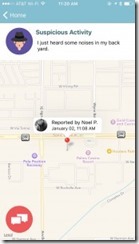
This year our team once again participated in the AT&T Developer Summit 2016 hackathon. With M2M in our minds, we created a platform to allow machines and humans report extraordinary events in their neighborhood.  Whenever a new event was reported (by machine or human),  devices and people (notified by an app) connected to the platform could react accordingly.  We came with two possible use cases to showcase our idea.

Virtual Gated Community

Gated communities are a great commodity for those wanting to have privacy and security. The problem is that usually these communities come with a high price tag. So we came up with a turnkey solution for a virtual gate using M2M. We created a device using the Qualcomm DragonBoard 410c board with wifi and bluetooth capabilities. We used a common motion sensor and a camera to detect cars and people not belonging to the neighborhood. Then, we used Bluetooth beacons that could be placed in at the resident keychains. When a resident drove (or walked) by the virtual gate, it would not trigger the automated picture and report to the system, but if someone without the Bluetooth beacon drove by, the system will log and report it. Read the complete article here.

SOA & BPM Partner Community

For regular information on Oracle SOA Suite become a member in the SOA & BPM Partner Community for registration please visit www.oracle.com/goto/emea/soa (OPN account required) If you need support with your account please contact the Oracle Partner Business Center.

Blog Twitter LinkedIn image[7][2][2][2] Facebook clip_image002[8][4][2][2][2] Wiki

REST enabled Oracle Database Cloud Service – my first experiences by Niall Commiskey

clip_image001

I have heard that APEX supports REST so I decided to try this out on my SOA CS environment’s
DB CS instance. AS per usual, I studiously avoided reading any documentation.
This should be simple, right?
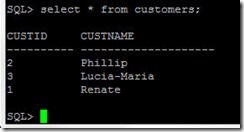
I created a simple table Customers

Now, as luck would have it I locked my ADMIN APEX user out.
This I fixed as follows –
ssh into the DB CS machine
start sqlplus

conn system/yourPwd@yourSOADB;

alter session set current_schema = APEX_050000;

select user_id, substr(user_name, 1,10), account_locked from wwv_flow_fnd_user;

update APEX_050000.WWV_FLOW_FND_USER

set web_password = ‘yourNewPassword’

where user_name = ‘ADMIN’

Read the complete article here.

SOA & BPM Partner Community

For regular information on Oracle SOA Suite become a member in the SOA & BPM Partner Community for registration please visit www.oracle.com/goto/emea/soa (OPN account required) If you need support with your account please contact the Oracle Partner Business Center.

Blog Twitter LinkedIn image[7][2][2][2] Facebook clip_image002[8][4][2][2][2] Wiki

Salesforce to SAP Integration with Oracle ICS


clip_image001

Watch the video here.

SOA & BPM Partner Community

For regular information on Oracle SOA Suite become a member in the SOA & BPM Partner Community for registration please visit www.oracle.com/goto/emea/soa (OPN account required) If you need support with your account please contact the Oracle Partner Business Center.

Blog Twitter LinkedIn image[7][2][2][2] Facebook clip_image002[8][4][2][2][2] Wiki

Preparing & installing the ICS on-premises Connectivity Agent by Robert van Molken

clip_image002


In this second article about the Connectivity Agent we deep-dive into the details. We take a look in preparing and installing the agent. This is done in combination with Integration Cloud Service. For more information about the architecture and inner workings of the agent I recommend to read this article first.

What is the Connectivity Agent?

Basically it is a gateway between cloud and on-premises. The Agent eliminates common security and complexity issues previously associated with integrating on-premises applications from outside the firewall. With the agent it is possible for example to connect with an on-premises database or ERP application using the existing JCA adapter framework.

Downloading the Connectivity Agent

There are a few steps in installing the agent. First the installer can only be downloaded from your Integration Cloud Service instance. Secondly the installer can only be run on a linux environment. Thirdly some settings can be tuned / changed after installation.

Downloading the Agent

The agent first need to be downloaded from Integration Cloud Service. Login into your ICS instance and navigate to the Agents page.


At the top-right corner the user can find the “Download Agent installer” button. When clicking on the button it will show two options; the connectivity and execution agent. This article describes the first option. The second agent is evenly interesting, because it will install an instance of Integration Cloud Service on-premises. More details on this agent at a later time. Read the complete article here.

SOA & BPM Partner Community

For regular information on Oracle SOA Suite become a member in the SOA & BPM Partner Community for registration please visit www.oracle.com/goto/emea/soa (OPN account required) If you need support with your account please contact the Oracle Partner Business Center.

Blog Twitter LinkedIn image[7][2][2][2] Facebook clip_image002[8][4][2][2][2] Wiki

E-Business Suite Integration with Integration Cloud Service and DB Adapter by Ulrich Janke

clip_image002


Introduction

Integration Cloud Service (ICS) is an Oracle offering for a Platform-as-a-Service (PaaS) to implement message-driven integration scenarios. This article will introduce into the use of ICS for integrating an on-premise E-Business Suite (EBS) instance via Database Adapter. While EBS in recent releases offers a broad set of integration features like SOAP and REST support (i.e. via Integrated SOA Gateway), these interfaces are not available in older versions like 11.5.x. In the past it has been a proven approach to use Oracle Fusion Middleware Integration products (SOA, OSB etc.) running on-premise in a customer data center to connect to an EBS database via DB Adapter. In a short time this feature will be available also in a cloud based integration solution as we will discuss in this article.

Unless we focus on EBS integration here the DB Adapter in ICS will work similarly against any other custom database. Main reason to use an EBS context is the business case shown below, where ICS is connected to Mobile Cloud Service (MCS) to provide a mobile device solution.

Business Case and Architecture

Not hard to imagine that Oracle customers running EBS 11.5.x might have a demand to add a mobile channel for their end-users. One option could be an upgrade to a recent release of EBS. As this will be in most cases a bigger project, an alternative could be the creation of a custom mobile solution via Oracle Jet and MCS as figured below. MCS is a PaaS offering and requires access to an underlying database via REST/JSON. This is the situation where ICS appears in this architecture.

In absence of native SOAP or REST capabilities being available in EBS 11.5.x tech stack, the integration via ICS would close that gap. Any database access activities (retrieving data, CRUD operations etc.) can run via an ICS/DB Adapter connection to an EBS on-premise database. ICS itself will provide a REST/JSON interface for the external interaction with EBS. This external interface is generic and not restricted to MCS as caller at all. However in our business case the ICS with DB Adapter fulfills the role of a data access layer for a mobile solution. Read the complete article here.

SOA & BPM Partner Community

For regular information on Oracle SOA Suite become a member in the SOA & BPM Partner Community for registration please visit www.oracle.com/goto/emea/soa (OPN account required) If you need support with your account please contact the Oracle Partner Business Center.

Blog Twitter LinkedIn image[7][2][2][2] Facebook clip_image002[8][4][2][2][2] Wiki

Integration Cloud Service (ICS) On-Premise Agent Installation by Greg Mally

clip_image002


The Oracle On-Premises Agent (aka, Connectivity Agent) is necessary for Oracle ICS to communicate to on-premise resources without the need for firewall configurations or VPN. Additional details about the Agent can be found under New Agent Simplifies Cloud to On-premises Integration. The purpose of this A-Team blog is to give a consolidated and simplified flow of what is needed to install the agent and provide a foundation for other blogs (e.g., E-Business Suite Integration with Integration Cloud Service and DB Adapter). For the detailed online documentation for the On-Premises Agent, see Managing Agent Groups and the On-Premises Agent.

On-Premises Agent Installation

The high-level steps for getting the On-Premises Agent installed on your production POD consist of two activities: 1. Create an Agent Group in the ICS console, and 2. Run the On-Premises Agent installer. Step 2 will be done on an on-premise Linux machine and the end result will be a lightweight WebLogic server instance that will be running on port 7001.

Create an Agent Group Read the complete article here.

SOA & BPM Partner Community

For regular information on Oracle SOA Suite become a member in the SOA & BPM Partner Community for registration please visit www.oracle.com/goto/emea/soa (OPN account required) If you need support with your account please contact the Oracle Partner Business Center.

Blog Twitter LinkedIn image[7][2][2][2] Facebook clip_image002[8][4][2][2][2] Wiki

Implementing an SFDC Upsert Operation in ICS by Ricardo Ferreira Leave a Comment

clip_image002


Introduction

While designing SOA services; especially those ones that represent operations around a business object, a common implementation pattern used is upsert. Upsert is an acronym that means the union of “update plus insert”. The idea behind is having a unique operation that decides which action to take – either update the existing record or insert a new one – based on information available in the message. Having one operation instead of two, makes the SOA service interface definition clearer and simpler.

Some SaaS applications offer upsert capabilities in their exposed services, and leveraging these capabilities can considerably decrease the amount of effort required while designing SOA services in an integration platform such as ICS. For instance, if you need to develop an upsert operation and the SaaS application does not have this functionality; you will have to implement that logic using some sort of conditional routing (see Content-Based Router pattern) or via multiple update and insert operations.

Salesforce.com (or SFDC for short) is one of those SaaS applications that offers built-in support for the upsert operation. This post will show how to leverage this support with ICS. Read the complete article here.

SOA & BPM Partner Community

For regular information on Oracle SOA Suite become a member in the SOA & BPM Partner Community for registration please visit www.oracle.com/goto/emea/soa (OPN account required) If you need support with your account please contact the Oracle Partner Business Center.

Blog Twitter LinkedIn image[7][2][2][2] Facebook clip_image002[8][4][2][2][2] Wiki

Integration Cloud Service – Promote Integrations from Test to Production (T2P) by Shreenidhi Raghuram

clip_image002


The purpose of this blog is to provide simple steps to move Oracle Integration Cloud Service (ICS) integrations between different ICS environments. Oracle ICS provides export and import utilities to achieve integration promotion.

A typical use-case is to promote tested integrations from Test ICS Environment to Production ICS Environment, in preparation for a project go-live. Usually the Connection endpoints used by the integrations will be different on Test and Production Environments.

The main steps involved in code promotion for this typical use-case are as follows

  • Export an integration from Test ICS
  • Import the integration archive on Prod ICS
  • Update Connection details and activate the integration on Prod ICS Environment
Export an integration from Test ICS

Login to Test ICS
Search and locate the integration on Test ICS
Select ‘Export’ and save the integration archive to the file system. Read the complete article here.

SOA & BPM Partner Community

For regular information on Oracle SOA Suite become a member in the SOA & BPM Partner Community for registration please visit www.oracle.com/goto/emea/soa (OPN account required) If you need support with your account please contact the Oracle Partner Business Center.

Blog Twitter LinkedIn image[7][2][2][2] Facebook clip_image002[8][4][2][2][2] Wiki

Leveraging the Twitter Adapter in ICS – Tweeting through Oracle Integration Cloud Service by Lucas Jellema

clip_image002


The Oracle Integration Cloud Service – ICS – comes loaded with a rich collection of Cloud Adapters. These adapters facilitate the integration with SaaS applications and internet services of various natures. These include Oracle SaaS applications (such as RightNow, Eloqua, ECommerce Cloud, ERP Cloud, HCM Cloud), on premises ERP applications (SAP, EBusiness Suite, Siebel) and assorted third party applications such as SalesForce, Facebook, Google Mail and Task, LinkedIn and Evernote. Through these adapters, interacting with said applications and services becomes a simple, declarative operation instead of a custom programming effort.

In this article, I will use the Twitter Adapter to create a connection to a Twitter Account (leveraging the Twitter API under the covers). The Twitter Adapters exposes over a dozen operations. I will use just the operation to publish a message (aka Tweet) in this example. From ICS, I will expose an integration through a simple REST connection. This allows trusted consumers to publish Tweets in a very easy way – leaving the authorization details and the API intricacies to ICS.

The steps I went through:

  • Grant access to [ICS Connection] app in the Twitter developer page and generate API Key and Consumer Key
  • Create a new ICS Connection based on Twitter Adapter; set up the API Key and Consumer Key
  • Create an ICS REST Connection (to expose)
  • Create an integration – between REST Connection as inbound (source) to Twitter Connection (as outbound destination); configure the endpoint (inbound) and operation (inbound and outbound)
  • Create the mappings for request and response
  • Define the tracking – business identifiers
  • Activate the integration
  • Test the exposed REST connection from any REST client, for example SoapUI, to Tweet a message through a simple REST POST call

Most of these steps are explained by the screenshots you will find below. Read the complete article here.

SOA & BPM Partner Community

For regular information on Oracle SOA Suite become a member in the SOA & BPM Partner Community for registration please visit www.oracle.com/goto/emea/soa (OPN account required) If you need support with your account please contact the Oracle Partner Business Center.

Blog Twitter LinkedIn image[7][2][2][2] Facebook clip_image002[8][4][2][2][2] Wiki

Create an Integration on ICS to expose a REST API for a SOAP Connection for an external web service by Lucas Jellema

clip_image002

In this article, I will show a little bit more of ICS – the Integration Cloud Service. In a previous article, I have introduced some concepts – such as Connection, Integration, Business Identifier. I have shown how to create an integration connecting two connections – an inbound and an outbound one (both of type SOAP).

In picture, that looks like this:

In this article, I will create a new connection (REST API style) and create an integration to expose this connection, leveraging the same outbound connection:

After creating the integration, I will activate it and invoke the new REST API from a web browser and from SOAP UI.

The steps are:

  • Create REST Connection
  • Create and activate the Integration (with the mappings for request and response and the business identifiers for tracking)
  • Invoke the REST API
Configure REST Connection

Go to the ICS Home Page and navigate to the Connections page.

Create a New Connection. Read the complete article here.

SOA & BPM Partner Community

For regular information on Oracle SOA Suite become a member in the SOA & BPM Partner Community for registration please visit www.oracle.com/goto/emea/soa (OPN account required) If you need support with your account please contact the Oracle Partner Business Center.

Blog Twitter LinkedIn image[7][2][2][2] Facebook clip_image002[8][4][2][2][2] Wiki