SOA and Integration On-Prem and in the Cloud


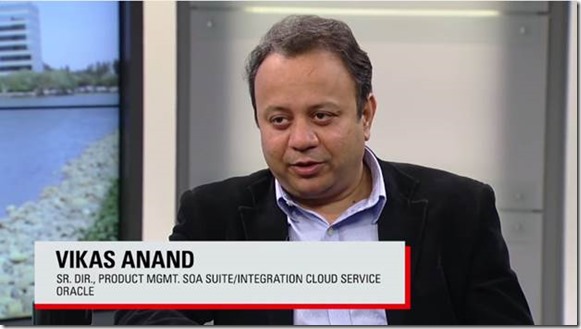
Vikas Anand (Senior Director, Product Management, SOA Suite/Integration Cloud Service, Oracle) and Ram Menon (Product Manager, Oracle Integration Cloud Service) join OTN TechCast host Bob Rhubart for a discussion about meeting SOA and integration challenges on-prem and in the cloud.

clip_image002

Watch the video here.

SOA & BPM Partner Community

For regular information on Oracle SOA Suite become a member in the SOA & BPM Partner Community for registration please visit www.oracle.com/goto/emea/soa (OPN account required) If you need support with your account please contact the Oracle Partner Business Center.

Blog Twitter LinkedIn image[7][2][2][2] Facebook clip_image002[8][4][2][2][2] Wiki

Uploading files to Oracle Document Cloud Service using SOA by Shreenidhi Raghuram

clip_image002

This blog provides a quick tip for implementing file upload into Oracle Document Cloud Service (DOCS) using java in Oracle SOA and Oracle SOA Cloud Service(SOACS)

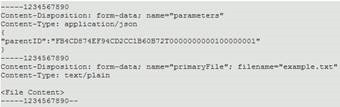
The DOCS upload REST service requires POSTing of multipart form, a feature that is currently unavailable in the REST cloud adapter. This POST request to upload a file contains 2 body parts. The first being a json payload and the second containing the actual file content.

The request format looks as shown here in the Oracle Documents Cloud Service REST API Reference.

The section below shows a java embedded block of code that can be used within a BPEL process to achieve the file upload. This can be used in Oracle SOA and SOACS – BPEL composites. A valid DOCS endpoint, credentials for authorization, and a GUID of the folder location for the file upload are required to execute this REST call.
In this sample, a pdf document file is being uploaded into DOCS. The media type should be appropriately changed for other content formats.
Also, It is recommended to access the authorization credentials from a credential store when developing for production deployments. This section is only intended as a demo. Read the complete article here.

SOA & BPM Partner Community

For regular information on Oracle SOA Suite become a member in the SOA & BPM Partner Community for registration please visit www.oracle.com/goto/emea/soa (OPN account required) If you need support with your account please contact the Oracle Partner Business Center.

Blog Twitter LinkedIn image[7][2][2][2] Facebook clip_image002[8][4][2][2][2] Wiki

Integration Cloud Service (ICS): A developer’s first impression by Maarten Smeets

clip_image001


Oracle provides ICS (Integration Cloud Service) as a simple means for citizen developers to do integrations in the cloud and between cloud and on-premises. On the Oracle Fusion Middleware Partner Community Forum I got a chance to get some hand-on experience with this product in one of the workshops. In this blog post I will describe some of my experiences. I’m not the target audience for this product since I am a technical developer and have different requirements compared to a citizen developer. I’ve not been prejudiced by reading the documentation

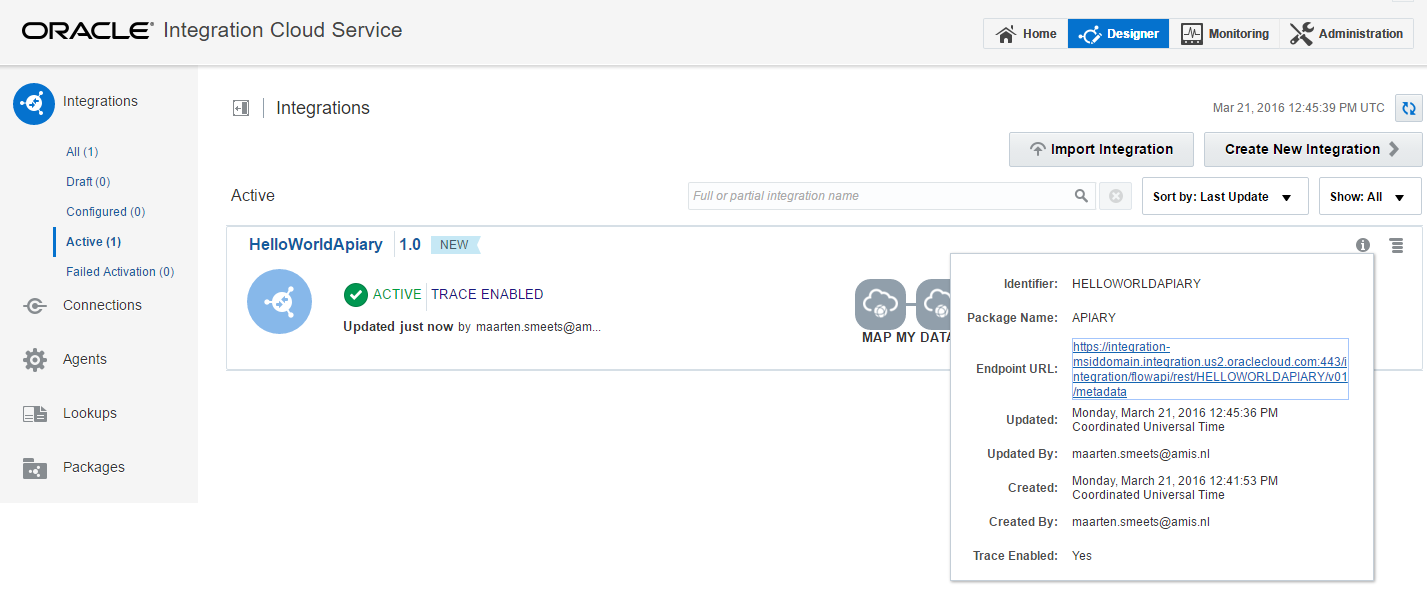
I experimented with ICS on two use-cases. I wanted to proxy SOAP and REST requests. For the SOAP request I used a SOA-CS Helloworld web-service and for the REST request I used an Apiary mockservice. I will not go into basics too much such as creating a new Connection and using the Connection in an Integration since you can easily learn about those in other places.

ICS: Calling a SOAP service on SOA-CS

When you want to call a SOAP service which you have exposed on ICS, you require two sets of headers. The WS-Timestamp headers and the WSS-UserName token headers (with the password in plain text).

This is required even when you have not specified a security policy (currently username/password token and basic authentication are supported). When you don’t provide them, you get Service Bus errors (as shown in the screenshot below) which indicates ICS is running on the Service Bus (in case you didn’t know this yet, it is no secret). This was not required when directly calling the SOA-CS service. Read the complete article here.

SOA & BPM Partner Community

For regular information on Oracle SOA Suite become a member in the SOA & BPM Partner Community for registration please visit www.oracle.com/goto/emea/soa (OPN account required) If you need support with your account please contact the Oracle Partner Business Center.

Blog Twitter LinkedIn image[7][2][2][2] Facebook clip_image002[8][4][2][2][2] Wiki

Are you doing SaaS, or EBS, integrations and using Oracle Integration Cloud Service (ICS)? By Angelo Santagata

clip_image002


Are you doing SaaS, or EBS,  integrations and using Oracle Integration Cloud Service (ICS)?

Do you need some inspiration? Well this is your lucky day!

Below you’ll find a collection of ICS Integration videos , produced by our product managers and our UA development team which go though, step by step, how to integrate  two SaaS applications

There are plenty more videos available at the Oracle Help Centre here and read the complete article here.

SOA & BPM Partner Community

For regular information on Oracle SOA Suite become a member in the SOA & BPM Partner Community for registration please visit www.oracle.com/goto/emea/soa (OPN account required) If you need support with your account please contact the Oracle Partner Business Center.

Blog Twitter LinkedIn image[7][2][2][2] Facebook clip_image002[8][4][2][2][2] Wiki

Using the ICS Connectivity Agent with an On-Premises Database by Robert van Mölken

clip_image002

In this third article about the Connectivity Agent we deep-dive into the details. We learn how to use the ICS Connectivity Agent in combination with an on-premises database. For more information about the architecture and installation of the agent I recommend to read these two articles first. This article continuous where the previous article about the installation ended.

Taking the Agent for a test drive

Now that the Connectivity Agent is installed, registered and running we can use the Agent to create connections to our on-premises applications and create integration on top of these applications.

Preparing the connection to the on-premises database

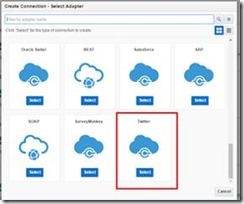
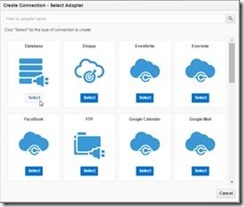
Now that we know the Agent is running we can make a connection to the on-premises database. For this example I use the HR sample schema that is part of my database installation. Navigate to the connections page of ICS and click on the “Create new Connection” button. My instance is running the latest 16.1.3 version. The “Create Connection” dialog now at lot nicer and user friendlier.

Select the Database adapter to create a connection your database instance. the connection is named OnPremisesHRDB which creates the associated identifier ONPREMISESHRDB. Read the complete article here.

SOA & BPM Partner Community

For regular information on Oracle SOA Suite become a member in the SOA & BPM Partner Community for registration please visit www.oracle.com/goto/emea/soa (OPN account required) If you need support with your account please contact the Oracle Partner Business Center.

Blog Twitter LinkedIn image[7][2][2][2] Facebook clip_image002[8][4][2][2][2] Wiki

Integration Cloud Service 16.4.1 Fall Release available including free trials for Partners

image

We are pleased to announce the availability of 16.4.1 – Fall release of Integration Cloud Service (ICS) .

This October release continues to broaden it’s connectivity portfolio in various segments. These include:

  • Oracle Utilities – New Adapter
  • Oracle Eloqua – Inbound (Trigger) Support

New Oracle Utilities Adapter:

imageA recent survey of 100 North American electric, water and gas utility industry executives completed by Zpryme and Oracle Utilities GBU shows that Utility Companies are embracing the Cloud. With 45% of organizations using the Cloud in some form today and another 52% planning to move to the Cloud. Nearly 97% of interviewees told us they have become involved with Cloud technologies or applications and computing resources delivered as services over a network connection instead of through in-house resources at a utility. This means integration is imperative to all Utility customers without doubt!

This release introduces the new Oracle Utilities adapter taking the list of total adapters closer to 50! This adapter enables you to easily integrate with Oracle Utilities applications that use Oracle Utilities Application Framework v4.3.0.0 or later and supporting Web Services.

For those Utilities Applications using JMS or DB integration services, you can continue to leverage the generic ICS adapters instead.

New Status and Usage APIs:

imageThe brand new /status API is now available that can be queried for system health status (runtime, storage, messaging, and security services). Similarly, the new /usage API returns metrics for system design-time (adapters, agent, application instances, lookups, integrations, packages, and runtime – messages and messaging system). Refer to the REST API documentation for more details.

Support for Service Callbacks:

Starting this release, you can configure outbound SOAP invocations to specify callback ICS flows for asynchronous conversations with external systems/web services.

For example, if you are invoking a credit rating service that responds to you asynchronously (One-Way with Async Call back), you can receive that callback as a delayed response. Remember that the callback flow will be specified within the SOAP adapter design-time as a separate ICS flow.

Learn More: More details on what’s new is available here. Learn more about Oracle Integration Cloud Service at http://cloud.oracle.com/integration

Want to try ICS Cloud Service? Get access here.

Partner Resources (community membership required):

Sales kit for partners: Cloud and On-Prem Integration: Integrate CRM SaaS Apps with On-Premises ERP & Integrate HCM Cloud with on-premises ERP

Marketing kit for partners: SOA Campaigns

SOA & BPM Partner Community

For regular information on Oracle SOA Suite become a member in the SOA & BPM Partner Community for registration please visit www.oracle.com/goto/emea/soa (OPN account required) If you need support with your account please contact the Oracle Partner Business Center.

Blog Twitter LinkedIn image[7][2][2][2] Facebook clip_image002[8][4][2][2][2] Wiki

SOA Cloud Service 16.4.1 is available–including free trials for Partners

image

The Oracle SOA Cloud Service Help Center was refreshed on October 10th, 2016 for the 16.4.1 release.

New Features:

  Oracle Business Activity Monitoring, available as part of the Integration Analytics Cluster service type, is now certified for production use. See What’s New for Oracle SOA Cloud Service for details.

Updates to the Service Guides:
Using Oracle SOA Cloud Service (12.2.1)

Detailed Updates to the product in this release:

Want to try SOA Cloud Service? Get access here.

Partner Resources (community membership required):

Sales kit for partners: Cloud and On-Prem Integration: Extend SOA to the Cloud

Marketing kit for partners: SOA Campaigns

SOA & BPM Partner Community

For regular information on Oracle SOA Suite become a member in the SOA & BPM Partner Community for registration please visit www.oracle.com/goto/emea/soa (OPN account required) If you need support with your account please contact the Oracle Partner Business Center.

Blog Twitter LinkedIn image[7][2][2][2] Facebook clip_image002[8][4][2][2][2] Wiki

PaaS4SaaS Developers’ Code Is Always ‘On’: OAUX is on OTN and GitHub by Ultan O’Broin

clip_image001Boom! That’s the sound of thunder rolling as PaaS and SaaS developers work as fast as lightning in the cloud. The cloud has changed customer expectations about applicationstoo; if they don’t like their user experience (UX) or they don’t get it fast, they’ll go elsewhere.

PaaS4SaaS developers know their code is always ‘on’.

But you can accelerate the development of your PaaS4SaaS solutions with a killer UX easily by now downloading the AppsCloudUIKit software part of the Cloud UX simplified UI Rapid Development Kit (RDK) for Release 10 PaaS4SaaS solutions from the Oracle Technology Network (OTN) or from GitHub.

The Oracle Applications User Experience (OAUX) team’s Oracle Cloud UX RDK works with Oracle JDeveloper 11.1.1.9.0, 12.1.3.0.0 and 12.2.1.0.0. The kit downloads include a developer eBook that explains the technical requirements and how to build a complete SaaS or PaaS solution in a matter of hours.

The AppsCloudUIKit software part of our partner training kit is on OTN and GitHub and is supported by video and eBook guidance.

The developer eBook is part of the AppsCloudUIKit downloads on OTN and GitHub.

Read the complete article here.

SOA & BPM Partner Community

For regular information on Oracle SOA Suite become a member in the SOA & BPM Partner Community for registration please visit www.oracle.com/goto/emea/soa (OPN account required) If you need support with your account please contact the Oracle Partner Business Center.

Blog Twitter LinkedIn image[7][2][2][2] Facebook clip_image002[8][4][2][2][2] Wiki

PaaS Podcast Series – The Oracle Process Cloud by Leon Smiers and Jeroen van Essen

clip_image002


In this series we will walk through different cloud products and how SaaS and PaaS can be combined together and their use in different projects.
In this podcast we would like to introduce you to Oracle Process Cloud to a wider audience. Oracle Process Cloud is the part of Oracle PaaS Cloud and it focuses on delivering processes in Cloud.

This episode features Leon Smiers, Solution Architect in Capgemini and Oracle ACE and Jeroen van Essen, Capgemini BPM Specialist. Listen to the podcast here.

SOA & BPM Partner Community

For regular information on Oracle SOA Suite become a member in the SOA & BPM Partner Community for registration please visit www.oracle.com/goto/emea/soa (OPN account required) If you need support with your account please contact the Oracle Partner Business Center.

Blog Twitter LinkedIn image[7][2][2][2] Facebook clip_image002[8][4][2][2][2] Wiki

Process Cloud Service (PCS) – Release 16.1.3 (February) and Process Mobile App 2.0 is available

clip_image002


What’s New!

  • New Pricing Metrics
  • Sample Apps
  • Process Conversations
  • Enhanced Local and Remote App Deployment
  • New Tablet App
  • Start Process App from Mobile

New Pricing Metrics:

PCS pricing has moved to a 3-tier hosted named user model to accommodate varying levels of process service interaction from those who require full access to composition and management capabilities, to participants assigned review and approval tasks, to those whose interactions are limited to making service requests. This new pricing model helps maintain competitive pricing in use cases where there are large numbers of casual users. Below are the subscription pricing details. Metered pricing uses the same metrics at 2x the cost.

Oracle Process Cloud:

· $100 per Hosted Named User per Month

· Defined as a named user who can access analytics, compose applications and manage lifecycle

· Required minimum of 10 Users, 12-Months minimum contract

· Requires Oracle Process Cloud – Participant User

Oracle Process Cloud – Participant User:

· $30 per Hosted Named User per Month

· Defined as a named user who can participate in process approvals and tracking

· Required minimum of 10 Users, 12-Months minimum contract

· Requires Oracle Process Cloud

Oracle Process Cloud – Invocation User:

· $3 per Hosted Named User per Month

· Defined as a named user who can initiate a process and query status and notifications

· No minimum required – minimum of 100 Users if purchased, 12-Months minimum contract

· Requires Oracle Process Cloud

Sample Apps:

Sample Apps provide a quick and easy way to create and configure fully functional Process Apps with minimal technical knowhow. PCS includes a catalog of predefined ready to run Sample Apps that can be used both to provide first time designers a quick introduction to creating Process Apps and Business IT users easy to configure tailor made apps for a variety of use cases. IT and partners can publish their Process Apps as Sample Apps with specific pre-defined configurations allowing Business IT to quickly create, configure and deploy tailor made Process Apps.

Process Conversations:

Process Apps now support the addition of a process level conversation within the context of assigned tasks to allow stakeholders and participants to collaborate and streamline getting work done. Process Conversations also support various options to configure process activity stream messages that automatically update the conversation with process milestones.

Enhanced Local and Remote App Deployment:

Process App deployment has been enhanced to support complete segregation of test and production data. Test and Player functionality has been simplified to allow designers to either step through the Process App one activity at a time or run the Process App from the Workspace in Test Mode to experience the app from the perspective of an end-user. Production deployment has been enhanced to support deploying the Process App to the local environment or directly to remote environments.

New Tablet App:

A new universal Process Mobile App now supports native tablet form factors for both iOS and Android platforms. The tablet app takes advantage of the larger screen real-estate to provide an improved experience for managing tasks and initiating process requests.

Start Process App from Mobile:

Process participants can now remotely initiation process requests directly from their mobile App. Onboard camera support allows the user to capture pictures that are uploaded to Documents Cloud Service and displayed in context to downstream task participants.

Learn More:

Learn more about Oracle Process Cloud Service at https://cloud.oracle.com/process

SOA & BPM Partner Community

For regular information on Oracle SOA Suite become a member in the SOA & BPM Partner Community for registration please visit www.oracle.com/goto/emea/soa (OPN account required) If you need support with your account please contact the Oracle Partner Business Center.

Blog Twitter LinkedIn image[7][2][2][2] Facebook clip_image002[8][4][2][2][2] Wiki